
How to Simplify Microsoft 365 User Management in 5 Steps
To simplify Microsoft 365 user management, you must automate user provisioning to Microsoft tools, optimize its license management, and secure Copilot access controls.
Also, Gartner’s 2026 IAM predictions emphasize that both human and machine identities are now the main targets for cyberattacks. This makes Microsoft 365 governance a business-critical priority in 2026.
In this blog post, you’ll get to know the 5 steps that help enterprises, SMBs, and MSPs in streamlining their Microsoft 365 user management.
Key Takeaways
What Is Microsoft 365 User Management and Why Does It Matter?
Microsoft 365 user management refers to the process of managing the user access lifecycle, license assignments, data permissions, and Copilot usage throughout your Microsoft 365 tenant.
For instance, your procurement lead received a $240K auto-renewal invoice for Microsoft 365 licenses that 60% of your team stopped using months ago. But they have overprivileged access, which leads to data breaches and overcostly licensing. However, with proper user management practices, your company can achieve optimal user productivity with its Microsoft tools and ensure compliance with its IT policies.
Why Is Managing Users in Microsoft 365 Is Becoming Complex In 2026?
The difficulties of Microsoft 365 user management are increasing nowadays due to several factors. They are:
- AI-assistants like Copilot require additional IT governance to avoid unauthorized Copilot usage and business data leakages.
- With evolving cyber threats, RBAC and Entra SSO are becoming more essential. While Entra SSO simplifies user authentication, companies need to integrate it with solutions like CloudFuze Manage to manage user provisioning, licenses, data permissions, Copilot access, and employee offboarding.
- The SaaS portfolio in every company expands, and it demands an automated user license management framework.
Challenges Involved in Managing Users in Microsoft 365 Manually in a Spreadsheet
Whenever your Microsoft 365 users’ onboarding and offboarding details are managed by your IT executives in a spreadsheet, you’ll experience all the issues mentioned below:

- Time-Consuming IT Processes: Manually overseeing users in Microsoft 365 is a very slow process that is usually prone to human errors. To be more specific, this spreadsheet-based management often leaves your new hires waiting for days to access relevant apps because your IT team has to handle manual provisioning tickets.
- License Mismanagement: Without IT centralized oversight, organizations experience issues like over-licensing and under-utilization of Microsoft 365 seats.
- IT Security Risks: Manual Microsoft 365 user management can miss deprovisioning of inactive/orphaned user accounts, which, in turn, increases your org-wide risk of unauthorized employee access.
How to Streamline Microsoft 365 User Management in 5 Simple Steps
Microsoft 365 user management doesn’t require complex overhauls. Begin with these five easy actions:
Step One: Automate User Provisioning
Use automated user management tools, such as CloudFuze Manage, to provision your employees automatically. So, you can now set up new user accounts with appropriate file-sharing permissions and app access specific to their designation in minutes. This way, you can reduce the waiting period for new hires.
Step Two: Optimize License Management
Try implementing a centralized license management solution to track enterprise-wide license usage and reduce licensing costs. This reduces shelfware and makes sure your organization pays only for what it uses.
Step Three: Implement Role-Based Access Control
Do not forget to configure RBAC to assign data access based on work roles and apply least-privilege access to eliminate security risks and simplify user administration.
Step Four: Utilize Entra SSO for Secure Employee Access
Entra SSO streamlines user access management by allowing users to sign in once and gain access to relevant business resources.
Step Five: Audit User Activity Regularly
Perform regular audits of your Microsoft 365 user activity logs. According to IBM’s 2025 Data Breach Report, companies with a regular audit process reduce breach costs by 28%. Because regular-interval audits identify security threats and maintain compliance with your IT policies.
4 Best Practices for Governing Copilot Users in Microsoft 365
Governance of AI-assistants like Copilot involves specific practices:
- Start by framing standard governance policies on Copilot’s use within your enterprise.
- Always use activity logs to monitor your employees’ interactions with Copilot to comply with industry data protection regulations (GDPR, ISO 27001 & SOC 2 Type 2).
- Regularly revamp your org-wide security protocols to protect your enterprise from emerging security threats.
- Do not forget to conduct IT workshops to educate your users on the secure use of Copilot.
How CloudFuze Manage Simplifies Microsoft 365 and Copilot Governance
Our SaaS and AI app management platform, CloudFuze Manage, offers a comprehensive solution to streamline Microsoft 365 user management. Here are our platform’s distinct features:
- Centralized User Discovery: Detect all Microsoft 365 accounts, including active, inactive, and underused users, from one place.
- Automated Lifecycle Workflows: Simplify employee lifecycle workflows with automated user provisioning, deprovisioning, and license recovery.
- Secure Access Governance: Apply RBAC, connect with Entra SSO, and manage file-sharing permissions without over-provisioning users.
- Copilot Usage Control: Track Copilot access and its user interaction to make sure Copilot access is assigned only to the right users. Also, you can enforce policies on your AI assistants so that they have the least data access privilege.
Supporting over 190 leading SaaS and AI apps (FreshDesk, Salesforce, Slack, Claude, and Copilot) with flexible per-user pricing, our platform, CloudFuze Manage, is the ideal solution for simplifying Microsoft 365 Copilot governance.
Take a look at our Copilot governance dashboard:
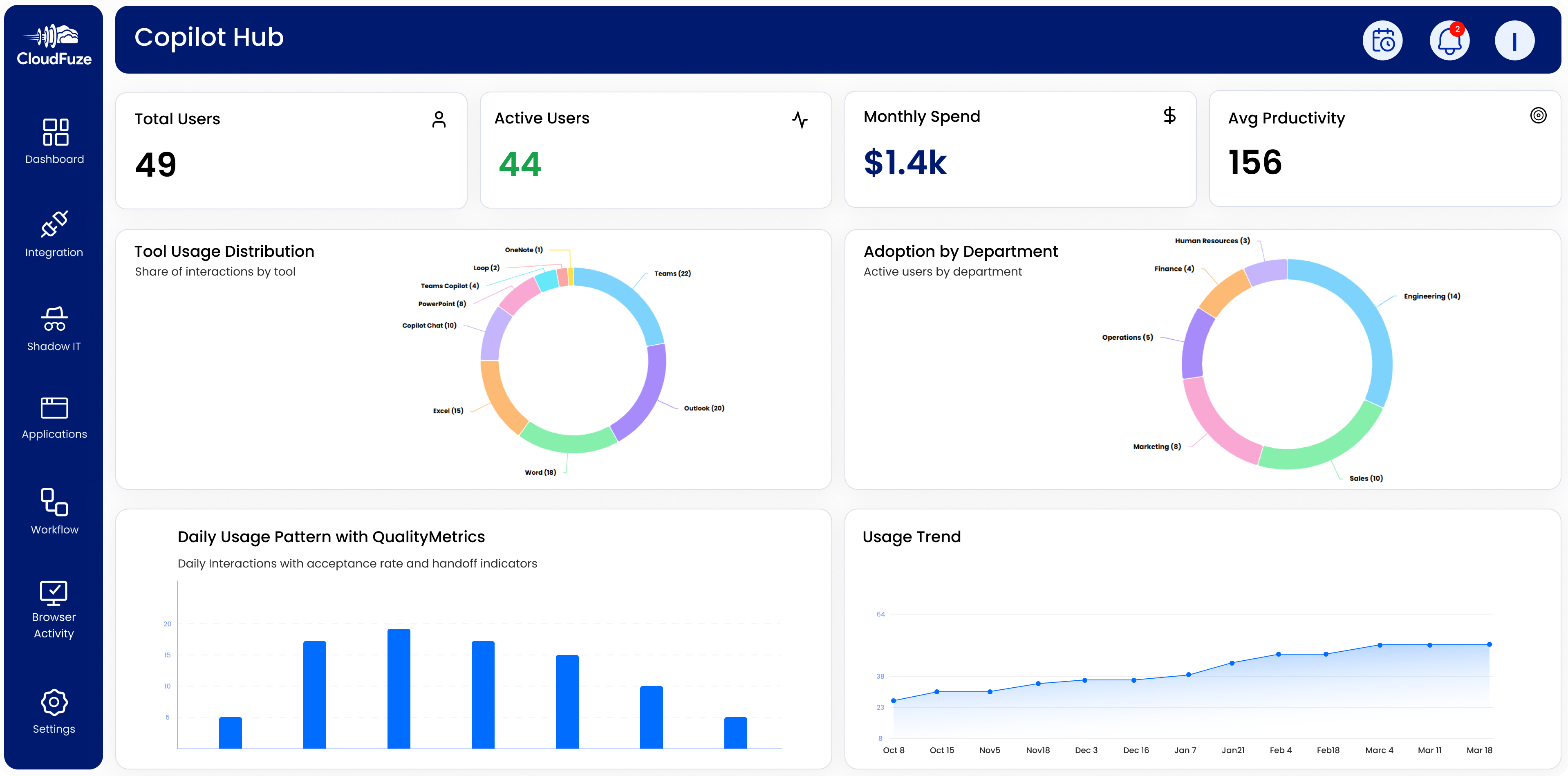
Also, move from Gemini or Claude to Copilot confidently with our enterprise-grade migration platform, CloudFuze Migrate.
Use case: A mid-sized enterprise can reduce its Microsoft 365 licensing costs by 30% and improve its IT compliance using our platform, CloudFuze Manage.
Benefits of Using CloudFuze Manage for User Administration
This table clearly shows how CloudFuze Manage excels at automating user management at a large scale:
| Capability | Typical Approach | CloudFuze Manage |
|---|---|---|
| User Onboarding & Offboarding | Manual and time-consuming | Automated user lifecycle workflows |
| Data Access Control | Basic user role assignment | Granular RBAC and data access governance |
| License Management | No or low visibility into license usage | License optimization and subscription cost reduction |
| Compliance & Auditing | Manual compliance reviews and reporting | Built-in audit tracking and IT governance |
| Scalability | Hard to manage at enterprise-scale | Designed for growing companies and large enterprises |
Automate Your Microsoft 365 User Management with CloudFuze Manage
Enterprises can no longer rely on manual PowerShell scripts and ad hoc user reviews to keep their Microsoft 365 environment. Our platform, CloudFuze Manage, automates user provisioning, right-sizes Microsoft 365 licenses, and secures copilot access controls.
Schedule your free demo to see how CloudFuze Manage transforms your Microsoft 365 governance and liberates your IT team from spreadsheet overwhelm!
Frequently Asked Questions
1. How do I add and remove users in a cloud-based office suite user management system?
You can access your Microsoft 365 admin portal, select the user management section, and follow prompts for adding or removing your users. Tools like CloudFuze Manage automate user lifecycle workflows to gain maximum IT ops efficiency.
2. What are the leading practices for managing users in a subscription-based productivity platform (Microsoft 365)?
You can implement RBAC, audit user access reports, and use identity solutions such as Entra SSO to automate your enterprise-wide user access allocation as well as revocation.
3. How can I remove an inactive user account from the Microsoft 365 tenant?
You can use tools like CloudFuze Manage to automate the removal of inactive user accounts with a single click.
4. What solutions can help automate user provisioning in your Microsoft 365 environment?
Connecting Entra ID with a SaaS and AI app management software like CloudFuze Manage automates user lifecycles. This is one of the quickest and most accurate ways to set up new Microsoft 365 accounts in minutes.
5. How can I supervise user activity and sign-ins in Microsoft 365?
You can monitor user sign-ins through the activity logs in the admin center for your Microsoft 365 tenant. Platforms like CloudFuze Manage support Microsoft 365 user monitoring in a single, intuitive dashboard.
About the Author: Rashmi Ramesh



