
Track Microsoft O365 Tenant Transfer with Live Dashboard
Any problem in migrating thousands of users, shared drives, permissions, and collaboration within the tenant could lead to unnecessary delays. This is why, for IT administrators, CIOs, and CTOs who manage a massive transition of their organization to the cloud, real-time visibility becomes essential to keep everything on schedule.
At CloudFuze, we tackle this challenge by offering you a live migration dashboard that provides you with a complete overview of all migration processes, files, permissions, and conflicts.
This way, your Microsoft 365 tenant to tenant migration process will be much easier to follow, validate, and fix any issues along the way.
Key Takeaways
The Importance of Real-Time Visibility During Microsoft Office 365 Tenant Migration
During a Microsoft Office 365 tenant migration, apart from migrating user accounts, enterprises may also migrate the following workloads:
- Mailboxes
- OneDrive files
- Document libraries in SharePoint
- Microsoft Teams conversations
- Shared links
- Folder permissions
These workloads are mission-critical for organizations working in healthcare, IT services, and other sectors. Lack of visibility could mean that it may take time for administrators to realize that some files have not been migrated, there are permission issues, or migration jobs failed after completion of the cutover period.
Real-time visibility allows administrators to monitor the migration process and take action on the spot when there are delays and conflicts.
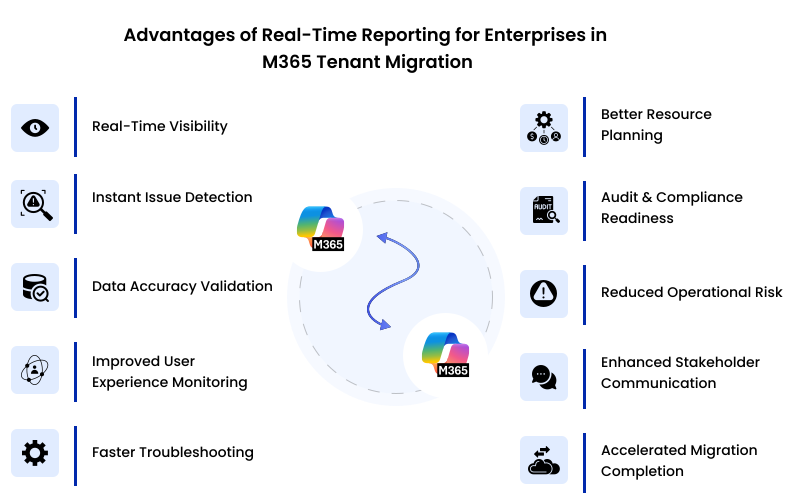
CloudFuze’s Approach to Real-Time Visibility for Microsoft O365 Tenant Transfer
We at CloudFuze enable real-time visibility with our advanced migration dashboard, which is specifically designed for enterprise-level migrations. Our dashboard gives valuable operational insight during migrations of multiple workloads to administrators.
Live Monitoring of Jobs in Workspaces
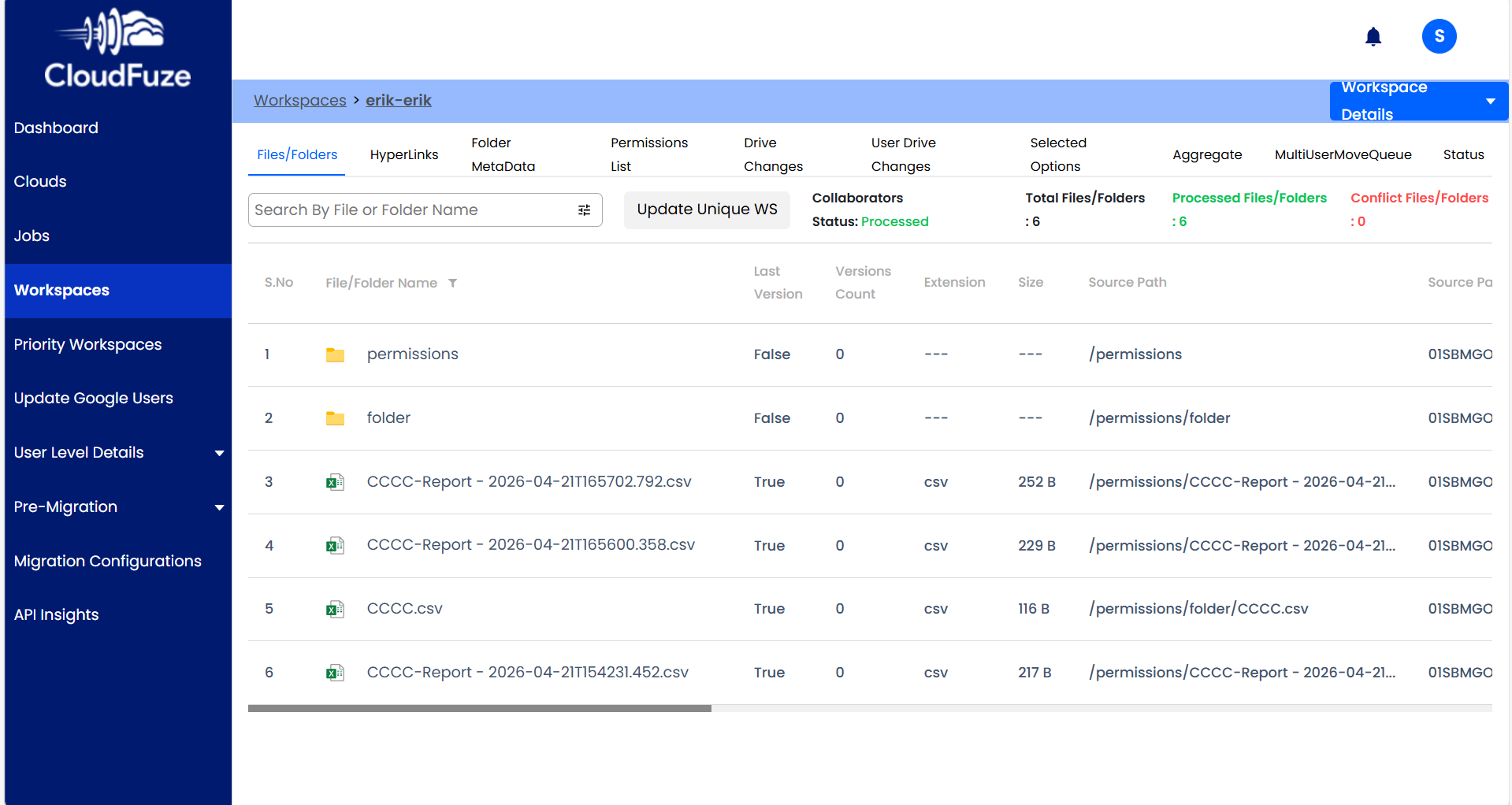
We enable live monitoring and tracking of Microsoft O365 tenant transfer tasks in Workspaces.
This means that teams can:
- Track various migration waves
- Track individuals and departments separately
- Check the status of folders and files
- Confirm processing status instantly
In cases where migrations are done phase-wise for enterprises, this will be helpful when verifying initial pilots before a full-scale migration to the entire tenant.
Report Dashboard Overview
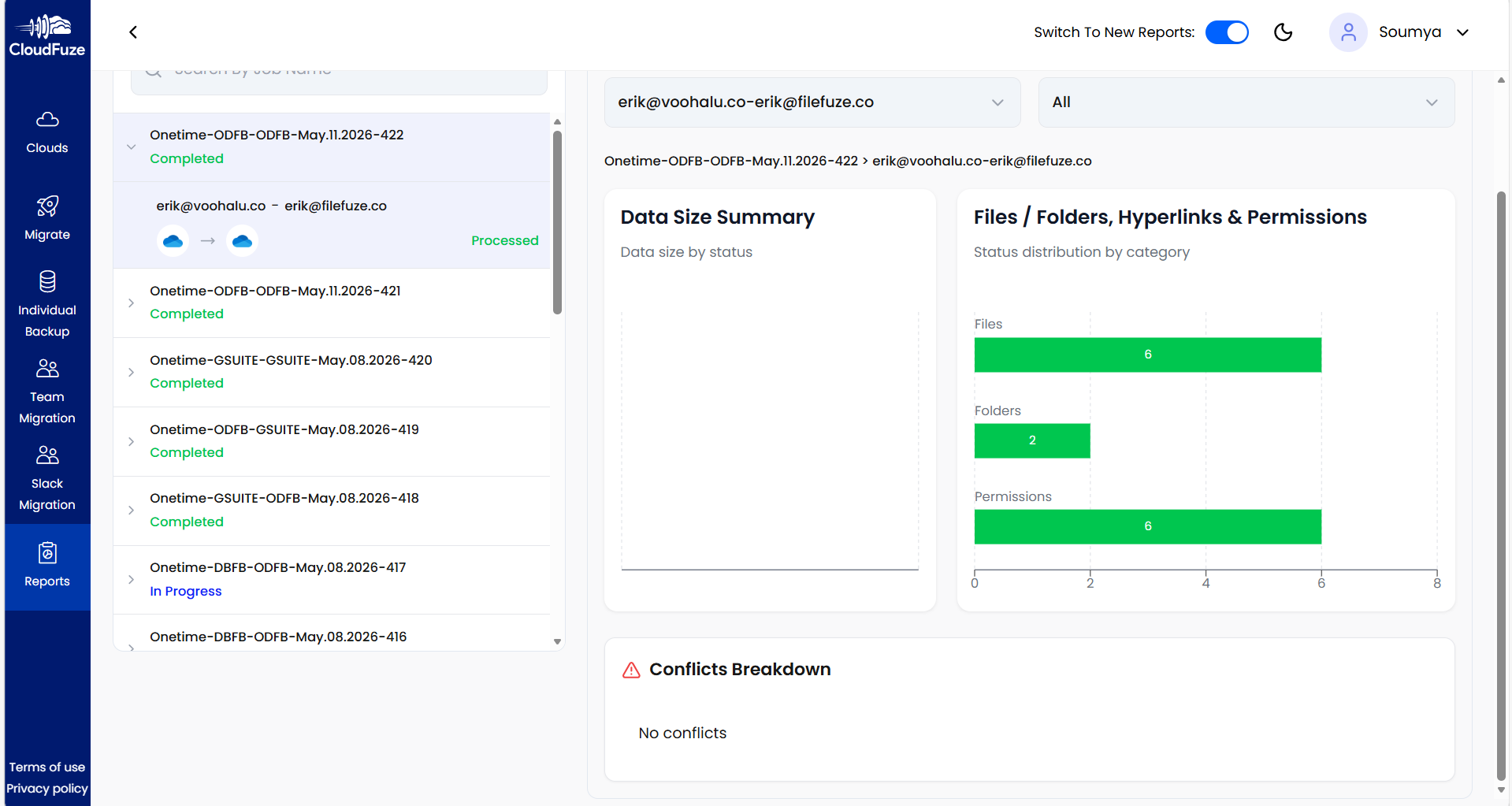
A report dashboard consolidates all information related to migrations.
Using the dashboard, CloudFuze provides insight into:
- Completed/In Progress migration jobs
- Summary of data volume
- Counts of files/folders
- Permission management
- Hyperlinks migration status
- Conflict resolution status
This will help technical teams understand migration status in detail.
Executives and CIOs do not have to ask engineers about the status because the dashboard shows them a complete overview without further communication.
We Provide Downloadable Migration Reports for Microsoft 365 Tenant Migration
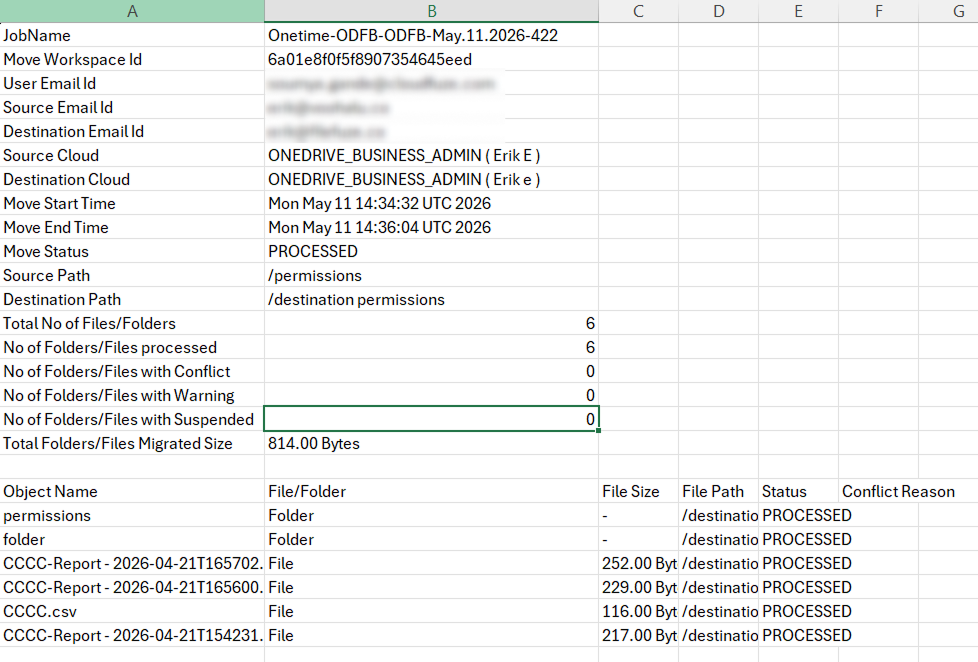
Using CloudFuze, IT administrators can simply download migration reports that will allow them to monitor all the migration procedures.
The report contains information about:
- Migration status (processed, conflicts, warnings, and failures)
- Source and target information for complete tracking
- Migrated files and folders, their size, and counts
- Object-level details, such as the path and name of each file, and their status
- Handling conflicts and errors to ensure smoothness
For instance, IT administrators can easily determine the number of files migrated, the presence of any conflict issues, and the successful processing of each object without manually checking log files.
At CloudFuze, we allow enterprises to access real-time, accurate, and exportable migration reports that help in managing the Microsoft 365 tenant migration process much more effectively.
How CloudFuze’s Real-Time Dashboards Help Enterprise IT Teams
Using CloudFuze’s real-time migration dashboards, enterprise IT administrators can:
- Monitor migration progress live
- Track processed files and folders
- Validate permission migrations
- Detect conflicts instantly
- Audit migrated data
- Verify metadata preservation
- Ensure hyperlink continuity
- Avoiding migration downtime
This level of operational visibility helps enterprises execute Microsoft 365 tenant migrations with greater confidence, accuracy, and control.
What IT Teams Can Monitor with CloudFuze
The table below highlights the key migration elements that enterprise IT teams can monitor in real time using CloudFuze’s live Microsoft O365 tenant transfer dashboard.
| Migration Element | Real-Time Visibility Provided |
|---|---|
| Processed files | Yes |
| Folder migration status | Yes |
| Permission migration | Yes |
| Conflict tracking | Yes |
| Hyperlink migration | Yes |
| Migration waves | Yes |
| User-level migration details |
Yes |
Advantages of Real-Time Reporting for Enterprises O365 Tenant Transfer
1. Fast Detection of Issues
With real-time visibility, teams will be able to detect any migration problems almost instantly. This helps prevent any delays from developing serious business risks.
2. Better Planning for Cutover
Teams performing migration can rely on live dashboards to assess whether each migration batch is eligible for final cutover. This minimizes uncertainties in weekend or overnight migrations.
3. Compliance Verification
Healthcare and financial enterprises need verification regarding sensitive files and their transfer to the cloud. CloudFuze provides migration reports that enable administrators to conduct compliance checks.
4. Progress Reports for Executives
Executives like CIOs and CTOs need to know migration status without going through technical log files.
A dashboard makes this possible by providing visual reports of:
- Files processed
- Jobs completed
- Conflict reports
- Counts of objects
Live Monitoring is the Safety Net for Enterprise Data!
Real-time visibility offered by CloudFuze gives companies the tools to monitor their migration processes and ensure everything goes smoothly. From monitoring files and permissions to spotting conflicts and confirming completion, the platform helps IT leaders handle migration without disrupting enterprise activities.
For large-scale enterprises such as those in healthcare, software development, and IT solutions, real-time visibility means eliminating risks and maintaining operational continuity.
Ready to see your migration in high-definition? Schedule a CloudFuze Demo and see how our live dashboards take the stress out of enterprise tenant transfers.
Frequently Asked Questions
1. What is real-time visibility in Microsoft Office 365 tenant migration?
Real-time visibility enables the monitoring of migration jobs, files, folders, permissions, and conflicts during an ongoing migration process. This allows IT professionals to recognize any issues immediately without waiting for the migration process to end and resolve them instantly.
2. Why is real-time monitoring critical in large enterprise migrations?
Typically, enterprise migrations involve moving hundreds or thousands of users and millions of files, and real-time monitoring guarantees admins can keep track of migration progress and address any issues promptly.
3. How does CloudFuze assist in monitoring Microsoft Office 365 tenant migration?
CloudFuze offers dashboards that provide IT admins with information on migration progress, processed files, permissions, conflicts, and job statistics. It makes migration management simple for businesses.
4. In which industries do real-time migration visibility have the greatest impact?
Organizations operating in the healthcare, computer software, financial services, and IT services sectors have the most significant advantage of real-time migration monitoring because they deal with sensitive information and data sets.
5. How does real-time visibility help uninterrupted tenant migration?
Yes. With real-time migration monitoring, IT professionals can recognize any bottlenecks, throttling API limits, synchronization failures, and permission issues.
About the Author: Aayushi Raj



