
Migrate Calendars & Contacts Between Google Workspace Tenants
While performing a tenant to tenant migration for Google Workspace, enterprises tend to overlook calendars and contacts in favor of emails and files. Yet, missing out on meetings, having an incomplete schedule, having a wrong contact list, or even losing a shared calendar can disrupt an organization’s business operations.
For organizations involved in mergers, acquisitions, tenant consolidation, and reorganizations, a smooth transfer of Google calendars and contacts from one Google Workspace to another should be a priority.
At CloudFuze, we help enterprises safely move their Google Calendars and Contacts from one Google Workspace tenant to another.
Key Takeaways
Why Does Calendar & Contact Migration Matter?
Google calendars and Contacts facilitate the internal communication and collaboration of businesses every day. The loss of calendar and contact information during migration might lead to serious complications.
Business-critical calendar and contact information includes:
- Employee meeting calendar
- Team calendars
- Customer and vendor contacts
- Conference event
- Resource booking
- Distribution group
- Appointment history
- Time zone information
- Recurring meetings
Without careful migration planning, enterprises risk having:
- Missed meetings
- Disrupted recurring meetings
- Duplicate contacts
- Incomplete calendar permissions
- Conflicts during scheduling
- Collaboration delays
Thus, an enterprise needs a migration plan.
Migration Challenges of Calendars and Contacts among Google Workspace Tenants
Google Workspace calendars and contacts migration is much more complex than typical file transfer. It involves relations, permissions, metadata and synchronizations.
1. Keeping Recurring Meetings
Recurrence patterns must remain unbroken after migration to the new calendar.
2. Preserving Calendar Permissions
Shared calendars involve delegation and permission levels which should be saved during migration.
3. Preventing Duplicate Contacts
Synchronization might lead to duplication of contacts across various users.
4. Preserving Metadata
Metadata items such as:
- Meetings history
- Contact group
- Label
- Note
- Attachment
Should be preserved as well.
5. Guaranteeing Business Continuity
Businesses cannot suffer from downtime due to disruptions in scheduling and communication processes.
What Does CloudFuze Migrate?
At CloudFuze we ensure full Google Workspace tenant migration of calendars and contacts.
| Calendar Migration Capabilities | Contact Migration Capabilities |
|---|---|
|
|
Users can keep their productivity and collaborate during migration while using CloudFuze.
How CloudFuze Easily Migrate Calendars and Contacts Between Google Workspace Tenants
- Automated/CSV User Mapping: CloudFuze enables seamless user mapping through automation or CSV-based matching.
- Incremental Synchronization: All new calendar events and contact updates made during the migration process will be kept in sync.
- Zero Downtime Migration: The user can access their calendars and contacts even while migrating.
- Metadata Preserving: We retain important metadata information that helps ensure smooth usage post-migration.
- Secure Migration with Enterprise-Level Security: CloudFuze uses security best practices in all migrations with encrypted migration and access controls.
- Real Time Migration Tracking: IT department has access to migration dashboards with visibility into:
- Migration status
- Calendar migration status
- Contact migration status
- Conflict and errors
- Migration completion reports
Seven Step Process to Migrate Calendars & Contacts using CloudFuze
Step 1: Environment Assessment
Our engineers assess the following:
- Number of users
- Calendar architecture
- Contact architecture
- Shared resources
- Dependency between permissions
Step 2: User Mapping
Users are mapped from source tenant to destination tenant.
Step 3: Migration Configuration
Migration settings are defined as below:
- Calendars
- Contacts
- Permissions
- Scheduling preferences
Step 4: Pilot Migration
The pilot batch is migrated first to establish processes and discover any problems.
Step 5: Full Migration Execution
Full batch calendars and contacts are migrated using CloudFuze migration tools.
Step 6: Delta Sync
Incremental changes are synced before final cutover.
Step 7: Validation and Reporting
The department receives detailed reports for successful validation.
Below are the Screenshots of Contacts and Calendar Migration Between Google Workspace Tenants:
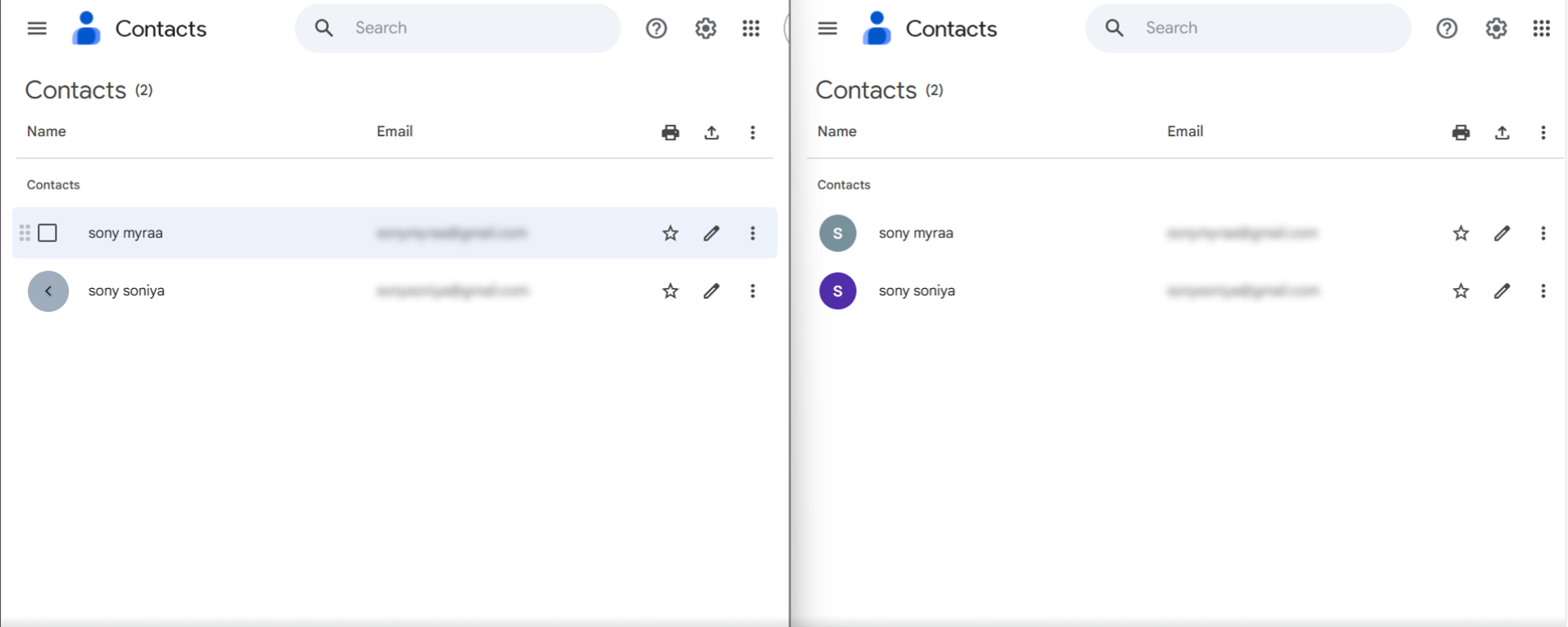
Contact Migration:
The left side shows the source Google Workspace contacts before migration, while the right side displays the destination tenant after migration with all contact details successfully transferred. Our tool preserves contact information, labels, and user data accurately across Google Workspace tenants.
Calendar Migration:
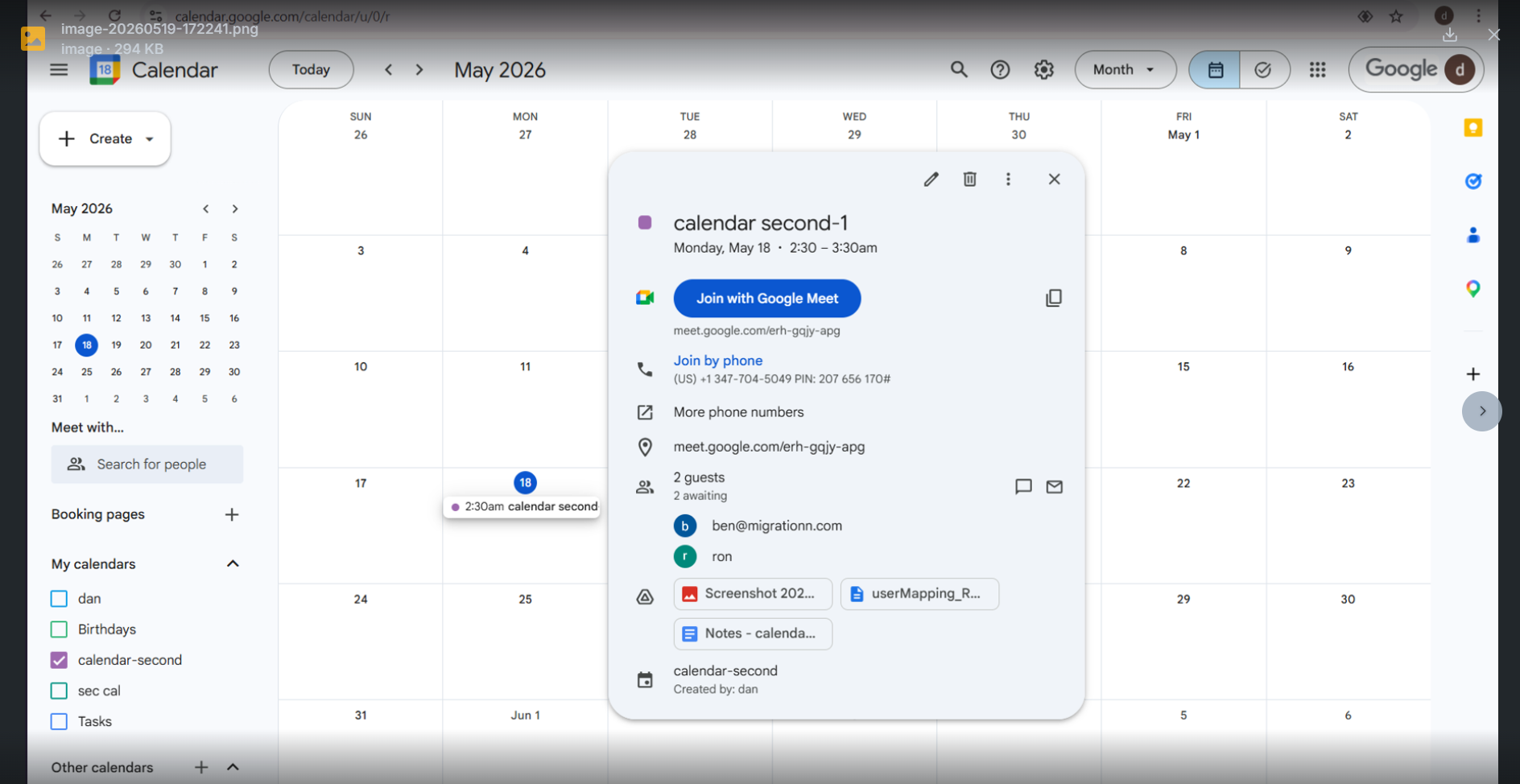
Source:
The source Google Workspace calendar contains all existing meeting data, including recurring events, attendees, attachments, reminders, shared permissions, and metadata.
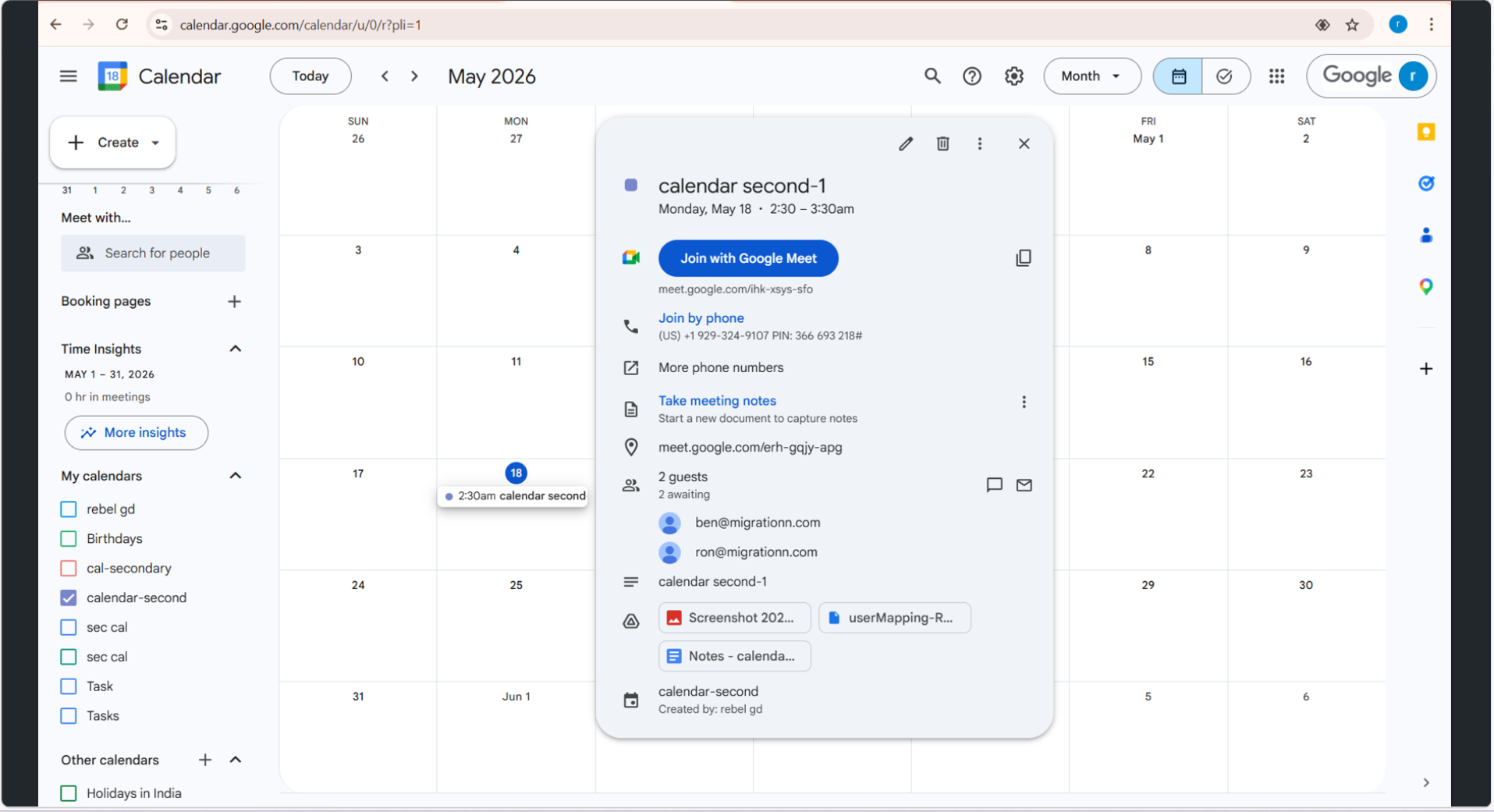
Destination:
The destination Google Workspace calendar receives all migrated events, permissions, attendees, attachments, and metadata with full fidelity. We at CloudFuze ensure calendars remain fully functional after Google Workspace tenanat migration and preserve scheduling continuity and collaboration across teams.
Calendars and Contacts Migration Between Google Workspace Tenants: CloudFuze vs. Native Tools
| Feature | CloudFuze | Native Tools (CSV/ICS) |
|---|---|---|
| Cross-Tenant | ✅ Full support | ❌ Not direct (manual export/import required) |
| Events/Attendees | ✅ Preserved | ✅ Partial (reminders often lost) |
| Contact Fields | ✅ All (notes/groups) | ❌ Limited (name/email only) |
| Delta Syncs | ✅ Unlimited | ❌ None |
| Scale | ✅ Handles large-scale (10K+ users) | ❌ Manual, error-prone |
| Auto-Mapping | ✅ Automated (UPN/email, CSV) | ❌ Manual CSV |
Why IT Teams Prefer CloudFuze for Google Workspace Tenant Migration
- CloudFuze provides faster migration processes even in larger organizations involving 10,000+ users and datasets from TBs to PB-scale environments.
- No business processes are interrupted when migration is being performed.
- Preserves 100% of critical collaboration data, including meetings, contact lists, and collaboration calendar scheduling.
- All migration activities can be monitored by the IT team in real-time with the migration dashboard.
Best Practices for Google Workspace Migration of Calendar and Contacts
In order to ensure successful migration, enterprises should:
- Perform audit of calendars and contact lists
- Delete old and irrelevant information
- Properly validate user mappings
- Test ability of recurring meetings management
- Analyze permission structure
- Perform migration pilots
- Notify about migration schedule
- Verify migrated data after migration completion
Observing these practices reduces potential migration risks.
Main Indicators of Successful Migration
IT administrators should track:
| Metric | Importance |
|---|---|
| Migration completion rate | Measures overall success |
| Calendar accuracy | Ensures schedules migrate correctly |
| Contact integrity | Validates contact preservation |
| Permission accuracy | Prevents collaboration issues |
| Downtime incidents | Measures business continuity |
| User support tickets | Indicates migration impact |
The above-mentioned metrics will assist in verifying the quality of the migration process and optimizing any future initiatives.
Why Enterprises Migrate with CloudFuze
At CloudFuze, we provide enterprise-grade Google Workspace migration services for large businesses globally.
CloudFuze offers:
- Complete migration management services
- Compliant and secure transfers
- Superior speed for migration
- Real-time monitoring dashboard
- Professional migration support
- Large-scale migration services
No matter how many users you migrate – hundreds or thousands, CloudFuze assists in ensuring accurate transfer of your calendars and contacts without affecting business processes.
Migrate Calendars and Contacts Between Google Workspace Tenants with CloudFuze!
With the correct migration strategy and appropriate migration tooling, an enterprise will successfully be able to migrate to their calendars and contacts across Google Workspace domains. At CloudFuze, we help simplify complex Google Workspace migration processes through our advanced, secure, and downtime-free migration tools.
Contact CloudFuze today to set up a Proof of Concept (POC) and experience enterprise-grade migration speed.
Frequently Asked Questions
1. How do migrations of calendars and contacts between Google Workspace tenants work?
It means transferring Google Workspace events and contacts between two domains, such that the following are preserved:
- Details of the event (date, attendees, attachments)
- Permissions on the calendar
- User contacts/contacts list
2. When would an enterprise require calendar and contacts migration between Google Workspace tenants?
An enterprise migrates its data for:
- Mergers & acquisitions
- Consolidation of domains or tenants
- Domain change/rebranding
- Separation/divestiture of business units
To have all users under one Workspace tenant
3. How is calendar migration done between tenants for shared calendars?
Calendar migration for shared calendars can be performed using:
- Exporting calendar information (using API or tool)
- Creation of calendars on the target tenant
- Importing of events
- Manually re-application of sharing permissions
About the Author: Aayushi Raj



