
1. Introduction
Today, many established enterprises with thousands of employees struggle to govern their ever-expanding Google Workspace environment. With employees frequently joining and leaving companies, most IT teams find it difficult to track overall license usage, enforce IT security policies, and identify inactive user accounts in real-time.
Using SaaS and AI app management software helps enterprises simplify their Google Workspace management and gain better IT control.
This guide explains what smart Google Workspace management and governance looks like and how to choose the right management platform to support it.
2. What is Google Workspace Management and Governance?
Google Workspace management and governance refers to centrally optimizing and controlling all Google Workspace tools across your organization. It includes user lifecycle and group management, license optimization, third-party app oversight, and Gemini AI data compliance policy enforcement.
3. Why Google Workspace Management and Governance Is Challenging for Enterprises?
As hybrid and remote work becomes common nowadays, manually managing Google Workspace through the “Admin Console” is increasingly inefficient and error-prone.
At the same time, native AI assistants like Gemini introduce new data security risks by inheriting existing user permissions and data access gaps.
Without strong IT data governance and user access permission controls, the above-discussed factors complicate Google Workspace management and governance for today’s enterprises.
4. Challenges Involved in Manually Governing and Managing the Google Workspace Environment
When enterprises manually oversee their Google Workspace environment without dedicated SaaS management software, they’ll face the following challenges:
- New Hire Onboarding Delay: Creating user accounts manually slows new hires’ access to Gmail, Drive, and Meet, especially for worldwide teams operating in different time zones.
- License Overspending: Inactive Google Workspace user accounts sometimes go unobserved by IT executives without proper automated license tracking, increasing your Google Workspace subscription costs.
- Limited User Activity Visibility: Native (Google Admin Console) reports lack up-to-date usage insights across Drive, Sheets, Docs, Gmail, Gemini, and third-party apps.
- Gemini-Related Data Exposure: With no proper policies on Google data governance, Gemini inherits existing access permissions and shared content, increasing the risk of unintended data access.
- Compliance & Security Gaps: Manual enforcement of two-factor authentication and external-file sharing controls creates data access inconsistencies and complicates audit readiness.
- Shadow IT Risks: Employees connect unauthorized apps to Google Workspace without IT visibility or timely IT controls.
5. What Smart Google Workspace Management and Governance Looks Like?
With smart Google Workspace management and governance through a SaaS and AI app management platform, you can:
- Instantly provision and deprovision users without any manual efforts across your Google Workspace tenant.
- Automate role-based user access controls to safeguard your company’s business data.
- Monitor your Google Workspace tenant license usage continuously and eliminate license sprawl.
- Gain a unified IT governance dashboard and AI-powered insights for your IT, HR, security, compliance, and finance teams.
- Generate audit-ready reports for your Google Workspace with full visibility into user-level activity.
- Manage Google Workspace (including Gemini) alongside 175+ SaaS and AI apps from one platform.
6. Manual vs. Automated (Smart)Google Workspace Management and Governance
The differences between manual Google Workspace management and governance and a SaaS-based automated approach are discussed in the table below:
| Aspect | Manual | Automated (like CloudFuze Manage) |
|---|---|---|
| User Management | Slow, manual user provisioning | Instant, automated user access |
| License Management | Spreadsheet-level license tracking, waste | Live license usage updates & overlaps cleanup recommendations |
| Security & Compliance Governance | Limited IT visibility, manual audits | Continuous IT monitoring, audit-ready reports, and controlled Gemini data exposure |
| Cost Optimization | Reactive subscription/license cost reviews | Proactive license cost savings |
| Stack Visibility | Fragmented spreadsheet reports | Unified IT dashboard with AI-powered insights. |
7. Tips to Choose the Right Google Workspace Management and Governance Platform for Your Organization
- Choose a SaaS and AI app management platform that automates user onboarding & offboarding across your Google Workspace.
- Look for real-time license tracking to eliminate unused user accounts and reduce annual license spend.
- Select a platform that provides role based user access controls to protect your company’s sensitive enterprise data.
- Select a Google Workspace management and governance tool that provides instant, downloadable, audit-ready reports for IT compliance.
- Prioritize a cloud app management tool that supports several app integrations beyond Google Workspace for centralized SaaS and AI app management.
- Opt for built-in cost optimization features like license consolidation, reporting, and automated renewal tracking.
- Pick a scalable SaaS and AI app management platform that grows with your organization’s needs and offers AI-powered insights.
Our industry-leading SaaS and AI app management platform, CloudFuze Manage, checks all these boxes, giving you full control over your Google Workspace environment while supporting your broader SaaS and AI ecosystem.
8. Why CloudFuze Manage Is the Right Choice for Smart Google Workspace Management and Governance
Our SaaS and AI app management platform, CloudFuze Manage, is the right choice because it simplifies Google Workspace management and governance by automating user management, optimizing licenses in real time, and implementing role-based user access controls from a single pane of glass.
Discussed below are the steps to manage your Google Workspace tenant smartly:
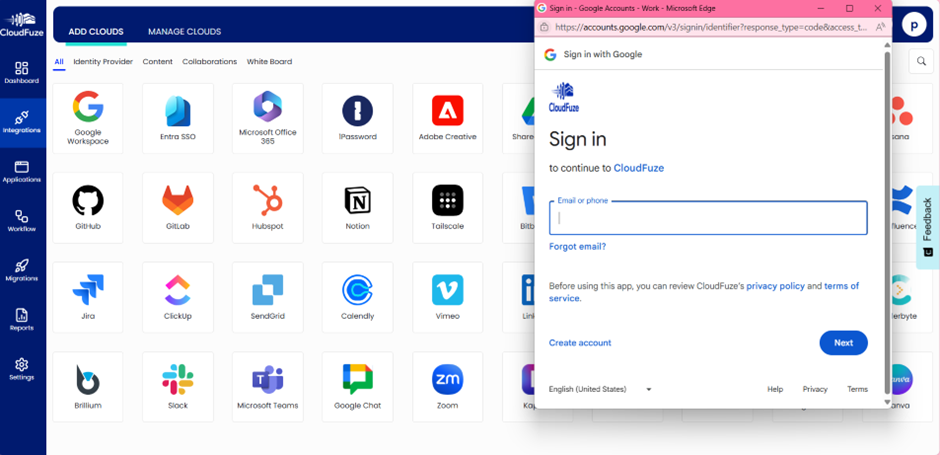
- Step 1: Sign in to connect your Google Workspace account with CloudFuze Manage.

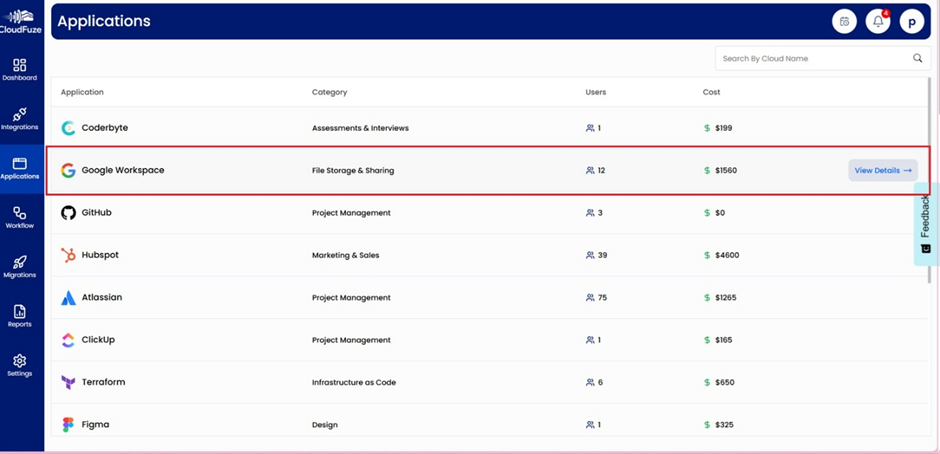
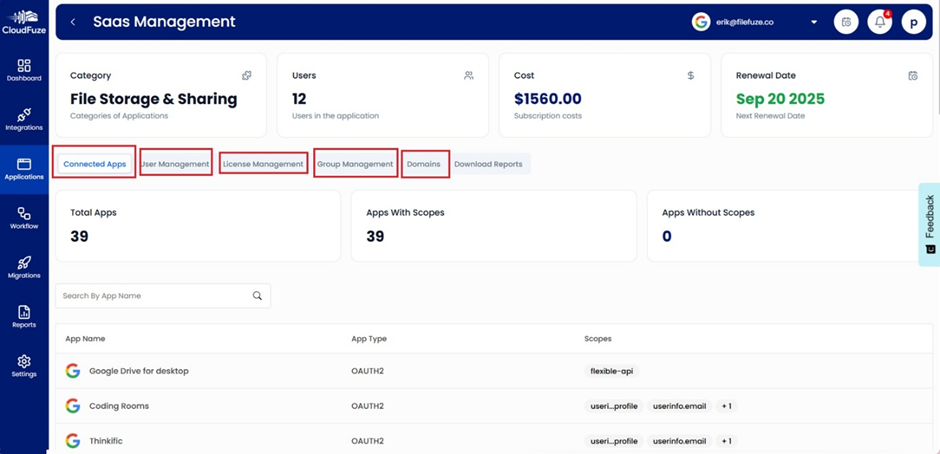
- Step 2: After connecting your Google Account with CloudFuze Manage, you can find your Google Workspace app under the Applications widget.
Also, you can effortlessly view the Google Workspace app’s category, its number of users, and its total cost in a single dashboard.

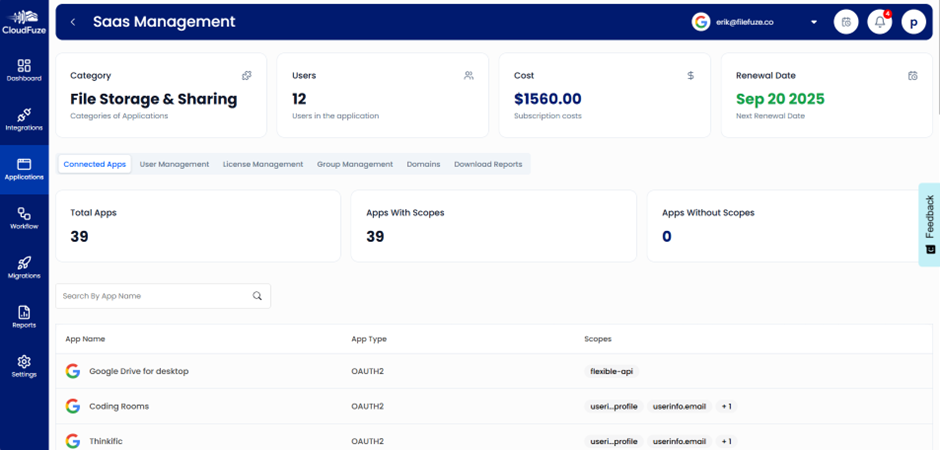
- Step 3: Hover your mouse over the Google Workspace icon, and the “View Details” icon will appear, which gives you a more precise and in-depth view of your Google Workspace.

- Step 4: With our SaaS and AI management app, you can optimize and manage your Google Workspace connected apps, users, licenses, teams, and domains easily.
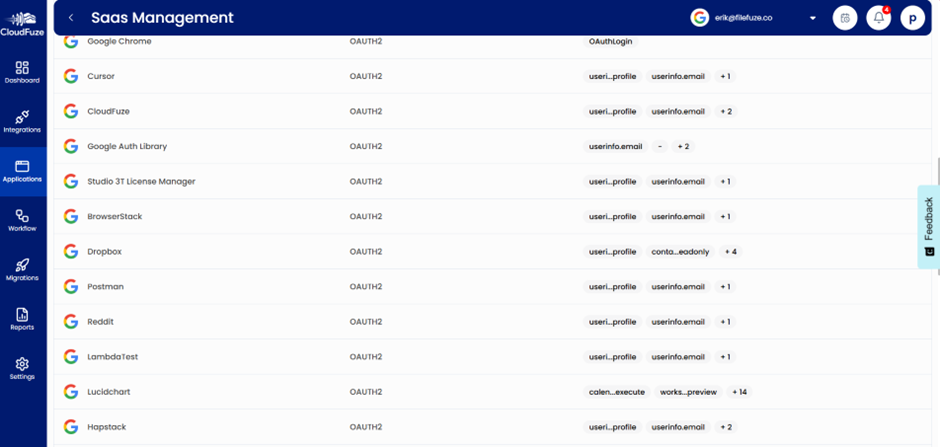
- Step 5: Select the “Connected Apps” labelled icon to view all the SaaS apps (BrowserStack, Dropbox, Reddit, Postman, and more) connected via Gmail. This dashboard shows the corresponding app’s name, its authentication type, and access scopes.

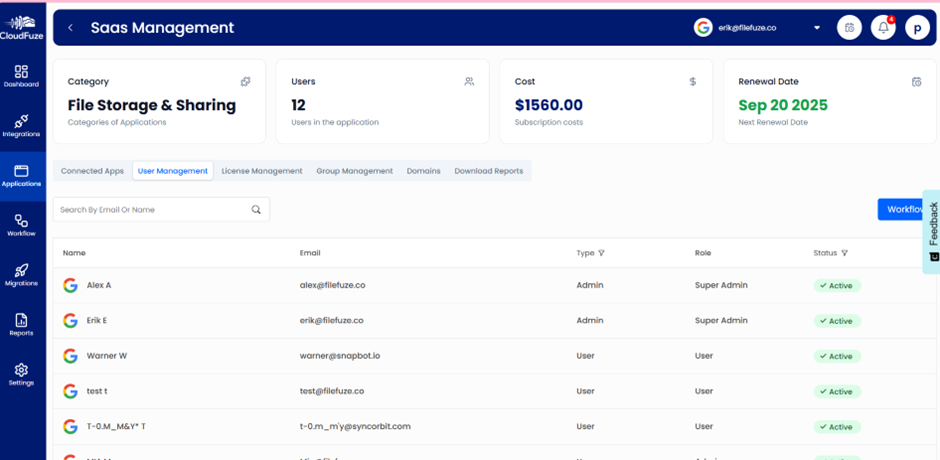
- Step 6: Click on the “User Management” labelled icon to discover each user along with their email IDs, access roles (Admin, Super Admin, and User), and activity status.
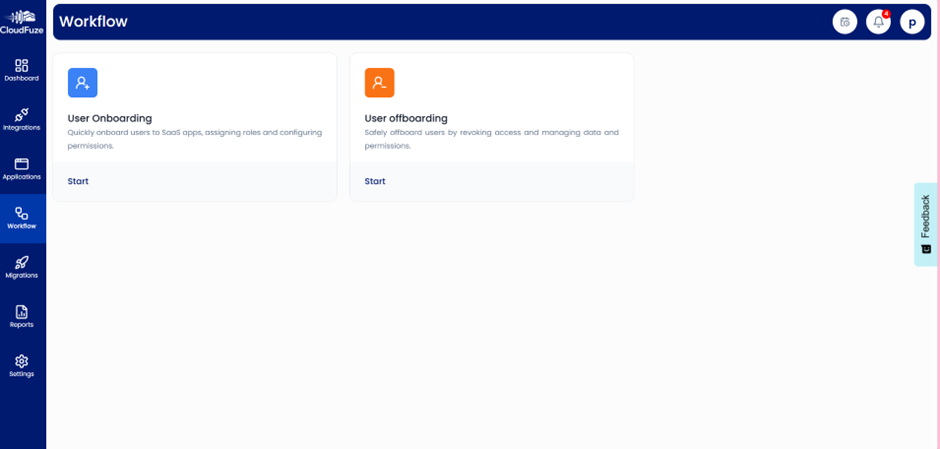
And there is a workflow icon in the right corner of this dashboard, which helps businesses automate their employee onboarding and offboarding processes across Google Workspace.Note: To fully understand our automated onboarding and offboarding processes in Google Workspace, check out our blog post: Zero-Touch Onboarding & Offboarding in Google Workspace

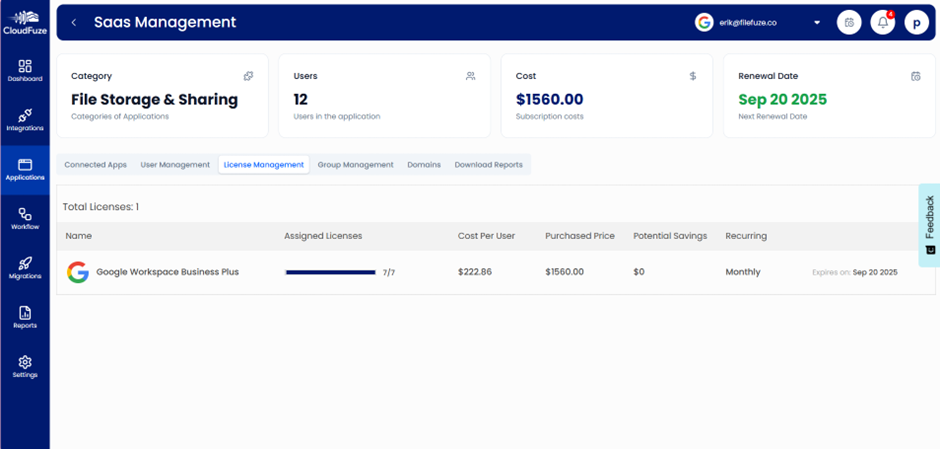
- Step 7: The “License Management” labelled icon shows the number of used/unused Google Workspace licenses, license cost per user, potential savings, and license renewal dates.
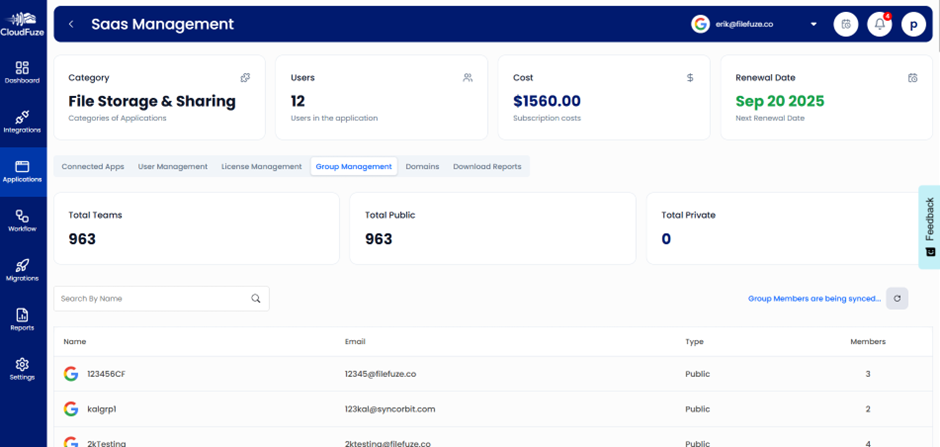
- Step 8: Under the “Group Management” labelled icon, one can manage different groups/departments across the organization.
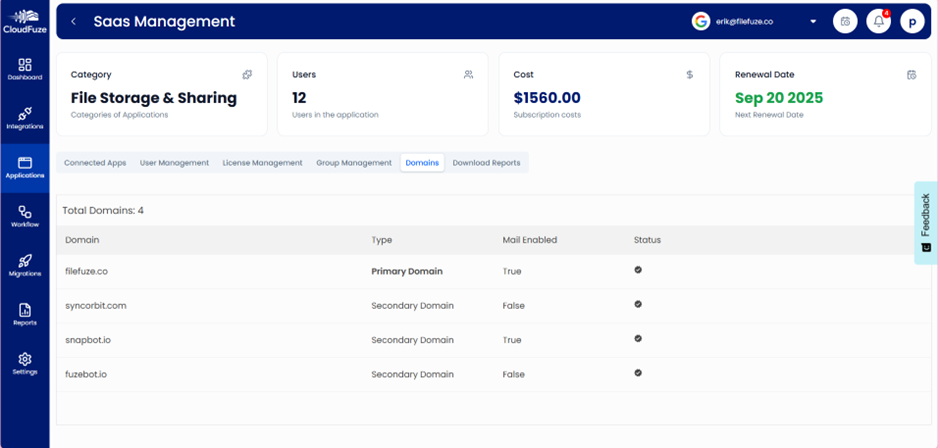
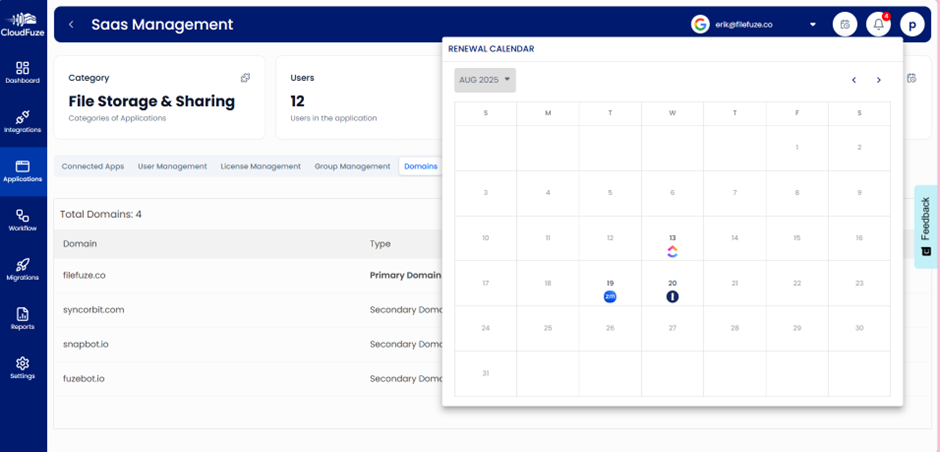
Additionally, CloudFuze Manage lets you oversee both public and private team members in this dashboard. - Step 9: Businesses can manage their primary and secondary domains using the “Domains” labelled icon present in the “Application” dashboard. Further, you can see its mail-enabled and active status in this dashboard.

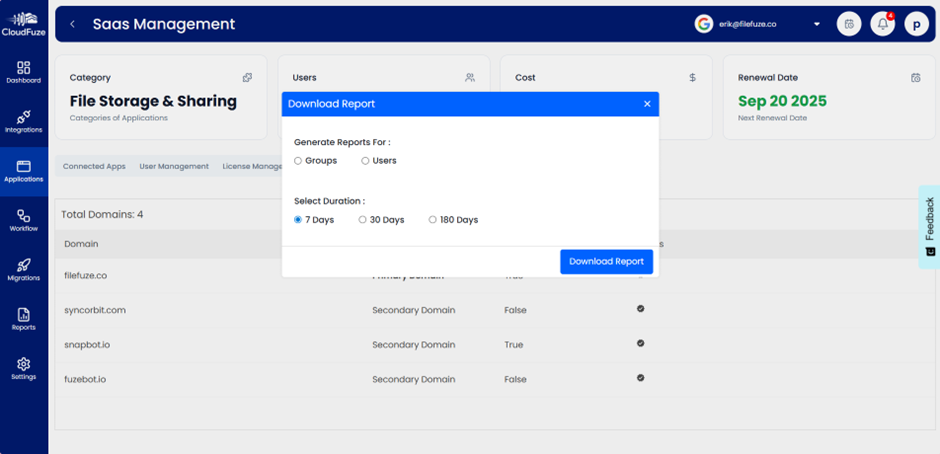
- Step 10: IT managers can generate and download audit-ready reports for 7,30, or 180-day time windows.
- Step 11: The finance team of an organization can set and receive license renewal alerts for their Google Workspace using our platform.

- Step 12: Our platform intelligently identifies content duplicates, outdated files, and risky external file shares in your Google Workspace to shrink your organization’s cyber-attack surface and reduce costs.
- Step 13: IT teams can classify sensitive/duplicate business data in your Google Workspace, enforce external sharing and stale-content cleanup policies, and continuously assess data security risks against compliance standards such as GDPR, ISO27001, and SOC 2 Type 2.
Pro Tip 1: CloudFuze Manage’s AI chat agent (Manage AI) instantly delivers clear, accurate answers by surfacing real-time insights directly from our unified dashboard.
Pro Tip 2: You can simply ask questions like: “How many Google Workspace licenses are unused?”, “Who has external-file sharing access in Drive?”, “Show me the recent user activity graph for this app?” and get an instant answer without switching tabs.
9. Gain Total Control Over Your Google Workspace with CloudFuze Manage
In an organization with a distributed work culture, manually managing Google Workspace can be time-consuming and tedious.
With our intelligent SaaS and AI app management platform, CloudFuze Manage, large enterprises and SMBs can fully manage and govern their Google Workspace in a single pane of glass.
Request a free demo and explore how CloudFuze Manage simplifies Google Workspace management and governance.
10. Frequently Asked Questions
1. What is Google Workspace Optimization?
Google Workspace optimization refers to improving how your organization uses Google Workspace by simplifying user access management, automating IT workflows, efficiently managing SaaS licenses, and integrating it seamlessly with other SaaS and AI tools to improve your ROI.
2. Can CloudFuze help with migrating data to or from Google Workspace?
Yes. CloudFuze Migrate supports transferring data from Google Workspace to Google Workspace without even writing a single line of code.
3. What are the best tools for managing user permissions and access in a corporate email platform?
CloudFuze Manage is one of the best tools for managing user permissions and access in a corporate email platform, which also makes user management (RBAC) across your tech stack completely zero-touch.
About the Author: Rashmi Ramesh


