
Plan for IT Firms to Move 500+ Dropbox Users to Microsoft 365
IT firms, such as IT consulting companies, that need to migrate more than 500 users from Dropbox to Microsoft 365 must have a proper migration plan that ensures little to no downtime and disruption for the users.
Read this guide to explore proven strategies to migrate a high volume of users while ensuring their collaboration and context do not break in the process.
Key Takeaways:
Plan a Proper Scope of Work
When you have a large volume of 500+ Dropbox users to migrate to Microsoft 365, planning a proper scope of work is important as it gives structured direction to the overall migration project. The scope of work must include all important action items, such as:
- The total and final number of users to migrate
- The total size of data to migrate
- The types of properties and context to migrate
- The total number of hyperlinks to migrate
- The type of instances needed for the migration
- Whether or not a managed migration service is required

Perform a Thorough Data Cleanup Before Migrating
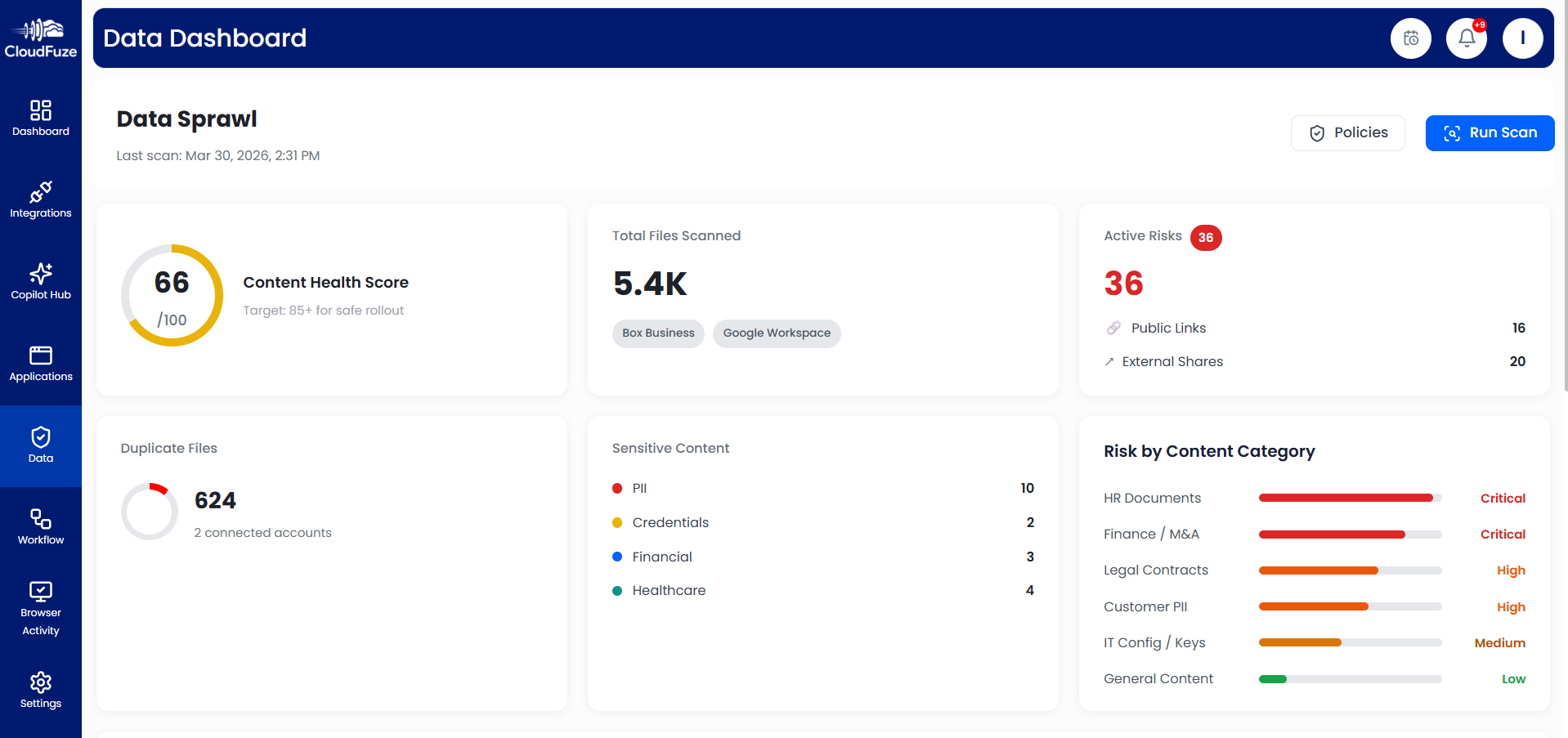
In your journey of moving away from Dropbox and adopting Microsoft 365, it is highly likely that your company is also focusing on Copilot AI adoption. There is no doubt that there are a lot of advantages to adopting Copilot.
However, if ungoverned data lives in your Microsoft 365 ecosystem, it is highly likely that Copilot will surface sensitive information in its natural language answers, which, eventually, can lead to security and compliance violations.
And ensuring your Microsoft 365 ecosystem has governed data starts from the migration process itself. We recommend performing a deep data cleanup of your source cloud environment (Dropbox in this case) with CloudFuze Manage to:
- Remove duplicates
- Delete stale content
- Apply filters and clean up manually
This way you can optimize the scope of work as well as start on a clean slate in Microsoft 365 which further makes data and AI governance simpler, and more ROI driven.
The value in cloud migrations is no longer in “moving” the data, it’s going to be making that data usable, trustworthy, and AI-ready during the process. – Anthony Raymond, Head of Strategic Partnerships, CloudFuze.
Map the Large Pool of Users Accurately
Proper mapping is also one of the highest priorities when it comes to moving more than 500 Dropbox users to Microsoft 365. There are several user mapping options you can choose from, including:
- CSV-based user mapping
- Auto mapping
- Folder display mapping
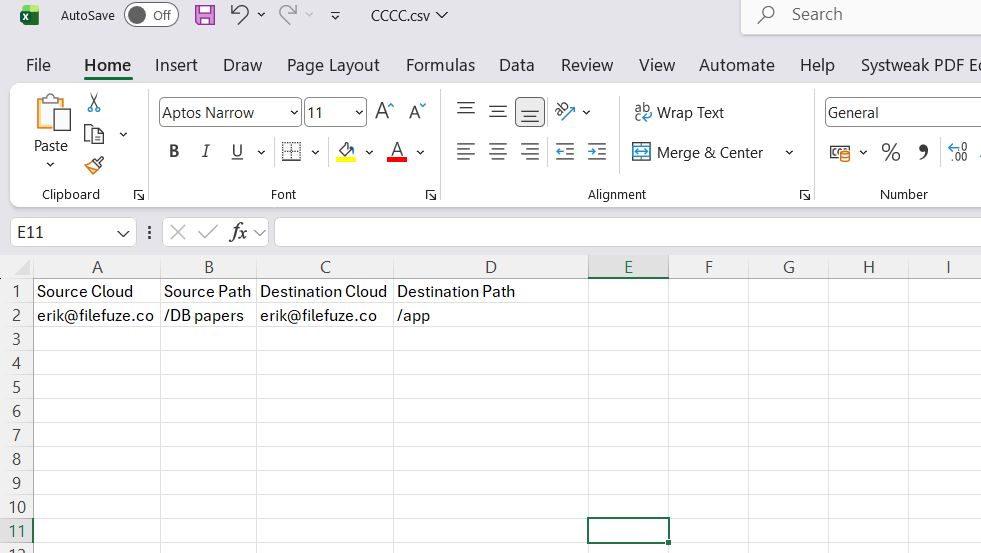
Out of the three options, we recommend choosing the CSV-based mapping option as it is highly accurate and lets you manually configure mapping paths for each user. The CSV-based mapping option is also highly useful if you want to create custom mapping paths between specific users.
Here is an example of CSV mapping for Dropbox to OneDrive migration:
Focusing on Security and Compliance is a Must
It goes without saying that focusing on security and compliance is a must when it comes to migrating 500+ Dropbox users to Microsoft 365. Make sure that the migration vendor you partner with meets all your security and compliance requirements.
At CloudFuze, we adhere to all industry-standard security regulations, including SOC 2, Type 2, GDPR, and ISO 27001. We also use highly secure migration infrastructure, including enterprise-grade instances, along with secure OAuth-based cloud authentication and RSA 2048 data encryption during migration.

Plan for Validation Sequence, Cutover, and User Onboarding
Lastly, make sure to plan the sequence of validating the completed migration jobs. One proven approach is to validate each user batch as and when they get migrated from Dropbox to SharePoint Online and OneDrive.
It is equally important to plan for a smooth cutover (if your organization wants to decommission Dropbox after migration) and enable smooth user onboarding to Microsoft 365.
With CloudFuze Manage, you can onboard users to Microsoft 365 strategically. With our user onboarding and offboarding workflows, you can ensure that all the governance policies are enforced to each user when he or she is onboarded to Microsoft 365.
Move 500+ Dropbox Users to Microsoft 365 Strategically
Leverage our tried-and-tested cloud migration and Microsoft 365 governance solutions to transition your users from Dropbox to Microsoft 365 strategically. By aligning governance with your migration right from the start, we help you accelerate adaptability in the fast-growing and changing AI landscape.
Contact us today for an in-depth discussion on migration and governance strategies.
Frequently Asked Questions
1. What are the common issues users encounter when migrating from Dropbox to OneDrive?
Loss of context and collaboration workflows is one of the biggest issues that users encounter after they have been transitioned from Dropbox to OneDrive. To eliminate this problem, it is important to preserve sharing permissions, hyperlinks, file versions, external shares, timestamps, shared links, and more.
2. How can I measure the success of my migration from Dropbox to OneDrive?
Little to no disruption is one of the biggest indicators of a highly successful Dropbox to OneDrive migration. You can also check the accuracy of the migration to validate its success.
3. What are the best tools for migrating users from a file sharing app to a productivity suite?
CloudFuze Migrate is one of the best tools for migrating users from a file sharing app like Dropbox to a productivity suite like Microsoft 365. The tool helps companies of all sizes migrate thousands of users and petabytes of data without any downtime or disruption.
4. Are there automated services to migrate user accounts between cloud storage platforms?
Yes, CloudFuze Migrate is one of the best automated services to migrate user accounts between cloud storage platforms, such as Dropbox and Microsoft 365. The tool automates a lot of tasks, such as replacing unsupported characters, preserving rich contextual metadata, and more.
About the Author: Pankaj Rai



