
Slack DMs Migration to Teams: What’s Possible & What’s Not
Migrating direct messages (DMs) is one of the most important steps in any Slack to Teams transition. DMs hold one-on-one conversations, file exchanges, and communication context that teams rely on every day.
But not every Slack DM feature has an equivalent in Microsoft Teams, which means some features can migrate cleanly, while others need specific solutions.
This guide breaks down exactly which Slack DM features can be migrated to Teams, which ones cannot, and why. These insights will help IT teams plan the migration accordingly.
Key Takeaways:
Why Migrating Slack DMs to Teams Matter
Direct messages on Slack and other collaboration chat platforms aren’t just casual conversations.
According to research on enterprise communication patterns, a significant share of actionable business conversations, approvals, file shares, and decision making happen in private one-to-one and group DMs rather than in channels.
When organizations migrate from Slack to Teams without transferring DMs, users lose their collaboration context entirely. They arrive in teams with no history, no prior attachments, and no record of what was discussed. That disruption adds up fast, especially for large-scale teams.
By migrating Slack DMs to Teams, organizations and their IT teams can preserve communication continuity and help users pick up where they left off. This way, productivity impact risk is little to none.
Slack DMs Migration to Teams: What’s Possible?
A lot is possible with CloudFuze Migrate when it comes to migrating direct messages from Slack to Teams. Here are all the Slack direct messages features that you can migrate to Microsoft Teams using CloudFuze Migrate:
| Features | Migrated by CloudFuze |
|---|---|
| Direct messages (one-to-one) | Yes |
| Group direct messages | Yes |
| Direct message history | Yes |
| Direct message attachments | Yes |
| Reactions in direct messages | Yes |
| Timestamps in direct messages | Yes |
| Pinned direct messages | Yes |
| User mentions in direct messages | Yes |
| Option to pause direct message migration | Yes |
| Option to cancel direct message migration | Yes |
| Direct message export through JSON | Yes |
| Delta migration for direct messages | Yes |
| Auto-retry for conflicted DMs | Yes |
| Direct message migration reporting | Yes |
A few things worth noting about what this covers:
- Full message history is migrated, not just recent messages. Whether you have months or years of DM history, everything is migrated.
- Attachments and media migrate with the messages they belong to.
- Delta migration means you can migrate new messages added after the one-time migration gets completed.
- Auto-retry handles conflict items automatically. This eliminates the need for IT teams to manually troubleshoot failed items.
Screenshots of Slack DMs Migration to Teams
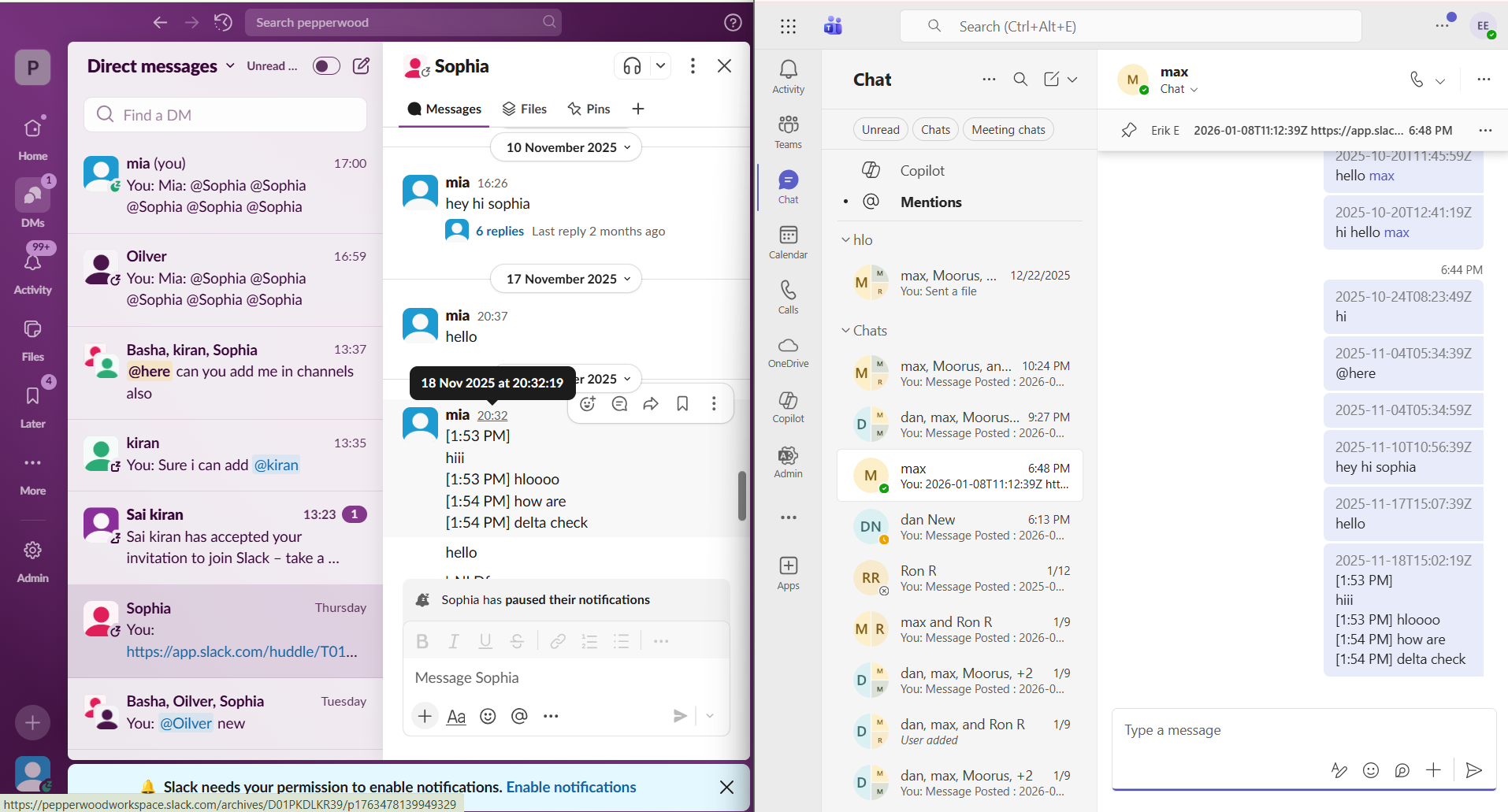
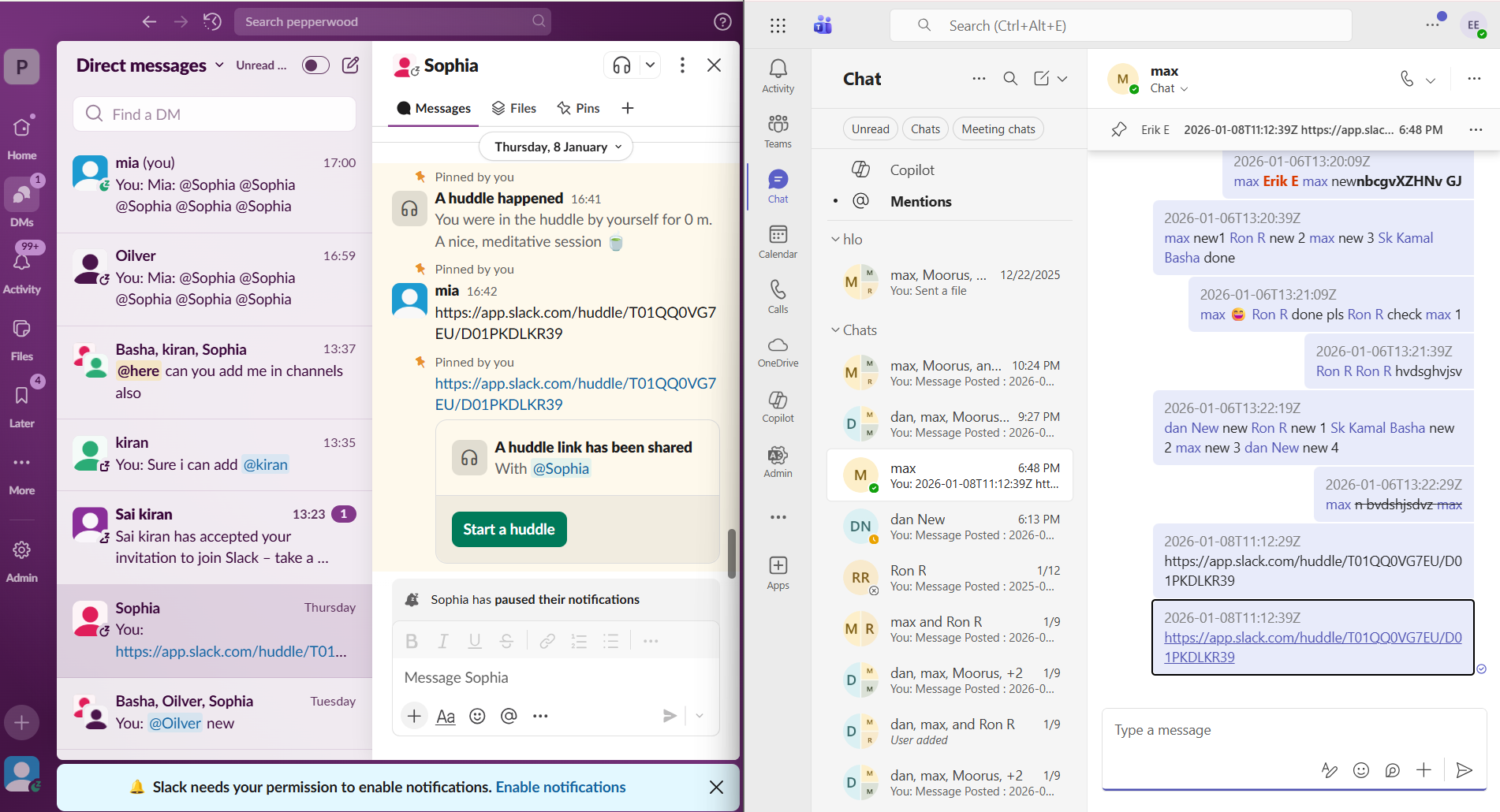
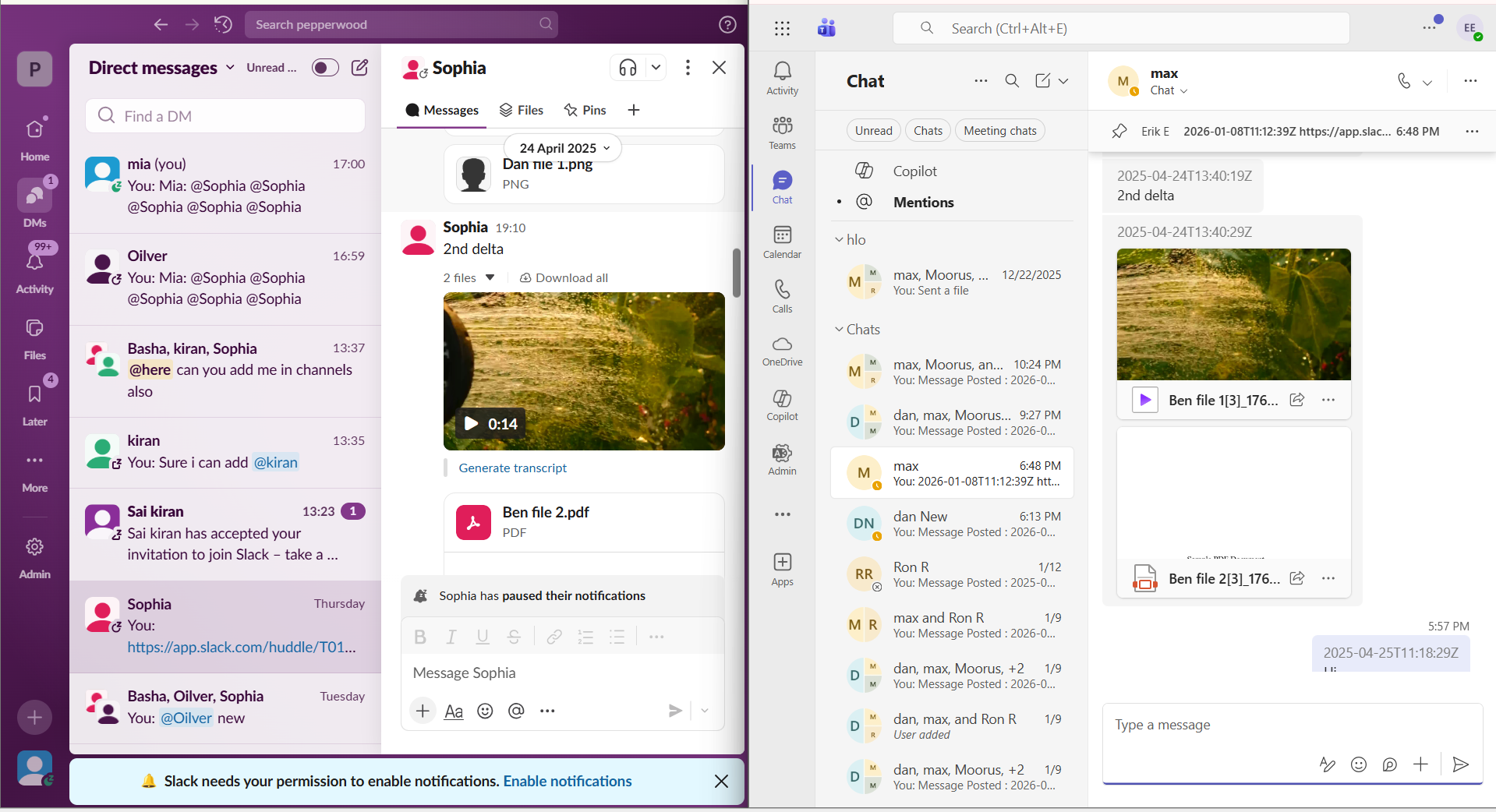
Here are some screenshots that show how our Slack to Teams migration tool transfers direct messages and their properties and metadata:
Slack to Teams DMs timestamps migration:
Migration of pinned messages and user mentions in direct messages from Slack to Teams:
Direct messages attachments migration:
Slack DMs Migration to Teams: What’s Not Possible?
There are several direct messaging features that are specific to Slack and therefore cannot be transferred to Teams (from any migration tool) as Microsoft 365 does not support them. Here are those features:
| DMs Features Specific to Slack | Limitations in Microsoft 365 |
|---|---|
| Slackbot Actions like reminders, ask questions, etc. | Slackbot is exclusively for Slack and is not available in Microsoft 365 and therefore cannot be migrated. |
| DMs search metadata, such as advanced filters. | Slack-specific search metadata does not work in Teams as Teams performs search actions across the Microsoft 365 repository. |
| Custom emojis exclusive to Slack | Emojis that are exclusively designed for Slack in direct messages cannot be migrated with any migration tool. |
| Custom DMs organization exclusive to Slack | DMs grouping feature in Slack is not supported in Teams and therefore cannot be migrated. |
| DMs-specific app shortcuts in Slack | Since third-party app commands in Slack DMs are set up with certain quirks, they cannot be migrated to Teams. |
The key point to understand here is that these limitations are not a tool problem; they are more of a platform incompatibility problem.
It goes without saying that Microsoft Teams was not built to receive these Slack-native features and properties, so no migration tool can walk around those gaps.
The best way to approach these limitations is to set expectations with end users before migration starts. Letting users know upfront that Slack Bot reminders won’t carry over, or that certain DM groupings will look different in Teams, reduces post-migration friction significantly.
Migrate Slack DMs to Teams with Accurate Replication
Leverage our proven Slack to Teams migration tool to transfer direct messages accurately. Apart from Microsoft-unsupported features, we at CloudFuze migrate all direct messaging features of Slack to create familiar context in Teams for the end-users.
Request a quote tailored to your company’s Slack to Teams migration needs today!
Watch our Slack to Teams transfer tool in action:
Frequently Asked Questions
1. Why is migrating Slack DMs to Microsoft Teams important for organizations?
Since direct messages are critical to user workflow, context, and overall productivity, migrating them is a must when moving from Slack to Teams. It’s important to preserve all the important direct messaging features during migration.
2. Can you migrate all direct messages from Slack to Teams?
Yes. You can migrate your company’s entire direct messages, even if the volume is in millions or billions, by using advanced migrations tools like CloudFuze Migrate. The migration tool enables businesses to migrate high volumes of DMs without downtime or user impact.
3. What are the best practices for preserving message integrity when moving DMs from one chat service to another?
Some of the best practices for preserving messaging integrity when migrating DMs include preserving chat history, replies, reactions, attachments, gifs, user mentions, pinned status, and more.
4. Can I migrate direct message data without losing attachments or media files?
Yes, with CloudFuze Migrate, you can migrate direct messages without losing any attachment or media file. CloudFuze Migrate ensures a high level of accuracy and security during migration.
5. What tools are available for transferring private chat history between popular team messaging services?
CloudFuze Migrate is one of the best tools for securely transferring private chat history between popular team messaging platforms like Microsoft Teams, Slack, and Google Chat. With end-to-end migration encryption, every user’s private chat migration is secure.
About the Author: Pankaj Rai



