
Best Time to Schedule Cutover for Slack to Teams Transitions
A cutover during Slack to Teams migration is the switchover when the migration is complete and validated, and the company stops using Slack and starts using Microsoft Teams as its primary chat platform.
It involves performing the final delta migration to bring the last set of incremental changes to Teams and decommissioning the Slack environment (if needed). Off-peak hours, such as weekends, are the best time to schedule cutover.
In this brief article, we have shared actionable insights on planning for cutovers.
Key Takeaways:
What Exactly is a Cutover and Why is it Important?
A cutover is a collection of steps to perform at the end stages of any cloud migration project, including Slack to Teams migration. One of the main steps of a cutover is performing the final delta migration to sync the final incremental changes users make. In full tenant migrations, cutover tasks also include DNS/routing changes.
The criticality of a cutover is that after it is completed, businesses permanently transition from the source to the destination cloud. And in most cases, the source cloud is decommissioned after cutover.
What is the Best Time to Schedule Final Cutover for Slack to Teams Migration?
The best time to schedule a final cutover for Slack to Teams chat migration is during off-peak hours. Weekends present the best time window as all employees are on leave, and there are no user activities in the source and destination cloud.
So, the question you might ask is why not schedule the final cutover during weekdays when users are working?
The main reason is that when users are working during cutover, more new changes get accumulated in Slack channels and DMs, which, in turn, makes the final delta migration irrelevant.
And to migrate those new incremental changes, a new delta migration and cutover is required. So, the loop keeps repeating.
Tip: We strongly recommend scheduling the final cutover during weekends as this strategy has worked for all our customers.
Weekend vs. Weekday Cutover
| Factors | Weekend Cutover | Weekday Cutover |
|---|---|---|
| User activity during delta sync | Minimal to none | Ongoing, creates new incremental changes mid-delta sync |
| Risk of incomplete final delta sync | Low | High |
| Need to repeat delta sync | Not likely | Likely |
| IT team availability for support | Easer to dedicate full attention | Competing with regular workload |
At What Stage Should You Schedule Final Cutover for Slack to Teams Migration?
You must schedule the final cutover after performing the final delta migration. This helps you ensure that there are no important leftover data, such as chat messages, attachments, etc., when performing the cutover to ensure a complete Slack to Microsoft Teams transition.
Here’s a full picture of the migration process to help you understand the entire migration journey:

Real-World Patterns from Slack to Teams Cutovers
Having helped more than 5,000 businesses (of various sizes and industries) transition from Slack to Teams successfully, we at CloudFuze, have identified several cutover patterns that can help you plan better:
- Cutovers scheduled during work hours almost always need additional delta migrations, since user activity in Slack keeps adding newer incremental changes.
- For smaller teams with lighter Slack chat history, the cutover can be completed within a single off-peak window, e.g., a weekend.
- Cutovers for larger workspace with a high volume of users and more chat history need more off-peak time window.
- Global teams need to factor in time zones applicable to them in order to plan the cutover window strategically.
Perform a Full Cutover for Your Slack to Teams Transition with CloudFuze
At CloudFuze, we have helped a lot of companies transition from Slack to Teams completely by enabling full cutovers. Our advanced Slack to Teams migration tool helps you replicate your company’s Slack environment in Teams through accurate migration of:
- Public and private channels
- Direct messages
- Threads
- Replies
- Attachments
- Message history
- Pinned messages
- Reactions
- Mentions
Contact us today to learn how our migration solutions can address your company’s Slack to Teams migration needs and use cases.
What Do Customers Say About Us?
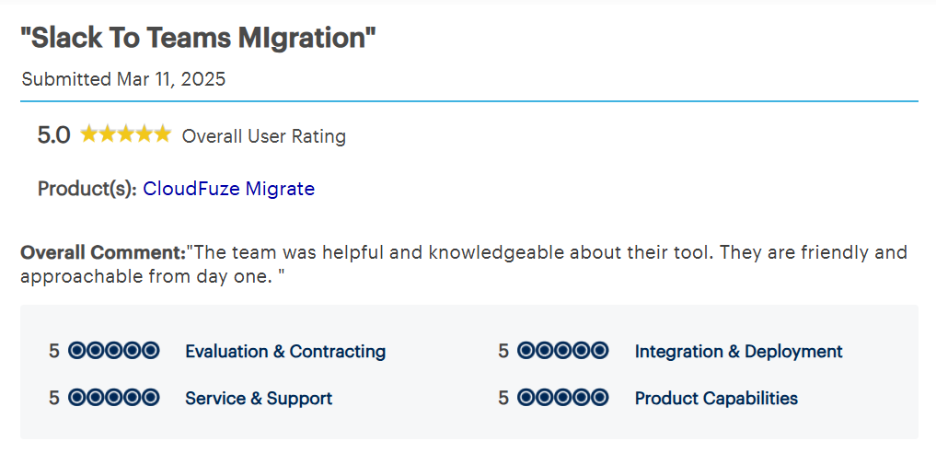
We have helped a lot of companies migrate from Slack to Teams successfully. Here’s one of our 2025 Gartner reviews that highlights one of the many migration success stories we have created over the years.
As per this review, the customer mentioned that our knowledge and expertise around our tool, along with our approachable service, were of immense value to them.
Watch our Slack to Teams migration tool in action:
Frequently Asked Questions
1. What does cutover mean in a Slack to Teams migration?
A cutover in a Slack to Teams migration is when a company completes the migration, stops using Slack, and switches to Teams as its primary chat platform. It happens after the final delta migration, where all incremental changes in Slack are migrated over to Teams.
2. Do you have to decommission Slack after cutover?
No. Decommissioning Slack after cutover is entirely the company’s decision. Some companies shut it down immediately after cutover, while others keep it accessible for a certain period of time before fully retiring it.
3. How long should you wait after the final delta migration before cutover?
Cutovers should happen as soon as possible after the final delta migration is validated, ideally within the same off-peak window, so there’s minimal gap for new Slack activity to accumulate.
4. How to map Slack channels to Teams structure?
With CloudFuze Migrate, you can map Slack channels to Teams effortlessly. CloudFuze also offers advanced user mapping by providing the CSV user mapping option for userbases of all sizes.
5. What are the tools to migrate Slack history and attachments?
CloudFuze’s Slack migration solution is one of the best tools to migrate all Slack chat history and attachments of all sizes. The tool helps businesses of all sizes preserve rich metadata associated with chat history and attachments as well.
6. What are the companies that specialize in cloud messaging platform cutovers for enterprises?
CloudFuze is one of the leading migration companies that specialize in cloud migration platform cutovers for enterprises by offering advanced capabilities, such as migration of all data and users, one-time and delta migration stages, and cutover support through post-migration support, user onboarding support, decommissioning support, and more.
About the Author: Pankaj Rai


