
10 Pre-Scan Checks Before a Teams Migration Tenant to Tenant
Before starting a Microsoft Teams migration tenant-to-tenant, IT teams should perform a pre-migration scan to identify users, teams, channels, chat data, permissions, connected SharePoint files, apps, compliance requirements, API limitations, and destination tenant dependencies. A thorough pre-scan helps reduce migration failures, permission issues, data gaps, and post-migration rework.
In this blog, we’ll share the top 10 pre-scan checks for enterprises to ensure a successful MS Teams to Teams migration. These checks are based on our experience helping hundreds of global enterprises securely migrate Teams data with our robust Microsoft Teams migration tool.
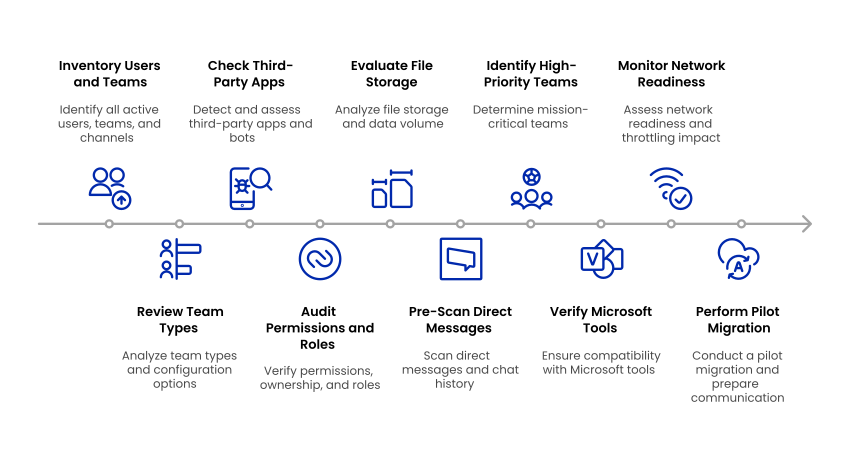
Key Takeaways
10 Teams Tenant-to-Tenant Migration Pre-Scan Checks at a Glance
| Pre-Scan Check | What to Review |
|---|---|
| Users, Teams, and Channels | Active users, inactive Teams, channels, memberships, ownership, messages, and files |
| Team Types and Configuration | Standard, private, and shared channels, guest access, external collaboration, and policies |
| Third-Party Apps, Bots, and Connectors | Integrated apps, custom bots, connectors, and other dependencies |
| Permissions, Ownership, and Roles | Team owners, members, permissions, and administrative roles |
| File Storage and SharePoint Data | Connected SharePoint sites, file volume, folder structures, and storage usage |
| Direct Messages and Chat History | One-to-one chats, group chats, attachments, shared files, and message volume |
| High-Priority Teams and Regulated Content | Business-critical Teams, retention requirements, legal considerations, and regulated data |
| User Identities and Tenant Mapping | Unmatched, duplicate, inactive, and guest accounts |
| Network Readiness and API Throttling | Network capacity, API limits, throttling risks, migration batches, and workload scheduling |
| Pilot Migration and End-User Readiness | Test users, Teams, migration results, access validation, and user communication |
What Is a Pre-Scan in Teams Tenant-to-Tenant Migration?
A pre-scan in Microsoft Teams tenant-to-tenant migration is an assessment performed before data transfer to analyze the source environment, destination environment, migration scope, dependencies, permissions, data volume, and potential risks.
The results help IT teams plan user mapping, migration batches, remediation tasks, and pilot testing.
10 Pre-Scan Checks Every IT Admin Needs Before Teams Migration Tenant to Tenant
1. Inventory All Users, Teams, and Channels
Prior to the migration process, the migration platform assesses both the source and destination tenants for a thorough inventory. All existing users, messages, files, Microsoft Teams, and channels (whether public, private or shared) are detected along with ownership data for each element. This helps in creating a baseline so that nothing important is missed during the migration, including inactive and orphaned teams that need to be assigned new ownership.
In addition, verify correct user permission mapping to eliminate access issues, assess storage limits to avoid exceeding quotas, and identify unused Teams for removal or archiving to streamline the migration.
The assessment process will help organizations realize the total migration scope prior to migrating Teams to new Teams in the destination tenant.
Your environment is unique. Your migration plan should be too. Get a personalized assessment from CloudFuze’s enterprise migration team. Book your free consultation.
2. Review MS Team Types and Configuration Options
Microsoft Teams can consist of public, private, and shared channels, where each type of channel has certain requirements for membership and collaboration. Prior to migration, IT professionals need to recognize all the types of channels and configure them to find out how they will be migrated.
The pre-scan must reveal important dependencies including guest access, external collaboration settings, channels’ memberships, permissions, and DLP policy. All these configurations may influence the process of Teams and channels migration and access to them after migration.
CloudFuze’s Office 365 tenant-to-tenant migration tool helps enterprises identify and analyze these configurations during the pre-migration assessment. It enables IT teams to detect compatibility issues and plan remediation before the migration begins.
3. Check Third-Party Apps, Bots, and Connectors
In today’s business settings, Teams is deeply interwoven with other applications, from project management tools to customer support bots.
IT teams should inventory all third-party apps, bots, connectors, and custom integrations associated with Microsoft Teams before migration. Some integrations may not transfer directly to the destination tenant and could require reauthorization, reconfiguration, or replacement after migration.
CloudFuze helps enterprises identify these dependencies during pre-migration assessment, so IT teams can plan remediation before the migration begins.
4. Audit Microsoft Teams Permissions, Ownership, and Roles
Permissions and admin roles are also essential in the governance of teams. We scan every team’s ownership in advance and make sure no team finds itself without an owner after migration. Our pre-scan utility cross-checks user information between tenants and recommends role allocations to maintain hierarchy and control after migration.
You can also read our article to understand the potential challenges for businesses to migrate teams to teams.
5. Evaluate File Storage, SharePoint Sites, and Data Volume
High file volumes, particularly in connected SharePoint document libraries, can create migration bottlenecks. CloudFuze’s solution analyzes file sizes, folder hierarchy, and usage patterns.
We also mark out storage-intensive teams that could need staggered migration or higher API limits to aid in smooth transfer.
Reviewing file volume, SharePoint dependencies, and storage requirements is an important part of Microsoft Teams data migration, particularly for large enterprise environments.
6. Pre-Scan Direct Messages and Chat History
Direct messages are under-emphasized, yet they contain rich business information. With our tool’s specialized DMs migration functionality, we pre-scan chat history between individuals, detect total number of messages, and identify messages with shared files or inline content.
This aids in estimating the level of complexity involved in maintaining one-to-one and group chats during Microsoft Teams migration to new Teams.
7. Identify High-Priority Teams and Regulated Content
Not every team has the same level of significance. Our pre-scan identifies mission-critical teams, those with connections to executive-level decision making, regulated, or legal holds for businesses.
We bring to light any channels subject to retention policies, legal compliance, or audit requirements so you can strategize accordingly and stay compliant after migration.
8. Validate User Identities and Tenant Mapping
Before Microsoft Teams data migration, IT teams should map source-tenant users to their corresponding accounts in the destination tenant. The pre-scan should identify unmatched, duplicate, inactive, or deleted accounts, as well as guest users and ownership dependencies that could cause access issues after migration.
Accurate user mapping helps ensure that Teams, channels, chats, files, memberships, and permissions are associated with the correct destination accounts. CloudFuze helps enterprises analyze user mappings during pre-migration assessment and identify potential mapping issues before MS Teams data transfer begins.
Identity validation is important when enterprises are migrating to Microsoft Teams as part of a broader Microsoft 365 tenant consolidation or transformation project.
9. Network Readiness and Throttling Impact Monitoring
Microsoft Graph applies throttling to help maintain service availability and reliability. When throttling thresholds are exceeded, requests can receive an HTTP 429 response. Microsoft also publishes service-specific throttling limits for Teams-related resources.
A MS Teams pre-migration assessment should therefore consider API limits, workload volume, concurrency, batching, and retry strategies when planning large-scale migrations.
These factors should be evaluated before enterprises Migrate Microsoft Teams Tenant to Tenant, especially when planning large-scale migrations involving high message volumes and extensive Teams workloads.
10. Perform a Pilot Migration and Get Ready for End-User Communication
Prior to launching the one-time migration, we perform a dry-run pilot migration using a controlled set of users and teams. This helps us confirm everything works as expected, check performance, and fix any issues before the full migration (one-time migration).
Concurrently, we assist IT teams in developing user communication plans, establishing expectations for downtime, access after migration, and feature behavior.
Want to see how your environment performs in a pilot run? Our team can walk you through a free pre-migration assessment tailored to your setup. Talk to our migration experts to get started.
How CloudFuze Supports Microsoft Teams Tenant-to-Tenant Migration
With enterprise-level Microsoft 365 tenant to tenant migration solution, CloudFuze Migrate, businesses can be assured of Teams migration tenant to tenant projects of any complexity. From documents, chats, and attachments to metadata, our solution provides secure, compliant, and automated data transfer.
Our Microsoft Teams cross-tenant migration tool provides end-to-end visibility (via our platform’s dashboard), pre-migration audits, accurate reports, and enterprise-level security to guide you through every phase of your Microsoft Teams tenant migration.
Our exclusive features include:
- One-time and delta migrations
- Public and private teams
- Full end-to-end message support
- User mentions, threads, attachments
- Mapped user filtering, conflict retry, and rollback
- Compliance-grade pre-scan and reporting
You can even pause, cancel, or resume any migration process, providing your IT team complete control and assurance.
Ready to start your migration process? Reach out to our enterprise team for a customized migration audit to explore our end-to-end solution for Teams to Teams migration.
Frequently Asked Questions
1. What should be checked before an MS Teams tenant-to-tenant migration?
Organizations should check users, teams, channels, permissions, ownership, chat data, files, connected apps, compliance requirements, and destination tenant compatibility before migration.
2. What data can be included in a Microsoft Teams tenant migration?
Depending on the migration scope and tool capabilities, data can include teams, channels, conversations, chat messages, files, attachments, memberships, permissions, and metadata.
3. Why is a pre-migration scan important for MS Teams migration?
A pre-migration scan for MS Teams migration helps identify risks, dependencies, compatibility issues, and data complexities before migration. This reduces failures and post-migration rework.
4. How do private and shared channels affect Teams migration?
Private and shared channels can have different memberships, permissions, and access settings. These differences must be assessed to ensure users retain appropriate access after migration.
5. How can organizations identify Teams migration risks before migration?
Organizations can perform a pre-scan to identify issues such as unmapped users, orphaned teams, permission conflicts, unsupported configurations, large data volumes, and compliance requirements.
6. What is the difference between a pre-scan and a pilot migration?
A pre-scan analyzes the migration environment and identifies potential issues before data transfer. However, a pilot migration moves a small set of users or teams to test the migration process and validate results.
7. How does CloudFuze help with MS Teams tenant-to-tenant migration?
CloudFuze helps enterprises assess their Microsoft 365 Teams migration environment, identify risks, migrate Teams data, and monitor progress through pre-migration analysis, automated migration workflows, reporting, and validation.
About the Author: Aayushi Raj



