
How SMPs Ease SaaS Operations for Enterprise IT Teams
SaaS management platforms (also called SMPs) ease SaaS operations for enterprise IT teams by centralizing every application they use, along with associated licenses, users, and costs, into one system of record, then automating repetitive workflows (like user management, RBAC, data access governance, and more) around them.
In this blog post, you’ll get answers to why SaaS ops are getting harder for enterprise IT teams, and how SaaS management platforms help them regain their IT control without adding headcount.
Key takeaways
Why Are SaaS Operations Becoming More Challenging for Enterprise IT Teams?
Managing software is now becoming an operational burden for IT teams in enterprises with more than 1000 employees.
In this era of AI, SaaS operations have evolved from managing five to ten core software applications to overseeing hundreds of software and AI platforms along with several AI agents across your enterprise. As software and AI adoption accelerates without proper governance controls, IT teams face increased challenges around IT visibility and licensing cost control.
Furthermore, Gartner forecasts worldwide IT spending to reach $6.37 trillion in 2026, with software spending alone expected to exceed $1.46 trillion.
Meanwhile, decentralized software purchases, AI-powered features embedded in SaaS apps, agentic AI oversight, and manual user lifecycle management are increasing IT operational complexity. When IT admins manage software and user details through spreadsheets and disconnected admin consoles, these SaaS ops challenges lead to shadow IT, wasted license costs, orphaned user accounts, and IT compliance risks.
To overcome these operational challenges, enterprises need SMPs to eliminate SaaS sprawl, decentralized app purchases, and user offboarding risks.
How SMPs Help Enterprise IT Teams Simplify SaaS Ops
An SMP converges your entire SaaS stack into one platform and automates end-to-end user lifecycle workflows.
A SaaS Management Platform (SMP) gives IT teams a centralized view of every application, license, user, and subscription in their IT environment. By combining automated app discovery, user lifecycle automation, and governance controls, SMPs replace manual SaaS administration with intelligent IT automation.
Advantages of using SaaS management platforms for SaaS ops include:
- 360-Degree IT Visibility: Surface IT-approved SaaS and AI apps, shadow IT, and shadow AI in your enterprise.
- Recommendations on License Right-Sizing: Find and remove unused SaaS and AI licenses and reduce unnecessary licensing spend by up to 30%.
- Zero-Touch User Lifecycle Automation: Simplify user onboarding, offboarding, and data access management on a single, intuitive dashboard.
- One-Click Security Policy Implementation: Enterprises can apply security and governance controls at scale across their application stack.
- Easy Subscription Renewal Control: CIOs/CTOs can track enterprise-wide subscription renewals effortlessly and downgrade or cancel software and AI platform subscriptions using the actual app as well as license usage data.
Example: If various departments in your enterprise use a duplicate communication tool (say, MS Teams), an SMP can identify overlapping applications, uncover unused software licenses, and offer license-optimization insights to consolidate vendors before renewal, reducing both software spend and IT governance risk.
How Does an SMP Differ from Traditional IT Management Tools?
Traditional IT management tools watch devices and networks. But an SMP governs your enterprise’s SaaS layer that runs on top of devices and networks.
Let’s see the difference between traditional IT tools and SaaS management platforms.
| Capability | Traditional IT tools | SaaS management platform (SMP) |
|---|---|---|
| Primary scope | Devices, networks, IT tickets | Apps, licenses, users, spend |
| App discovery | Manual app inventory in spreadsheets | Automated app inventory, including shadow IT |
| License optimization | Limited, as license tracking is spreadsheet-based | Continuous license tracking with usage-driven analytics |
| User lifecycle automation | Partially completed through native application automation tools. | Automated workflows across all apps |
| Cost visibility | Fragmented cost analytics in department-level spreadsheets | Unified across your SaaS estate |
| AI and agent oversight | Rarely covered | Built-in AI and agent governance controls |
| Audit readiness | Manual evidence collection | On-demand and automated evidence trail |
What Features Should Enterprises Look for in an SMP?
The best SMPs pair deep visibility with IT automation and strong governance controls for both apps and AI agents.
When you’re evaluating SaaS management platforms, prioritize the capabilities mentioned below to reduce recurring manual effort and risk at enterprise scale. They are:
- Complete, automated discovery of every SaaS app and AI platform in use, including unsanctioned ones.
- Granular SaaS and AI application usage and cost analytics that tie IT spend to real user adoption.
- Automated user onboarding and offboarding across your full app catalogue.
- Consistent policy controls that simultaneously support SaaS and AI governance.
- Oversight for autonomous agents through a separate AI agent governance dashboard.
- Always-on audit trails that keep you ready for compliance reviews at any time.
- The chosen SMPs should support leading SaaS and AI app integrations to reflect your actual environment.
Why Are Enterprises Using CloudFuze Manage for SaaS Operations?
Enterprises adopt CloudFuze Manage to unify SaaS & AI app visibility, optimize licensing costs, automate user lifecycle processes, and stay compliance-ready in one platform.
CloudFuze Manage is a unified SaaS and AI app management platform that helps enterprises gain complete IT visibility, control licensing costs, manage end-to-end user lifecycle automation, and stay audit-ready, without adding unnecessary IT operational complexity.
How CloudFuze Manage Helps Enterprises:
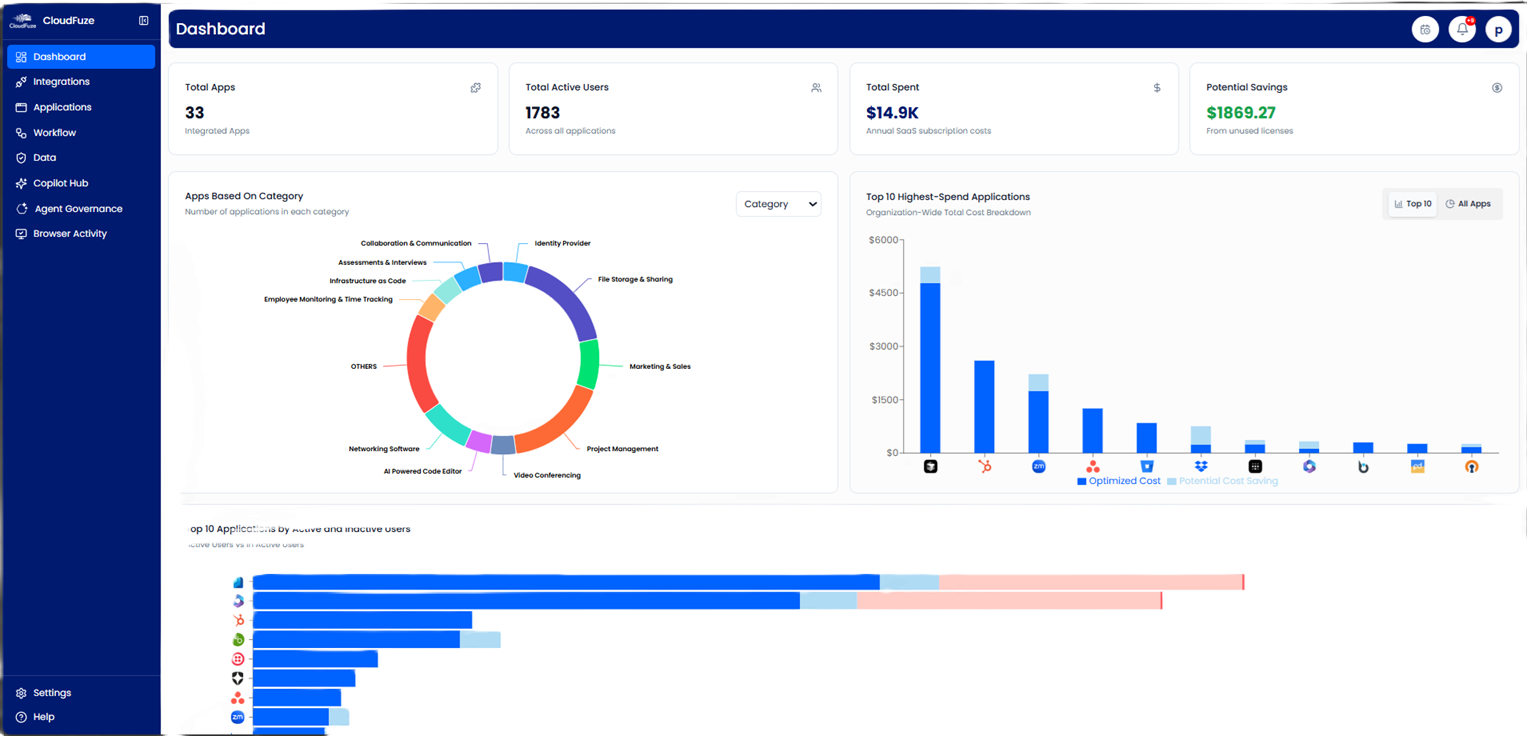
- Discovers every SaaS app and AI tool across your organization, including shadow IT and shadow AI.
- Turns app usage and IT spend data into clear license optimization actions.
- Automates user provisioning and deprovisioning across your connected apps.
- Governs AI agents and their access with automatically enforceable agent governance policies.
- Keeps continuous audit trails capturing agent activities and user logins.
Ease Your SaaS Operations with CloudFuze Manage
SaaS operations will only get more demanding as apps, licenses, and AI apps multiply across your enterprise. Enterprises trying to manage that with spreadsheets and separate admin consoles guarantee wasted license spend and hidden data breach risk. CloudFuze Manage gives IT teams one place to see every app, automate IT routine work, and stay compliant, so your IT team can spend its time on the high-stakes work that moves your business forward.
Frequently Asked Questions
1. What are the best SaaS operations management tools for small businesses?
Smaller teams should look for platforms that deploy quickly, cover app discovery and license tracking, and integrate with the identity provider they already use. CloudFuze Manage is one of the best SaaS ops management tools because it adds IT automation, SaaS & AI governance, and audit readiness at scale.
2. How can teams track SaaS usage and optimize SaaS operations?
IT teams can use CloudFuze Manage to track real app usage data rather than relying only on license seat counts. From there, IT admins can spot idle and duplicate licenses, reclaim them before they auto-renew, and set renewal-notification alerts to save up to 30% on license waste.
3. Which SaaS operations platforms offer third-party integrations?
SMPs such as CloudFuze Manage support over 190 apps, including identity providers, finance systems, and the major SaaS and AI apps many enterprises already run (Zoom, Entra ID, Microsoft 365, Bill.com, Tableau, Gemini, Claude, OpenAI, and more)
4. How can large enterprises reduce SaaS operational costs?
Large enterprises with more than 1000 employees can reduce SaaS ops costs by eliminating unused licenses, duplicate tools, and forgotten renewals. An SMP like CloudFuze Manage surfaces all three on a single platform, letting your IT and finance teams right-size license seats, reduce overlapping apps, and adjust renewals using license-usage evidence.
5. How can IT teams simplify SaaS operations for better efficiency?
IT teams can streamline SaaS ops by centralizing their IT estate in one system of record, automating user lifecycle work, and applying RBAC policies consistently. These practices help IT teams reduce manual administrative work, close data security gaps, and free up time for other higher-value work.
About the Author: Rashmi Ramesh


