
Advanced Slack to Teams Migration Tool for Enterprises
If you are an enterprise planning to perform a migration from Slack to Teams, it is important to choose a reliable migration tool. Since a successful transition doesn’t end with moving Slack messages but involves seamless transfer of metadata, choosing the right Slack to Teams migration tool is necessary.
Here, we have covered how CloudFuze Migrate helps you perform Slack to Microsoft Teams migration with complete accuracy.
Key Takeaways:
What Are the Common Challenges When Migrating from Slack to Teams?
Challenges you can face while migrating from Slack to Teams include:
- Migrating terabytes and petabytes of data without any downtime issues
- Transferring Slack file features such as channels, timestamps, etc.
- File compatibility issues
- Transferring incremental changes
- Assigning the right permissions
- API throttling issues
1. Check for Direct Messages Migration
One of the key challenges with Slack to Teams migration using generic approaches is the limitation of migrating direct messages. If you are planning on how to migrate Slack direct messages and group chats to Teams securely, then consider a reliable migration tool such as CloudFuze Migrate.
The image below shows DMs transferred during Slack migration to Teams migration using CloudFuze Migrate.
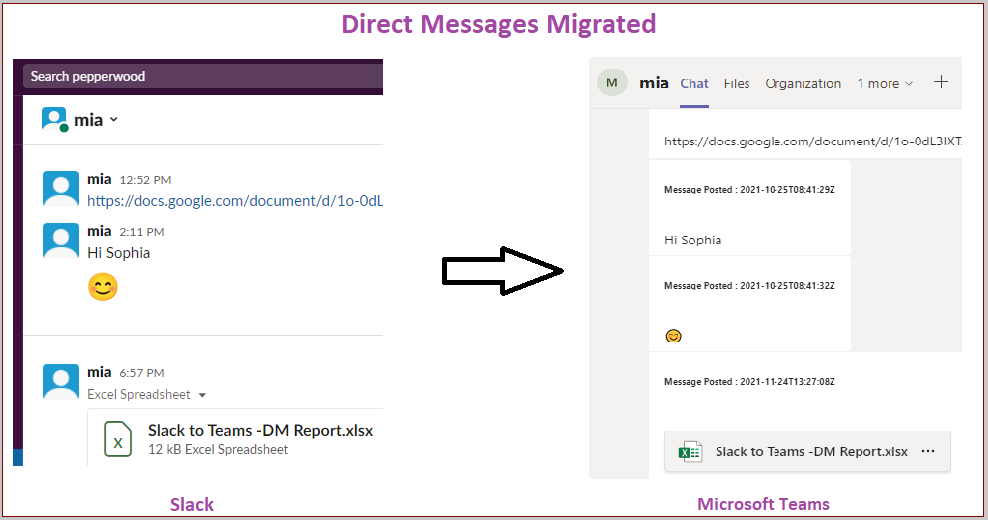
Read more about how the CloudFuze platform migrates direct messages from Slack to Teams.
2. Check the Tool’s Compatibility to Move Necessary Metadata from Slack
Slack involves many features to make collaboration easier and more productive. So, ensure that your chosen tool seamlessly migrates all necessary metadata.
How do you choose the right Slack to Teams migration tool for your organization? Consider the feature scope and success rate before selecting your migration tool.
With CloudFuze Migrate, businesses can migrate important metadata such as:
- Public and Private Channels
- Channel Members
- Message Posted Usernames
- Emojis
- Timestamps
- @mentions
- Threads
- Pinned messages
- Attachments
- GIFs
- DMs and Group DMs
We understand how important a single file is for business and migrate all the direct messages files to your OneDrive and both private and public channels files into the respective SharePoint Sites with as-is ownership.
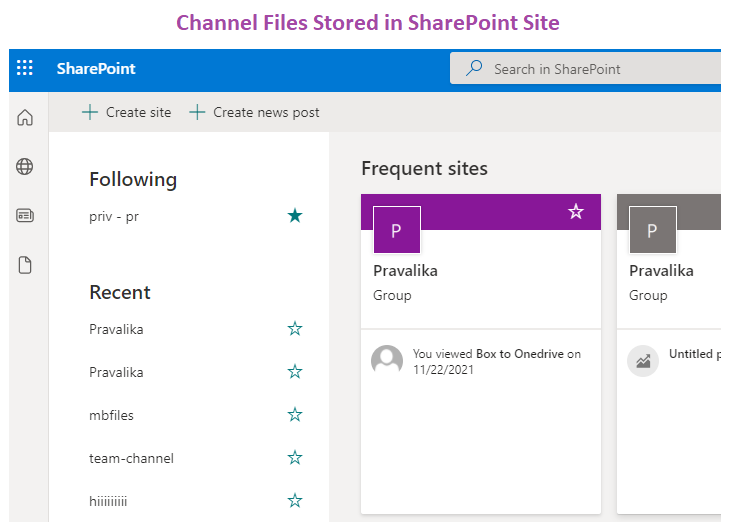
Read more about how to maintain Slack message threads when migrating to Teams using CloudFuze Migrate.
3. Check the Tool’s Performance
Performance is a top priority for businesses with a huge amount of data that must be migrated in an acceptable timeframe.
If you are concerned on how to choose a Slack to Teams migration service provider, then try out the following:
- Check the user reviews of popular Slack to Teams migration platforms and decide for your business.
- Check for the tool’s capabilities and performance through a migration demo
- Have a pilot migration and check if the tool replicates the necessary data and metadata completely
When it comes to migration throughput, CloudFuze Migrate tops the list as affordable Slack to Teams migration tools with good reviews for enterprises.
4. Check for Downtime Issues
“How long does a typical Slack to Teams migration take using a migration tool?” – This is a typical question that comes to any business planning to migrate from Slack to Teams.
Your chosen migration tool should:
- Mitigate API throttling issues
- Ensure zero downtime
- Guarantee complete data and metadata replication
Reliable tools like CloudFuze Migrate helps you transfer terabytes and petabytes of Slack data with no downtime and complete replication.
5. Check for Security and Compliance Regulations
Security is an important factor to consider before choosing a third-party tool for enterprise data migration. Choose a Slack to Teams migration tool that clearly indicates the level of security it offers for your data during the migration process.
At CloudFuze, we use highly secure data centers with up-to-date SOC 1 and SOC 2 Type 2 certifications along with GDPR and ISO 27001 compliance.
Ensure a Seamless Slack to Teams Migration with CloudFuze Migrate
CloudFuze tops the list when it comes to trusted companies that specialize in Slack to Teams migration. With CloudFuze Migrate, achieve full transfer to Teams in a successful and secure way. Have any questions or want to learn more about Slack to Teams migration?
Contact us for your successful migration today!
Check Out How Our Tool Helps in Migrating from Slack to Teams:
What Are Some Successful Case Studies of Organizations Migrating from Slack to Teams?
Discussed here are two successful case studies of migrating from Slack to Teams using CloudFuze Migrate:
1. Litera’s Slack to Teams Migration Using CloudFuze Migrate
Litera wanted to perform Slack to Teams migration of 200+ channels and around a million messages. They wanted to migrate in a short time period. CloudFuze Migrate helped our customer seamlessly migrate data and metadata such as DMs, timestamps, channels, emojis, replies and @mentions along with delta sync support.
We helped them transfer within a week while ensuring zero downtime and 100% replication. Check out the case study on detail here.
2. Stryker Corporation’s Slack to Teams Migration Using CloudFuze Migrate
Stryker Corporation wanted to perform Slack to Teams migration within a timeframe of 1 month. With CloudFuze Migrate, we helped them:
- Complete the whole transition within the short timespan
- Transfer cate Slack permissions intact along with metadata such as emojis, mentions, public and private channels, users, etc.
- Migrate all incremental changes through delta migration
- Replicate Slack channel structure in the respective team in Microsoft Teams.
To learn more about the case study, click here.
Frequently Asked Questions
1. Best tools to migrate Slack channels and messages to Microsoft Teams?
There are limitations when you want to migrate Slack metadata such as channels, usernames, etc using generic tools. So, migrating from Slack to Teams with a trusted migration tool is the best option. CloudFuze Migrate is one of the best tools to migrate Slack channels and messages to Microsoft Teams.
2. Can I migrate Slack files and attachments to Teams without data loss?
Yes, businesses can migrate Slack files and attachments to Teams without data loss. Our advanced migration tool helps you seamlessly migrate Slack files and attachments, and other file features from Slack to Teams with complete accuracy.
3. Is it possible to test Slack to Teams migration tools with a demo or trial?
Yes, you can test Slack to Teams migration tools with a demo or trial. A trial migration or demo helps you check the migration accuracy of your chosen migration tool. Users can take a pilot test where you can test data along with necessary file features from Slack to Teams with CloudFuze.
4. Benefits of using a paid migration service over manual Slack to Teams migration
Benefits of using a paid migration service like CloudFuze Migrate over manual Slack to Teams migration include:
- Complete transfer of data and metadata without any data loss
- Allows no downtime and ensures high-speed transfer
- Adheres to security and compliance
- Allows unlimited delta migration.
5. Popular Slack to Teams migration tools with data compliance certifications
As one of the top-rated Slack to Teams migration tools, CloudFuze has helped enterprises seamlessly migrate from Slack to Teams platform. We adhere to SOC 2 Type 2, GDPR and ISO 27001 compliance.
About the Author: Bhavani Asok



