
The True Cost of Manually Moving from Gmail to Outlook 365
Initially, the decision to migrate from Gmail to Microsoft 365 seems to be an easy choice: export the information, import it to Outlook, and proceed with operations. The idea of doing all manually seems budget-friendly because the organizations require no expenses for third-party tools and services.
However, the actual cost of manual data migration turns out to be extremely high. What looks like a zero-cost operation routinely balloons into one of the costliest IT projects a mid-sized company undertakes, not because of what you pay upfront, but because of what you lose along the way.
Key Takeaways
5 Hidden Costs of Manually Moving from Gmail to Outlook 365
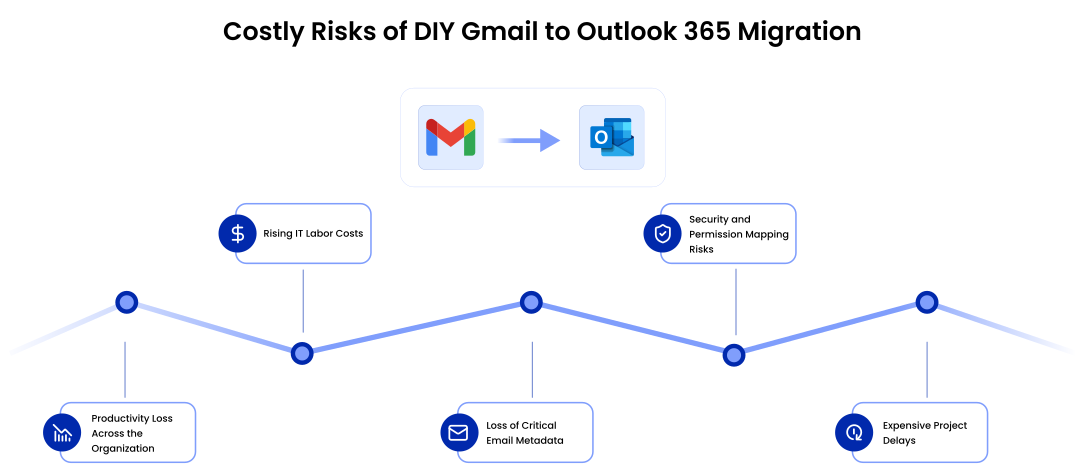
1. Reduction in Employee Efficiency During Migration
The most obvious hidden cost of moving from Gmail to Outlook 365 is a reduction in employee efficiency.
Migration through manual means implies such actions as:
- Frozen mailboxes
- Delayed migration
- Asynchronous synchronization
- Incomplete email migrations
- Confusion among end-users
- Login and authentication issues
Even small interruptions can create enterprise-wide operational slowdowns. When migration projects are poorly managed, enterprises risk creating the exact opposite effect:
- Delayed correspondence
- Missed client meetings
- Overload of helpdesk services
- Reduced employee efficiency
The more employees there are, the higher chances there are for the inefficiency to become obvious.
2. Increasing IT Labor Expenses
In the beginning, many CIOs select a DIY migration solution to save money on enterprise migration tools and professional migration service expenses. However, manual migration usually requires far more internal IT labor than anticipated.
Internal employees are forced to spend many days, weeks and even months on:
- Mailbox mapping
- Provisioning users
- Making DNS adjustments
- Dealing with failures in transfer
- Recreating permissions
- Verifying migration results
- Managing migration batches
- Helping users after migration
IT personnel end up dealing with repetitive migration activities rather than pursuing strategic modernization projects. The longer the migration takes, the more expensive it will be.
When working with such an environment, which may contain:
- Merger and acquisition activity
- Several business sites
- Hybrid IT infrastructure
- Regulations requiring data retention
- Shared mailboxes
The above problem tends to be exacerbated.
3. Email Metadata Issues Increase Risks
Loss of email metadata remains one of the most underestimated challenges associated with migration. The DIY approach to migration cannot retain the following information:
- Email timestamps
- Folder hierarchy
- Labels and categories
- Email read/unread statuses
- Inline attachments
- Calendar relationships
- Conversation threading
For businesses operating in regulatory industries, this can create significant risks of non-compliance. Inconsistencies in audit trail and loss of original characteristics of email archives can make meeting legal requirements for discovery and retention challenging.
Using our email migration tool, CloudFuze Migrate, CIOs and CTOs can preserve timestamps when switching from Gmail to Outlook and eliminate metadata inconsistencies.
4. Security and Permission Mapping Challenges
In addition, manual migration methods create security risks and permission mapping issues.
For instance, when migrating legacy Gmail groups, delegation options, or shared mailbox permissions manually, inconsistencies can arise. Employees may have access to emails that they should not be able to view, while others may lack access to vital communication channels.
This becomes particularly problematic once companies enable Microsoft 365 Copilot.
Since Copilot uses Microsoft 365 permissions, poor permission migrations can inadvertently reveal sensitive enterprise data through AI-powered searches or interactions.
5. Migration Delays Result in Higher Total Project Costs
Migration projects conducted manually typically fail to complete within initial project deadlines.
Reasons for delays commonly include:
- API rate limiting
- Failed mailboxes batches
- Delta migration inconsistencies
- PST export corruption
- Network failures
- End-user resistance
- Inadequate testing
Every additional migration week increases:
- Infrastructure investments
- IT headcount expenses
- Operational risk
- Project management overhead
- Productivity losses
And what seems to be “free” today ends up being quite costly later on.
Why Manual Migration Becomes Even Riskier in the Age of AI
Moving from Gmail to Microsoft 365 is not only a migration from emails; it has become tied to AI readiness of enterprises today.
Microsoft’s latest research on use cases for workplace AI demonstrates fast adoption of AI technologies and high utilization rates in Outlook, Teams, Word, and collaboration platforms.
However, efficient use of AI requires:
- Enterprise data cleanliness
- Correct permissions set
- Effective governance
- Well-managed collaboration platforms
As proven by studies and experience reports, Copilot cannot function effectively in companies where data environment and governance practices are not consistent.
In other words, migration inefficiency today may harm your AI success tomorrow.
The True Cost of Manual Migrations from Gmail to Microsoft 365 (Outlook)
| Hidden Cost Area | Business Impact |
|---|---|
| Employee Downtime | Reduced productivity and delayed communication |
| Extended Migration Timelines | Increased operational costs |
| IT Labor Hours | Higher burden on internal teams |
| Metadata Loss | Compliance and legal risks |
| Permission Errors | Security exposure |
| Failed Migration Batches | Additional remediation effort |
| Dual Licensing During Delays | Increased software costs |
| User Support Tickets | IT helpdesk overload |
| Rework After Migration | Additional project expenses |
Reasons for Using Automated Gmail to Microsoft 365 Migration Tool for Large Enterprise
Migration platforms for enterprises minimize several risks associated with manual migration.
With an enterprise grade migration platform like our CloudFuze, also a Microsoft partner, organizations can:
- Automate user and mailbox mapping to eliminate identity mismatches
- Preserve complete email metadata, including timestamps and headers
- Perform incremental and delta migrations to keep source and target in sync
- Maintain accurate folder and label structures without duplication
- Eliminate user downtime with staged and throttling aware execution
- Validate migration accuracy using automated verification reports
- Manage large migration batches reliably and at scale
- Avoid business disruption caused by failed jobs or manual rework
From a CIO/CTO perspective, the actual value of automated migration is not just speed but operational risk mitigation.
Automated migration will allow the internal IT team to concentrate on:
- AI governance
- Optimizing Microsoft 365
- Enabling Copilot
- Cybersecurity measures
- Enterprise modernization
rather than spending months fixing errors in manual migration.
CloudFuze Demo Video for Gmail to Outlook Migration
Want to know how easy it is to perform a Gmail to Outlook migration? Watch this quick 36-second CloudFuze demo video for a simple step-by-step migration walkthrough.
Consequences of a Failing Enterprise Email Migration
A failing enterprise migration does not only pose technical challenges.
It can cause the following issues within the business:
- Damage to employee experience
- Delay in AI projects
- Increase security vulnerability
- Non-compliance
- Disruption of customer communications
- Increased operational expenses of IT
- Disappointment among executives
Companies usually understand the full cost of manual migration only when remediation becomes necessary.
At that point, most enterprises end up paying much more to solve the migration issue than what they initially would have paid to implement a robust enterprise migration solution.
Start with CloudFuze Today!
If you decide on manual migration, it will be twice as costly than using migration software since you will need to fix your mistakes at some point anyway. By opting for an enterprise solution from the get-go, you secure not only your productivity but also your compliance position and eventual return on investment with AI.
CloudFuze offers enterprise solutions that allow for a seamless transition from Gmail to Office 365 while ensuring data integrity, zero downtime, and preparing environments for AI-powered productivity transformation in the future.
Does your IT team consider taking a DIY approach to migration? Speak to CloudFuze experts and find out how we transform “migration risks” into “AI preparedness.”
Frequently Asked Questions
1. What are the steps in manually migrating from Gmail to Office 365/Outlook 365?
Manually migrating from Gmail to Office 365 requires exporting emails from Gmail via Google Takeout or IMAP, importing them to Office 365, and configuring Outlook folders as well as contacts and calendars manually.
2. What are the pros and cons of manual migration from Gmail to Outlook 365 vs. migration tools?
Pros:
- Low or zero direct cost
- Manual control over what data gets migrated
Cons:
- Lack of automation and data validation
- Time-consuming process and prone to human errors
- Cannot support all types of data and permissions
3. Which best practices must one follow while manually migrating from Gmail to Outlook 365?
- Start by migrating a small pilot group
- Take backups of all data in Gmail before beginning
- Use consistent folder structures
- Plan for migration during off-peak periods
- Check mail, contacts, and calendars afterward
4. Which common challenges does manual migration from Gmail to Outlook 365 bring about?
- Missing or duplicate emails
- Inconsistent folder structure and labels
- Incomplete migration of contacts and calendars
- Login errors and IMAP sync failures
- Long downtime and user frustration
5. Which metrics should be used to gauge the effectiveness of migration from Gmail to Outlook 365?
- Rate of successful migration of emails
- Error and retry rates
- Accuracy of mailbox data migration
- Duration of downtime and help desk tickets
- Adoption rate after migration
About the Author: Aayushi Raj



