
1. Introduction
In most enterprise IT environments, Microsoft 365 is the central tool for team-level and enterprise-level collaboration. In 2026, due to a distributed work culture, maintaining complete IT control over the Microsoft 365 environment becomes challenging for every CIO/CTO and IT leader.
Fortunately, a modern SaaS & AI app management platform helps enterprises as well as SMBs to operationalize Microsoft 365 at scale and gain complete tech stack visibility across their IT environment.
This guide will help you understand the fundamentals of Microsoft 365 management and the criteria CIOs/CTOs should use while selecting the right SaaS management platform for their company.
2. What Is Microsoft 365 and Microsoft 365 Management & Governance?
Microsoft 365 is a cloud-based business collaboration and productivity suite that includes Outlook, SharePoint, OneDrive, Teams, and the Office suite. The latest version of Microsoft 365 includes Microsoft Copilot, an AI-powered assistant embedded across the Microsoft ecosystem, which empowers organizations with AI-powered digital transformation and innovation.
Now, let’s move to what Microsoft 365 management is.
Microsoft 365 management and governance refers to the end-to-end strategic oversight and security administration of Microsoft 365 across your organization to optimize Microsoft 365 license utilization and maintain its security posture.
This includes:
- Enterprise-level Microsoft 365 user and group governance.
- Microsoft 365 license optimization and spend control.
- Oversight of unauthorized third-party Microsoft 365 integrations (Shadow IT) via Entra ID.
- Implementation of Microsoft 365 security and compliance policies.
- Automation of user onboarding, offboarding, and cross-team workflow processes across Microsoft 365 environments.
- Govern Microsoft Copilot by setting limits for premium AI chat requests.
For CIOs and IT leaders, scalable Microsoft 365 management is essential for achieving enterprise-wide IT operational efficiency and security.
3. Why Microsoft 365 Management and Governance Is Essential for Enterprises
Whenever your Microsoft 365 environment is left unmonitored, especially in a large enterprise with 1000-2000 employees, the impact it creates is severe and non-recoverable.
The impact includes:
- Uncontrolled Microsoft 365 user access privileges leading to data security risks.
- Increased Microsoft 365 license waste, causing unnecessary IT spending.
- The growth of Shadow IT via unauthorized third-party applications increases your enterprise’s cybersecurity risk surface.
- Unmonitored copilot activity exposes enterprises to subscription cost overruns due to high premium AI chat requests.
- An unrevoked ex-employee’s user access increases insider data threat risks.
In order to safeguard your enterprises from the above-mentioned risks and threats, Microsoft 365 management and governance are mandatory.
A top-notch SaaS and AI app management platform like CloudFuze Manage helps enterprise IT leaders to ease their Microsoft 365 management in a single platform.
4. Challenges of Manually Managing Microsoft 365 at Enterprise Scale
Manually managing Microsoft 365 in hybrid and remote work models introduces Shadow IT security risks, IT operational inefficiencies, and unnecessary Microsoft 365 license spending in enterprises.
- IT Operational Bottlenecks in User Onboarding
Manual user provisioning slows access to Microsoft Outlook, Teams, SharePoint, and OneDrive, impacting employee productivity for global new hires. - Unmonitored Microsoft 365 License Overspending
Inactive/ orphaned user accounts and poorly allocated Microsoft 365 licenses lead to significant IT overspend across every department. - Fragmented IT Visibility Across Your Workloads
Microsoft native admin centers provide siloed license usage insight and limited visibility into Microsoft 365 user activity, group ownership/membership, and other third-party app usage. - Microsoft 365 Governance & Compliance Gaps
The application of inconsistent Microsoft 365 MFA, file-sharing policies, orphaned user accounts, and security configurations can expose your enterprise to data compliance and security risks. - Shadow IT Growth
Unapproved SaaS and OAuth apps connected via Entra ID pose significant security and compliance risks to Microsoft 365 without complete IT visibility.
5. Benefits of SaaS-Based Microsoft 365 Management and Governance for Enterprises
With a SaaS-based application management platform, CIOs and IT leaders can:
- Grant new-hire access to necessary Microsoft 365 apps on day one.
- Automate user offboarding across their Microsoft 365 tenant to reduce data exposure.
- Monitor and optimize Microsoft 365 license utilization in a single, user-friendly dashboard.
- Gain 360° IT visibility into Microsoft 365 user activity, permissions, apps, and costs.
- Manage Microsoft 365 alongside SaaS and AI apps in a unified view.
6. Manual vs. SaaS-Based Microsoft 365 Management and Governance
| Aspect | Manual Management & Governance | SaaS-Based Management & Governance |
|---|---|---|
| Microsoft 365 User Management | Slow, manual user provisioning across global regions | Automated global user onboarding & access control |
| Microsoft 365 License Management | Spreadsheet-based manual, license tracking | Real-time license intelligence & optimization |
| Microsoft 365 Security & Compliance | Hard to identify risky third-party app access/activity | Continuous IT risk monitoring + audit-ready Microsoft 365 compliance reporting |
| Microsoft 365 Cost Optimization | Late discovery of unused Microsoft 365 licenses | Early detection of unused Microsoft 365 licenses with up to 30% cost savings |
| Complete Visibility | Fragmented IT admin centres | Unified 360° Microsoft 365 governance dashboard |
7. Choosing the Right Microsoft 365 Management Platform (CIO/CTO Checklist)
Enterprise-level CIOs, CTOs, and IT leaders should evaluate Microsoft 365 platforms based on:
- Go for a platform that provides end-to-end IT automation for Microsoft 365 user onboarding/offboarding.
- Prioritize a tool that gives real-time Microsoft 365 license consumption along with license cost optimization insights.
- Choose a solution that has role-based user access workflows as well as scalable Microsoft 365 governance models.
- Select a centralized app SaaS & AI app management platform that lets you download audit-ready Microsoft 365 reporting for industry compliance frameworks.
- Always search for a tool that supports multi-app SaaS and AI ecosystems (just Microsoft 365).
- Look for a Microsoft 365 management solution that can easily scale with your organizational growth and expanding teams.
Our SaaS & AI app management platform, CloudFuze Manage, checks all the above mentioned criteria and is a Gartner-recognized vendor for Microsoft 365 governance tools.
8. CloudFuze Manage: The Enterprise Microsoft 365 Management and Governance Platform
Our SaaS & AI app management platform, CloudFuze Manage, is built for global organizations, CIOs, CTOs, and enterprise IT leaders to:
- Automate user provisioning/deprovisioning across Microsoft Outlook, Teams, SharePoint & OneDrive.
- Monitor Microsoft 365 license allocation and usage across their business units in real-time.
- Track your developer’s AI suggestion acceptance rate and limit premium Copilot AI chat requests.
- Apply standardized Microsoft 365 governance measures throughout their organization.
- Generate instant, audit-ready Microsoft 365 compliance reports for SOC 2 Type 2, GDPR & ISO 27001.
- Centralize SaaS & AI app management of over 175 popular SaaS & AI apps like Salesforce, Trello, Tableau, GitHub, Gemini, Cursor, and more.
Our platform, Cloudfuze Manage, gives CIOs and IT leaders the end-to-end IT visibility and control they need to improve their org-level Microsoft 365 operational governance and ROI.
9. Enterprise Steps to Manage Microsoft 365 with CloudFuze Manage
Discussed below are the steps for managing and governing Microsoft 365 with CloudFuze Manage.
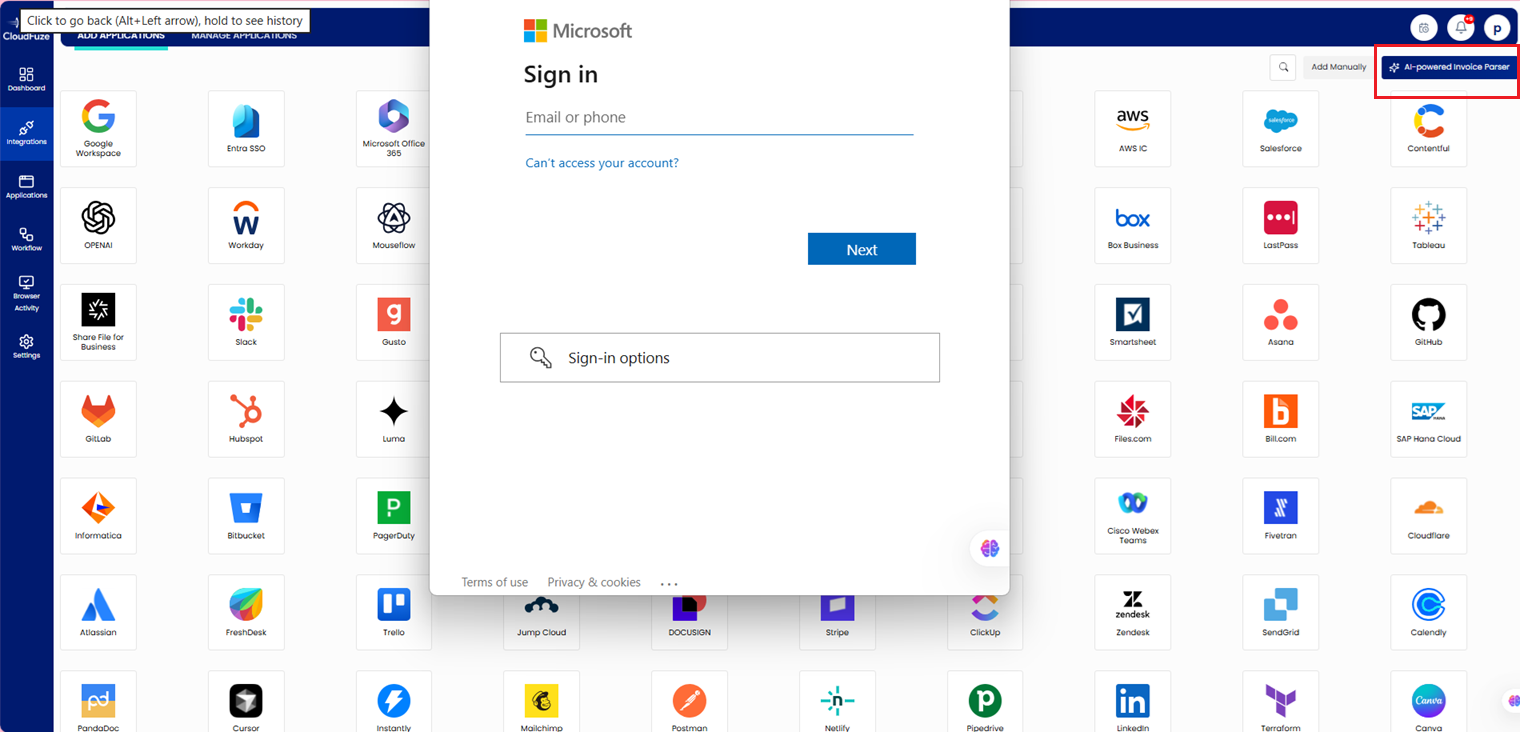
Step 1: Connect Your Microsoft 365 Tenant Securely
Sign in and connect your Microsoft 365 tenant to our platform, CloudFuze Manage, using AI-powered invoice parsing or via Entra SSO.
Step 2: View Microsoft 365 Insights in the Applications Widget
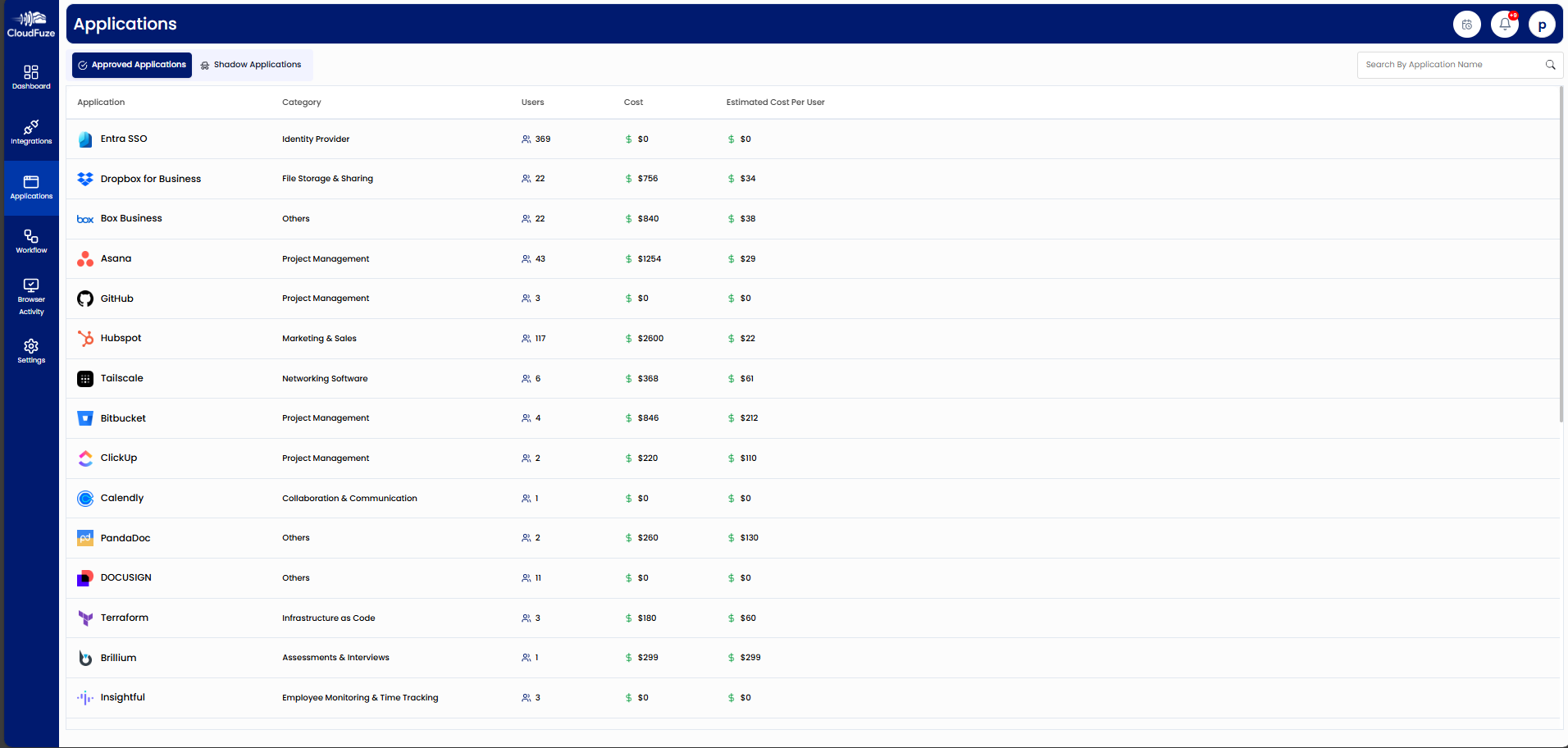
Once your invoice is parsed, find your Microsoft 365 under the “Applications Widget à Approved Applications,” which shows its app category, user count, total cost, and estimated cost per user at a glance.
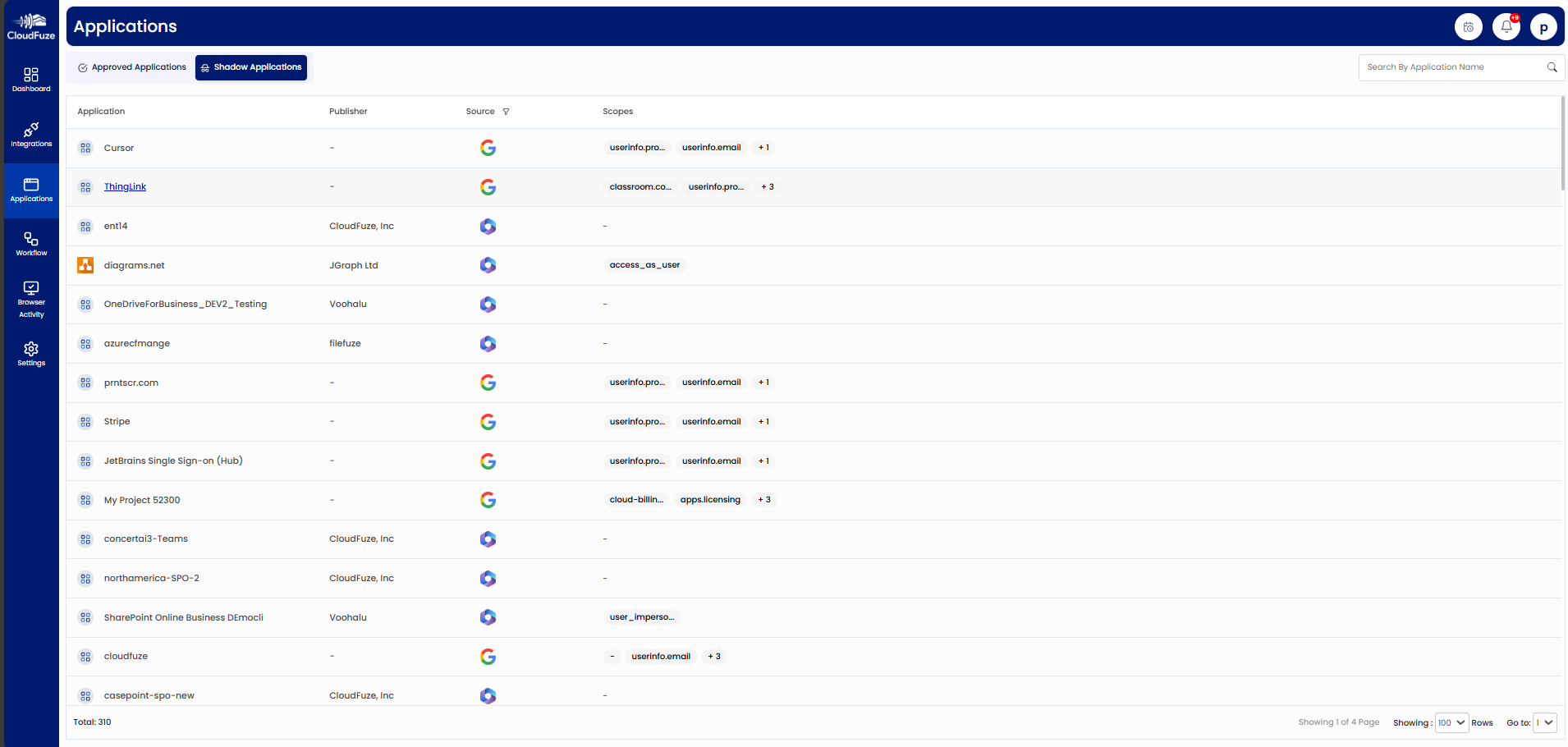
CIOs/CTOs can also find shadow IT activities within their organizations by switching to the “Shadow IT Applications” labelled icon, as shown below.
Step 3: Access Detailed Analytics of Microsoft 365
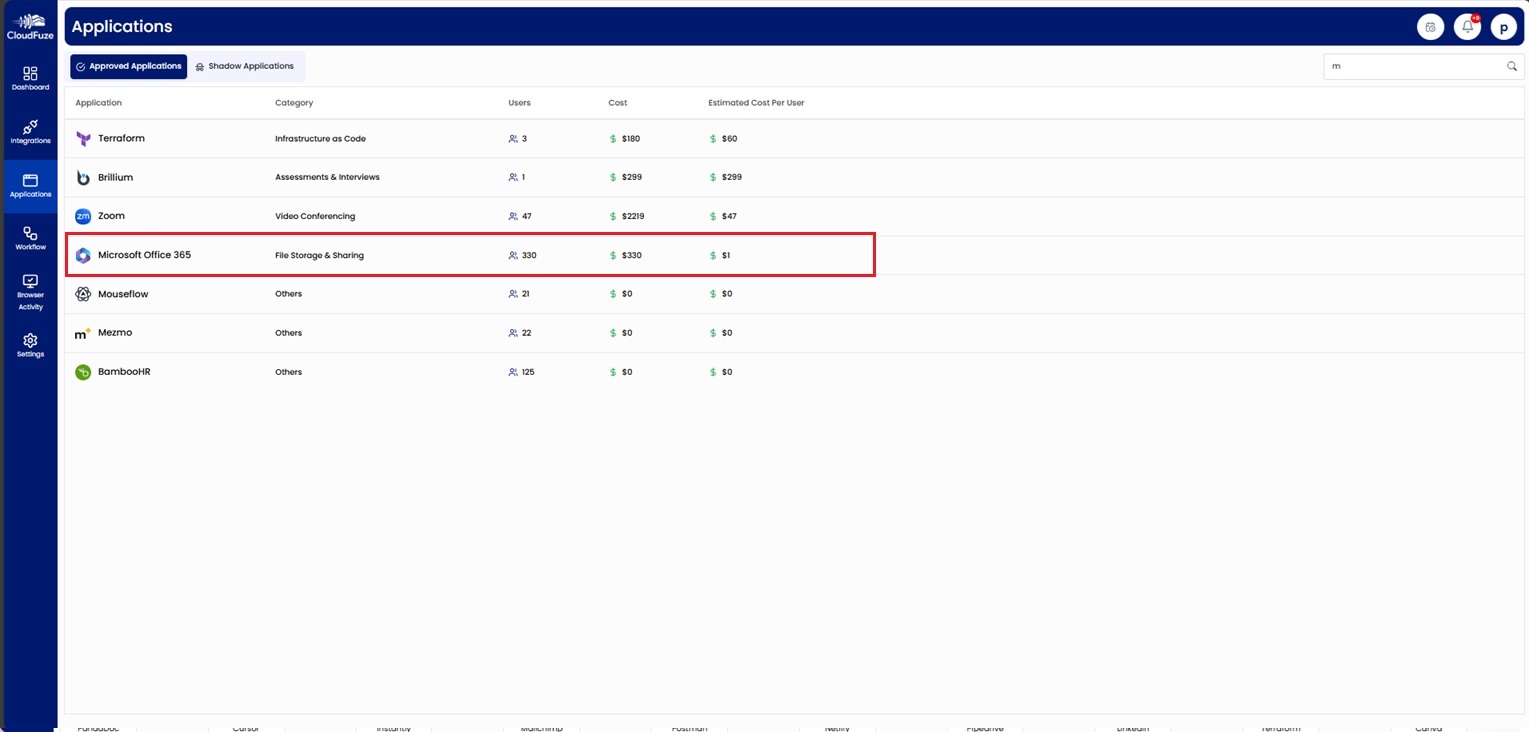
Click on the Microsoft 365 icon located on “Approved applications” for a deeper, tenant-level view of your organization’s Microsoft 365 environment.
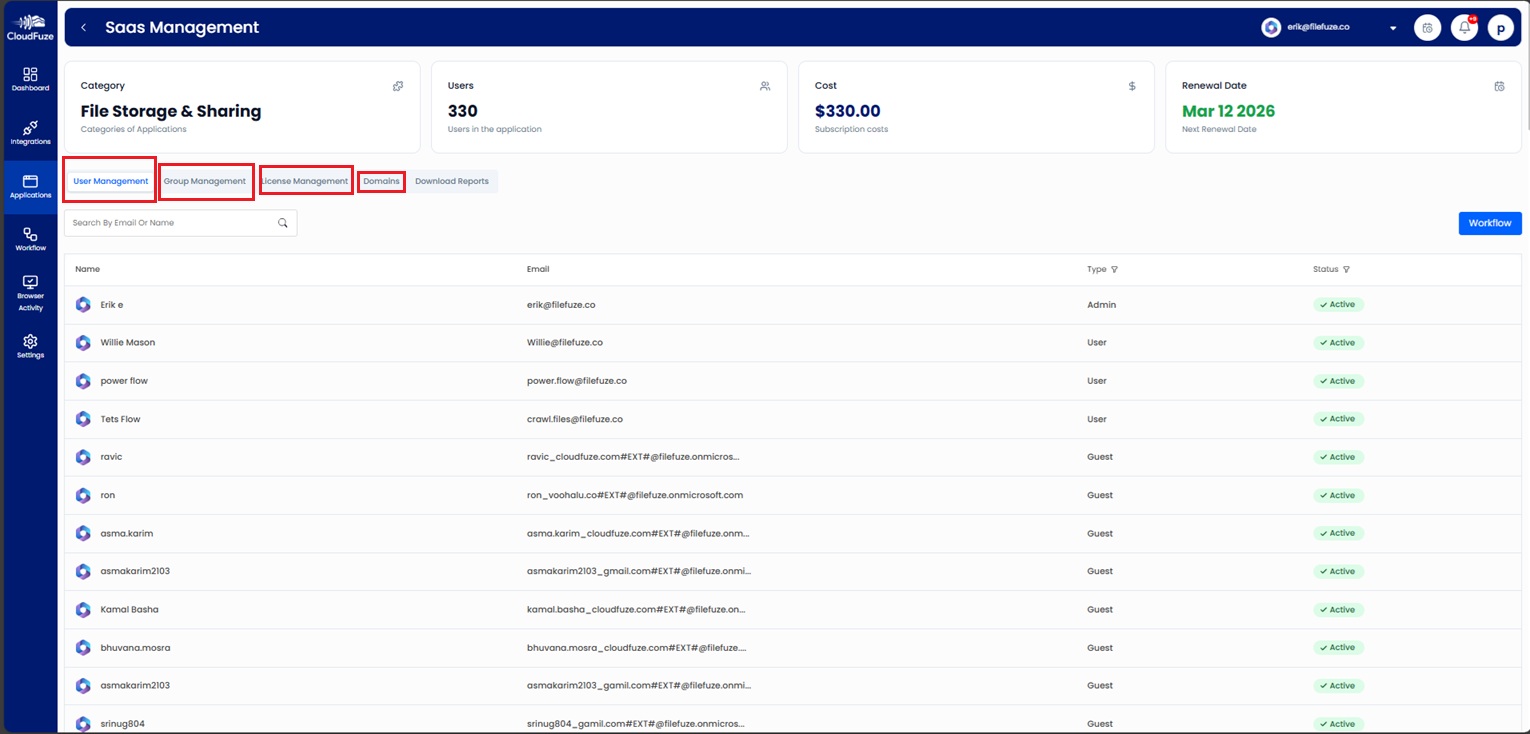
Step 4: Manage Users, Apps, Licenses, Teams, and Domains
From the Microsoft Office 365 application workspace, optimize and manage connected apps, users, licenses, teams/groups, and domains.
Step 5: Use User Management for Global Microsoft 365 User Automation
Go to User Management to see Microsoft 365 users, their email IDs, their access roles (Guest/Admin/User), and app usage activity.
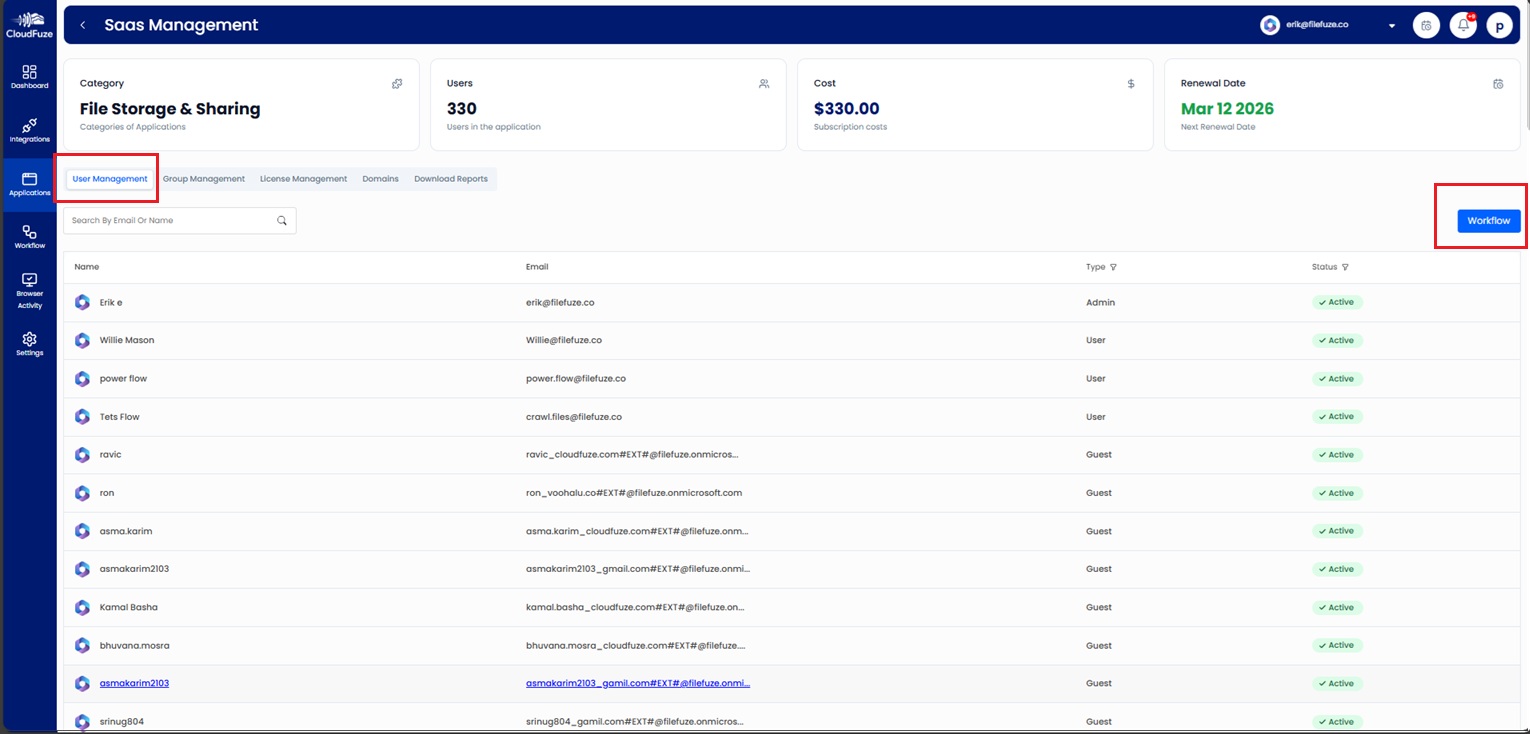
You can launch the workflow icon in the right corner to automate or group schedule onboarding and offboarding across Microsoft 365.
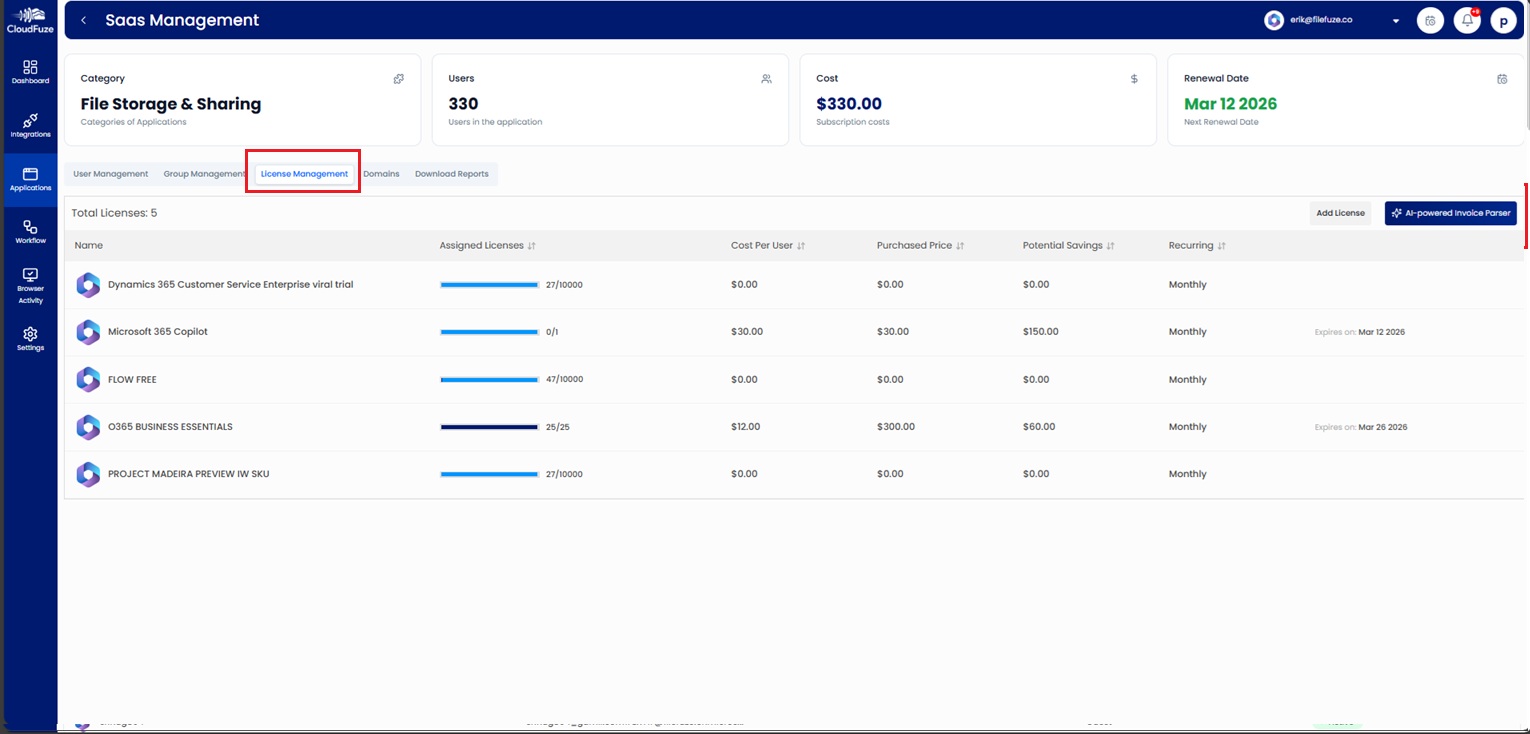
Step 6: Optimize Microsoft 365 Licensing through Our License Management Dashboard
Visit “License Management” to view used/unused Microsoft 365 licenses, their license cost per user, their potential savings, and renewal dates.
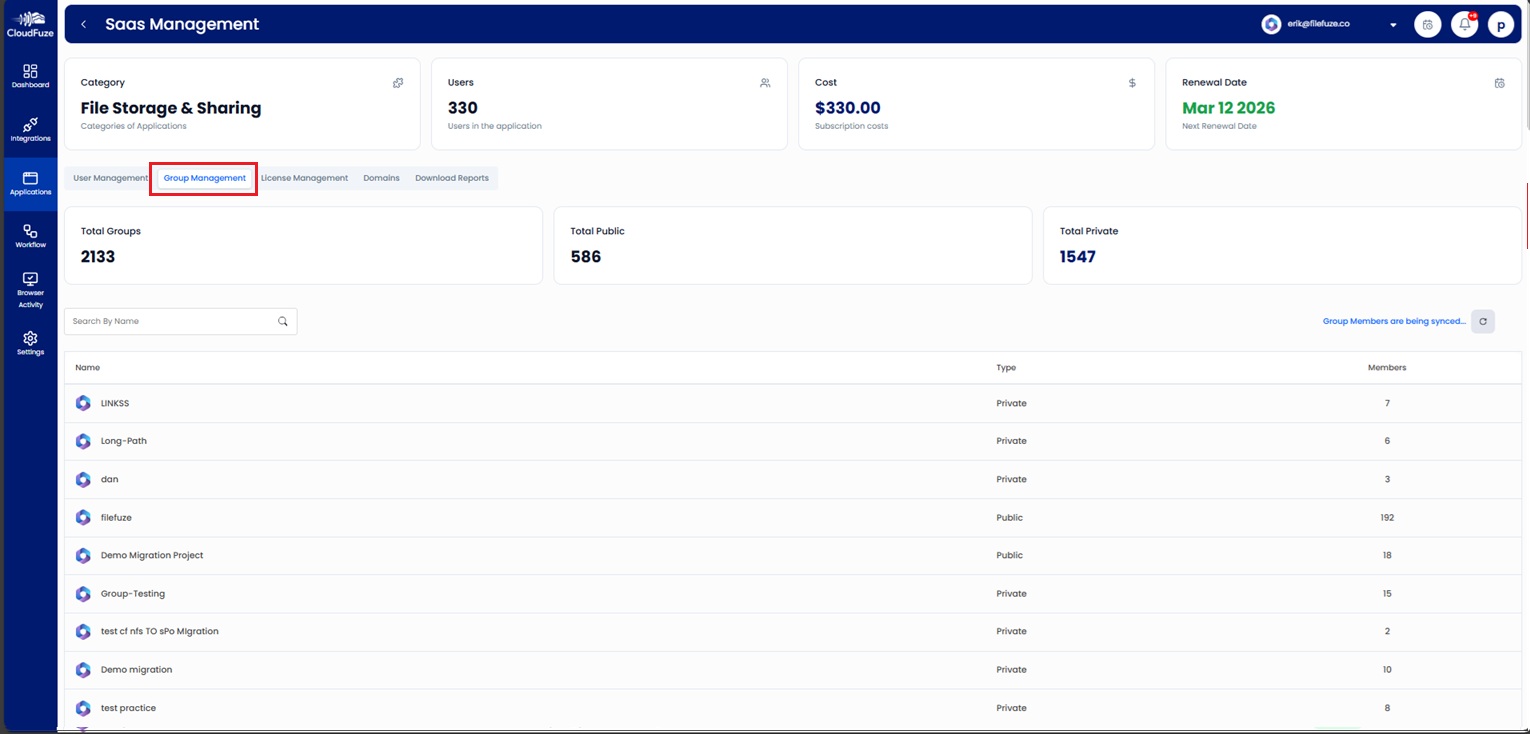
Step 7: Govern Microsoft 365 Groups & Teams Across Regions
Use “Group & Team Management” to manage your Microsoft 365 Groups, security groups, and Teams (including public/private membership).
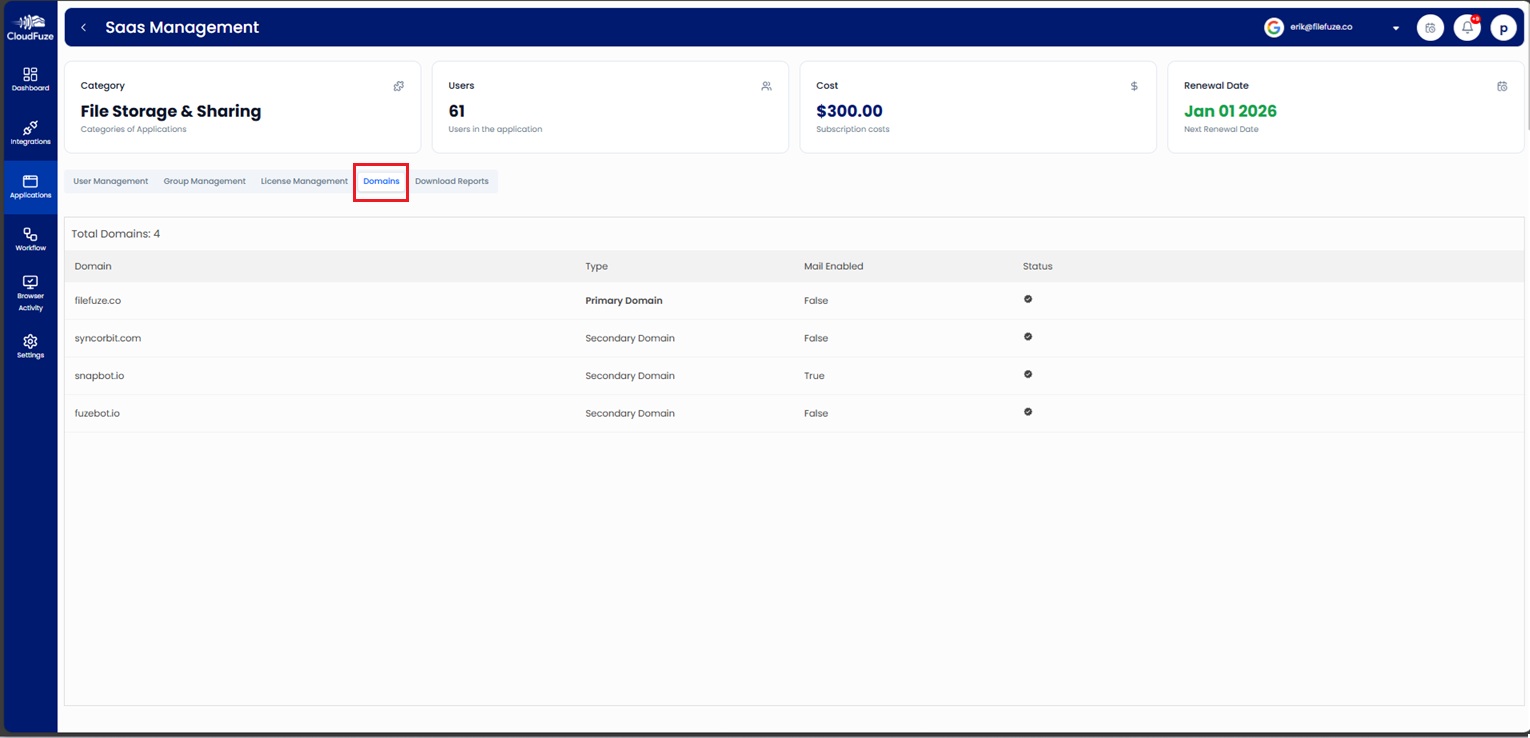
Step 8: Manage Microsoft 365 Primary and Secondary Domains
With “Domain management,” CIOs/CTOs can easily manage their organization’s primary and secondary domains and view their mail-enabled and active status.
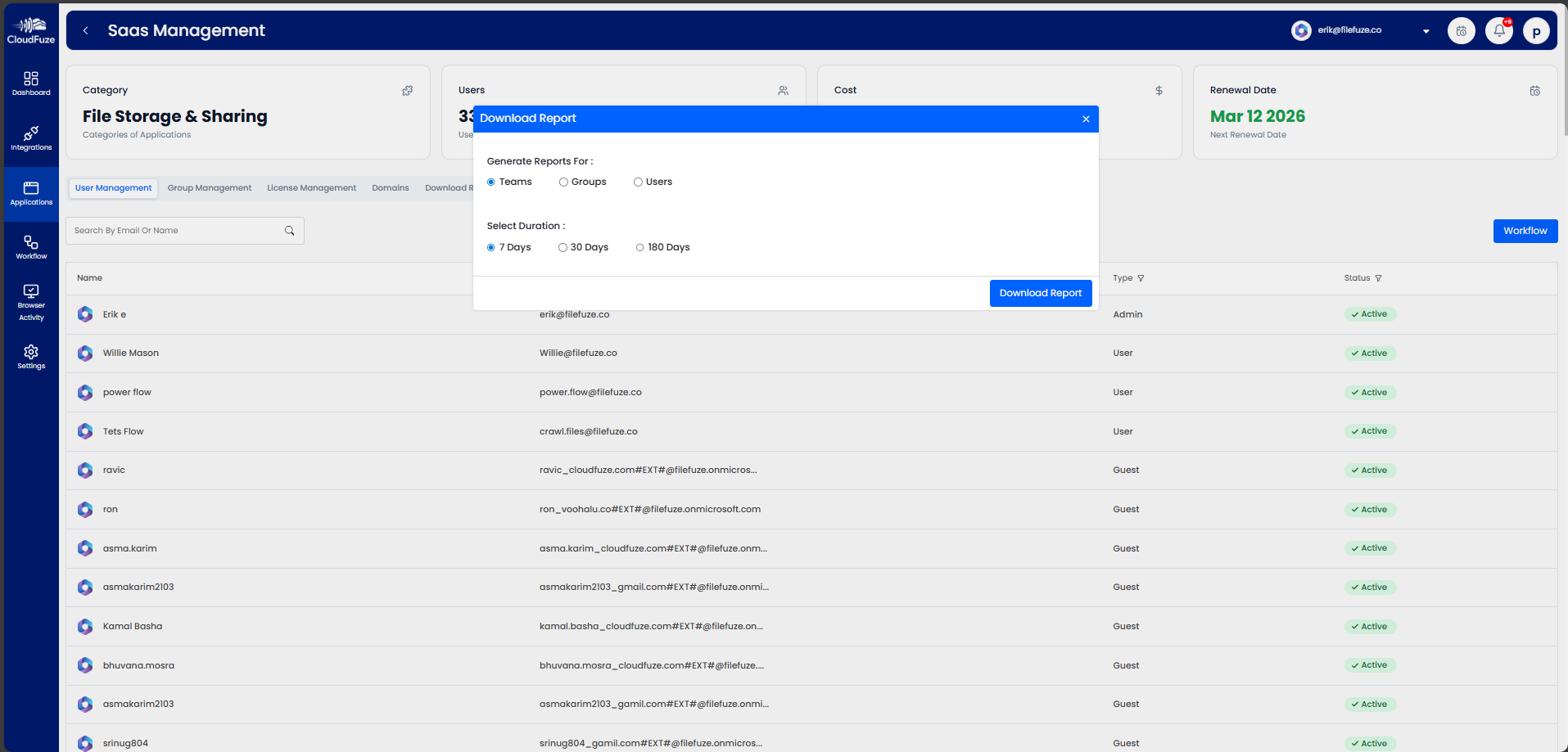
Step 9: Download Instant Audit-Ready Microsoft 365 Compliance Reports
Compliance teams can generate and download instant Microsoft 365 audit-ready reports for 7, 30, or 180-day windows.
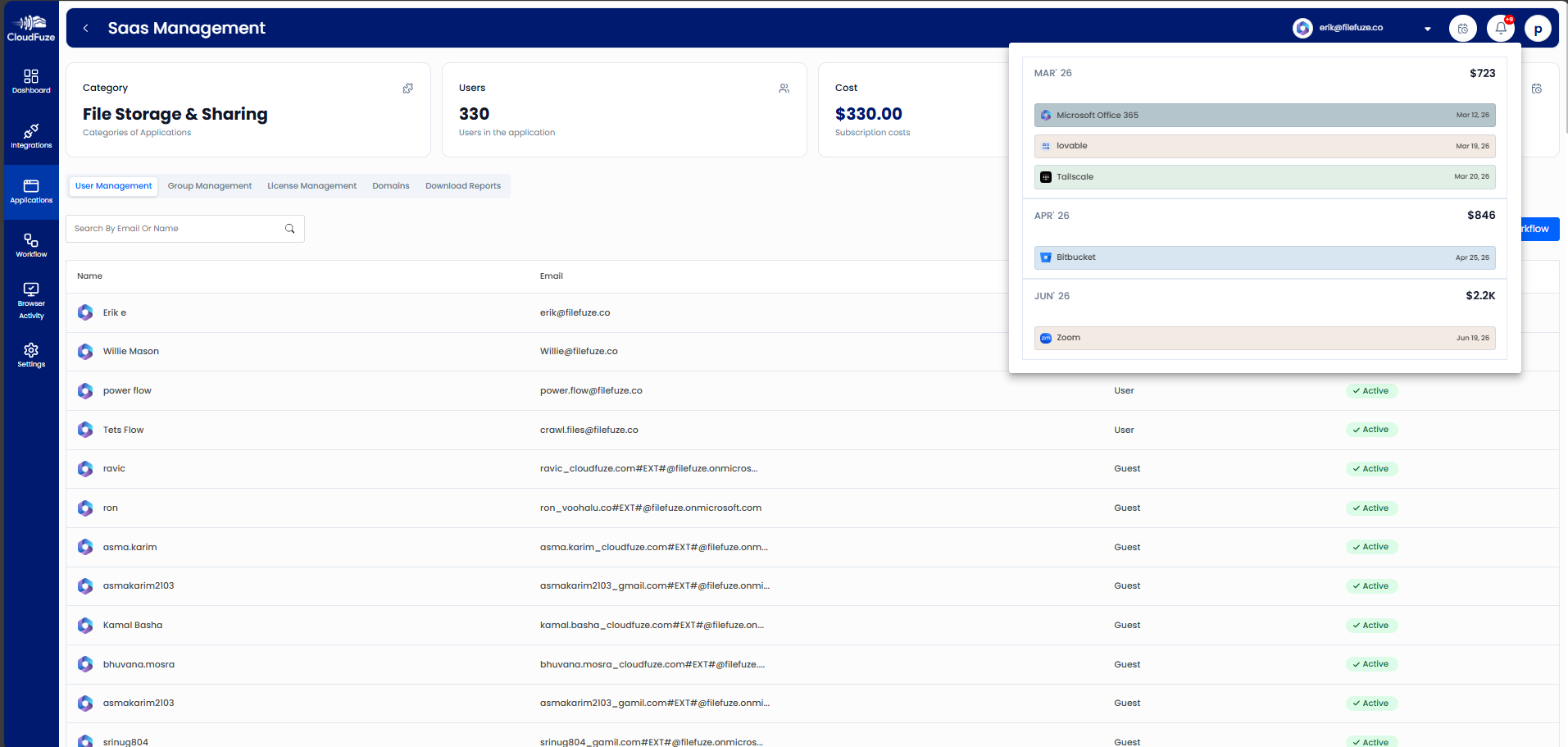
Step 10: Enable Automated License Renewal Alerts for Enterprise Forecasting
Finance teams can set renewal alerts to stay ahead of their organization’s Microsoft 365 subscription timelines and make prior decisions to downsize/reclaim unused Microsoft 365 licenses.
Gain Complete Control Over Your Microsoft 365 Spectrum with CloudFuze Manage
For CIOs and IT leaders managing hybrid or distributed workforces, manual Microsoft 365 management creates serious security risks and IT operational inefficiencies.
Our platform, CloudFuze Manage, centralizes and automates your entire Microsoft 365 management and governance with a flexible per-user pricing option.
Also, we support SMBs and large enterprises in eliminating Microsoft 365 license waste, reducing subscription costs by up to 30%, and staying compliant.
Request a free demo and explore how CloudFuze Manage simplifies Microsoft 365 management and governance.
11. Frequently Asked Questions
1. Does CloudFuze support Microsoft 365 migrations?
Yes. Our migration platform, CloudFuze Migrate, supports Microsoft 365 tenant-to-tenant migrations for large enterprises with high data volumes.
2. How to onboard new users to a M365 productivity suite?
Our platform, CloudFuze Manage, automates Microsoft 365 onboarding with zero-touch user provisioning, which instantly assigns users the Microsoft 365 apps, licenses, and the right permissions based on their job roles.
This intelligent user automation reduces your organization’s IT workload.
3. How do I monitor usage and analytics for Microsoft 365 productivity services?
At CloudFuze, we offer live Microsoft 365 usage insights, app activity analytics, and license consumption dashboards, helping IT leaders in SMBs and large enterprises to optimize their SaaS & AI app performance, reduce license waste, and maintain total visibility.
4. Best practices for managing M365 licenses and groups
One of the best solutions is to implement CloudFuze Manage, which centralizes your company’s Microsoft 365 license tracking, unused Microsoft 365 license seat detection, Microsoft 365 group governance, and automated license reclamation in a single platform.
Also, our platform offers recommendations to optimize Microsoft 365 license costs and ensure enterprise-grade compliance.


