
Migrate O365 Tenant to Another Tenant with Timestamp Intact
During enterprise Microsoft 365 (Office 365) tenant-to-tenant migrations, preserving historical metadata such as Created Date, Modified Date, and Created By / Modified By attributes is important for compliance, governance, and operational continuity. Native migration methods often overwrite these attributes and replace them with new migration timestamps.
We at CloudFuze prevent this metadata loss through deep Microsoft Graph API integration and advanced migration controls. Our tool, CloudFuze Migrate, preserves 100% original timestamps and metadata throughout the process.
Key Takeaways
Challenges In Migrating O365 Tenant to Another Tenant with Timestamps
- Limited capability of native Microsoft migration tools to preserve metadata
- Preservation of Created Date and Modified Date metadata
- Retention of Created By and Modified By metadata
- Mapping of users between source and destination tenants
- Risk of loss of file version history
- Throttling of Microsoft API calls affecting the migration rate
- Running incremental migration with accurate deltas
- Duplicate data or incorrect timestamp migrations
How CloudFuze Migrate O365 Tenant to Another Tenant with Timestamps in All Workloads
CloudFuze uses a high-performance migration engine that streams data efficiently. As the data moves, it simultaneously maps metadata with fine-grained accuracy.
- OneDrive & SharePoint Online: When you migrate OneDrive files and folders to the target location we keep the original date the file was created and last altered intact for both the file itself and the nested folder structure. This is really important for Office 365 users. We handle version history mapping, so those historical file versions still keep their specific modification dates and author stamps in the target library.
- Mailboxes: We take care to migrate the exact date emails were received and sent along with calendar meeting schedules and historical archived emails dates to the destination Outlook mailbox.
- Microsoft Teams: The channels, shared chat logs, and file tabs are all migrated with the original post date and user tracking intact.
How We Preserve Metadata During Migration
To ensure that all the historical timestamps and metadata are preserved during an Office 365 tenant to tenant migration, we at CloudFuze follow a very specific structured migration workflow.
Phase 1: Getting Tenants Ready
First things first, we connect both the source and destination Microsoft 365 tenants to CloudFuze using the secure OAuth 2.0 and Microsoft Graph API authorization.
Phase 2: Setting Up the Destination
We make sure all the users, shared mailboxes, and groups are all good to go and pre-created in the target Azure AD Entra ID to ensure we can accurately map metadata and permissions.
Phase 3: User Mapping
We do automated identity mapping and also support custom CSV mappings to correctly match source and destination users when you migrate O365 tenant to another tenant.
Phase 4: Preserving Metadata for the Move
Our Microsoft 365 to Microsoft 365 migration tool (CloudFuze Migrate) lets you set up your metadata preservation settings so we can retain the following:
- Created Date
- Modified Date
- Created By / Modified By
- Version history
- Permissions
- Folder structures
Phase 5: Executing O365 Tenant to Tenant Migration
Next, CloudFuze performs background migrations that can keep running while you keep working in the old tenant. Our throttling-aware pipelines are designed to handle large migrations (even 10K+ users) without slowing down.
Phase 6: Perform Delta Migration
Before we switch everything over to the new tenant, we do a “delta migration” which catches all the new data that was added or changed during migration, so you don’t lose any of that data.
Phase 7: Making Sure Everything Works After
Once the move is done, our tool runs a report to check that all the timestamps, permissions, email counts and file versions all match right across all the different areas of Microsoft 365.
Metadata Preserved by CloudFuze
| Metadata | Preserved by CloudFuze |
|---|---|
| Created Date | Yes |
| Modified Date | Yes |
| Created By | Yes |
| Modified By | Yes |
| File Version History | Yes |
| Permissions | Yes |
| Shared Links | Yes |
Why Businesses Trust CloudFuze for “Timestamp Intact” Migrations
Large companies choose CloudFuze when they need to move their Office 365 tenant to another tenant because we’re built to handle those massive multi-terabyte workloads involving thousands of users. We make it easy by:
- Explicitly supporting the preservation of original created/modified dates.
- Retaining full metadata – modified by, versions, permissions, and even links to external sites.
- Scaling up to 10K+ users and massive amounts of data, with zero downtime.
- Handling OneDrive, SharePoint, Teams and email all in a single workflow with consistent metadata handling.
Our platform uses API throttling management, automated/CSV user mapping, parallel migration architecture and delta migration to keep your migration process smooth.
Screenshots Showing How CloudFuze Preserves Historical Metadata
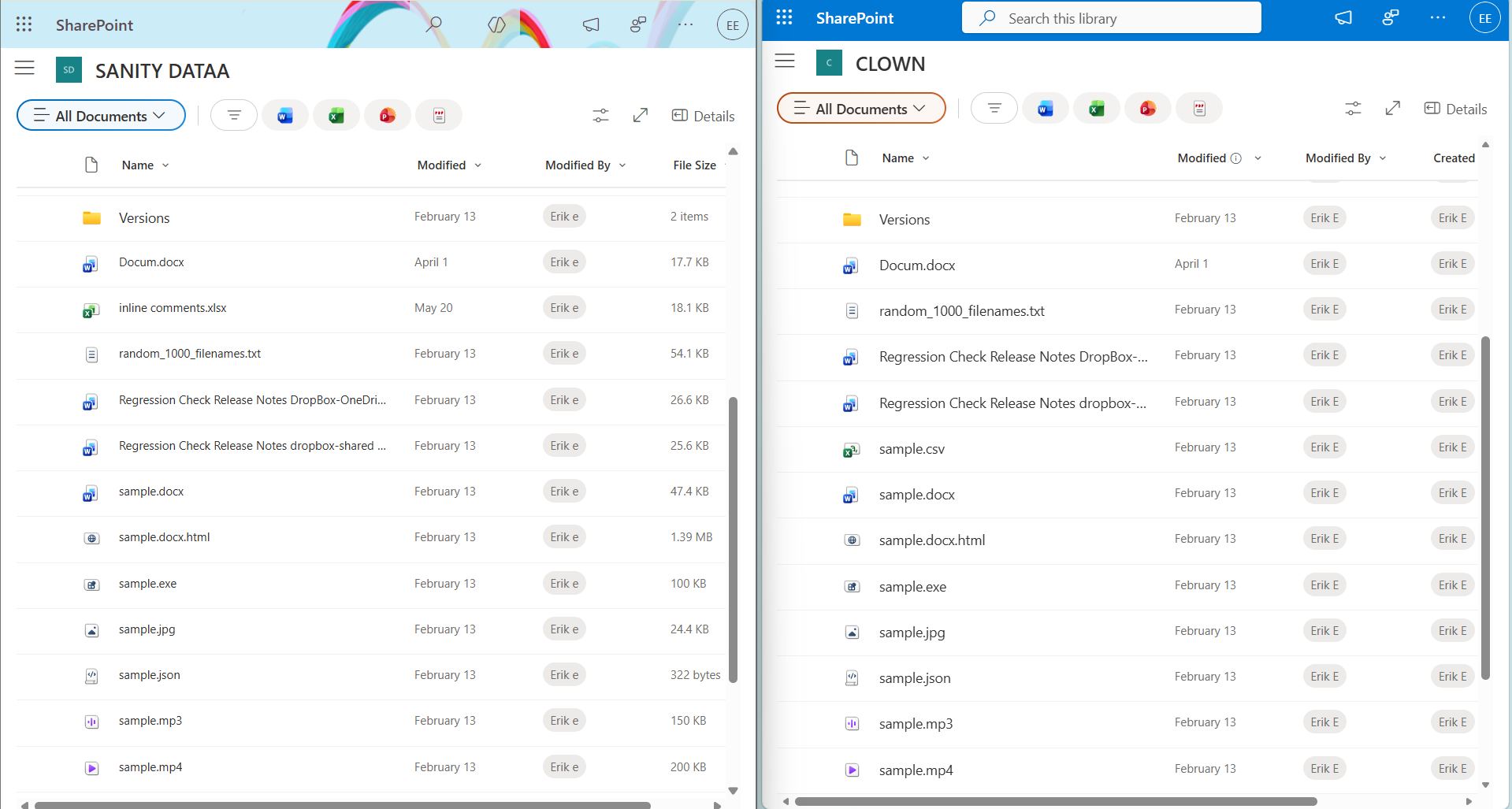
Source Environment (left side)
The screenshot represents the source Microsoft 365 tenant where the original email data and historical metadata already exist before migration. This includes important attributes such as email received time, sender information, and timestamps that enterprises must preserve during Office 365 tenant-to-tenant migration.
Destination Environment (right side)
After migration, the target Microsoft 365 tenant should retain the exact same timestamps and metadata from the source environment. With CloudFuze, original email timestamps, author details, permissions, and historical metadata remain fully intact instead of being overwritten by new migration dates.
Case Study: Preserving 100% Metadata During a Microsoft 365 Tenant Migration
A global financial services company with over 3,200 employees needed to migrate mailbox, OneDrive, SharePoint Online, and Microsoft Teams data during a 365 tenant-to-tenant consolidation.
The organization migrated:
- 42 TB of business data
- 3,200+ mailboxes
- 1,100+ SharePoint sites
- Thousands of OneDrive and Teams files
The company’s primary concern was preserving:
- Created & Modified dates
- Created By / Modified By metadata
- File version history
- Permissions and folder hierarchy
Using CloudFuze, the organization completed the migration with:
- 100% migration accuracy
- Zero user downtime during cutover
- Preservation of historical timestamps and metadata
- Retention of file version history and permissions
CloudFuze achieved this through Microsoft Graph API-based migration workflows, automated user mapping, parallel migration processing, and throttling-aware migration pipelines.
Technical Safeguards for Metadata-Intact Migration
To make sure your CloudFuze migration goes off without a hitch, keep these technical details in the back of your mind:
1. API Throttling and Migration Speed
Preserving historic timestamps and metadata means a lot of back-and-forth with Microsoft Graph, mailbox and SharePoint Online. Big migrations can easily trigger throttling issues, so your migration slows down or even fails.
Our tool takes care of all that by using throttling-aware pipelines, multi-threading, smart rate limiting, and retry logic to keep your migration running smoothly.
2. Post-Migration Validation and Reconciliation
After we’re all done, you need to check that the migrated data is all correct and valid for accuracy and compliance reasons. CloudFuze generates a full report that checks source and destination objects for item counts, file sizes, permissions, and timestamp attributes.
This process gives you surety that all your data has been moved over correctly, across all the different workloads of Microsoft 365.
3. Larger Mailboxes and File Volumes
Moving large mailboxes, SharePoint sites, and OneDrive files needs a special kind of migration architecture that avoids bottlenecks and gets the job done.
Our platform uses parallel processing and workload balancing to get the job done on high-volume Microsoft 365 environments, all while keeping metadata intact and migration stable.
So, what happens next after a successful migration?
- Check the data and timestamps
- Reassign all the permissions and licenses
- Update DNS and MX records
- Let your users in and give them access
- And of course, decommission the source tenant after verification
Migrate O365 Tenants with Timestamps Intact Using CloudFuze
The process of migrating Office 365 tenants with their timestamps preserved is possible when the following requirements are met:
- Right planning
- Trusted tools
- Accurate implementation
At CloudFuze, we assist our clients in migrating Office 365 tenants and preserving their timestamps, metadata, permissions, and versioning in mailbox, OneDrive, SharePoint Online and Microsoft Teams.
Frequently Asked Questions
1. How are timestamps preserved in O365 tenant migrations?
Timestamps (Created, Modified, Sent/Received) in most cases cannot be properly preserved with native Microsoft tools. To preserve them, migration tools like CloudFuze replicate exact metadata while transferring data.
2. Does CloudFuze preserve version history in migration of files from O365 tenants?
Yes. At CloudFuze, during OneDrive and SharePoint Online migrations, version history is completely preserved, along with historical timestamps and file author metadata.
3. Does CloudFuze preserve metadata such as timestamps in migration of O365 tenants?
Yes. At CloudFuze we preserve critical metadata in Office 365 tenant migrations, specifically created date, modified date, created by / modified by, file version history, file and folder permissions and folder structure.
Historical metadata and timestamps are retained across all of the workloads mentioned above during migration.
4. What are the tools that can be used to migrate O365 tenants while maintaining timestamp integrity?
CloudFuze is a tool that is used for migrating O365 tenants while retaining all metadata and timestamps securely.
About the Author: Aayushi Raj



