
5 Hidden AI Advantages of Gmail to Outlook Email Migration
With the advent of Copilot by Microsoft and the incorporation of AI throughout Outlook within the Microsoft 365 framework, businesses have come to recognize the reality that moving from one platform to another also means tapping into some hidden intelligence of email processes. At CloudFuze, we support enterprises in enabling this transformation through strategized email migration.
For IT administrators or CIOs, such benefits are usually overlooked when devising plans but have an obvious impact on the performance and operations of the organization.
The following are 5 hidden AI advantages of migrating Gmail to Outlook that organizations should know before moving ahead with their plans.
Key Takeaways
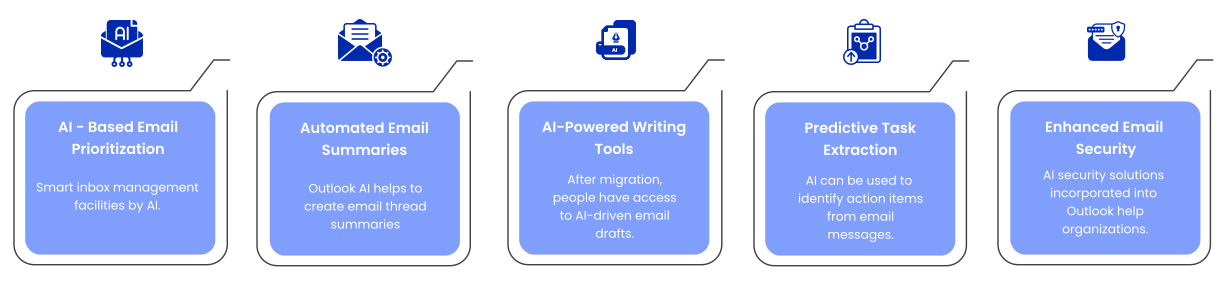
1. AI-Based Email Prioritization & Inbox Intelligence
The first benefit one receives post-migration to Outlook is smart inbox management facilitated by AI.
Features of Microsoft Copilot and AI-based Outlook:
- Prioritizes essential emails based on context
- Identifies actionable emails
- Saves time on low-value emails
It becomes especially beneficial for organizations where employees spend a lot of time handling email communications. This makes inbox optimization a major productivity lever.
In the case of CIOs, this leads to:
- Reduced cognitive burden
- Enhanced decision-making cycle
- Improved operational efficiency across teams
2. Automated Email Summaries for Multi-thread Emails
Large companies always have multi-threaded emails that include multiple recipients. Outlook AI helps to:
- Create email thread summaries
- Extracting key action points
- Identify decisions and follow-ups
It is useful when migrating from Gmail to Outlook because it keeps all historical emails accessible.
Instead of manually sifting through lengthy emails, AI creates a summary for employees, saving them time to read messages. Research on Microsoft Copilot shows that people complete communication-related tasks (such as searching for messages, creating messages, and summarizing emails) up to 29% faster with the help of AI.
For IT admins, this reduces dependency on manual review processes and improves cross-team collaboration.
3. AI-powered Writing and Messaging Tools
After Gmail to Outlook email migration, people have access to AI-driven email drafts. These drafts include:
- Email drafting per prompts
- Correcting the email’s tone and message
- Reply suggestions
- Tailoring the messaging to an executive/client
It is especially helpful for enterprise communication.
Research has found that the use of AI-based tools increases accuracy in emails by 44%, saves about 26% of time, and enhances clarity.
In turn, CIOs can benefit in the following ways:
- Better-quality communications across departments
- No dependence on senior-level reviews
- More efficient external communication cycles
4. Predictive Task Extraction and Workflow Automation
The potential for automatic task extraction using AI technology remains one of the least known capabilities of the Outlook email system.
AI can be used to:
- Identify action items from email messages
- Convert emails to tasks or calendar appointments
- Provide follow-up suggestions
- Automate workflows within Microsoft 365 applications
It changes email from the medium of communication to a workflow tool.
For IT staff working on enterprise-level email operations, it allows for less manual work and improved adherence to SLAs across business units.
For CIOs, AI-based email automation supports initiatives such as:
- Digital transformation
- Automation of workflows
- Efficient use of resources
5. Enhanced Email Security and Threat Detection via AI
Email security issues play an important role in enterprise decisions about migration from legacy solutions. AI security solutions incorporated into Outlook help organizations to:
- Recognize email phishing attacks
- Identify suspicious email activity patterns
- Recognize email accounts that were compromised
- Eliminate errors associated with human threat recognition
AI technology makes detection more accurate than conventional rules-based systems as it takes behavioral and contextual data into account.
For enterprises, it means:
- Stronger protection against email-based attacks
- Quicker reaction times to incidents
- Better regulatory compliance
For CIOs, this directly supports enterprise risk management and regulatory compliance requirements.
Copilots help people work more efficiently, unlocking greater creativity and saving valuable time. Here’s what early adopters are seeing so far.
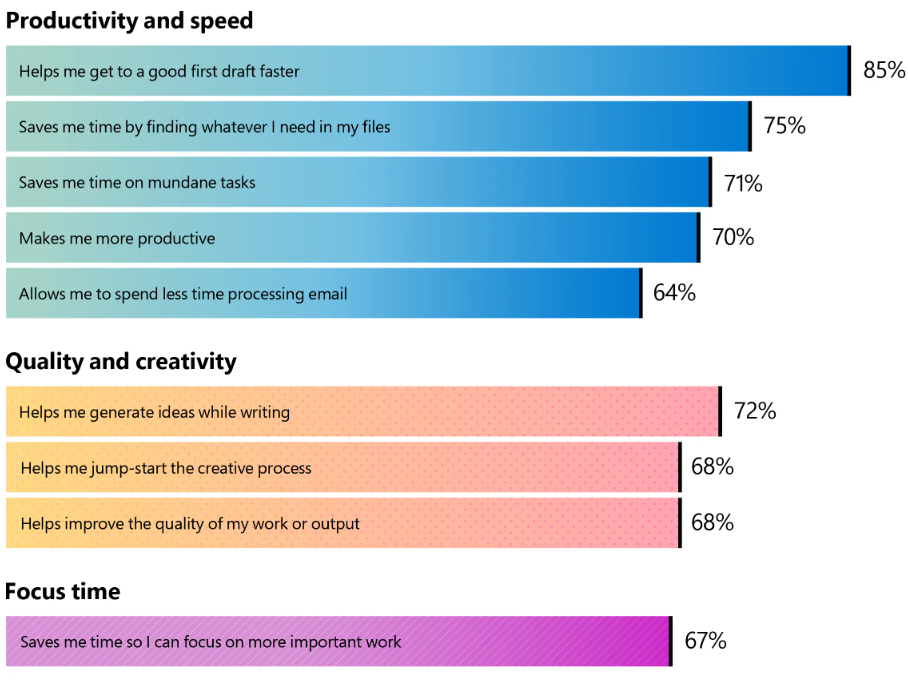
Source: Microsoft blog
Summary Table
| # | Capability | Key Features | Business Value |
|---|---|---|---|
| 1 | AI Inbox Prioritization | Highlights important and actionable emails | Improves focus and saves time |
| 2 | Email Summaries | Condenses long and multi-thread conversations | Faster understanding and decision-making |
| 3 | AI Writing Assistance | Drafts emails, improves tone, suggests replies | Better communication with less effort |
| 4 | Task Automation | Extracts action items and create tasks/events | Streamlined workflows and higher productivity |
| 5 | AI Security & Threat Detection | Identifies phishing and suspicious activity | Stronger protection and reduced risk |
Why Does This AI Edge Matter in Gmail to Outlook Email Migration?
Today, Gmail to Outlook email migration is more than a platform change for CIOs and IT managers; it’s a step toward a governed, AI‑ready environment. The reason is that with a migration, users can experience such benefits of AI implementation as:
- Measurable productivity boosts due to AI usage
- Centralized governance and compliance due to AI implementation
- Less AI-related risk
- AI orchestration across the enterprise
With the evolution of AI in terms of its usage within organizations’ operations, AI capabilities are determined by the selected email platform. This means that it is only after migration that the advantages provided by AI usage will become obvious, improving internal processes and decision-making.
Recommendations for CIOs and IT Managers
To make the most of Gmail to Outlook migration, IT managers and CIOs should:
- Consider AI-readiness when planning a migration process
- Clean data and metadata preservation
- Properly align identity and access structure and identities
- Analyze AI potential during ROI assessment
- Not cause any workflow disruptions during migration
Email Migration to Outlook from Gmail with CloudFuze: Get Your Enterprise Copilot‑Ready
At CloudFuze, we view Gmail to Outlook email migration as more than an infrastructure change. We consider it an AI enablement strategy.
For CIOs and IT administrators, migrating to Outlook brings in the untapped benefits of AI in the form of:
- Increasing productivity through email assistance powered by AI and workflow automation
- Securing and governing corporate communication
- Streamlining repetitive processes through intelligent Microsoft 365
- Facilitating enterprise collaboration
All of this is achieved seamlessly, efficiently, and securely via our automated migration platform and process. With CloudFuze’s migration platform, you can rest assured of your emails being migrated accurately and securely without losing any data.
When companies migrate to Outlook, they not only migrate email but move towards an all-encompassing digital transformation process for their organizations.
Take the first step to your copilot journey with Gmail to Outlook migration.
Frequently Asked Questions
1. Is the Gmail to Outlook migration largely an AI-driven process?
Yes. Although email is the apparent transition, companies often move to Outlook in order to facilitate their AI journey. With Microsoft 365 Copilot running in Outlook, it becomes possible to use AI not only in email but across all workflows in a company while adhering to consistent AI governance.
2. What are the differences between AI in Outlook and AI in Gmail?
AI in Gmail focuses solely on improving email experiences, while Microsoft Copilot is tightly connected with other components in Microsoft 365. It means that insights obtained from emails will be available to other applications like calendar, Teams, documents, etc.
3. Does moving to Outlook automatically unlock AI features?
No. AI services such as Copilot need to be licensed and managed by IT administrators who have control over enabling AI and who may benefit from it.
4. How does Outlook help with AI management and compliance?
Outlook is included in the Microsoft 365 ecosystem and thus inherits all its compliance capabilities, sensitivity labels, audit logs, DLP policies, and eDiscovery tools. With Outlook, enterprises can manage and audit AI-driven processes via enterprise mechanisms.
5. What are the main opportunities that an organization will experience following the migration?
Once the migration is completed and AI-powered processes start running within the enterprise, benefits can be witnessed, ranging from faster emails to efficient prioritizing.
About the Author: Aayushi Raj



