
How to Handle Role-Based Access Controls During Migration?
When it comes to managing user roles and permissions during cloud data migration, implementing the role-based access approach is one of the best steps to take. But what is it, and how does it help streamline the user role and permission management process during migration? Learn about it all in this brief guide.
Key Takeaways:
What is Role-Based Access Control and Why is it Important in Cloud Migration?
Role-based access control is the approach of assigning permissions to users based on their roles as opposed to individually. This approach helps secure the permission-assigning process during cloud migration and helps avoid permission mismatches and unauthorized access to a certain set of users.
With an RBAC-based approach, businesses can streamline user roles and permissions mapping and migration processes without facing inaccuracies. This, in turn, helps avoid accidental data leaks and maintains the full spectrum of data integrity.
What are the Challenges of Handling Role-Based Access Controls During Migration?
Permissions sprawl is one of the biggest challenges of handling role-based access controls during cloud migration. In many cases, businesses have undocumented access rules in their current cloud platforms, especially old legacy platforms.
Another big challenge is temporary access converting into permanent access post-migration. When undefined temporary roles do not expire, they get converted into permanent roles post-migration in the new cloud platform.
Other challenges include:
- Role explosion
- Non-human identities
- Multi-cloud migration-related complexity
- Improper governance
- Compliance complexities
What Tools Can Assist in Implementing Role-Based Access Control During Cloud Migration?
Our advanced cloud migration tool, CloudFuze Migrate, is one of the best options for businesses to implement role-based access control best practices during cloud migration to streamline user role and permission migration.
Here are some of the ways that we at CloudFuze manage role-based access controls with strategic approaches:
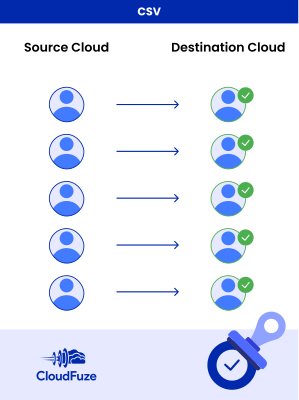
1. CSV-Based User Mapping
We implement the CSV-based user mapping approach to ensure a high level of accuracy during the user mapping process. With the CSV-based approach, you can also create custom mapping between each source and destination cloud user.
Our migration team will guide you with best practices, such as using correct syntax, to create CSV mapping for all your users.
2. Accurate Migration of User Roles
Unlike many other cloud migration solution providers, we ensure accurate migration and conversion of user roles. If the source and destination cloud platforms do not have the exact user roles, we will ensure conversion to the most relevant roles to preserve data access integrity.
Here’s an example of user roles conversions when migrating from Box to OneDrive with CloudFuze:
| Box | OneDrive |
|---|---|
| Owner | Owner |
| Co-owner | Manager |
| Viewer Uploader | Edit |
| Previewer Uploader | Edit |
| Uploader | Edit |
| Editor | Edit |
| Previewer | Read |
| Viewer | Read |
3. Granular Control in Permission Mapping
Our cloud migration tool has a dedicated permissions mapping page that automatically generates permission mapping as per the user roles between the source and destination cloud users.
You can also edit the automatically generated permission mapping if you want to create customized paths as per your company’s migration needs.

4. Root and Inner Level Permissions Migration
Lastly, to ensure accurate permissions migration, we have built our migration tool to accurately transfer various levels of sharing permissions, including:
- Root folder permissions
- Sub folder permissions
- Root file permissions
- Inner file permissions
Streamline Role-Based Access Controls in Migration with CloudFuze
Ensure accurate transfers of permissions as per user roles and privileges when migrating across cloud platforms with CloudFuze. We have helped a lot of large enterprises, such as Warner Bros. Discovery, WeWork, Broadcom, Intuit, National Geographic, NFL, and more, migrate with accurate permission retention.
Contact us today for a no-obligation migration tool demo, free of cost.
Check out our migration tool’s overview video:
Frequently Asked Questions
1. What are the best practices for implementing role-based access controls during cloud migration?
Addressing unaccounted roles in the source cloud is the first best practice to follow. Another is to map user roles properly to ensure permissions are transferred accurately during the migration process.
2. How to migrate role-based access controls without disrupting user access?
You can transfer role-based access controls across cloud platforms with a professional and proven cloud migration tool like CloudFuze Migrate. The tool is designed to accurately migrate permissions as per relevant user roles to maintain complete data and sharing integrity.
3. What are the role-based access control features to look for in migration platforms?
To migrate role-based access controls across cloud platforms, some of the features to check in migration platforms include CSV-based user mapping, automatic and editable permission mapping, etc. You can access these features in CloudFuze Migrate.
About the Author: Pankaj Rai



