
What to Look for in a Cloud Migration Reporting Dashboard?
Are you looking for a professional cloud data migration tool? When exploring migration tools, you must check the cloud migration reporting dashboard features. With proper reporting, it becomes easy to monitor the migration process as well as streamline validation.
In this guide, we have explained about the migration reporting features that you must look for and ones that are available in our advanced cloud migration tool, CloudFuze Migrate.
Key Takeaways:
What is the Importance of Reporting in Cloud Migration?
Reporting is one of the most important functionalities in cloud migration. It helps you keep proper track of the migration progress and ensure every migration job is progressing on the right track.
Reporting is also highly important for validating the migration and ensuring all files, folders, emails, chat messages, attachments, permissions, hyperlinks, versions, etc., have been migrated accurately and successfully.
What to Look for in a Cloud Migration Reporting Dashboard?
There are several important features to look for in a cloud migration reporting dashboard. They include:
- Migration status
- Total size of data migrated
- Remaining data size to migrate
- Total number of migration jobs
- Completed migration
- In-progress migration
With these parameters, you can monitor the migration progress in a structured way without missing out on any area.
Utilitarian Cloud Migration Reporting Dashboard from CloudFuze
At CloudFuze, we provide the industry’s most advanced cloud migration reporting dashboard to help IT teams get live insights into the migration statuses and overall progress.
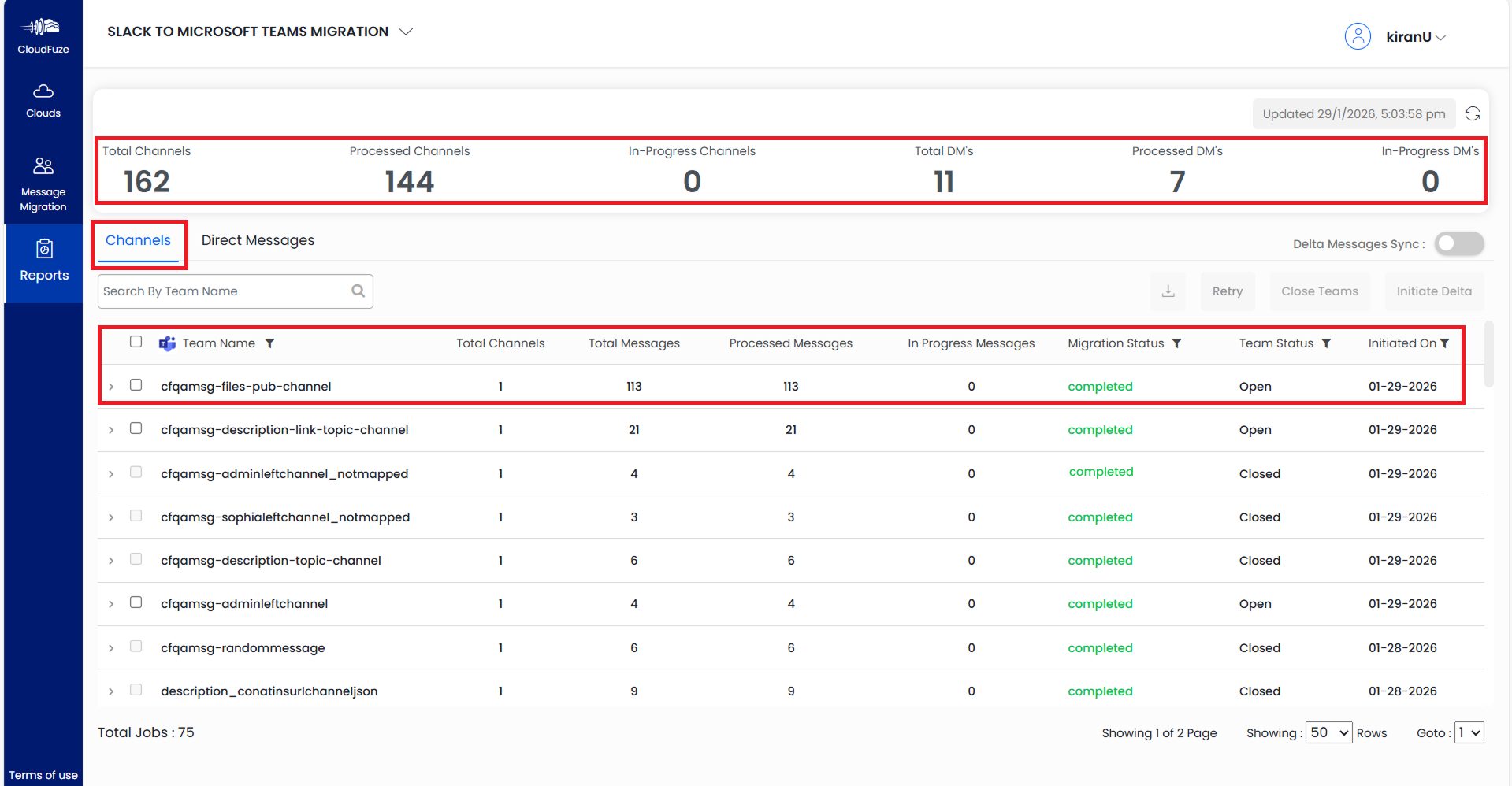
Taking Slack to Teams migration as an example, we have listed a couple of screenshots of our migration dashboard below:
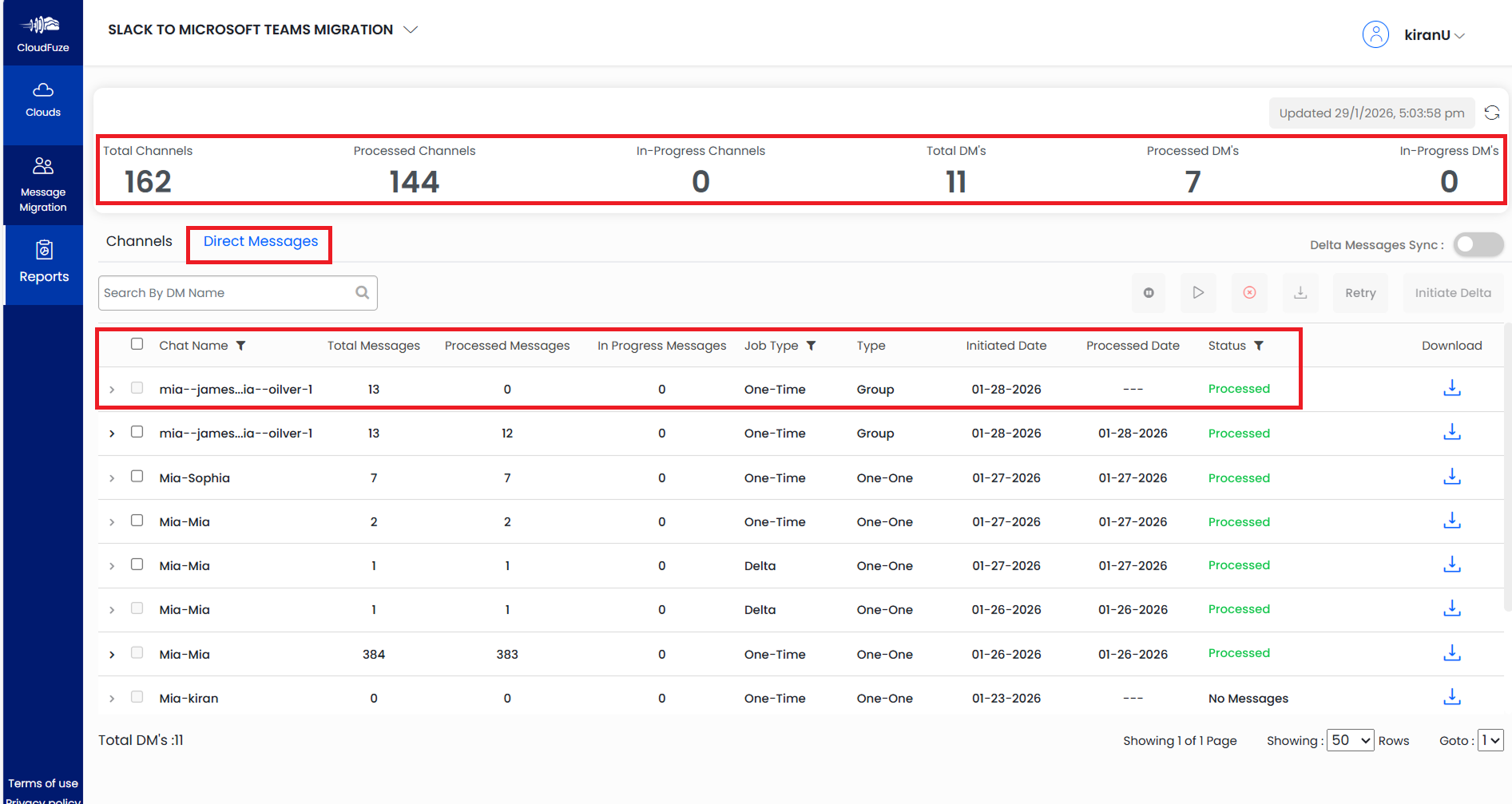
For Slack to Teams migration, our tool’s reporting dashboard displays two options, one for channels, and the other for direct messages.
The dashboard displays several reporting features, such as information on the total channels, processed channels, in-progress channels, total DMs, processed DMs, and in-progress DMs.
The dashboard also shows the migration status and details of each migration job.
This second screenshot shows how the reporting dashboard looks like when the Direct Messages panel is selected. All parameters, including the migration status, are shown for each direct message migration job.
Migrate Across Clouds Successfully with CloudFuze
Leverage our industry-leading cloud migration tool with advanced reporting functionalities to migrate to your preferred cloud platform. With 12+ years of expertise, we can help you migrate securely and successfully without any downtime or user impact.
Contact us today for a free and no-obligation demo of our migration tool.
Learn more about our one-stop cloud migration tool in this video:
Frequently Asked Questions
1. How can teams utilize a cloud migration reporting dashboard to track progress during migration?
Teams can check migration statuses, such as in-progress status, processed status, and completed status, of each migration job in the reporting dashboard of an advanced cloud migration tool like CloudFuze Migrate.
2. What are the best tools for cloud migration reporting and analytics?
CloudFuze Migrate is one of the best tools for cloud migration reporting and analytics. It helps businesses and their IT teams perform large-scale and complex cloud migrations while enabling seamless and structured monitoring and validation through advanced reporting features.
3. What are cloud migration reporting best practices for IT teams?
Checking the migration status is one of the best practices to follow. It is also important to check other details, such as the number of files and folders migrated, the remaining number of files and folders to be migrated, the types of metadata and properties preserved, and more.
About the Author: Pankaj Rai



