
Slack vs Google Chat (2026) Comparison Guide
Slack and Google Chat are widely popular platforms used by companies worldwide in 2026. Both are powerful tools with several features that make them suitable for any workplace. This Slack vs Google Chat comparison guide helps you choose the right cloud storage for your business.
[Overview]
1. Slack Vs Google Chat – Features Overview
Check out the table below to compare features between Slack and Google Chat.
| Features | Slack | Google Chat |
|---|---|---|
| Pricing | Pricing plans start from $4.38/user/month. | Pricing plans start from $7/user/month |
| Message Limit | You can save and search messages for up to 90 days | Unlimited messaging in all plans |
| Direct messages | Yes | Yes |
| Channels (Public and Private) | Yes | Yes |
| Integrations | Over 2600 integrations are available | 1000+ integrations are available |
| Screen Sharing | 1:1 available in Free plans Available only in paid plans |
Available in all plans |
2. Slack vs Google Chat – Pricing Plans
Google Chat Pricing Plans
The table below compares Google Workspace pricing plans that include Google Chat:
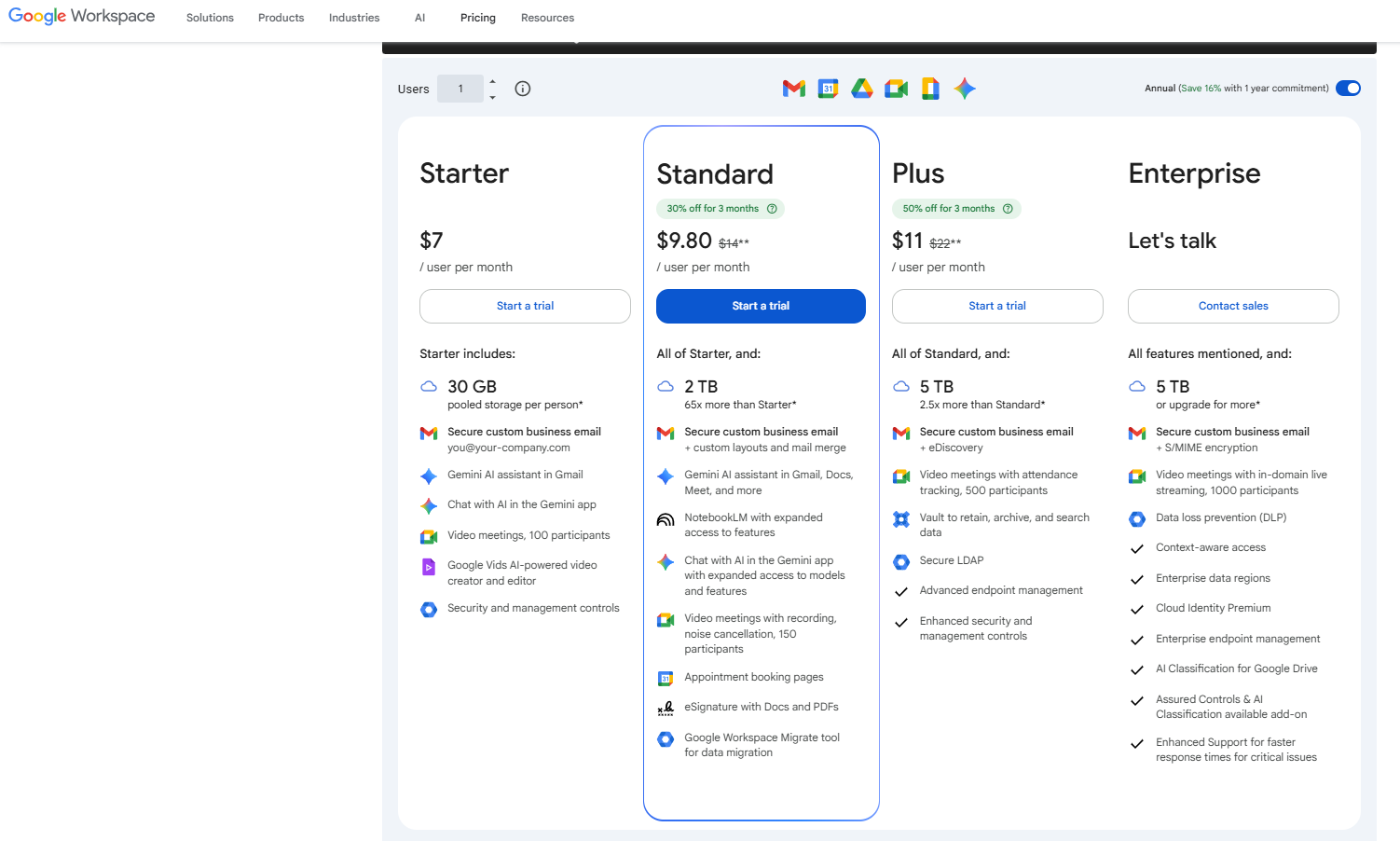
Image Source: Google Chat Plans in Google Workspace
Note: Google Workspace prices are based on April 2026 data. Prices apply only when you take an annual subscription.
Slack Pricing Plans
Here’s a glimpse of Slack’s plans and pricing:
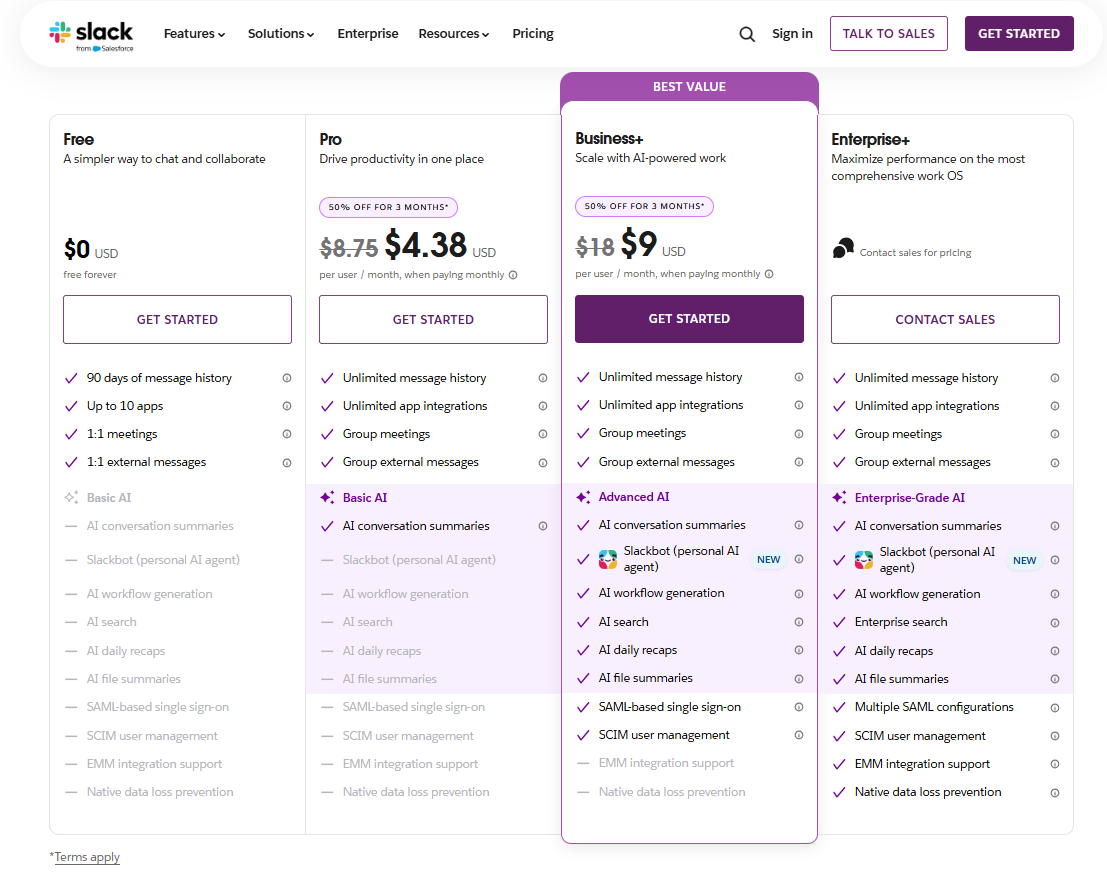
Image Source: Slack
Note: Slack prices are based on April 2026 data and are applicable only when you take an annual subscription. Confirm the current rates directly from the respective provider.
For detailed comparison, check the official pricing pages:
How Do the Pricing Plans Compare Popular Team Collaboration Tools?
From the above discussed Slack vs Google Chat pricing plans, we can infer that:
- Users get AI functionalities with all the pricing plans of Google Workspace and Slack.
- Slack provides 2 pricing ranges followed by an enterprise pricing plan.
- The Slack Enterprise license plan provides several AI functionalities when compared to all other Slack plans.
- Users can choose from 3 different pricing ranges followed by an enterprise-level pricing plan in Google Workspace.
- The Enterprise plan of Google Workspace offers users several AI functionalities.
Advanced migration tools such as CloudFuze Migrate can help you with smoother transition of Slack data along with metadata. Check out our Slack to Google Chat migration guide.
3. Slack vs Google Chat – AI Features
Gemini Features in Google Chat
With Gemini in Google Chat, businesses can:
- Summarize conversations and files
- Improved messaging and team collaboration
- Automatic AI-powered message translation
- Create and refine messages in Google Chat
- Generate a list of action items in Google Chat
- Answer to specific questions on the conversation
Slack AI Features
Slack provides added AI functionality to all its pricing plans.
| Plans | AI Features |
|---|---|
| Free | N/A |
| Pro |
|
| Business+ |
Advanced AI
|
| Enterprise+ |
Enterprise-grade AI
|
AI Feature Comparison Among Slack Plans
Here is a feature-wise comparison of AI features in Slack
| AI-Powered Work | Free Plan | Pro Plan | Business+ | Enterprise+ |
|---|---|---|---|---|
| Thread And Channel Summaries | No | Yes | Yes | Yes |
| Huddles Notes | No | Yes | Yes | Yes |
| AI Assistant Apps | No | Yes | Yes | Yes |
| Slackbot (Personal AI agent) | No | No | Yes | Yes |
| Daily Recaps | No | No | Yes | Yes |
| File Summaries | No | No | Yes | Yes |
| AI Language Translations | No | No | Yes | Yes |
| AI Workflow Generation | No | No | Yes | Yes |
| AI Steps In Workflow Builder | No | No | Yes | Yes |
| AI Message Explanations | No | No | Yes | Yes |
| AI Writing Assistance In Canvas | No | No | Yes | Yes |
| AI Search | No | No | Yes | Yes |
| Enterprise Search | No | No | No | Yes |
4. Slack vs Google Chat – Built-in App Integrations
Google Chat Integration
Users can integrate Google Chat with other Google Workspace apps including:
- Google Drive
- Google Calendar
- Google Meet
Google Chat supports several third-party applications. You can find and add apps from the Google Workspace Marketplace to connect to tools such as project management, CRM, and other business software, directly into your Chat environment.
As per December 2025 official update, users can find the latest apps with Google Chat:
- Apps for visual collaboration – Lucid delivered three apps for Google Chat, namely Lucidchart for diagramming, Lucidspark for whiteboarding and ideation, and Lucidscale for cloud architecture design.
- Apps for developers and admins –
- A new version of GitHub to streamline code reviews and tracking issues
- An updated Jira integration to help manage projects
- A new Feeds app, built by Google, that integrates RSS and Atom feeds directly into spaces
- An updated version of Datadog with automatic space creation, notifications, and dashboard previews.
- Feeds join existing DevOps apps such as PagerDuty and Bitbucket.
- Team collaboration, support and HR – Hubspot, Asana, Servicenow, Comeen, Workday, Poll
Slack Integration
Slack allows you to integrate around 2600 applications from the Slack App Directory. Users get unlimited application integration when they choose Slack plans such as Pro, Business+, and Enterprise+.
If you use custom tools or follow processes specific to your organization, explore Workflow Builder to create your own workflows, or build a custom app using the Slack API.
5. Slack vs Google Chat – Security
Security in Google Chat
Google Chat lets you send messages, attachments, photos, videos, or audio securely from world-class data centers. Data is encrypted in transit and at rest. If you choose to access these Google Chat files offline, you can then store this info on your device.
Google Chat allows you to block and report people or spaces. The content you share in Google Chat is private to you and those you chat with. For more information, check out the official page here.
The below image shows the security features offered in Google Workspace plans, which include Google Chat.
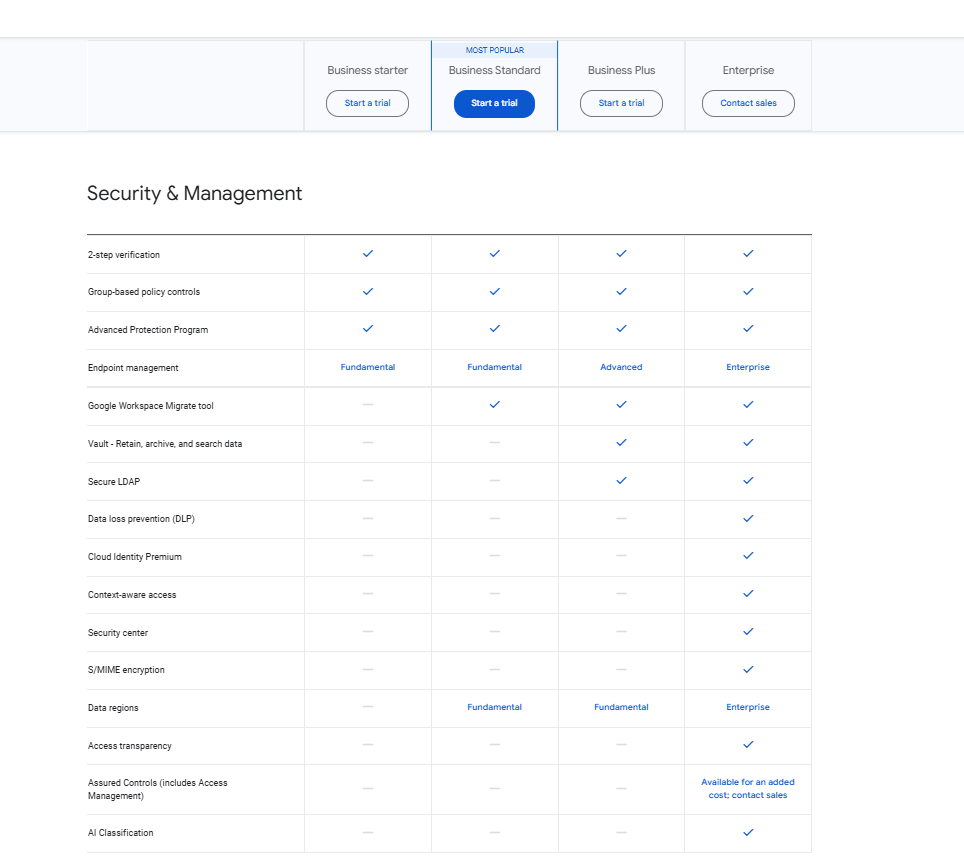
Image Courtesy – Google Workspace
Security in Slack
Discussed below are security features available under Slack plans:
| Security Features | Free | Pro | Business+ | Enterprise+ |
|---|---|---|---|---|
| Security | Yes | Yes | Yes | Yes |
| Data Encryption At Rest And In Transit | Yes | Yes | Yes | Yes |
| Two-factor Authentication | Yes | Yes | Yes | Yes |
| Session Duration | Yes | Yes | Yes | Yes |
| Native Device Management | Yes | Yes | Yes | Yes |
| Access Logs | – | Yes | Yes | Yes |
| Single Sign-on (SSO) | – | OAuth with Google | SAML-based | Supports Multi-SAML |
| Slack Enterprise Key Management | – | – | – | Add-on |
| Integration with Enterprise Mobility Management | – | – | – | Yes |
| Anomaly Event Response | – | – | – | Yes |
6. Slack vs Google Chat – Video & Audio Conferencing
Video and Audio Conferencing in Google Chat
Users can start a video meeting or call someone from Google Chat or Chat in Gmail.
| Features | Business Base | Business Starter | Business Standard | Business Enterprise |
|---|---|---|---|---|
| Meet video and voice Conferencing | 100 Participants | 100 Participants | 150 Participants | 1000 Participants |
| Meeting Length (Maximum) | 24 Hours | 24 Hours | 24 Hours | 24 Hours |
| US or International Dial-in Phone Numbers | Yes | Yes | Yes | Yes |
| Studio Sound Noise Cancellation | – | – | Yes | Yes |
| Adaptive Audio | – | – | Yes | Yes |
| Meeting Recordings Saved to Google Drive | – | – | Yes | Yes |
| Polling And Q&A | – | – | Yes | Yes |
| Moderation Controls | – | – | Yes | Yes |
| Hand Raising | – | – | Yes | Yes |
| Breakout Rooms | – | – | Yes | Yes |
| Attendance Tracking | – | – | – | Yes |
| In-domain Live Streaming | – | – | – | Yes |
Video and Audio-Conferencing Functionalities in Slack
When you need to connect by audio/video, you have options in Slack. You can start a huddle or visit the Slack Marketplace to install a third-party calling app of your preference.
Calling Apps for Slack
| Paid Subscription Required | Maximum Call Participants | Screen Sharing Available | External Calls Supported | |
|---|---|---|---|---|
| BlueJeans | Yes | 100 | Yes | – |
| Cisco Webex meetings | No | 200 | Yes | Yes |
| Dialpad | Yes | 2 | Yes | Yes |
| Fuze | Yes | 1,000 | Yes | Yes |
| Google+ Hangouts | No | 25 | Yes | – |
| GoToMeeting | Yes | 26 | Yes | – |
| join.me | Yes | 250 | Yes | – |
| Microsoft Teams Calls | Yes | 250 | Yes | – |
| RingCentral | No | 100 | Yes | Yes |
| Zoom | No | 1,000 | Yes | Yes |
Note that maximum call participants may differ depending on the subscription that you’re on with that service.
7. Slack vs Google Chat – File Sharing
Users can easily share files with teams directly in Slack or use Google Drive, Dropbox, Box, and OneDrive. You can easily search for particular Slack files. One can also give team context on the discussion about the document.
Users can attach files up to 200 MB from computer/mobile device or Google Drive directly to Google Chat messages. In spaces, users can view a list of files shared with the space, open files, and add them to Drive.
8. Slack vs Google Chat – Messaging Capabilities
In Slack, conversations happen through direct messages and channels. Users can send messages in real time. One can also schedule to send them later. Along with messages, you can attach files, emojis, audio clips, and video clips, etc. To mention a user, use the “@” symbol.
Users can send a direct message to a person or group of people in Google Chat. Along with your Google Chat messages, you can attach files, images, emojis, audio clips, and video clips, etc.
Image below shows messaging capabilities offered in Google Chat:
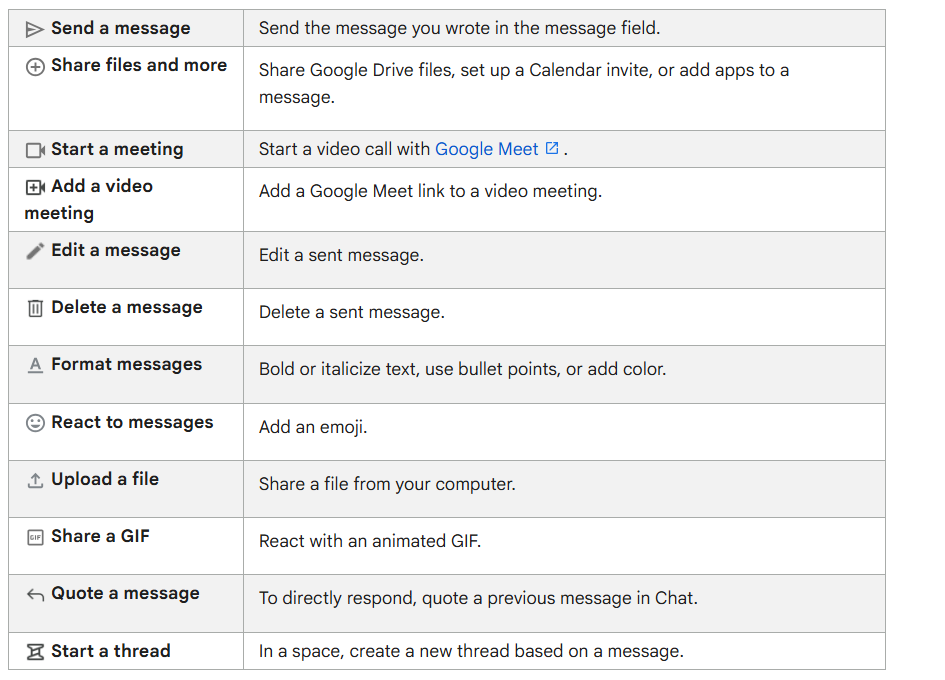
Image Courtesy – Google Workspace
CloudFuze’s Real World Case Study – Slack to Google Chat Migration
CloudFuze Migrate helped Vendasta transfer eight years’ worth of Slack data to Google Chat without any downtime. We helped them transfer more than 600 channels and 800 employees from Slack to Chat in under 2 weeks.
From segregating Channels to migrating over 1.2 million messages, our team ensured the project had no loopholes. Learn more about this case study here.
You can also find our Vendasta Case Study discussed in the customer stories section of Google Workspace.
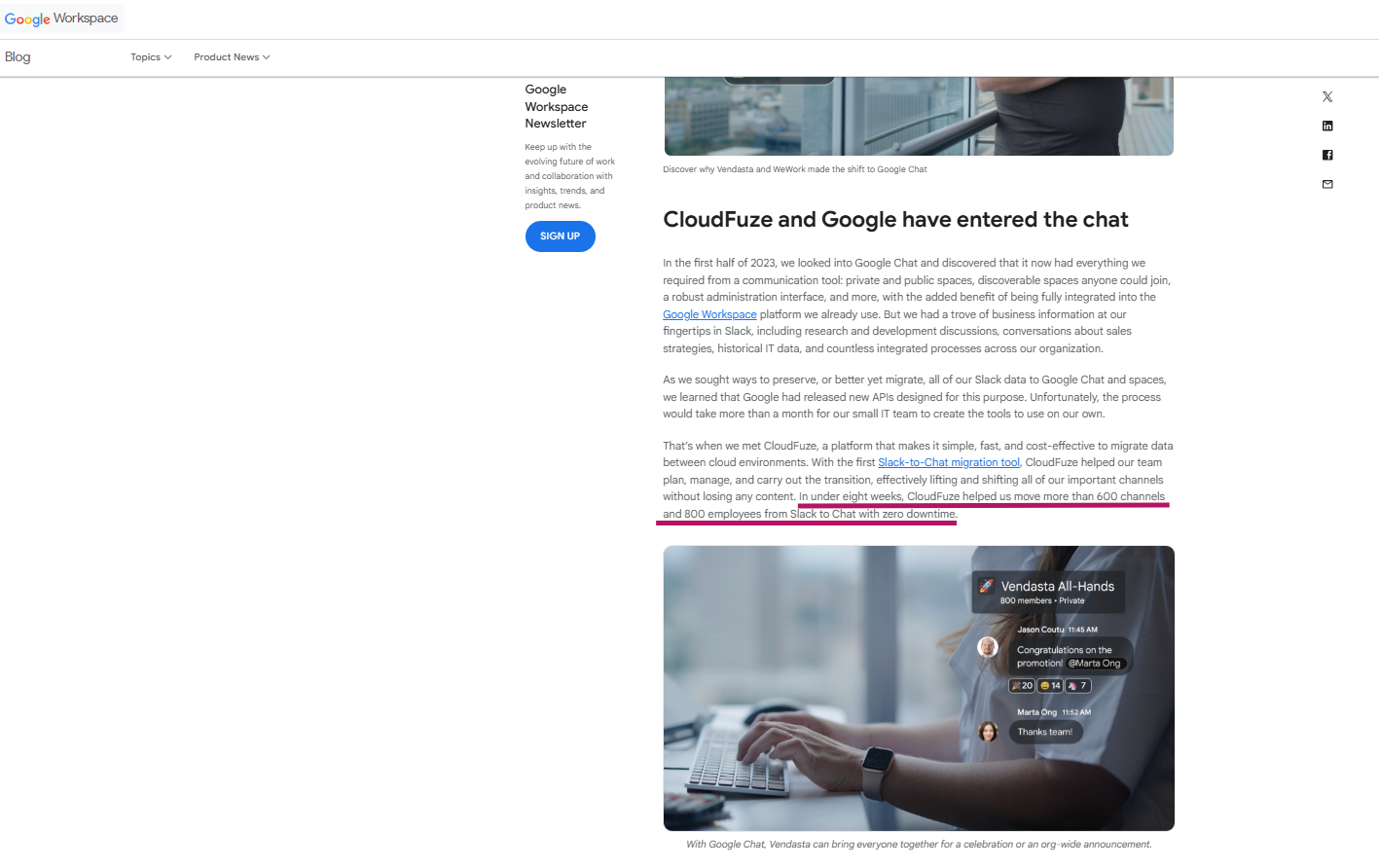
Image Courtesy: Google Workspace
Here’s a Video of our Slack to Google Chat Migration Tool:
Perform Secure and Successful Migrations with CloudFuze
Planning to switch from Slack to Google Chat? CloudFuze Migrate helps you transfer your Slack data and metadata to Google Chat with complete success.
Contact us today for a free and no-obligation of our migration tool.
Frequently Asked Questions
1. What metrics can be used to evaluate the effectiveness of Slack vs Google Chat in 2026?
In 2026, evaluating the effectiveness of Slack versus Google Chat focuses on how these platforms drive business outcomes rather than just message volume. Key metrics prioritize:
- AI integration
- Workflow automation
- Employee engagement.
2. How to set up Google Chat for team communication in 2026?
Businesses can have their teams aligned with collaboration spaces that support up to 500,000 members in Google Chat. Also, teams can integrate Google Chat for effective communication with Gmail, Calendar, Drive, Meet, Groups and more.
3. Best AI features in Slack and Google Chat 2026
Slack AI leads in workflow automation; Google Chat’s Gemini excels in native Workspace integration. Slack AI excels with intelligent conversation summaries, channel recaps, and Agentforce integration for CRM tasks.
Google Chat leverages Gemini for Workspace to provide smart responses, meeting synthesis, and seamless cross-app automation with Docs and Gmail.
4. Is Slack or Google Chat better?
Both platforms are excellent choices for team productivity and seamless communication. With Gemini AI expertise, Google Chat is a better option for companies when compared to Slack platform.
About the Author: Bhavani Asok



