
How Can Businesses Perform Office 365 Mailbox Recovery?
Microsoft 365 admins can recover and restore a user account from a deleted Office 365 mailbox. This approach is useful for IT admins in large organizations to make account retrieval smoother. In this blog post, we have covered how to restore mailbox in Office 365.
Key Takeaways:
How To Recover a Deleted Mailbox in Office 365?
IT admins can follow the steps below to recover a user’s deleted Office 365 mailbox.
- Go to Microsoft 365 Admin Center.
- Now click on Users–>Deleted Users.
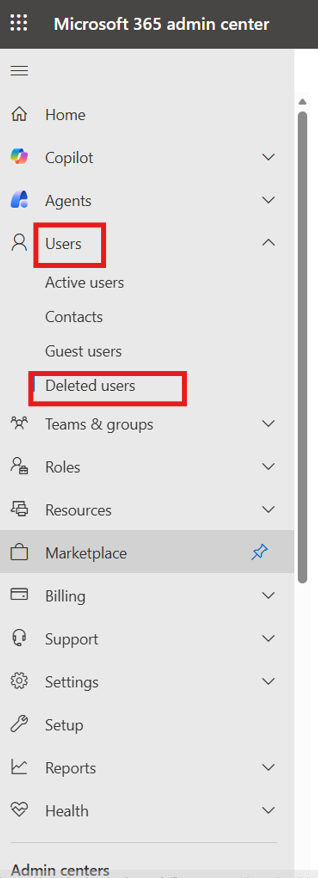
- Now select the user for whom you want to recover Office 365 mailbox.
- Click on the restore option. Now you can restore the deleted user’s mailbox.
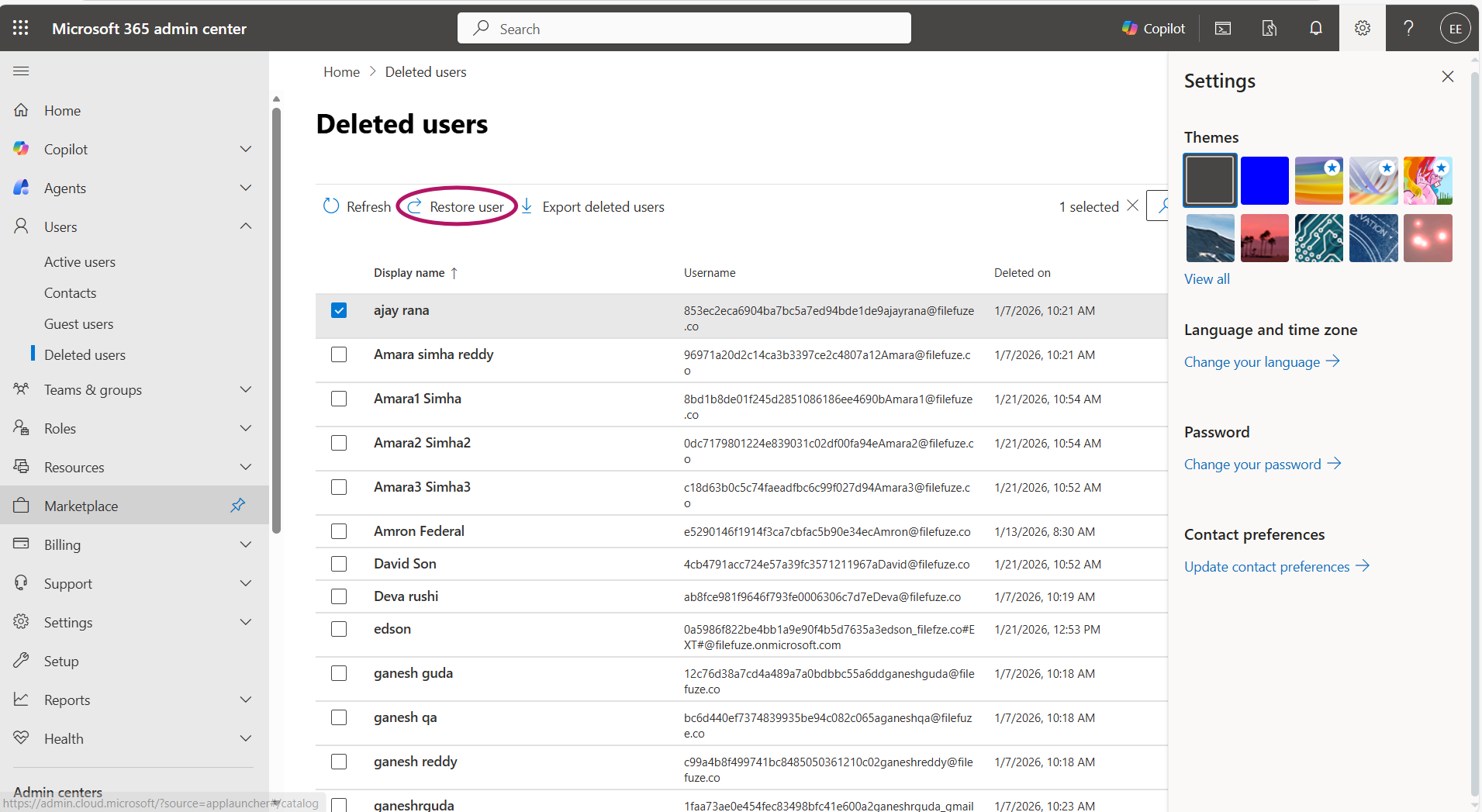


In the above image, the Office 365 mailbox gets restored for the user whose name is “ajay rana”. Administrators can also perform multiple user account restorations by enabling the checkboxes to the necessary user.
Migrating to Office 365?
If your enterprise is planning on migrating to Microsoft 365, CloudFuze Migrate makes it easy and secure. Our Office 365 migration tool ensures an accurate transfer of files, emails, and essential metadata with complete replication.
Schedule your free consultation today!
Frequently Asked Questions
1. What are the common challenges faced during Office 365 mailbox recovery?
Common challenges faced during Office 365 mailbox recovery:
- Issues in user mapping
- Downtime issues
- Technical expertise limitations
- High-volume email data
- Time constraints
2. What are common scenarios that necessitate Office 365 mailbox recovery for businesses?
Common scenarios that necessitate Office 365 mailbox recovery for businesses:
- Inaccurate transitions during migration
- Data retention for legal purposes
- Accidental mailbox deletions
3. What is Office 365 mailbox recovery and why is it important for businesses?
Office 365 mailbox recovery refers to retaining the mailbox after its deletion. It is important for businesses due to regulation policies, business workflow continuity, and restore back the necessary information etc.
4. How to migrate existing email to a new Office 365 mailbox?
Users can migrate existing email to a new Office 365 mailbox using a trusted Microsoft 365 migration tool. CloudFuze Migrate helps you migrate emails, necessary metadata from Gmail to Outlook, Outlook to Outlook with complete accuracy.



Leave A Comment