
Avoid User Confusions with Folder Structures After Migration
Maintaining proper folder structures after migration is critical for business continuity across platforms like SharePoint, OneDrive, and Google Drive.
Common challenges include deeply nested folders, broken file paths, user mapping issues, and destination platform limitations that disrupt how teams locate and access files.
CloudFuze Migrate preserves the original folder hierarchy accurately through auto mapping and CSV based mapping during migration.
Key Takeaways:
What Are Folder Structures After Migration and Why Are They Important?
Folder structures after migration refer to how files and folders are organized, mapped, and recreated in the destination platform (e.g., SharePoint, OneDrive, Google Drive) after migrating data from a source cloud platform such as Dropbox, Egnyte, or file servers.
Maintaining folder structures is important for the following reasons:
- Ensure business continuity without any issues
- Eliminate broken links
- Avoid file duplicates during transfer
- Eliminate unauthorized user access
What Are Common Pitfalls When Organizing Folder Structures After Data Migration?
Common pitfalls when organizing folder structures after migration:
- Presence of deeply nested folders
- Broken links and file paths
- Issues in user mapping
- Managing duplicate or obsolete files
- Limitations in the new destination environment.
What Are the Key Components of an Effective Folder Structure After Migration?
Below are the key components and best practices for maintaining folder structures after migration:
- Avoid deep nested folders. Have a file hierarchy with a maximum of 3–5 levels.
- Use standard naming conventions for files and folders.
- Ensure to allocate proper permission levels and role-based access to the right users.
- Remove duplicates and orphaned files to clear unwanted clutter.
- Use folder templates to maintain consistency across your team.
What Services Offer Automated Folder Structure Mapping During Migrations?
Advanced cloud migration tools such as CloudFuze Migrate offers enterprises with auto-mapping, CSV-based mapping to securely move files and folders.
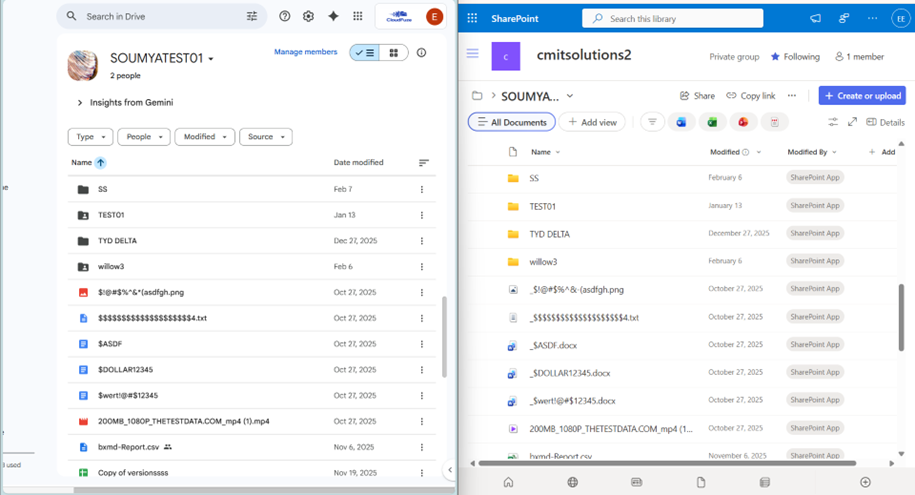
Here, we have discussed a small example of how CloudFuze Migrate helps in preserving the original file and folder hierarchy during migration from Google Shared Drive to SharePoint Online.
The image below shows how our tool ensures structural consistency between source and destination. Note that the complete parent-child structure, including nested folders and files, is accurately replicated in the destination document library.
Benefits of CloudFuze’s Folder Display Mapping
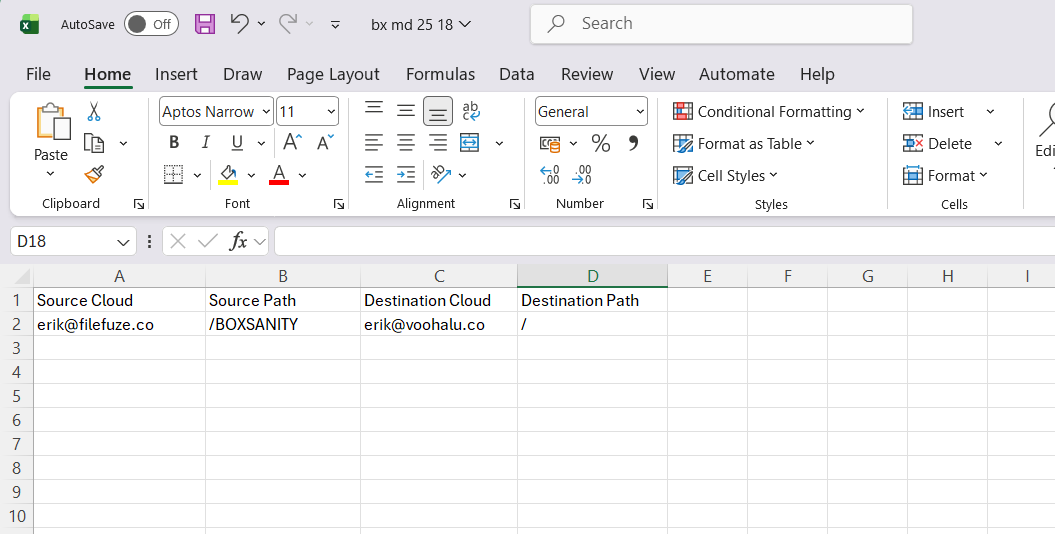
Folder Display mapping in CloudFuze is a critical feature for organizations seeking precision, scalability, and control in cloud data migration. By mapping structured input via CSV files, businesses can ensure accurate migration of files and folders while preserving hierarchy and eliminating manual intervention using folder display mapping.
For enterprises handling large volumes of data, CSV mapping is not just an option; it is a best practice for efficient, error-free migration.
The screenshot below shows the sample CSV file created by mapping specific users and the path where the data should be moved to when migrating from Box.
Watch Overview of Our Migration Tool:
Retain Folder Structures Intact with CloudFuze Migrate
With CloudFuze Migrate, businesses can ensure exact replication of folder structures post-migration in the destination platform. By preserving the existing folder structure and access rights, teams can easily locate their files and maintain collaboration workflows without disruptions.
Contact us for a free and no-obligation demo of our tool!
Frequently Asked Questions
1. What are best practices for reducing confusion with folder hierarchies’ post-migration?
Best practices for reducing confusion with folder hierarchies’ post-migration:
- Limit folders to 3–4 levels deep.
- Avoid spaces or special characters and ensure proper folder naming.
- Use folder templates and schedule regular audits.
2. Tools to automate permission mapping during cloud moves
CloudFuze Migrate helps you automate permission mapping during your cloud migration. Our tool offers a highly automated approach to user mapping with three specific strategies:
- Auto-Mapping
- CSV-Based Mapping
- Folder Display Mapping.
3. Common pitfalls in preserving SharePoint folder structures
Common pitfalls in preserving SharePoint folder structures:
- File/folder limitations in SharePoint
- Downtime while migrating high-volume data
- Broken links
About the Author: Bhavani Asok



