
Benefits and Limitations of Using Slack for Business
Slack helps businesses simplify team communication by bringing conversations, files, apps, workflows, and AI-powered assistance into one shared workspace. It also supports integrations with thousands of business apps, stronger security controls, search capabilities, and agentic workflows through tools like Agentforce.
However, Slack has limitations for free workspace users on message history, storage, app integrations, and large-scale channel management. Businesses can maximize Slack’s value by following best practices for Slack files, channels, notifications, automation, and integrations. Here, we discuss the benefits of using Slack for Business, limitations, and more.
Key Takeaways
What Is Slack?
Slack is a popular platform which brings people, processes, data, agents, and AI into one conversational interface. You can accomplish work in Slack using channels that help you connect with people easily. Slack makes it easy to connect with teams, manage daily tasks, and keep operations running.
Businesses can select from more than 2,600 enterprise-ready apps in the Slack Marketplace to integrate third-party services. You can also use Slack APIs to connect your own internal tools and customize Slack for your business.
Slack’s search capabilities and company directory allow you to connect with the right people based on programming language, topic or project. Slack channels support both asynchronous and real-time discussions, creating a living record of work that makes getting new developers up to speed swift and seamless.
5 Key Benefits of Using Slack for Business
Here are major benefits of Slack in the workplace:
1) Easy to Organize Tasks
In Slack, work happens in channels. You can build dedicated spaces for all the people, tools, and files that you need to get work done. Teams can be on the same page with other members with Slack notifications.
Slack also connects with your most used work tools. It is a rich interface for collaboration, transparent file sharing, and app integrations, while powering productivity with AI. File sharing, calls, clips and more are built into Slack along with real-time messaging for easier collaboration. Also, Slack brings internal, external teams together across locations, time zones and working styles instead of confining work to email siloed communication.
2) Improve Business Communication
Slack organizes conversations into channels. Here teams can come together in one place to share ideas, make decisions, and move work forwards. It allows teams to operate faster and stay in sync, wherever they are.
With Slack Connect (available with paid subscriptions), you can also improve how you communicate with partners, vendors, clients and more, by bringing your conversations directly into Slack.
3) Easier External Collaboration
With Slack Connect, one can send invitations to start direct message conversations with people external to your company. Once an invitation has been sent and accepted, you can begin to exchange messages with external users from another organization. People on the free subscription can still accept your invitation to start a direct message.
4) Enhanced Security
Slack delivers security at every layer, adhering to multiple compliance certifications, including SOC 2, SOC 3, ISO/IEC 27001 and more. Slack is GDPR, HIPAA and FINRA compliant. It is FedRAMP Moderate authorized.
Slack offers advanced security features, such as Enterprise Key Management. This allows for control over data encryption. You can also integrate your own security tools with Slack. Also, granular controls allow admins to customize security for each user.
5) Provides Effective Agent Responses
Slack data across channels, threads, and canvases enrich your connected, enterprise data sources. This results in effective agent responses and actions. When you add agents to Slack, customers can permit them to tap into the public conversational data in your organization’s Slack instance. Slack uses advanced Retrieval-Augmented Generation (RAG) techniques to give agents the context they need.
How Does Slack Integrate with Other AI And Agentic Products & Features?
When you deploy Agentforce in Slack, your team can collaborate with agents right where they’re already getting work done. Agents built with Agentforce can run directly in Slack channels, threads and DMs. This allows users to query data, get contextual responses, and trigger actions.
Through Slack enterprise search, Agentforce can access real-time messages, files and app data to generate accurate, up-to-date answers with the full context of your work. It also pulls in structured data from Salesforce and other systems, enabling agents to reason over both structured and unstructured information to assist users more effectively.
In addition to Agentforce, Slack has several agent apps such as Adobe Express, Asana, Box, Cohere, Workday and Writer, etc.
Limitations of Using Slack for Large Enterprise
Businesses using a Slack’s Free plan are bound to specific usage limits. Slack’s free version restricts use for storage and spam. You may be prevented from sending several messages or files in a short period of time.
Most notably, free workspaces are subject to a 90-day visibility limit, meaning teams can only view and search message and file history from the past three months. So, you can only view and search messages and files from the last 90 days. Once reaching the visibility limit, Slack starts to hide messages and files. You can add up to ten third-party or custom apps.
Also, Slack allows you to add up to 1,000 users to a channel at a time. For large groups, Slack recommends copying a list of full names or email addresses from another channel in Slack or another service.
The below image shows limitations in free plan and paid subscriptions in Slack.
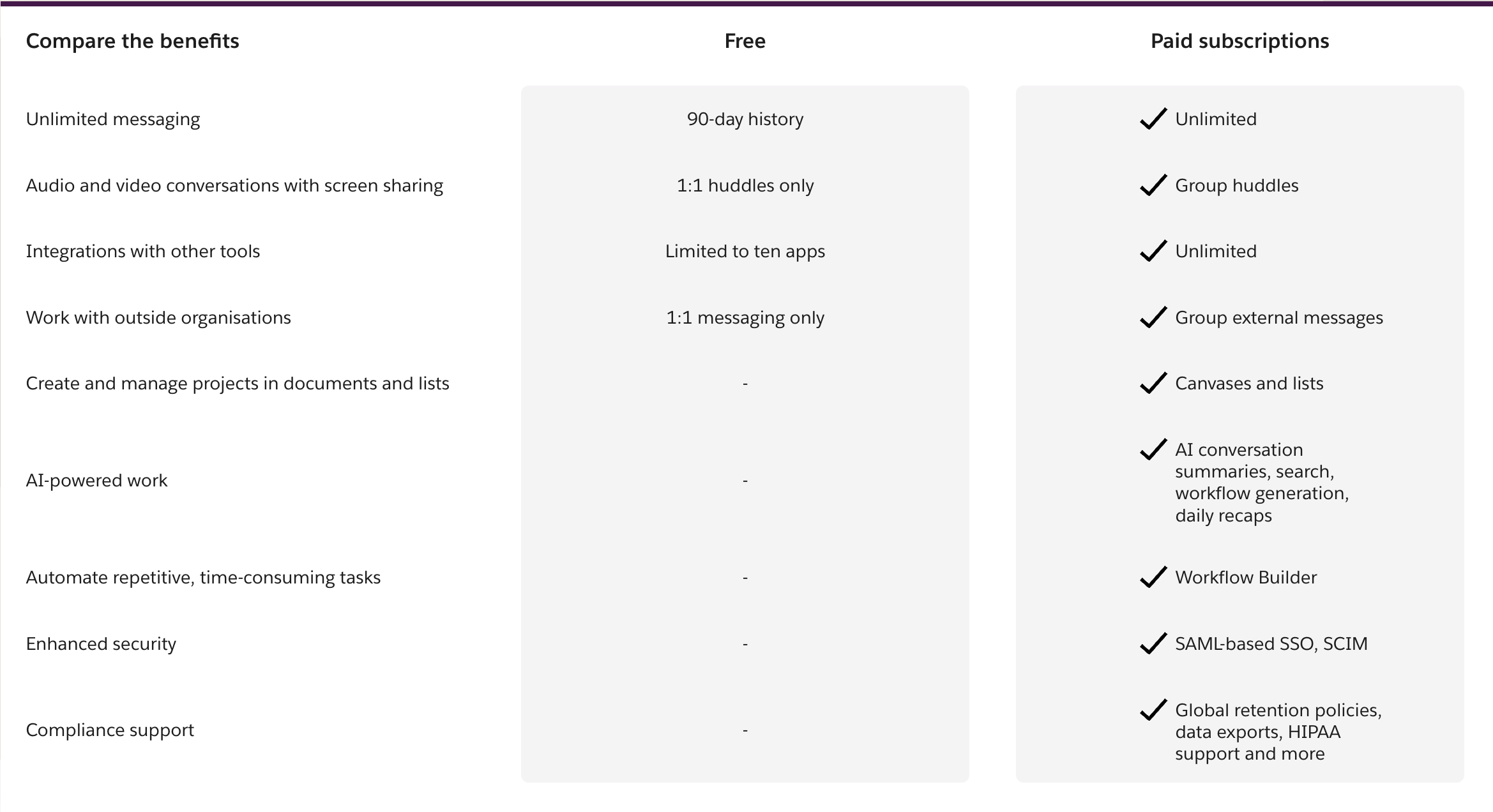
Image Courtesy – Slack
Note: Information is accurate as of September 2026 and may change as Slack updates its features, limits, and plans. Check Slack’s official documentation for the latest details.
Best Practices to Maximize Slack Benefits
Here are the major best practices to maximize Slack’s benefits:
- Use clear channel naming and archive inactive channels to prevent clutter.
- Manage notifications by customizing alerts and limiting @here/@channel use to reduce fatigue.
- Automate repetitive tasks with Workflow Builder to save time on approvals, updates, and onboarding.
- Integrate existing tools (Google Drive, Asana, Jira, CRM) to avoid app-switching.
- Use Huddles for quick check-ins instead of scheduling unnecessary meetings.
Planning to Migrate to Slack?
If you are planning to migrate to Slack and adopt the chat platform for your organization, we, at CloudFuze, can help you. We support migration to Slack from popular chat platforms like Teams.
Contact us today for a free and no-obligation demo of our tool.
Frequently Asked Questions
1. What are the main benefits of using Slack for business?
Slack has an intuitive interface, deep third-party app integrations, and built-in automation through Workflow Builder, which supports effective team communication.
2. Is Slack free for business use?
Slack offers a free plan suitable for small teams. But it comes with message history limits and limited integrations. Paid plans provide several advanced features, more app integrations, and advanced admin controls.
3. What are the biggest drawbacks of using Slack?
Common limitations include rising costs as teams scale, channel sprawl, and notification fatigue that is less robust than in other tools.
4. How does Slack compare to Microsoft Teams?
Slack is flexible with third-party integrations. Microsoft Teams offers deeper integration with Microsoft 365 apps. Today, most businesses prefer MS Teams over Slack.
5. What is the best Slack alternative in 2026?
Microsoft Teams and Google Chat are strong Slack alternatives for enterprises in 2026. Teams fits organizations using Microsoft 365, while Google Chat is ideal for Google Workspace users. CloudFuze helps enterprises migrate Slack channels, DMs, messages, threads, attachments, and other supported data to Teams or Google Chat with zero disruption.
About the Author: Bhavani Asok


