
Email Migration Rollback Planning: What IT Should Prepare
The riskiest assumption during the email migration of any enterprise would be assuming that a rollback scenario will never be required. In the case when one migrates thousands of mailboxes and huge volumes of business-critical email data measured in terabytes or petabytes, there could always be some unforeseen issues such as failed authentications, mail flow problems, or incorrect permissions.
Having a well-defined rollback strategy enables IT professionals to handle recovery in a controlled way. During a migration project, IT professionals should consider the email migration rollback planning mentioned in this article.
Key Takeaways
What is an Email Migration Rollback?
Email migration rollback is defined as the procedure of reverting the users, mail flow, authentication, and other migration-dependent services back to the source email environment if there is any critical problem identified during migration.
For example, if an organization migrates 50,000 Gmail mailboxes to Microsoft 365 and it finds out that a critical business application fails to authenticate against Microsoft 365 post-migration, then the migration rollback plan will help IT teams temporarily revert back to the existing configuration until the problem gets fixed.
In most enterprise migrations, it means the rollback to the source email environment while keeping the destination email environment data safe for future migration attempts.
10 Fail-Safe Email Migration Rollback Plan Strategies for IT Teams
1. Identify Rollback Criteria Before Email Migration Starts
Do not decide when to perform the rollback based on subjective opinions. Have some defined criteria in place.
Here are a few criteria that could lead to a email migration rollback:
- Critical failures in the mail flow
- Massive authentication failures with the mailboxes
- Critical data inconsistencies
- Loss of mailbox content
- Access control/permissions problems
- Migration tool failures
- Post-cutover failures of business-critical applications
- Security/compliance issues
- Outlook/mobile client failures
For instance, IT can set a threshold of greater than 5% of migrated users experiencing critical mailbox access issues as a cause for pausing migration and rollback assessment.
The actual threshold would be determined by business risk, migration scale, criticality of the users, and capability to recover.
2. Preserve the Source Environment
IT should keep the source environment available until IT has verified the success of email migration.
It is advisable not to start the process of deleting source mailboxes, removing source licenses, disabling accounts, removing migration permissions, removing forwarding/routing configuration and decommissioning source infrastructure immediately after the mailbox migration has been performed.
In case of large-scale mailbox migrations, IT should keep the source environment available for the agreed period after the last cutover. This period can range from several days to several weeks. It depends on the organization’s risk tolerance and compliance requirements.
3. Mail Flow Rollback Plan
Prior to cutover, define:
Source -> Internet -> Destination
and the reverse flow for email rollback.
Based on the nature of the email migration, this will require MX records, DNS configurations, mail connectors, transport rules, SMTP gateways, E-mail security platforms, forwarding rules, and routing configurations.
In case the destination environment is no longer accessible, IT needs to know precisely the configuration changes that are to be made to route the new messages to the source.
Important
Do not rely on memory or undocumented configuration changes. Capture the pre-migration state of all mail-routing components so they can be restored quickly.
4. Preserve Source Mailbox Data During Migration
For TB- and PB-scale Outlook to Gmail, Gmail to Outlook or Gmail to Gmail migrations, data preservation is especially crucial.
IT needs to preserve source mailbox availability, migration snapshots or reports, item-level migration logs, user mapping, folder mapping, permission mapping, failed items, and delta migration records.
With an email migration platform like our CloudFuze Migrate, it would be easier for IT departments to keep track of migration status, failed items, user mapping, and delta migration. It gives administrators the information needed to determine what has already moved before deciding on remediation or rollback.
5. Perform Pilot and Wave Migration
Perform pilot migration for groups including IT administrators, executives, mailboxes with heavy volume, shared mailboxes, big mailboxes, users from different business units, users with complicated workflows, and critical application accounts.
Verify the pilot before deploying migration to bigger groups of users. A phased deployment allows IT to get a much narrower radius of the impact if rollback becomes necessary.
6. Consider Identity and Authentication Rollback
The mailbox data is just one element of an email migration of an enterprise.
The rollback process will also include changes in the Microsoft Entra ID, Google identity services, SSO/MFA/conditional access/directory synchronization, user principal names, authentication policies, and application credentials.
For example, if users have already switched to Microsoft 365 for authentication, a simple change in the MX records will not help to revert to the old experience.
Document the current state of the authentication before email migration and define how it will be restored.
7. Think About Outlook and Endpoint Configuration
The rollback process will also influence end-user devices. When migrating Gmail to Outlook, IT may need to configure:
- Outlook profile
- Microsoft 365 credentials
- Mobile configuration
- Autodiscover settings
- Endpoint policies
- Email signatures
- Add-ins
Assess if rolling back the users to Gmail necessitates any changes to those configurations or if users will be able to work with the new client settings during the remediation of mailbox migration.
8. Outline the Data Reconciliation Strategy
The most challenging issue of rollback is data divergence.
Think about:
- 10,000 users get migrated.
- Users send/receive new emails in Microsoft 365.
- IT rolls them back to Gmail.
- Now there are new emails in both systems.
Which data is valid?
Your rollback strategy needs to outline the way you would reconcile the data that appeared after migration.
This could be done using delta migration back to the source, forwarding new emails, re-running the migration job, exporting newly created destination data, and having the destination as a secondary copy until the remediation.
In a large enterprise, this step should be defined in advance of cutover.
9. Set Up a Rollback Command Center
In a large migration, rollback should have a clear owner.
Define:
| Area | Owner |
|---|---|
| Migration platform | Migration team |
| Mail flow | Messaging team |
| Identity | IAM team |
| DNS | Network team |
| Security | Security team |
| Compliance | Governance team |
| User communication | Service desk |
| Executive escalation | Program leadership |
Also establish a communication plan covering when email migration rollback is triggered, who approves it, who executes it, how users are notified, how executives are updated, and when migration resumes.
10. Test the Rollback Before Production
A rollback plan that exists only in a document is not enough.
Run a controlled rollback simulation during the pilot.
Test:
- Stop migration jobs.
- Confirm source mailbox availability.
- Restore mail-routing configuration.
- Validate authentication.
- Test inbound and outbound email.
- Verify mailbox accessibility.
- Reconcile data changes.
- Validate critical applications.
- Confirm monitoring and logging.
- Communicate recovery status.
Measure how long each step takes. This gives IT a realistic Recovery Time Objective (RTO) for migration.
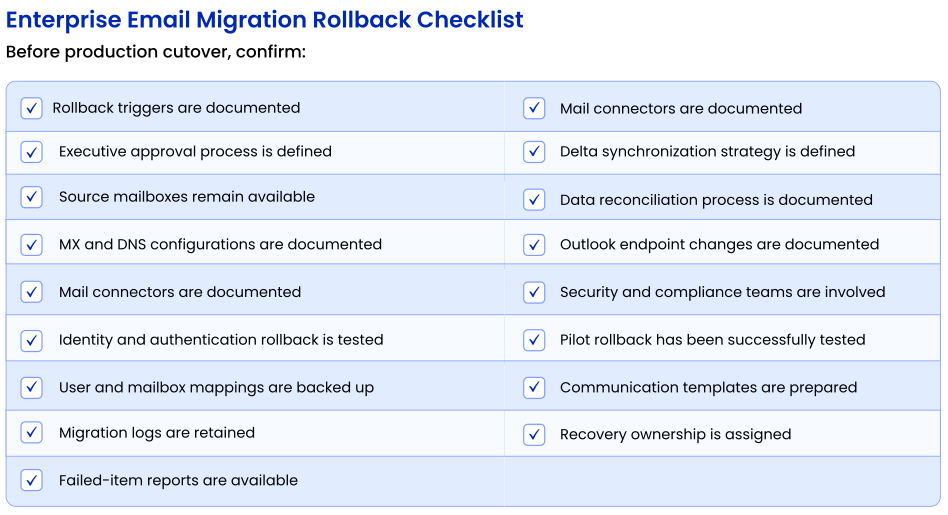
Consider Rollback in Your Email Migration Plan
The idea is not to anticipate failure but to be prepared for the possibility of encountering critical issues and be able to pause, reverse, reconcile, and resume without losing control of the migration environment.
Enterprises can leverage CloudFuze’s pre-migration assessment, pilot migration, bulk migration, incremental migration, detailed reports, and migration monitoring for a more controlled email migration process.
Are you planning to migrate emails in large numbers? Connect with CloudFuze migration experts and formulate an email migration and rollback strategy for your enterprise environment.
Frequently Asked Questions
1. What is email migration rollback?
Email migration rollback is the process of restoring the source email environment as the operational system when critical issues occur during or after migration.
2. Under what circumstances should enterprises initiate a rollback of their email migration process?
Email migration rollbacks should be considered in cases where certain threshold levels are reached, including mailbox access failures, mail flow failures, data integrity concerns, security issues, and application failures.
3. Should the source mailboxes be deleted after migration?
No. Source mailboxes must not be deleted until validation, reconciliation, and business sign-off have been completed.
4. How do enterprises ensure no data loss while rolling back the email migration process?
Ensure source environment availability, conduct incremental or delta migrations, log migration activities, and determine the process for reconciling messages and other data within mailboxes created after cutover.
5. Is it necessary to implement rollback steps in case of a phased email migration?
Yes. Phased migrations decrease failure impact, but each migration phase must have rollback criteria and steps defined.
6. What should be included in a rollback strategy from Gmail to Microsoft 365?
Mailbox data, mail flow, MX and DNS records, authentication, identity, Outlook configuration, application dependencies, permissions, data reconciliation, user communication, and migration tooling should be included in a rollback strategy from Gmail to Microsoft 365.
7. How can CloudFuze help with enterprise email migration?
CloudFuze supports enterprise email migration with capabilities such as pre-migration analysis, user mapping, bulk migration, delta migration, transfer monitoring, reporting, and migration support. These capabilities help IT teams maintain greater control and visibility throughout large-scale migration projects.
About the Author: Aayushi Raj



