
How to Discover AI Agents Across Google’s AI Ecosystem
To discover all Google AI agents, enterprises need a single inventory and a governance surface for viewing and managing agents, including Gemini Gems, Google AI Studio agents, Vertex AI (Gemini enterprise agent platform) agents, and Agentspace agents.
However, many teams are building AI agents faster than IT executives can track them. In fact, Gartner predicts that 40% of enterprise applications will include task-specific AI agents by the end of 2026. Therefore, to stay ahead of this agent explosion, SMBs and enterprises must have clear visibility into each and every agent they own, alongside their Google Workspace management initiatives.
This blog post shows you exactly how to discover Google AI agents across Google’s AI ecosystem.
Key Takeaways
What Are Google AI Agents in Google’s AI Ecosystem?
Google AI agents are autonomous, goal-driven digital workers built and operated across Gemini, AI Studio, Gemini Enterprise Agent Platform, and Agentspace. They use reasoning, external software tools, and your enterprise data to execute multi-step tasks independently.
For example, a Google AI agent can automatically check your customer information in your company’s database, update your sales opportunity record in Salesforce, and send a follow-up email to your customer without any human intervention.
Where Can You Find Google AI Agents Across Google’s AI Environment?
Google AI agents appear across several distinct surfaces, each with its own audience. The table gives you clarity over different agents running in Google’s AI environment:
| Surface | Who builds here | What lives here |
|---|---|---|
| Gemini Gems | Any employee | Custom no-code Gemini assistants |
| Google AI Studio | Developers | Prototype agents and API keys |
| Vertex AI Agent Builder (ADK, Agent Engine) | Engineering teams | Production, code-first agents |
| Agentspace / Gemini Enterprise | Business users | Employee-facing work agents |
Likewise, you can find Gems only in Gemini, AI Studio agents only in Google AI Studio, and custom agents in Vertex AI Agent Builder or ADK environments. There is no single, centralized native console for discovering and governing all Google agents created across Gems, Google AI Studio, and Agentspace.
What Makes Finding AI Agents Across Google’s Native Platform Difficult?
In the previous section, we discussed that Gems are managed within Gemini while Vertex agents and AI Studio agents are managed through separate interfaces. This kind of fragmented setup makes it difficult to maintain a unified inventory of all AI agents running within your enterprise.
Meanwhile, the governance and visibility challenge increases further when external agents connect through Google’s Agent2Agent (A2A) protocol.
Other challenges and risks of undiscovered agents in Google’s AI environment are:
- You can’t see all Google agents in one place.
- You have to switch between different consoles (Gemini, Vertex AI, or Google Agentspace) to know who owns what agent.
- Agent access to your enterprise data is difficult to track, and agents become orphaned when the owner leaves your enterprise, creating data security risks.
- Your teams can create agents (shadow AI agents) without IT knowing it.
- There’s limited visibility into your agent activity, and there is no named human accounting over your agentic actions.
How to Discover AI Agents Across Google’s AI Platforms in One Dashboard
The practical fix is a management and governance layer that sits above Google’s individual consoles and inventories every agent in one place.
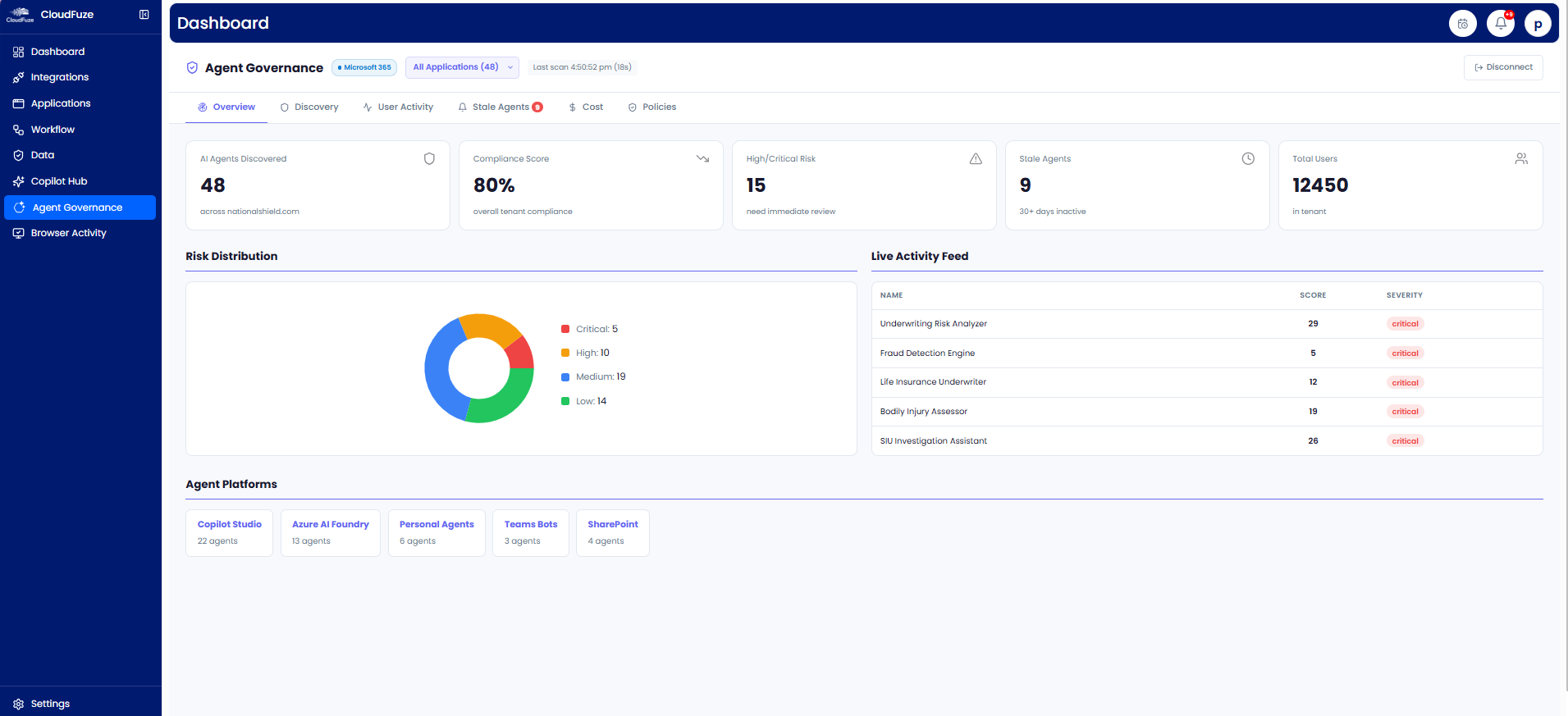
Our SaaS and AI app management platform, CloudFuze Manage, provides a centralized agent governance dashboard that automatically discovers and inventories AI agents across your enterprise environment, helping you answer critical agent management questions such as:
- Which AI agents are active today?
- Who owns this agent?
- What apps and data can this particular agent access?
- Which agents are unused or unmanaged?
- Where are over-permissioned agents creating security risks?
Beyond discovery, CloudFuze Manage helps SMBs, MSPs, and large enterprises continuously monitor and govern AI agents by enforcing AI security policies (e.g., orphaned-agent detection and stale-agent cleanup) on a single, user-friendly platform.
For Google’s AI environment specifically, it discovers, monitors, and governs all AI agents and assistants (Gemini Notebook) across your Google Workspace and the rest of your IT stack, so inherited data access and permission sprawl never go unnoticed.
Take a look at our agent governance dashboard:
Best Practices to Discover Google Agents
- Start by building a common inventory of all Google agents, not just Vertex. Make sure to include Gems, AI Studio agents, and Agentspace.
- Always assign a named human owner to each agent so accountability is never ambiguous.
- Review each agent’s data and OAuth scopes quarterly and tighten them to least privilege.
- Do not forget to track A2A (agent-to-agent) connections, since external agents extend your attack surface and expose your enterprise to AI security risks.
- Scan your agentic AI environment on a continuous schedule, because new agents appear rapidly within your enterprise.
Bring Every AI Agent Under One Roof with CloudFuze Manage
Google’s AI ecosystem is so powerful, but its agentic environment visibility is fragmented, with no centralized agent inventory.
Our platform, CloudFuze Manage, helps IT teams discover all Google agents, map every surface where agents live, and unify them into a single, governed view on a single platform, without switching between multiple tabs.
Try our free demo to see how CloudFuze Manage brings every Google AI agent into one place.
Frequently Asked Questions
1. What’s the difference between Gemini Gems and Vertex AI agents?
Gemini Gems are no-code custom assistants that anyone can build within their Gemini app. Vertex AI agents are built using Google ADK and other agent development tools, which are code-first, production-grade systems for engineering teams.
2. What is the easiest way to discover all Google AI agents?
The easiest way is to use a governance platform like CloudFuze Manage, which surfaces agents from Gems, AI Studio, Vertex AI, and Agentspace into a single inventory, including those IT never formally approved.
3. Can I search for AI agents built by other developers?
Yes. CloudFuze Manage shows agents created by any user across your connected Google and AI apps, each labeled with its owner and access level. So, IT managers, CTOs, and CIOs can view all their developer-built agents on a single, unified dashboard.
4. How to secure all Google AI agents that my company owns?
Start with complete discovery, then apply least-privilege access and a named owner to each agent. Also, employ SaaS and AI app management platforms like CloudFuze Manage, which flags over-scoped and inherited agent permissions and keeps audit-ready records.
5. How can I find orphaned AI agents in my Google Workspace?
Orphaned agents belong to departed employees or unowned user accounts. CloudFuze Manage links each agent to its owner and user lifecycle status, so every employee offboarding automatically surfaces agents for reassignment or removal.
About the Author: Rashmi Ramesh



