
Microsoft 365 Security and Defender Tools: Enterprise Guide
With many organizations adopting cloud-based productivity solutions, it is imperative to ensure the security of digital workspaces. Microsoft 365 provides organizations with an extensive array of built-in security tools that ensure the protection of data, identities, and devices in today’s workplace.
At its core, Microsoft 365 Defender is a comprehensive security solution that integrates advanced threat protection, identity security, and endpoint defense. Let’s take a look at some of the main Microsoft 365 security and Microsoft Defender tools designed to help organizations detect, prevent, and respond to cyberattacks.
Key Takeaways
What Is Microsoft Defender?
Microsoft Defender is a comprehensive security solution designed to detect, prevent, and respond to cyberattacks. It is an integrated solution that leverages Microsoft’s intelligence, AI, and analytics to improve an organization’s overall security posture.
Microsoft Defender is a suite of dedicated tools designed to work together seamlessly as a unified security ecosystem.
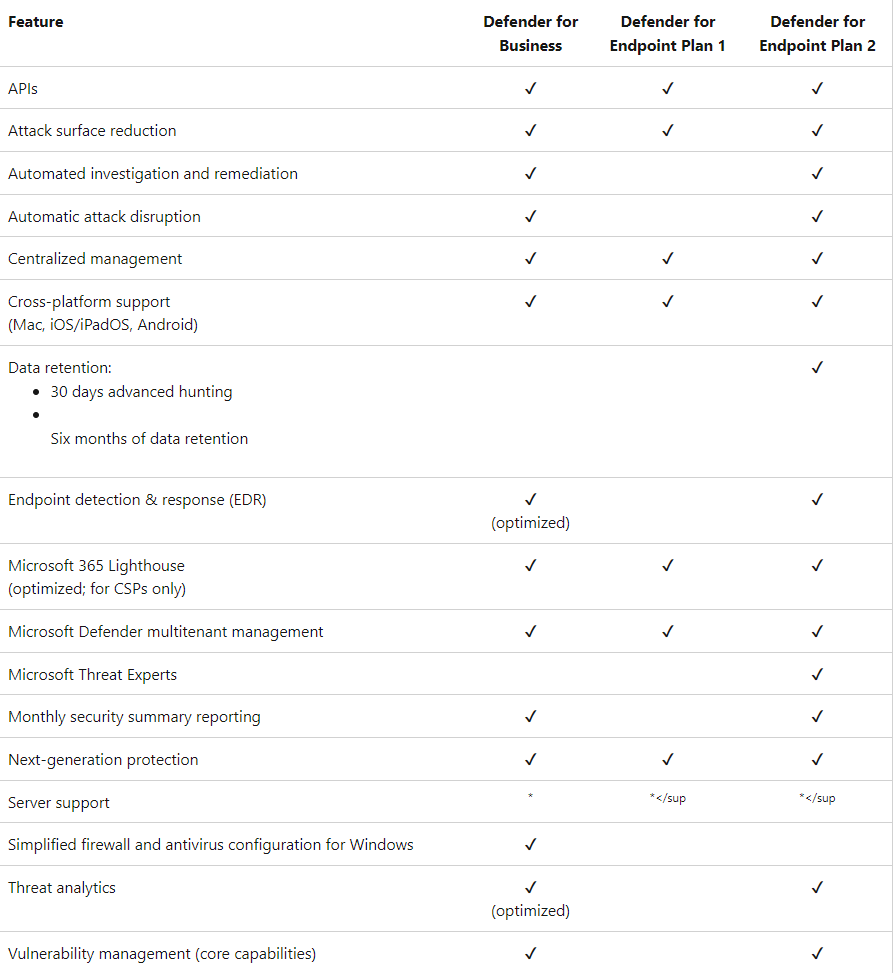
Key Microsoft Defender Tools
1. Microsoft Defender for Office 365
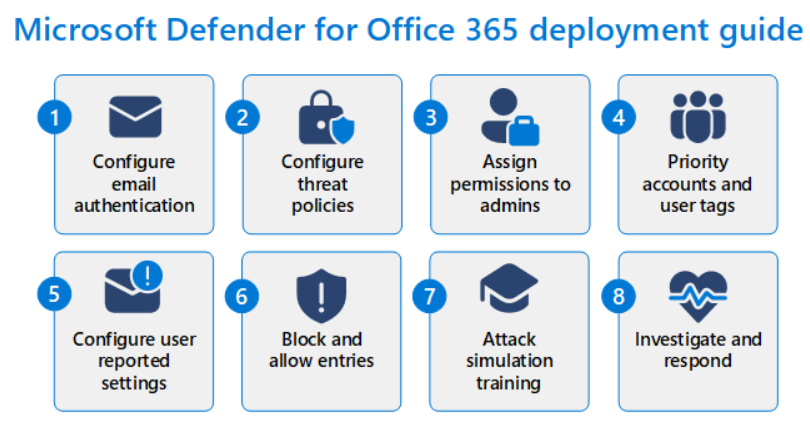
Microsoft Defender for Office 365 is designed to protect collaboration and communication channels, including Teams, SharePoint, OneDrive, and Outlook, against phishing, malware, and even sophisticated cyberattacks.
Key Capabilities
- The ability for users to report harmful messages in Teams has been expanded to Plan 1, enable the reporting of harmful chats and channel conversations.
- Blocking of malicious domains and sender addresses in Teams provides near real-time security through the Defender portal.
- Zero-hour Auto Purge (ZAP) is being made available for more licenses, enabling the automated removal of malicious messages even after they have been delivered.
Expansion of Licensing
Microsoft is expanding Defender for Office 365 Plan 1 licenses to more of the Microsoft 365 plans, including E3 tiers, in 2026. This will provide enterprise-level email security for more businesses without the need for higher-tiered licenses.
2. Microsoft 365 Defender (Unified XDR)
Microsoft 365 Defender is the unified XDR solution that provides a single platform for the integration of security signals from endpoints, identities, cloud applications, and email systems.
Latest Enhancements
- A centralized security portal at security.Microsoft.com has been made available, enabling the integration of several Defender solutions into a single platform for endpoint and Office 365 security.
- Incident correlation has been made available, enabling the creation of a single security incident from all related security incidents, including endpoints, identities, cloud applications, and Microsoft 365 workloads.
- Detailed intelligence reports are available with the release of the Threat Analytics feature.
AI-Driven Capabilities
Microsoft has introduced a unified AI security agent framework that integrates Microsoft Defender, Intune, identity, and compliance toolsets to enhance threat detection and response.
3. Microsoft Defender for Endpoint
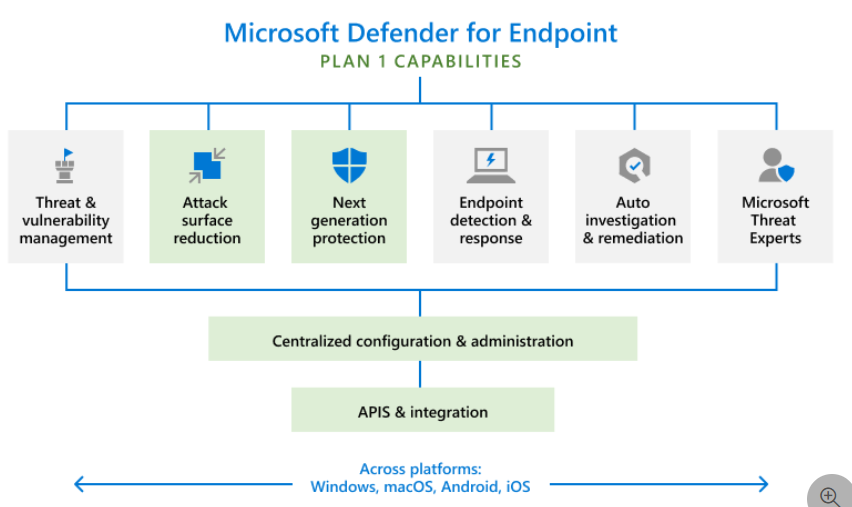
Microsoft Defender for Endpoint secures enterprise endpoints on Windows, macOS, Linux, iOS, and Android platforms using advanced features for endpoint security. The features are:
- Attack surface reduction
- Endpoint detection and response
- Automated investigation and remediation
- Threat intelligence integration
Integrated Enhancements
Defender for Endpoint is part of the Microsoft 365 Defender portal, providing security teams with a single pane of glass for threat investigation and response. Microsoft is enhancing Endpoint Privilege Management and Enterprise App Management for Defender for Endpoint E5 customers in 2026.
4. Microsoft Defender for Cloud Apps (CASB)
Microsoft Defender for Cloud Apps is a Cloud Access Security Broker (CASB), providing visibility and control over the SaaS applications an organization uses. The features are:
- SaaS app discovery and risk assessment
- OAuth app governance
- User activity monitoring
- Policy-based access controls
It also feeds these into the unified Microsoft Defender XDR platform. This enables security teams to connect various incidents that might involve more than one cloud service.
5. Microsoft Defender for Identity
Microsoft Defender for Identity is focused on protecting user identities. It is used to detect various identity-based cyber threats. It monitors both on-premises and cloud identity signals.
This enables it to detect various risks such as:
- Credential thefts
- Lateral movements between systems
- Privilege escalation attacks
All the alerts regarding identity are then sent to the incident management suite provided by Microsoft Defender.
6. Microsoft Intune Security & Endpoint Management
Microsoft Intune is still continuing to expand its capabilities in terms of improving endpoint management and device security.
New Updates
- Intune Remote Help for Secure Remote Support
- Intune Advanced Analytics for Enhanced Device Insight
- Additional Intune P2 Features Being Released to Microsoft 365 License Tiers
In addition to that, Microsoft is still continuing to improve diagnostic and troubleshooting capabilities. This is to help organizations reduce their support workload.
7. Security Copilot (AI Security Assistant)
Security Copilot is an AI-based security assistant. It is used to help security analysts respond to various cyber threats more efficiently.
Latest Updates
- Built on a unified AI agent framework that connects Microsoft Defender, Intune, identity, and compliance.
- Automatic rollout for Microsoft 365 E5 customers through 2026.
- Security Copilot is available for better investigation of security incidents, analysis of security alerts, and recommendations for responses.
8. URL Protection and Email Security Improvements
Microsoft is improving email and URL security for lower-tier versions of Microsoft 365. Key points:
- URL protection is available for Office 365 E1, Business Basic, and Business Standard.
- Improved phishing and URL protection with Defender for Office 365 Plan 1.
Best Practices for Fortifying Microsoft 365 Security
To use Microsoft Defender tools to their fullest potential, it is recommended that organizations take these best practices into consideration:
- Enable multi-factor authentication for all users
- Implement role-based access
- Monitor security alerts and reports
- Continue to educate employees about security
- Monitor SaaS applications and shadow IT usage
By doing so, organizations can take a proactive approach in maintaining a strong security posture.
Strengthen Microsoft 365 Governance with CloudFuze Manage
While Microsoft Defender tools provide robust protection against threats, many organizations still struggle with SaaS sprawl, shadow IT, and unmanaged app access areas that traditional security tools do not fully address.
This is where our SaaS and AI app management platform, CloudFuze Manage, helps strengthen Microsoft 365 governance.
With CloudFuze Manage, organizations can:
- Gain complete visibility into connected SaaS apps and OAuth access
- Detect and control shadow IT usage across the organization
- Automate user offboarding, including access revocation and data retrieval
By combining Microsoft Defender’s threat protection capabilities with CloudFuze’s SaaS governance and control, businesses can build a more complete and proactive security framework. Contact us today!
Get Started with Microsoft 365 Security and Defender Tools
With Microsoft 365’s robust security features, organizations can rest assured that their data, personnel, and devices are well protected. The added advantage of Microsoft Defender’s robust security capabilities enables organizations to implement a robust security framework that protects against cyberattacks.
Frequently Asked Questions
1. Do I need third-party antivirus if I already use Microsoft Defender for Endpoint?
In most cases, no. Microsoft Defender for Endpoint is a full-fledged Enterprise Endpoint Detection & Response solution that offers threat analytics, automated investigation, attack surface reduction, and endpoint protection. For most organizations, it is considered to be enough.
2. Which of the Microsoft 365 licenses gives you the advanced security features?
While the lowertiered versions include the basics of email and URL filtering, the more advanced security features of automated investigation, advanced hunting, endpoint privilege management, and cross-domain incident correlation are available with the E5 version of Microsoft 365 or with addon versions of Defender for Office 365 Plan 2 or Defender for Endpoint P2.
3. How does Microsoft Defender protect against phishing and malware?
Microsoft Defender for Office 365 uses machine learning, behavioral detection, and global intelligence to scan emails, attachments, and links for phishing and malware.
Suspicious emails can be blocked and quarantined before they reach the end user’s inbox. Additionally, automated investigation and response from Defender for Office 365 blocks malicious domains and removes emails from inboxes, even if they have already been received.
4. Can the Microsoft 365 Defender automatically respond to cyber threats?
Yes. The Microsoft 365 Defender has automated investigation and response that can detect suspicious or malicious activity and respond accordingly without the need for any further input. The actions that can be taken include:
- Isolate devices that have been compromised by the cyber attack
- Block malicious IP addresses or domains
- Remove infected files from the system
- Disrupt the active attack chain
About the Author: Aayushi Raj



