
Enterprise Guide: Managing SaaS Applications in Remote Teams
In 2026, distributed teams remain widespread and are more likely to persist in the coming years also. According to Backlinko’s December 2025 research on remote work, 22.5% of US employees worked remotely.
To stay up to date and smart in this remote-first workspace, enterprises like yours need SaaS & AI app management software that manages SaaS applications for remote teams as well as hybrid teams in a centralized dashboard.
This guide explains how large enterprises can strengthen their remote team operations with CloudFuze Manage.
Key Takeaways:
Importance of Managing SaaS Applications in Remote Teams
In a large enterprise, as your teams work remotely, you deal with more SaaS & AI tools, increased user login activity, and complex user access needs.
When enterprises like yours don’t centrally manage your SaaS & AI applications, shadow IT, data security gaps, and productivity issues begin to outgrow.
When you don’t manage your enterprise SaaS environment,
- Your enterprise’s data protection weakens because you can’t enforce role-based app access control.
- You let unauthorized tools spread across your enterprise’s remote workforce.
- You slow down your employees’ onboarding and offboarding, creating inconsistent user access and security gaps in your enterprise.
- Your IT teams delay your virtual teams from getting access to the tools they need.
- Your CIOs lose control of your SaaS ecosystem, making your enterprise less secure and your teams less productive.
By managing your SaaS applications effectively, you can ensure your remote teams stay productive while your enterprise stays secure.
Benefits You’ll Gain Using SaaS Management Software for Remote Teams
When you rely on spreadsheets and manual steps for managing SaaS applications in remote teams, your enterprise’s IT tasks become extremely slow and fragmented. Instead, when you use dedicated remote team management software like CloudFuze Manage, you can:
- View and govern your enterprise’s entire distributed team SaaS ecosystem in one dashboard.
- Automate user provisioning, role changes, and deprovisioning across your internal teams.
- Track your enterprise’s virtual teams’ activity, SaaS app usage trends, and access your employees’ behaviour.
- Optimize unused or duplicated licenses throughout your enterprise.
- Reduce your IT team’s workload while boosting your enterprise’s SaaS operational speed.
- Enforce consistent security policies across all cloud applications within your enterprise.
How SaaS-Based App Management Differs from Manual App Management
This table differentiates how SaaS-based application management differs from manual management.
| Manual App Management | SaaS-Based App Management |
|---|---|
| Missed user access revocations during employee offboarding. | SaaS user automation prevents human error during user account deprovisioning. |
| Inconsistent app user permissions. | Centralized SaaS app control improves your accuracy. |
| No visibility into your SaaS usage. | Role-based app policies ensure consistent user access. |
| Higher SaaS security risks due to manual audits. | Automated SaaS audit trails strengthen your enterprise’s compliance posture. |
Best Practices for Managing SaaS in Large Remote Enterprises
To scale your large enterprises securely, you need to follow these tips:
1. Centralize Your SaaS & AI App Management
Use a SaaS management tool like CloudFuze Manage to manage all your enterprise’s SaaS and AI apps
2. Standardize Role-Based Permissions
Map your users’ work roles to app entitlements to keep permissions clean and consist
3. Automate Your Enterprise’s User Lifecycle
Use no-code user workflows to automate onboarding, role transitions, and offboarding.
4. Monitor SaaS Usage & Optimize Spend
Track user inactivity, app adoption, and feature usage to reduce waste and optimize your SaaS spend.
5. Control App Adoption with Approved catalogue
Build an approved app catalogue and pre-approved remote work tools to limit app sprawl.
6. Strengthen SaaS Governance with Regular Audits
Conduct regular SaaS audits to refine and optimize your enterprise’s SaaS environment.
These practices help you create a safer and more efficient SaaS environment, even with a globally dispersed workforce.
How CloudFuze Manage Supports Enterprise-Grade SaaS Application Management
Our SaaS & AI app management platform, CloudFuze Manage, gives you a centralized platform to control SaaS user access, monitor users’ app activity, and automate user workflows across your enterprise’s entire remote workforce.
With our platform, you can:
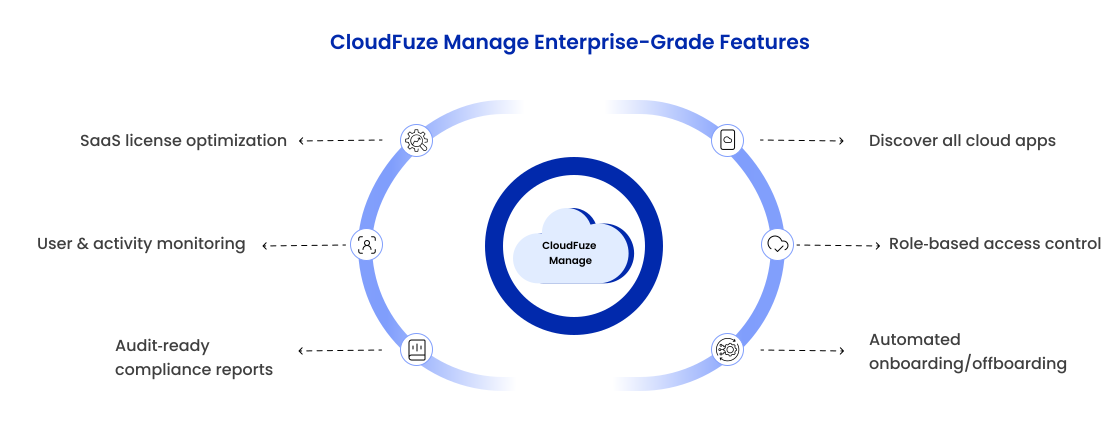
- Discover all cloud apps (both SaaS & AI applications) used across your enterprise.
- Manage app permissions with role-specific user access control.
- Automate user onboarding and offboarding workflows across your teams.
- View and optimize SaaS license usage enterprise-wide.
- Monitor virtual teams’ activity and SaaS user access behaviour.
- Generate audit-ready reports for compliance and security reviews across your enterprise.
By using our platform, CloudFuze Manage, you can streamline your enterprise’s SaaS management without increasing complexity for its IT teams.
Achieve 360° Control Over Your SaaS & AI Apps with CloudFuze Manage
When you manage your enterprise’s SaaS applications in remote teams with our SaaS & AI app management platform, CloudFuze Manage, you can gain 360-degree visibility of your enterprise’s tech environment, SaaS & AI user automation, and complete control over your SaaS stack.
Book your free demo to see how enterprise-level SaaS & AI app management works in CloudFuze Manage!
Frequently Asked Questions
1. What are the top tools for managing SaaS and AI applications in remote teams?
With our SaaS & AI app management, CloudFuze Manage, you can manage remote tools such as:
- Identity providers (Okta, Entra ID)
- Collaboration suites like Microsoft 365 or Google Workspace
- AI and data analytics tools like Gemini, Cursor, and Tableau & over 140 SaaS & AI apps and data governance tools.
2. Does CloudFuze Manage support only enterprise-level SaaS management?
No, you can use our platform, CloudFuze Manage, whether you’re a small, mid-sized, or large enterprise. Our platform grows with your organization’s needs.
3. Can CloudFuze Manage help you manage SaaS app permissions in one dashboard?
Yes. You can manage SaaS user roles, permissions, and app assignments for remote teams through a single centralized interface on our platform.
About the Author: Rashmi Ramesh


