
Cloud File Migration Best Practices for Enterprises in 2026
Cloud file migration in 2026 is a fundamental building block of enterprise digital transformation. As enterprises rapidly adopt next-generation collaboration solutions such as Microsoft SharePoint, Google Drive, and Dropbox, cloud file data migrations are rapidly evolving from being isolated IT projects to being enterprise-wide initiatives.
At CloudFuze, we assist enterprises in undertaking complex cloud-to-cloud migrations, such as SharePoint to Google Drive, Dropbox to Microsoft 365, or inter-tenant consolidations, while maintaining complete fidelity of files, permissions, and metadata.
The best practices outlined below represent what leading IT teams are doing to achieve success with enterprise-wide cloud file transfer in 2026.
Key Takeaways:
Why Cloud File Migration Best Practices Matter in 2026
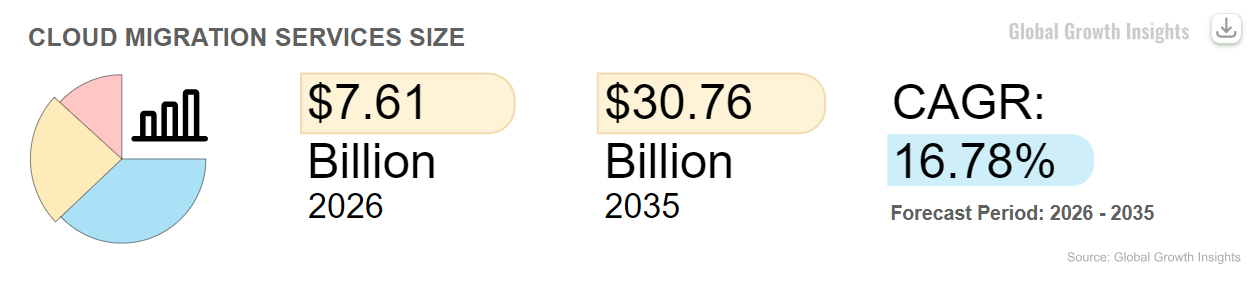
Cloud file migration is a business-critical need. As the global cloud migration services market is predicted to reach approximately $7.6 billion in 2026, with automation used in over 50% of enterprise migration engagements, the pace and volume of cloud migrations have never been higher.
Yet, with this rapid growth comes danger. Enterprises that migrate files between cloud platforms such as SharePoint, Google Drive, and Dropbox without established cloud migration best practices are likely to encounter issues such as data deletion, permission inconsistencies, regulatory issues, and unscheduled downtime.
Adherence to structured and automation-enabled cloud file migration best practices is critical to guaranteeing secure, auditable, and uninterrupted cloud file migrations in 2026 and beyond.
8 Must-Follow Cloud File Migration Best Practices for Enterprises in 2026
1. Define Enterprise Goals & Stakeholders Before You Migrate Files
Before embarking on cloud file migrations, it is necessary to consider migration as a strategic initiative rather than a one-time activity of the cloud migration process.
Cloud File Migration Best Practice Actions:
- Establish business goals (compliance, consolidation, and cost savings).
- Involve stakeholders from security, compliance, and business teams.
- Establish measurable success criteria (permissions accuracy, timeline, and zero downtime).
2. Analyze & Clean Data Before Migration
Enterprise ecosystems may have terabytes (or petabytes) of data spread across platforms such as SharePoint, Google Drive, and Dropbox. Migrating data without analysis can lead to the migration of unnecessary, unused, or orphaned data.
Cloud File Migration Best Practice Actions:
- Identify files and ownership across platforms.
- Mark or archive unused files before migration.
- Exclude unnecessary files and non-critical data from the migration scope.
This helps to minimize risks and accelerate enterprise cloud data transfer processes, which are also business-centric.
3. Preserve Permissions, Metadata & File Structures
Migrations that do not consider permissions and metadata can result in the disruption of collaboration and compliance. The best practice is to preserve all of the following during cloud file data migration:
- SharePoint permissions and groups
- Google Drive folder structures and access links
- Dropbox sharing roles and version history
Large-scale cloud migration tools automatically replicates these settings when migrating distributions of files across platforms (e.g., Dropbox to SharePoint, Google Drive to OneDrive).
4. Use Delta (Incremental) Sync to Capture Ongoing File Changes
In enterprise cloud file migrations, data is not static. Users continue to generate, modify, and share files during the migration period. Tools that support delta (incremental) migration are critical to detect and sync new or changed files after the initial migration baseline.
Delta migration ensures:
- Successful synchronization of delta file changes until the final cut-over
- Accurate detection of new files, modifications, and permission updates
- Minimized reprocessing of already migrated files and efficient transfer
These are essential when migrating from active environments such as Dropbox to Google Drive, SharePoint Online to another tenant, Google Shared Drives to OneDrive (Microsoft 365), or other Microsoft 365 and Google cloud file transfer scenarios, where collaboration needs to be maintained without breaks in data.
5. Employ an Enterprise Migration Platform (Avoid Manual Scripts)
Manual scripts or simple cloud migration tools might be sufficient for small migrations, but enterprise cloud migrations involving millions of files must be automated.
Best Practice Actions:
- Employ enterprise migration platforms capable of parallel processing, retries, and high volumes.
- Automate permission mapping from source/destination services.
- Utilize APIs and connectors specifically built for cloud-to-cloud migrations.
Cloud migration automation is currently employed in more than half of enterprise projects, which is a testament to its importance in project success.
6. Verify with Audit-Ready Reporting
Migration is not finished when files are transferred; it is finished when it is verified.
IT Teams must verify:
- File counts from source to destination
- Permission and access equivalence
- Metadata retention
- Delta sync completion and incremental changes
Audit-ready reporting is essential for compliance and governance across the full cloud migration process.
7. Address Security & Compliance from Day One
Migrating to the cloud involves sensitive or regulated data. New cloud file migration best practices dictate:
- Encrypt data in transit
- Keep detailed logs
- Verify compliance policy post-migration
- Alignment with regulatory requirements (GDPR, SOC 2) for cloud data
Given the prevalence of hybrid and multi-cloud architectures, cloud security needs to be integrated into cloud file data migration planning from day one, rather than being an afterthought.
8. Optimize Post-Migration Governance
Enterprises must change their approach to managing cloud file data after cloud file migration:
- Implement retention policies for Teams, SharePoint, Dropbox, and Google Drive
- Implement common access and sharing policies
- Archive unused or legacy files
Cloud migration helps to restructure and normalize collaboration platforms for the long term.
How CloudFuze Helps with Secure Enterprise Cloud File Migration
CloudFuze Migrate is an enterprise cloud file migration tool that securely moves files from one cloud service to another while maintaining data integrity, permissions, and compliance.
Our cloud file transfer service is designed for enterprise-level cloud file migrations of SharePoint, OneDrive, Google Drive, Dropbox, Box, and Microsoft 365 tenants, where downtime, data loss, or compromised access is simply not acceptable.
Key Cloud File Migration Features of CloudFuze
- Supports cloud-to-cloud file migration between 40+ cloud storage providers without downloading files locally or affecting users
- Preserves all data fidelity features, such as files, folders, versions, metadata, timestamps, and ownership
- Migrates permissions and sharing accurately, including internal and external access at root, subfolder, and file levels
- Supports one-time and delta (incremental) sync, continuously migrating new and changed files until final cut-over
- Supports cross-tenant OneDrive and SharePoint migration, allowing tenant consolidation and post-acquisition integration
- Provides enterprise-level dashboards and audit-ready reporting for validation, governance, and regulatory purposes
- Scalable migration engine capable of migrating millions of files and large-volume enterprise workloads (petabytes of data)
Whether it’s tenant consolidation, SaaS cost optimization, or post-acquisition integration, CloudFuze helps enterprises perform secure and scalable file migrations with no user impact.
Enterprise Adoption Trends for File Collaboration
Enterprise adoption rates indicate the strategic migration to the cloud:
- More than 94% of enterprises use cloud services in some capacity, making cloud migration a mainstream enterprise skill.
- 85%+ of all SharePoint implementations are now cloud-based, with SharePoint Online as the new standard for new environments.
These adoption rates indicate that enterprises are not only migrating but also transforming the way they manage file data in the cloud.
Start Cloud Migration with CloudFuze
By following these best practices, you can ensure a successful migration and help achieve your long-term governance objectives on platforms such as SharePoint, Google Drive, and Dropbox.
If you are embarking on a next-generation cloud file migration project, the difference between disruption and transformation may depend on the tools and best practices you choose to adopt.
Frequently Asked Questions
1. What are the most common pitfalls in enterprise cloud file migration?
The cloud file data migration pitfalls include permission issues, loss of file versions, failed sharing links, and downtime. These can be overcome by pre-migration analysis, accurate user mapping, and automated cloud file migration solutions that verify the process.
2. What are the best tools for enterprise cloud file migration in 2026?
CloudFuze Migrate is one of the top enterprise cloud data migration solutions that enables enterprises to migrate large files from SharePoint, Google Drive, Box, and Dropbox to other platforms while maintaining permissions, metadata, file versions, and audit trail reports.
3. How should enterprises estimate costs for large-scale cloud file migrations?
The cost of migration depends on the volume of data, number of users, file versions, permissions, and time. Redundant data removal and the use of automated migration solutions can minimize costs.
4. What are the compliance and security best practices for cloud file migration?
Best practices include least-privilege access, encrypted cloud file transfers, audit logging, metadata preservation, and post-migration permission validation across SharePoint, Google Drive, and Dropbox.
About the Author: Aayushi Raj



