
How to Move Google Workspace Hyperlinks to Another Workspace
An important aspect of a Google Workspace tenant migration involves retaining embedded hyperlinks within Docs, Sheets, Slides, and Shared Drives that should not break in the destination tenant after migration.
If you are planning a Google Workspace tenant-to-tenant migration and are curious about the ways CloudFuze makes the process of data transfer with Google Workspace hyperlinks secure for you, you are at the right place.
In this blog post, we will explain what makes it crucial to preserve hyperlinks and how we at CloudFuze successfully carry out a secure Google Workspace hyperlinks migration with Hyperlink Fixer.
Key Takeaways:
Why Preserve Hyperlinks When Moving Google Workspace to Another Workspace?
It is vital to preserve hyperlinks during any Google Workspace migration to another Workspace since Google Drive/Shared Drive uses specific file identifiers based on the source tenant to create its links.
When performing a Google Workspace cross-tenant data transfer, files are recreated in the destination Workspace. This process generates new file IDs. Subsequently, the hyperlinks within the document continue pointing to the source tenant, causing broken links post-migration.
In large organizations, this will impact:
- Interlinked compliance documentation
- Cross-department SOP references
- Engineering documentation repositories
- Financial spreadsheets referencing a shared file
- HR and Legal Documents stored in Shared Drives
In particular, within a multi-tenant environment for Google Workspace, especially during mergers, acquisitions, and consolidations, dependencies that are hyperlinked may be heavily integrated across business units.
When not managed appropriately, broken hyperlinks can disrupt workflows, delay projects, and compromise compliance.
Why Hyperlinks Break during Google Workspace Tenant-to-Tenant Migration?
Embedded links usually break during migration due to:
- Changes in File IDs for Google Drive/Shared Drive Files
- Shared Drive restructuring
- Shared Drive restructuring
- Domain name changes
- Permission Remapping Differences
Even if user data and files are migrated successfully, hyperlinks embedded within documents are not automatically corrected unless a dedicated hyperlink rewriting mechanism is used.
For enterprises that have access to tens of thousands of interlinked documents, manual correction is not feasible.
To ensure that embedded links do not break, it is essential to locate and fix these broken links during the Google Workspace migration process through an advanced migration tool like CloudFuze’s Hyperlink Fixer tool.
Our Hyperlink Fixer tool eliminates broken links during cloud migrations by automatically detecting, updating, and validating shared hyperlinks in the destination environment, ensuring seamless access and complete data integrity post-migration.
Transfer Google Workspace Hyperlinks Securely with CloudFuze’s Hyperlink Fixer Tool
We at CloudFuze eliminate hyperlink migration challenges with our Hyperlink Fixer tool, which is specially designed for large-scale tenant to tenant Google Workspace hyperlink migration.
Our Advanced Migration Engine:
- Detects embedded Google Drive hyperlinks within Docs, Sheets, Slides, and Shared Drives.
- Create a source-to-destination file ID mapping index during the migration process.
- Automatically rewrites any hyperlinks using new file IDs within the destination tenant.
- Verifies permissions to guarantee accessibility of the link after migration.
This ensures hyperlinks remain functional after moving Google Workspace to another Workspace.
CloudFuze Hyperlink Fixer Workflow to Move Google Workspace Hyperlinks to Another Workspace
| Stage | What CloudFuze Does |
|---|---|
| Discovery | Scans Docs, Sheets, Slides, Shared Drives for embedded links |
| Mapping | Builds source-to-destination file ID index |
| Rewriting | Automatically updates hyperlinks with new IDs |
| Permission Check | Validates access rights in target tenant |
| Reporting | Generates CSV hyperlink mapping report |
| Validation | GConfirms zero broken internal links |
Here’s How We Move Google Workspace Hyperlinks to Another Workspace Without Breaking Links
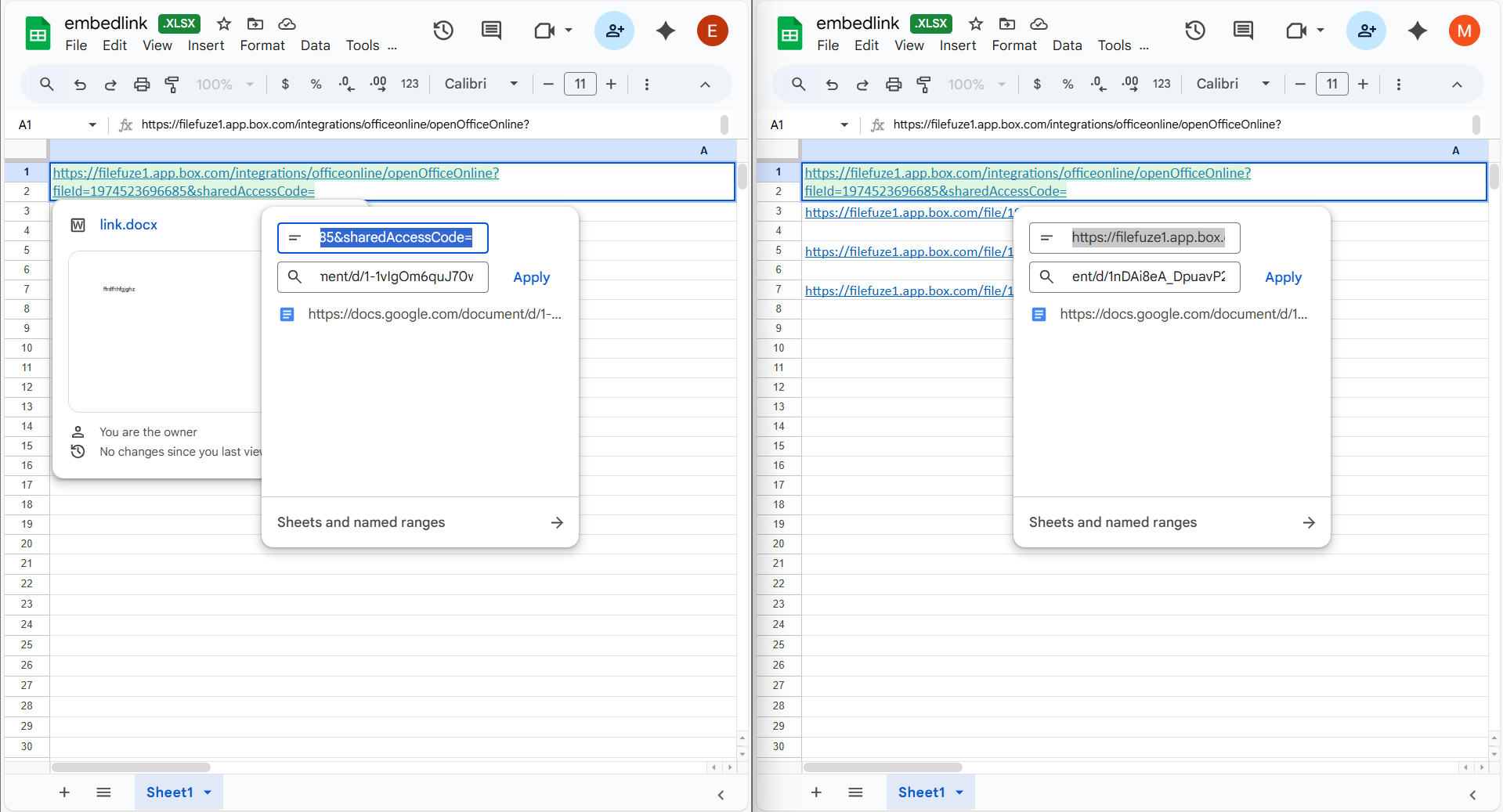
Before and After Migration View:
The screenshot shows the embedded hyperlink before migration (pointing to the source environment) and after migration (updated to the destination Workspace). During the migration process, CloudFuze automatically detects all embedded links within the source files and updates them to reference their corresponding files in the destination environment, so it remains fully functional in post-migration.
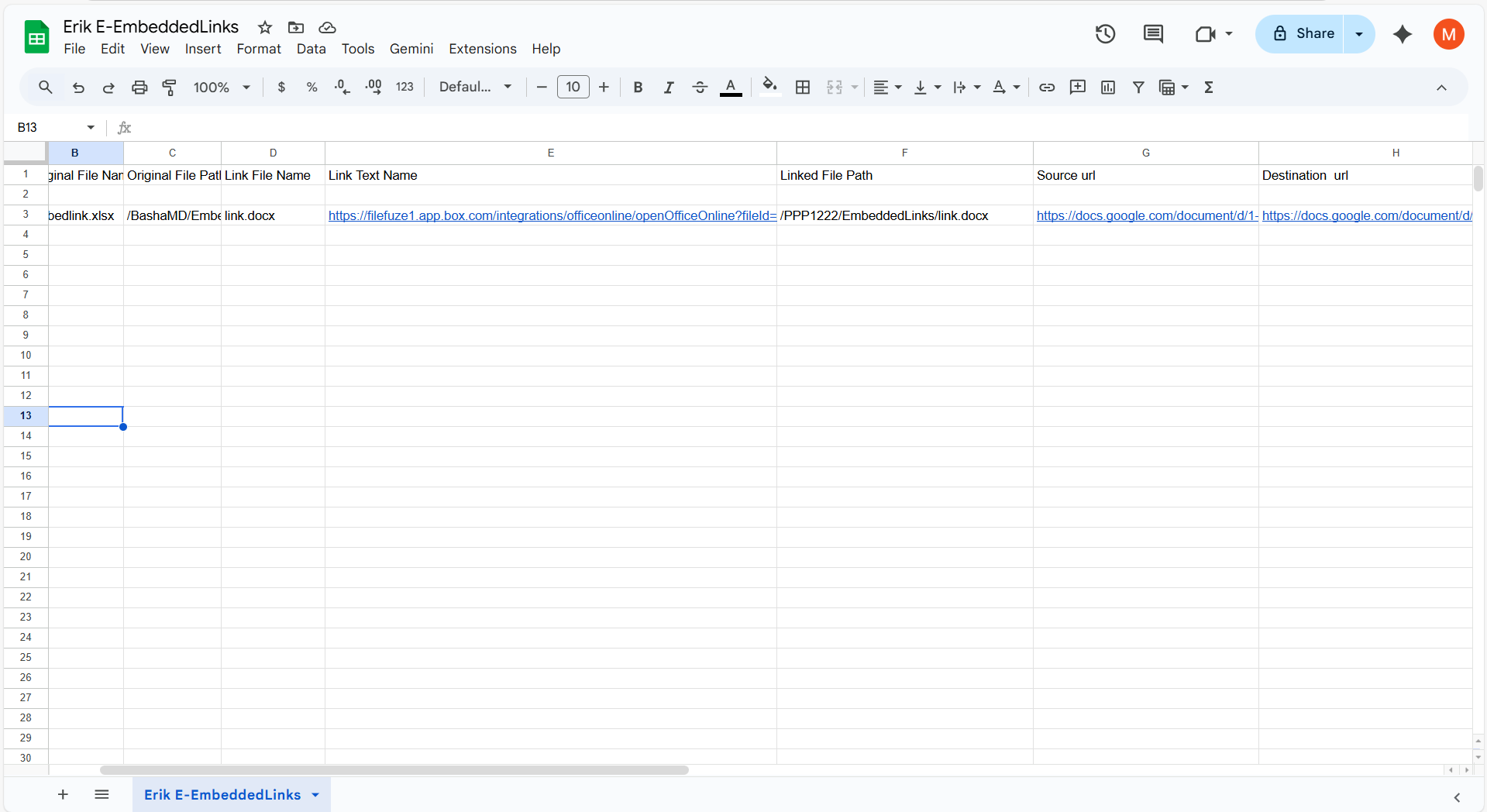
CSV Hyperlink Mapping Report (Destination):
After a successful Google Workspace tenant to tenant migration, a CSV report is generated at the destination containing detailed mapping information such as Original File Name, Original File Path, Linked File Name, Link Text, Linked File Path, Source URL, and Destination URL. This report serves as a reference to validate that embedded links have been correctly migrated.
Watch the overview video of CloudFuze Hyperlink Fixer:
Native Migration vs CloudFuze Hyperlink Fixer (Google Workspace Tenant Migration)
| Capability | Native Google Migration | CloudFuze Hyperlink Fixer |
|---|---|---|
| File Data Migration | Yes | Yes |
| Hyperlink Detection | No | Yes |
| File ID Mapping | No | Yes |
| Automatic Link Rewriting | No | Yes |
| Permission Validation | No | Yes |
| Post-Migration Link Report | No | Yes |
| Enterprise-Scale Automation | No | Yes |
Enterprise Example: Retain Hyperlinks in a Google Workspace Migration with Multiple Tenants
Consider an enterprise with three Workspace tenants to consolidate into one.
The environment comprises:
- 30,000+ users
- 600+ Shared Drives
- Thousands of interlinked legal and compliance documents
File IDs change during migration across tenants. Without hyperlink rewriting:
- Cross-function document reference fails
- Regulatory documentation links break
- Internal collaboration slows significantly
With CloudFuze’s Hyperlink Fix
- Embedded hyperlinks are automatically detected
- File ID mapping allows for precise rewriting
- The links are corrected during migration, not after
- Post-migration validation confirms zero internal link failures
This process ensures complete replication as well as uninterrupted operations.
Why Enterprises Should Not Ignore Hyperlink Migration
For big organizations, hyperlink integrity has a direct influence on:
- Knowledge management continuity
- Regulatory compliance
- Business process automation
- Internal collaboration efficiency
However, treating the correction of hyperlinks as a post-migration clean-up is risky. Instead, hyperlink preservation should be integrated into the Google Workspace migration strategy.
Also, you can check out our guide on FAQs on CloudFuze Hyperlink Fixer Link Fixing Tool.
Preserve Hyperlink in Google Workspace Tenant Migration with CloudFuze
We facilitate the migration of secure, automated, and enterprise-ready hyperlinks for Google Workspace within the process of tenant-to-tenant migration and cross-tenant data transfer.
With the sophisticated Hyperlink Fixer tool of CloudFuze, full replication with no broken links or operational disruptions is assured within an enterprise.
Get a free demo of our tool’s hyperlink migration capabilities!
Frequently Asked Questions
1. What is Google Workspace hyperlinks migration and why is it important?
Google Workspace hyperlinks migration refers to the process of detecting, mapping, and updating embedded Google Drive links during a tenant-to-tenant migration. It is important because file IDs change when you move Google Workspace to another Workspace. Without hyperlink rewriting, internal document references break, impacting collaboration, compliance, and operational workflows in large enterprises.
2. Can Google Workspace hyperlinks be preserved automatically during cross-tenant data transfer?
No, the native approaches of Google Workspace migration services do not update the hyperlinks; therefore, it becomes difficult for the organization to deal with such complexities. Enterprises need an advanced migration solution like CloudFuze’s Hyperlink Fixer tool, which creates a source-to-destination file ID mapping and automatically rewrites hyperlinks during cross-tenant data transfer to ensure complete replication.
3. What are common challenges faced by IT administrators when moving hyperlinks between Workspace Tenants?
IT administrators sometimes experience difficulties such as:
- Broken links due to new file IDs
- Restructuring issues of the shared drive
- Permission mismatches after migration
- Deeply interlinked documentation across departments
- API throttling during large-scale tenant to tenant migration
These are complicated issues, especially within multi-tenant Google Workspace environments.
4. How do enterprises verify the integrity of hyperlinks after migrating Google Workspace to another Workspace?
Enterprises need to perform the process of post-migration validation by
- Running automated broken link scans
- Verifying cross-Shared Drive accessibility
- Identifying permission inheritance alignment
- Testing department-specific document repositories
With a migration tool (CloudFuze Migrate) offering hyperlink reporting capabilities, the IT admin is able to ascertain that there are zero broken internal links after the migration is complete.
About the Author: Aayushi Raj



