
5 License Utilization Insights for IT Teams to Cut SaaS Spend
The five license utilization insights IT teams should track to cut SaaS spend are: (1) inactive user accounts, (2) low-usage accounts on premium licenses, (3) duplicate or overlapping licenses across teams, (4) orphaned accounts from missed deprovisioning, and (5) under-utilized license capacity. When IT teams track these 5 insights continuously, along with automated user management, they can significantly reduce wasted SaaS spend.
In this blog post, you’ll learn the 5 license utilization insights that reveal wasted SaaS spend in detail.
Key Takeaways
What Are License Utilization Insights and Why Do They Matter for IT Teams?
License utilization insights are measurable signals that show how your enterprise uses purchased software licenses. They show IT teams where their enterprise’s SaaS investment delivers value and where it leaks.
License utilization insights turn your enterprise-wide raw user login and activity data into SaaS spending decisions. They combine SaaS license tracking data (user logins, premium feature activity, and license seat assignments) with automated renewal and spend management.
Meanwhile, Gartner’s July 2026 forecast puts worldwide software spending at $1.47 trillion for 2026, up 15.5% from 2025. With increasing SaaS adoption, IT teams without license usage analytics only see their enterprise’s wasted software spend on invoices and fail to understand the ROI value it delivers.
Therefore, monitoring and analyzing license utilization insights play a vital role for IT teams in every enterprise in reducing software spend.
How Do License Utilization Insights Help IT Teams Reduce SaaS Spend?
Analyzing SaaS license utilization insights helps every IT team replace assumptions with evidence about every license seat they pay for. That evidence helps them right-size their enterprise-wide licenses and make smarter SaaS renewal decisions.
License utilization data gives SaaS spend visibility at the user level, which helps IT admins act on underutilized software licenses instead of renewing them by default. The table below shows the difference between what happens for IT teams with and without license usage data:
| Area | Without License Utilization Insights | With License Utilization Insights |
|---|---|---|
| Subscription Renewals | Auto-renews at the purchased license seat count | Renewals based only on verified active users |
| User Offboarding | Licenses stay assigned after employee exits | Licenses are reclaimed or reassigned using actual data |
| SaaS License Tiers | Premium plans for everyone | License tiers matched to employees with actual feature use |
| Application Portfolio | Duplicate tools across teams | Overlap tools are identified and consolidated |
| IT Budgeting | Reactive, invoice-driven | Forecast from license usage trends |
5 License Utilization Insights IT Teams Should Track
These five license utilization signals account for most wasted SaaS spend in growing enterprises. Every IT team must track these 5 license usage insights continuously. They are:

1. Inactive User Accounts
Inactive accounts belong to users who haven’t logged in to a specific software and AI application for 30 to 90 days. For instance, if your enterprise pays for 500 Jira license seats and only 340 users logged into the Jira application during the last 60 days, the remaining 160 license seats are either orphaned or underutilized and can be reclaimed.
Enterprise IT teams can set a clear inactivity threshold per app, so every license decision follows the same rule throughout the company.
2. Low-Usage Accounts on Premium Licenses
Many employees in an enterprise hold premium or advanced-tier licenses but only use basic features. Feature-level license usage analytics show who genuinely needs advanced capabilities and who can move to a lower-tier plan. In this case, instead of cancelling a premium licensing tier, IT teams can downgrade the subscription to a basic plan.
3. Duplicate or Overlapping Licenses Across Teams
In a large enterprise with 1000 employees, various teams often buy tools that do the same job, such as two project management apps or three video conferencing platforms. When enterprises start mapping overlapping SaaS applications by category, they can standardize on one tool and consolidate duplicate vendor contracts. This, in turn, helps them save on SaaS costs.
4. Orphaned Accounts from Missed User Deprovisioning
When your user offboarding process fails to revoke app access, a former employee’s license keeps billing, which further expands your enterprise’s attack surface. The only way to overcome these offboarding risks is to cross-check your identity provider and HR records against each app’s assigned users.
Orphaned accounts are one of the hidden SaaS cost wastes, which create both user access and data security gaps enterprise-wide.
5. Under-Utilized License Capacity
Under-utilized licensing capacity is the gap between how many licenses you bought and what you have assigned to your users. It covers unassigned seats in your license pool and usage-based subscription tiers (mainly for AI tools) whose usage limits your employees will never utilize.
It’s highly important for IT teams to review this license capacity before every subscription renewal so you can reduce seat counts or move to a basic licensing plan instead of renewing at premium plans at the same volume.
Example: A 1,200-person large enterprise reviews its CRM tool 120 days before renewal. License usage data shows 210 inactive license seats, 95 premium users who never touch premium features, and 40 orphaned user accounts belonging to former employees. The remaining 60 license seats sit unassigned in the license pool. Using the license usage information, the IT team of the large enterprise reclaims 250 seats, downgrades 95, cuts the 60 unassigned seats from the renewal, and selects a suitable licensing plan with clear usage evidence.
How Can IT Teams Turn License Utilization Insights into Cost Savings?
IT teams can cut costs only when they use the 5 license utilization insights discussed above and follow the best practices below.
- Make sure to define and set inactivity thresholds and licensing tier rules for each critical app.
- Automate user license provisioning and deprovisioning by tying license assignment to your identity provider and HR events so joiner, mover, and leaver actions trigger license changes automatically.
- Do not forget to reassign unused software licenses to new hires before purchasing new licensing seats.
- Ensure you sync your license usage and spend data with your financial systems so procurement and IT can also analyze and make data-driven decisions with license utilization data.
- Always start reviewing your license usage at least 90 days in advance to decide in advance on modifying the subscription tiers according to your employees’ license usage.
How CloudFuze Manage Helps Track License Utilization Insights
Our SaaS and AI app management solution, CloudFuze Manage, provides a single, user-friendly platform that connects license usage, subscription cost, and user lifecycle data in one place. That gives IT teams clear license utilization insights without manually tracking user license allocations in a spreadsheet.
Let’s see how CloudFuze Manage helps IT Teams track license usage insights:
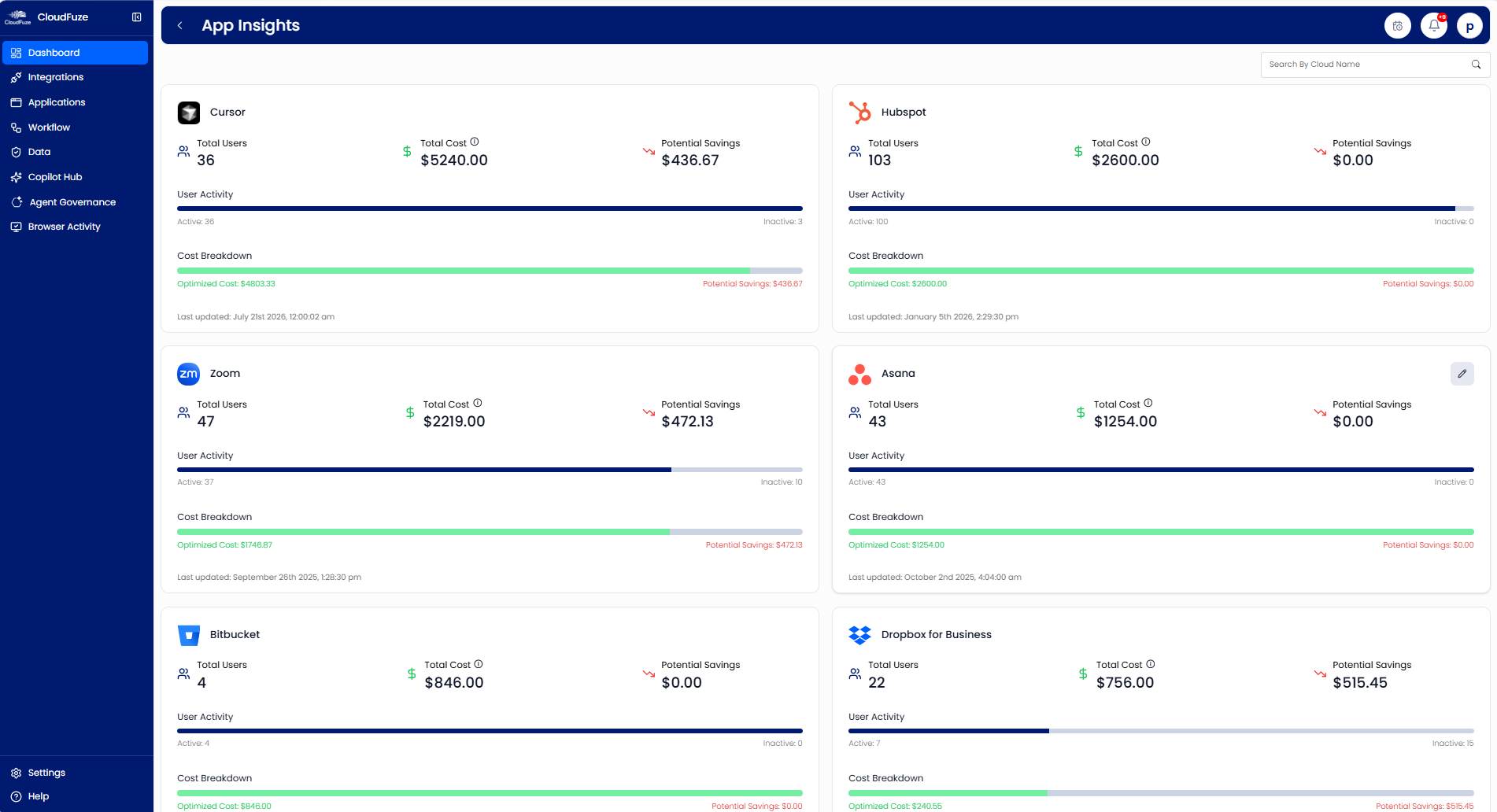
- Centralized SaaS discovery surfaces every app, user, and license, including shadow IT.
- License usage analytics highlight idle/inactive, underutilized, and orphaned user licenses across your IT stack, along with intelligent cost-optimization recommendations.
- User lifecycle automation supports account provisioning and deprovisioning aligned with license usage.
- Cost visibility dashboards show spend and license utilization trends to guide wiser renewal decisions.
- Governance controls extend to SaaS and AI governance, along with AI agent governance, so new-gen AI tools and agents are also accountable.
- Audit-ready reporting documents user logs and agent activities to stay compliant during audits.
Effortlessly Track License Utilization Insights with CloudFuze Manage
License utilization insights give IT teams the evidence to stop paying for software nobody uses. CloudFuze Manage helps IT teams track inactive user accounts, premium licenses on low-usage accounts, overlapping SaaS tools, orphaned user accounts, and unused license capacity, turning SaaS cost-optimization insights into significant cost savings.
Frequently Asked Questions
1. Where can IT teams find dashboards for visualizing SaaS license usage and cost trends?
SaaS management platforms like CloudFuze Manage provide dashboards that combine license usage analytics with spend data. Its unified dashboard shows license utilization rates, inactive users, and SaaS cost trends per app, giving IT, procurement, and finance teams a shared, unified picture of SaaS spend.
2. Can SaaS spend management tools integrate with existing financial software?
Yes. SaaS spend management tools, such as CloudFuze Manage, work well with financial systems such as QuickBooks and Bill.com and support 190+ SaaS and AI apps (Salesforce, Zoom, Mailchimp, Tableau, Cursor, Claude, Copilot, and more).
3. How can IT teams automate SaaS license provisioning and deprovisioning to control costs?
IT teams connect their SaaS management platform, like CloudFuze Manage, to the identity provider and HR system and automate license provisioning and deprovisioning to control costs.
4. How does SaaS license utilization help with renewal decisions?
License utilization data shows how many seats are actually active and whether tool adoption is expanding or shrinking. IT teams use that evidence to reduce unused seat counts, downgrade subscription tiers, or modify licensing plans before renewal.
5. Can spreadsheets effectively track SaaS license utilization?
Spreadsheets can work for a handful of apps but break down at enterprise scale. They rely on manually updating license allocation data, miss shadow IT, and go stale quickly. However, automated SaaS license tracking keeps license utilization data up-to-date and accurate.
About the Author: Rashmi Ramesh



