
How To Automate HubSpot User Management at Enterprise Scale
To automate HubSpot user management at enterprise scale, you need HubSpot management software like CloudFuze Manage that easily syncs with your IdPs (identity providers), provisions users into role-based permission sets on day one, and deprovisions them the moment your HR marks EXIT. It also automatically audits data permissions, allocated license seats, and inactive licenses throughout your entire IT stack.
Also, Verizon’s 2025 DBIR states that stolen credentials were the common initial access vector, involved in 22% of breaches, which means every unmanaged SaaS and AI user account is one more credential waiting to be abused.
This blog post explains what HubSpot user management involves and why spreadsheet-based user lifecycle administration approaches fail at enterprise scale.
Key Takeaways
What Is HubSpot User Management and Why Is It Important for Enterprises?
HubSpot user management is the centralized method of overseeing who can access your enterprise’s HubSpot portal and what each user can see and do. It covers the entire HubSpot user lifecycle, including user provisioning, permission settings, license assignments, team partitioning, and deprovisioning at the time of offboarding.
At enterprise scale, HubSpot user management matters for three reasons. First is for security purposes. Your HubSpot holds your customer PII, and customer PII was the most frequently compromised data type, exposed in 53% of breaches (as per IBM’s 2025 Data Breach Report). The second one is licensing cost optimization. A large number of paid license seats assigned to inactive or departed users bleed your IT budget every renewal cycle. The final one is compliance. Most auditors expect you to prove who had access to your customer data, when, and why. If your HubSpot access records are maintained in shared spreadsheets, demonstrating compliance can become difficult for you.
So, whether you’re an SMB, MSP, or large enterprise, managing users in HubSpot is important for tightening your company’s compliance and saving on your IT budget.
Challenges of Managing HubSpot Users Manually via Spreadsheets
Spreadsheet-based user management works until failure points start to show up predictably as your team’s headcount grows. The limitations include:
- Orphaned User Accounts: When no IT admin owns your company’s offboarding process, departed employees keep active HubSpot logins after several months of their exit. Since attackers increasingly log in through compromised credentials, every orphaned account is a standing invitation.
- User Permission Drift: Users accumulate data and file-sharing access with every role change and never lose the old access rights. For example, your sales rep who moved to your finance team two years ago still holds edit rights on your project deal pipeline.
- Stale License Usage Data: Your shared spreadsheet says 340 HubSpot seats are assigned to your employees. Meanwhile, HubSpot shows that 410 licenses have been allocated. Without proper license tracking, your finance team is paying the difference, and nobody in your IT department notices until renewal.
- No Audit Trail: When a compliance audit arrives suddenly and asks who approved a contractor’s super admin access, the answer is a Slack thread from last March. This may end up in legal fines or penalties.
- Human Error at Scale: A report from Verizon found the human element was present in 60% of breaches. Manual HubSpot access allocation is exactly the kind of repetitive administrative task where mistakes slip through unintentionally.
Manual User Administration vs. Automated User Administration in HubSpot: A Difference
The table below distinguishes the difference between manual and tool-based automated HubSpot user administration:
| Dimension | Manual | Automated (CloudFuze Manage) |
|---|---|---|
| Employee Onboarding | Accounts are created days after onboarding and require IT tickets for data and app access. | Users get day-one access through identity provider groups. |
| Role change | Old permissions continue to accumulate. | Access is automatically adjusted using RBAC. |
| Employee Offboarding | Revoke app accesses when some IT admins remember. | Same-day user deprovisioning + seat reclamation. |
| Audits | Involves weeks of evidence gathering. | Continuous user audit logs, export on a single click. |
| License review | Annual IT team’s guesswork. | Inactive seats are flagged continuously. |
| Shadow IT | Hidden apps and unmanaged HubSpot accounts go unnoticed. | Finds shadow apps and flags risky user access instantly. |
| App Consolidation | Duplicate tools and licenses are hard to find in a spreadsheet. | Highlights redundant IT apps and unused software & AI licenses. |
How to Automatically Set Up and Manage Users’ Permissions in HubSpot
Automating user permissions in HubSpot comes down to connecting three layers: your identity provider (Entra ID, Okta, or Google Workspace), a SaaS and AI app management platform like CloudFuze Manage that maps user identities to HubSpot and other relevant apps, and other data access.
For HubSpot specifically, our platform, CloudFuze Manage, lets you automate employee onboarding and offboarding against your identity provider, enforce role-based permission sets, flag over-permissioned and inactive users, and reclaim unused HubSpot seats before renewal. The same policies extend to 190+ leading SaaS & AI apps (Salesforce, Insightful, Mailchimp, Gemini, Claude, and more) your teams run, so HubSpot stops being a separately governed island in your org.
Here’s how you can automate user management in HubSpot with CloudFuze Manage:
Step 1: Sign in and authenticate your HubSpot CRM with CloudFuze Manage.
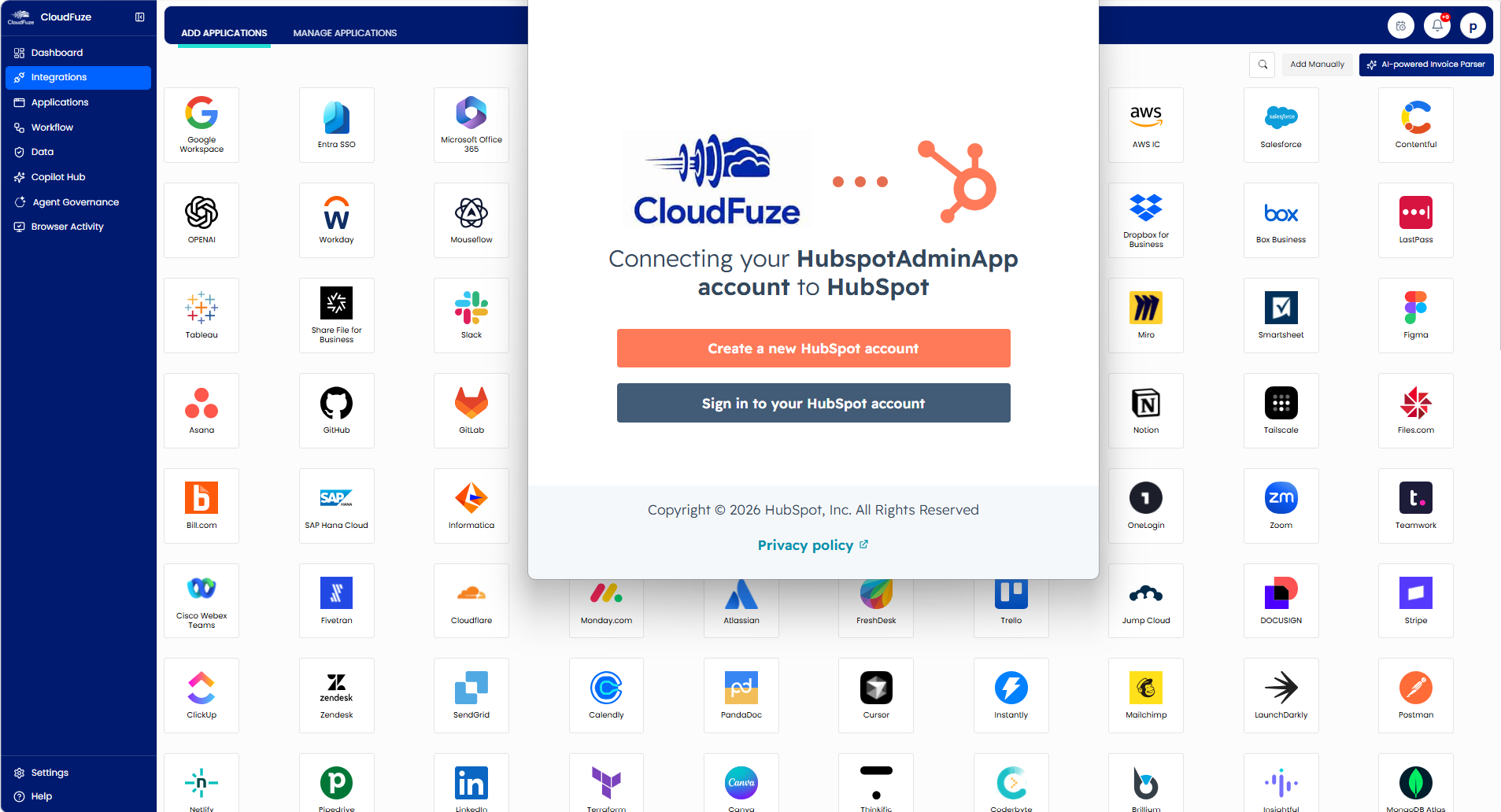
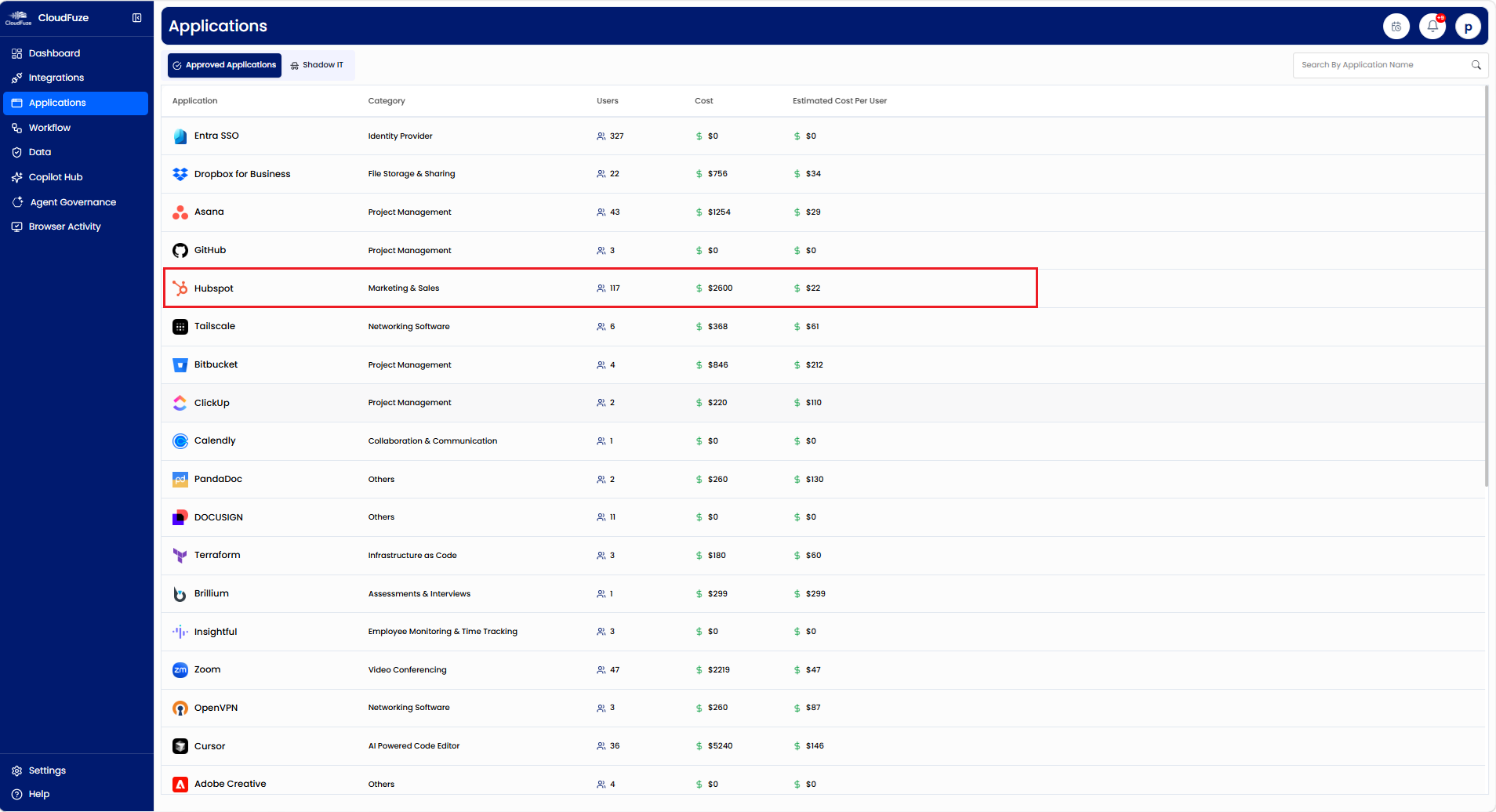
Step 2: Now, you can find your HubSpot app under the “Applications” Widget and click on it to have a detailed representation of your user’s HubSpot environment.
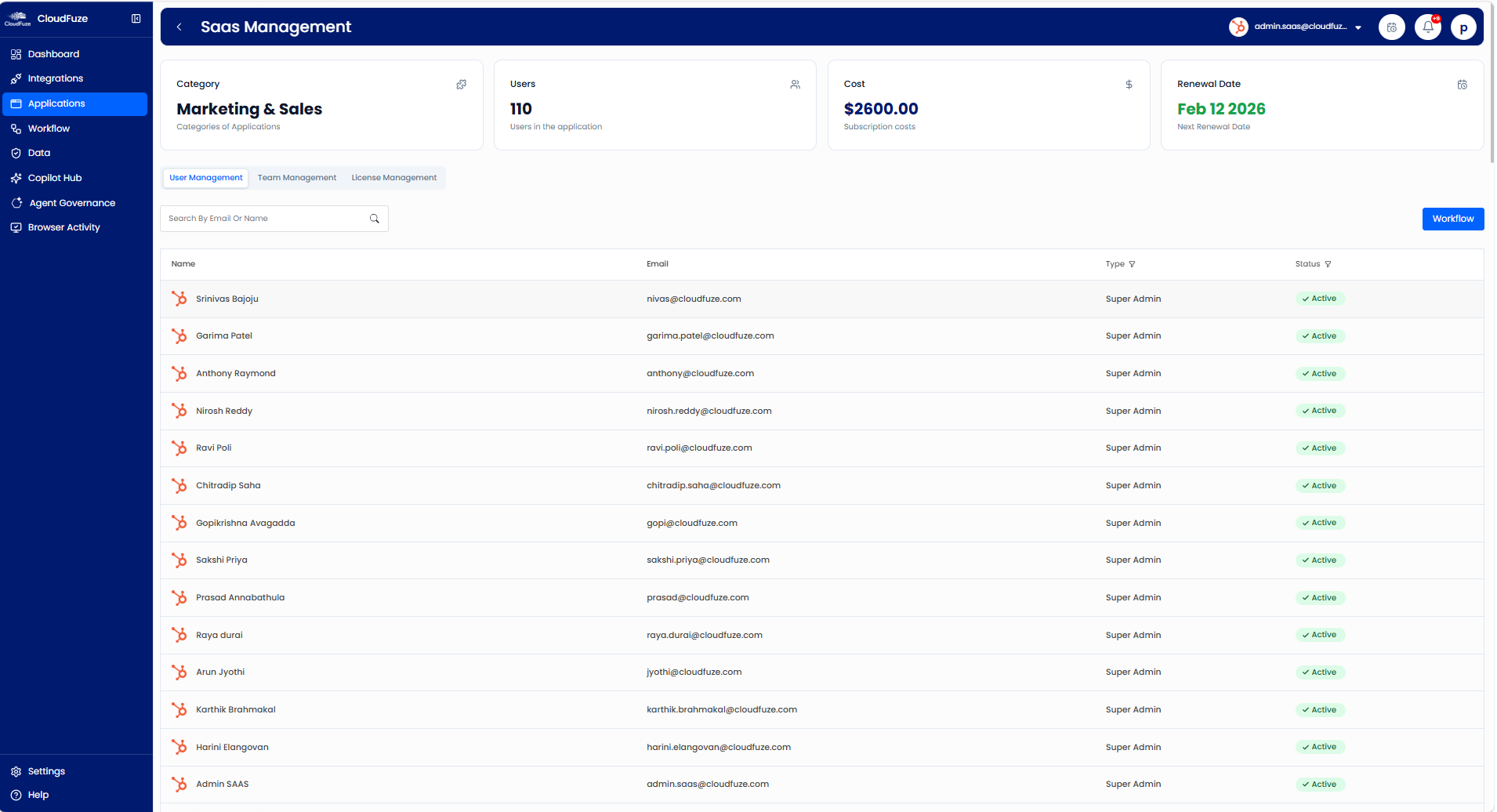
Step 3: Click on the “User Management” labelled icon to discover each and every HubSpot user along with their email IDs, their HubSpot access roles, and their activity status.
Step 4: Locate the “Workflow” labelled icon in the right corner of this dashboard, which helps businesses automate their employee onboarding and offboarding processes.
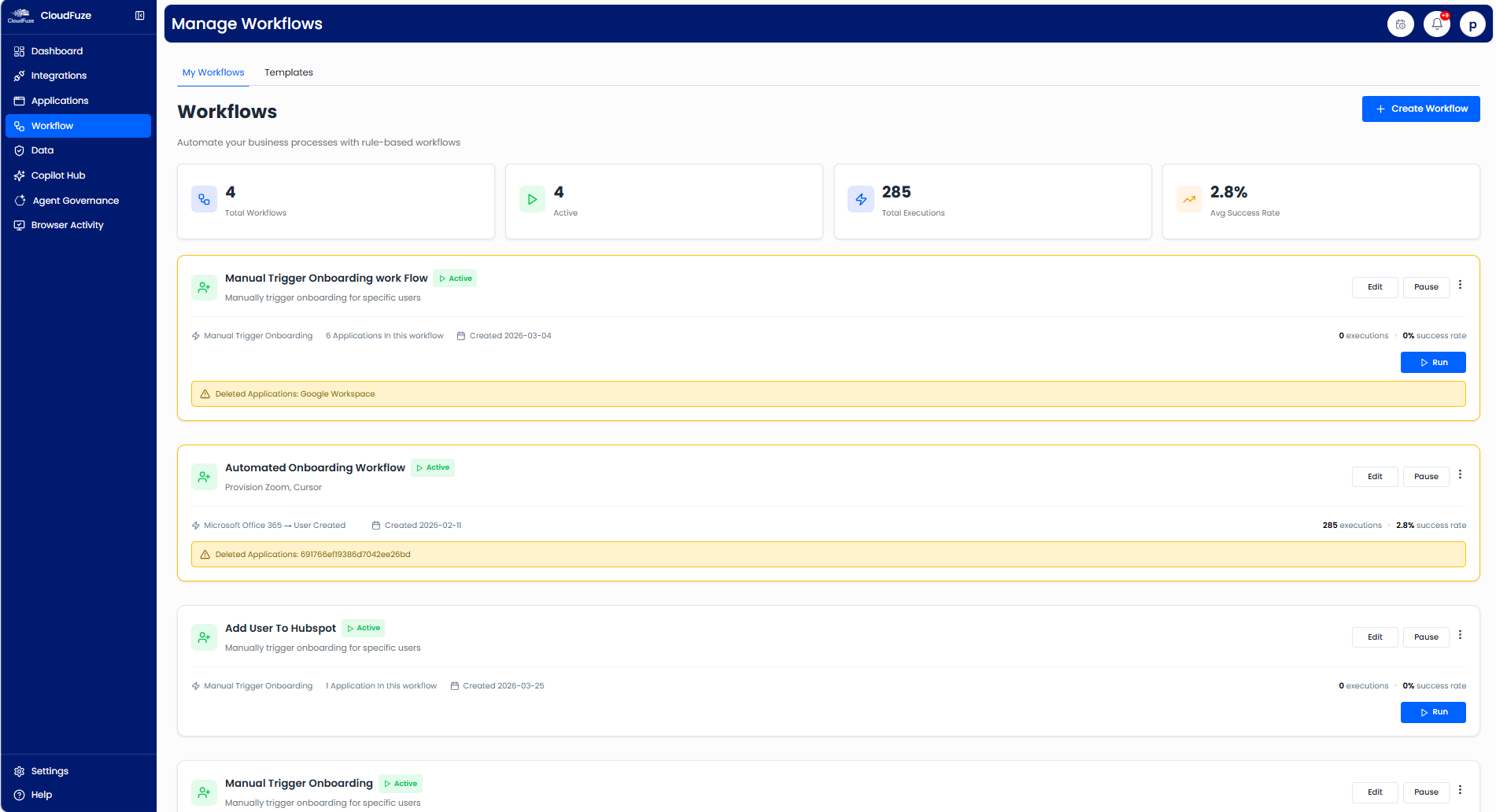
Step 5: You can also use our predefined templates or create custom user onboarding, user offboarding, and Role-Based Access Control workflows to automatically assign HubSpot roles and permissions based on your employees’ job functions, departments, or groups and securely revoke them during employee offboarding.
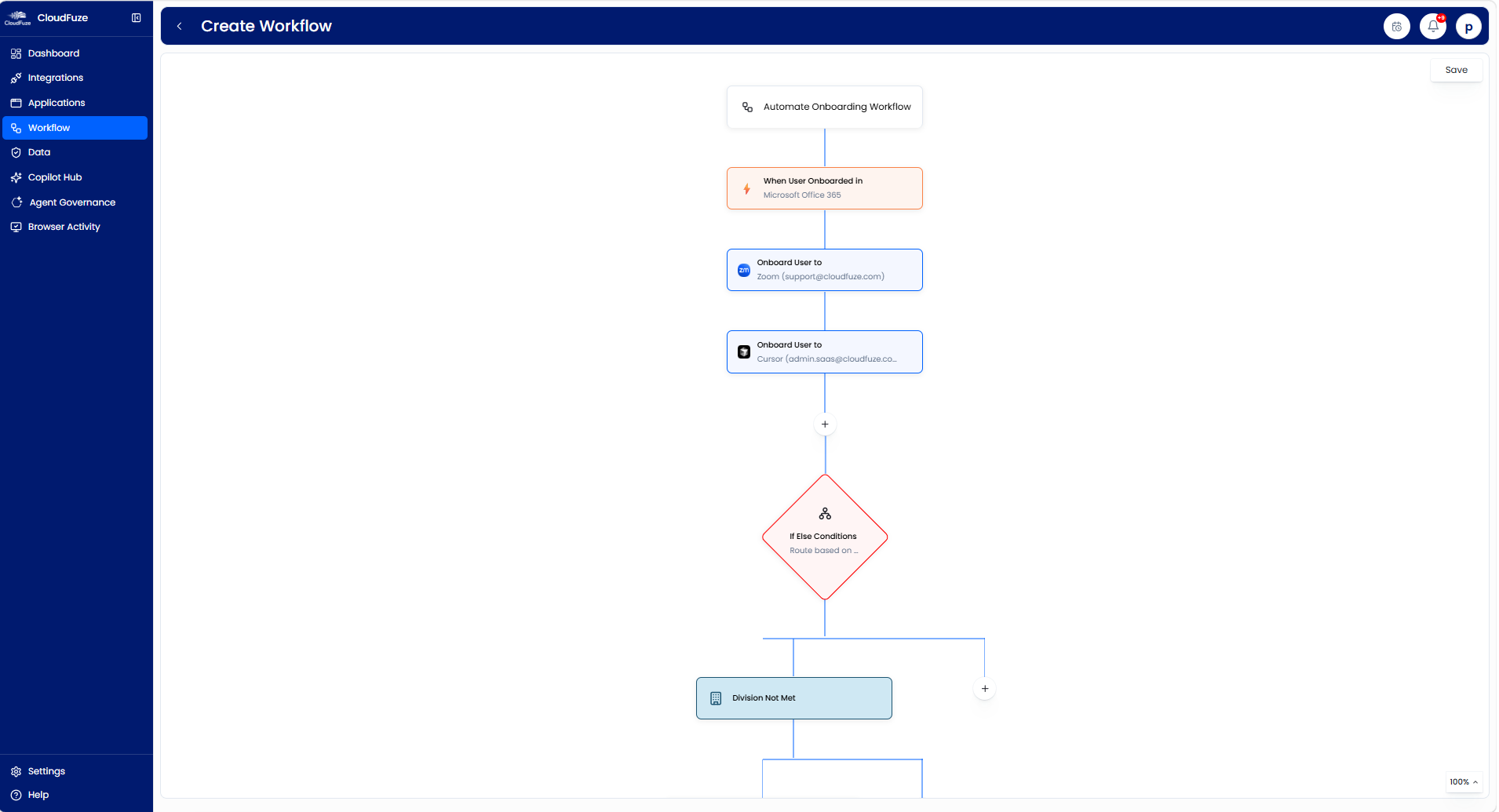
Bonus: Our solution, CloudFuze Manage, also detects shadow IT and highlights redundant/overlapping SaaS & AI apps, helping your enterprise reduce security risks and easily consolidate your duplicate apps.
Benefits of Automating User Lifecycle Workflows in HubSpot with CloudFuze Manage
The advantages of user lifecycle automation in HubSpot using CloudFuze Manage are:
- Faster new hire onboarding and secure user offboarding at enterprise-scale.
- Timely user access and Shadow IT updates and less IT administrative effort.
- Improved compliance and consistent user access monitoring in a unified dashboard.
- Save up to 30% on unused HubSpot licenses using our app consolidation report.
Future-Proof Your HubSpot User Management with CloudFuze Manage
Manual user management in HubSpot might work for small teams, but it doesn’t scale for large enterprises. With CloudFuze Manage, you can sync user data with identity providers such as Entra ID and automate user workflows on a flexible per-user pricing plan.
Schedule a free consultation to know how CloudFuze Manage automates the full user lifecycle across HubSpot and your entire IT stack and reclaim the hours your IT/HR team spends on resolving access tickets.
Frequently Asked Questions
1. What are the top tools for enterprise-scale user management automation in marketing platforms like HubSpot?
CloudFuze Manage is one of the strongest options because it governs your HubSpot users alongside every other app in your stack at enterprise scale.
2. How do I integrate automated user onboarding workflows in a HubSpot CRM system?
Connect HubSpot to your IdP through a SaaS & AI app management layer like CloudFuze Manage. Whenever your HR adds a new hire to your HR system connected to CloudFuze Manage, the platform automatically provisions their HubSpot account, assigns the matching permission set and team based on their designation, and allocates a seat, all without raising IT tickets.
3. What are the best practices to manage users in HubSpot?
A few tested practices for managing users in HubSpot include enforcing role-based permissions, using SSO, reviewing HubSpot user access frequently, removing inactive HubSpot users, automating user onboarding and offboarding workflows, and tracking HubSpot license usage across your teams.
4. How do I manage user permissions efficiently in an enterprise HubSpot CRM system?
Using a solution like CloudFuze Manage, you can automate user permission reviews in HubSpot, which instantly flags permission drift, inactive HubSpot users, and over-scoped access across HubSpot as well as the rest of your stack.
5. How do I map my existing Entra groups to HubSpot permission settings?
You can define a one-to-one mapping between each Entra SSO group and a HubSpot permission set, plus a team assignment, and then let your provisioning layer (CloudFuze Manage) enforce it automatically, so your user’s HubSpot access (Super Admin, Admin, or Guest) always reflects the user’s current role.
About the Author: Rashmi Ramesh



