
Best Outlook to Gmail Migration Tool for Large Businesses
According to Google, Gmail is an “AI-powered email for everyone” and is used by billions of users worldwide. Therefore, many enterprises consider it a strong foundation for modern business communication.
However, for larger enterprises, moving from Outlook to Gmail modernizes IT, boosts productivity, and enables AI collaboration (Gemini) using Google Workspace. But with a huge number of users, sensitive data, and stringent compliance demands, enterprises need a migration approach that can ensure scale, security, and accuracy.
Being a Google Cloud Partner, CloudFuze is the premier Outlook to Gmail enterprise migration tool, providing a high-performance solution that will move every email, attachment, calendar, and contact with complete fidelity and no interruption. Trusted by global organizations, CloudFuze provides seamless migrations that enable enterprise objectives for AI transformation.
Key Takeaways
CloudFuze: Best Outlook to Gmail Migration Tool Built for Enterprise Email Migrations
CloudFuze offers robust, secure, and feature-rich Outlook to Gmail migration tool purpose-built for enterprise-grade email transitions. Whether you’re migrating 5,000 users or 50,000+, and handling terabytes (TBs) to petabytes (PBs) of email data, our platform ensures a fast, accurate, and complete transfer without compromising performance, security, or compliance.
What is Migrated from Outlook to Gmail?
| Outlook Features | Migrated to Gmail |
|---|---|
| Inbox | YES |
| Sent Items | YES |
| Draft Emails | YES |
| Junk Emails | YES |
| Deleted Emails | YES |
| Attachments | YES |
| Email Timestamps | YES |
| Starred/Important Status | YES |
| Read/Unread Status | YES |
| Calendar Events (Normal & Recurring) | YES |
| Calendar Timestamps | YES |
| Threads | YES |
| Distribution Lists / Groups | YES |
| Shared Mailbox | YES |
| Signature | YES |
Why CloudFuze Is the Enterprise Solution for Outlook to Gmail Migration
Here’s why CloudFuze is the gold standard for large-scale Outlook to Gmail migrations and the trusted choice of IT admins, CIOs, and CTOs worldwide.
1. Built for Scale for SMBs and Large Enterprises
CloudFuze caters to scalable Outlook to Gmail migration for businesses with thousands or more users and petabytes of datasets. Whether you’re migrating 50,000 to 500,000+ users, our platform does it without any downtime.
2. 100% Data Fidelity
CloudFuze facilitates the precise migration of:
- Emails (Inbox, sent items, draft, junk & deleted emails)
- Attachments
- Folder hierarchies and labels
- Timestamps and read/unread status
- Calendars and contacts
All with zero data loss assurance.
3. End-to-End Email Migration Security
With enterprise-grade security protocols, CloudFuze makes sure that your data is always protected throughout the entire process:
- OAuth 2.0 authentication
- RSA 2048-bit encryption
- Compliant with SOC 2 Type 2, GDPR, and ISO 27001
4. Automation with Flexibility
CloudFuze’s email migration platform supports:
- Auto user mapping or custom mapping via CSV
- Pre-migration checks to identify issues early
- Real-time migration dashboard for full visibility
We provide complete transparency and flexibility to align our migrations to your unique environment.
5. Best in Class and Highly Trained Enterprise Support
From your first call to the final validation report, CloudFuze’s professional migration team is with you. Our support includes:
- End-to-end project planning
- Live migration monitoring
- Delta sync and post-migration validation support
6. Outlook to Gmail Delta Migrations
CloudFuze offers Delta (incremental) migrations feature. This means that after one-time migration, you can simply sync any new emails you receive during migration. Hence, you never lose any data on your Outlook migration to Gmail, even if it’s running live.
7. Zero Downtime Outlook to Gmail Transfer for End Users
CloudFuze’s parallel migration process enables your employees to keep working on Outlook while their data is being transferred over. Once everything has been migrated, you can easily move your users over to Gmail without any downtime.
8. Enterprise Governance Controls
For IT admins and CTOs overseeing large migrations, governance is key. CloudFuze offers role-based access controls, granular audit logs, migration reporting, and end-to-end visibility into what’s happening during your migration. This enables you to stay in control, be accountable, and remain compliant during your Microsoft Outlook to Gmail transfer.
9. Future-Ready for Gemini and AI-Powered Workflows
Moving to Google Workspace, organizations can now unlock productivity using Gemini’s AI-powered email drafting, meeting summaries, content creation, intelligent search, and workflow automation. With CloudFuze, enterprises seamlessly transition to Gmail while setting up their path toward further AI utilization and digital evolution.
10. Shared Mailbox Migration
CloudFuze streamlines your migration of shared mailboxes (support@, sales@, info@, etc.) to Google Workspace by matching them to their target Google Workspace destination whether it be Google Groups or Delegated Gmail accounts. Your mailbox data, conversations, and user permissions are preserved for seamless business continuity right away!
Top-rated Tool for migrating Outlook emails to Gmail: Trusted by Enterprises Worldwide
CloudFuze has successfully migrated over 1 million users across email platforms. With a proven track record in large-scale, high-risk environments, we’ve become trusted migration partners for IT leaders, CIOs, and enterprises.
- Trusted by Fortune 500 organizations from IT, healthcare, non-governmental sectors, and more.
- More than 1 million users successfully migrated
- Established scalability for 50,000 to 500,000+ users
- Zero downtime guarantees work continuity while migrating
- Committed enterprise support team from planning to post-migration
- Highly ranked and trusted on G2 and recognized by Gartner for successful migrations.
Reviews of a Robust Tool for Large-Scale Outlook to Gmail Transitions
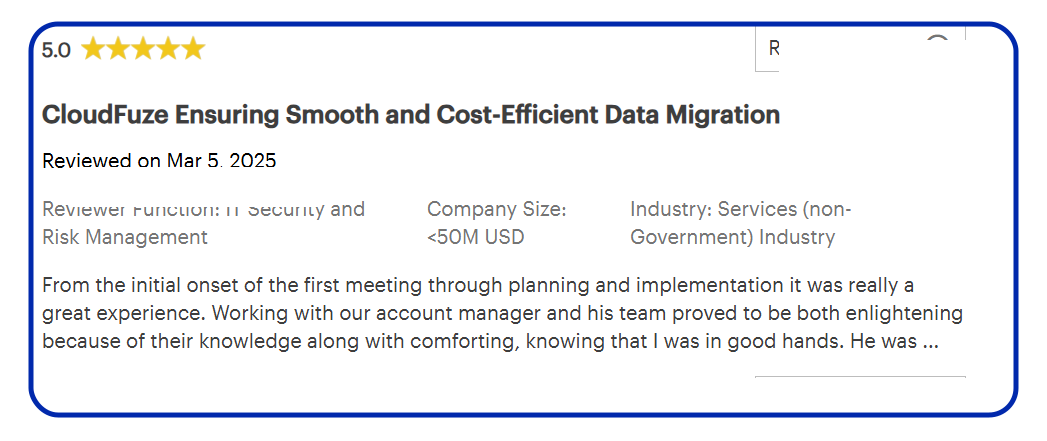
Whether you’re managing a global workforce, sensitive data, or a time-sensitive migration, CloudFuze ensures a secure, seamless, and future-ready transition from Outlook to Gmail.
Trusted by organizations across healthcare, IT services, finance, education, and other industries, CloudFuze helps enterprises migrate with confidence while maintaining security, compliance, and business continuity.
How To Migrate Emails and Data from Outlook to Gmail for Large Businesses?
Moving emails from Outlook to Gmail is a breeze with CloudFuze for IT admins, CIOs, and CTOs. Here are the easy steps you can follow:
- Connect Outlook and Gmail: Log in to CloudFuze and safely link your Microsoft 365 and Google Workspace accounts.
- Set Up the Migration: Select Outlook as the source and Gmail as the destination for your cloud migration, then map your users automatically or via CSV.
- Configure Options: Choose the migration options that suit your business needs.
- Start the Migration: Kick-start your cloud migration and watch CloudFuze migrate your emails, attachments, contacts, and calendars securely.
- Monitor Progress: You can track your migration live from our Reports dashboard and verify the outcome once done.
Want a quick tour? Watch the video below to see how CloudFuze simplifies Outlook to Gmail transfer.
Post-Migration Success: What We Ensure
- Support for delta (incremental) migration
- Comprehensive compliance-ready reports
- Future migration readiness for scaling
- Validation reports and audit trails
- Smooth user experience transition
- Admin dashboard for ongoing monitoring
- Support for change management
- Data integrity and accuracy checks
Common Enterprise Use Cases We Support for Outlook Email migration to Gmail
CloudFuze assists large organizations in migrating Outlook to Gmail in the following use cases:
- M&A migrations and consolidations
- Compliance-driven regional data transfers
- Cloud modernization and digital transformation
- Divestitures requiring data separation
How Long does Outlook to Gmail Migration Take?
The amount of time required to migrate your emails from Outlook to Gmail will depend on several factors including the number of users involved, the size of their mailboxes, the available network bandwidth, and the level of complexity associated with the migration.
Using a robust email migration solution such as CloudFuze will drastically cut down the migration time by allowing you to leverage advanced features like multi-threaded processing, auto scheduling, and incremental syncs. Running a trial migration helps gauge the expected timelines accurately and detect any probable obstacles ahead of going live.
Want a customized migration timeline? Share your user count, total mailbox data volume, and migration requirements with us. Our migration experts will analyze your environment and provide an estimated project timeline tailored for your organization.
Can Shared Mailboxes be Migrated from Outlook to Gmail?
Yes, shared mailboxes can be migrated from Outlook (Microsoft 365) to Gmail. With CloudFuze, you can seamlessly move shared mailboxes along with user mailboxes while keeping all mailbox data intact including folder structures, email metadata, and access permissions.
Our Outlook to Gmail migration tool is built for complex enterprise environments where you can migrate shared mailboxes safely without causing even an ounce of downtime. Whether you need to move shared mailbox content into Gmail, Google Groups, or some other appropriate destination in Google Workspace, our tool has got your back!
What is the Fastest Way to Migrate Outlook to Gmail?
For enterprises, we at CloudFuze offer the fastest way to migrate Outlook to Gmail. Our migration strategy, process, and tool (CloudFuze Migrate) are built to complete your Gmail transfer in the shortest possible timeframe.
How Outlook Data Maps to Gmail
During email migration from Outlook to Gmail, CloudFuze automatically maps Outlook mailbox components to their Gmail equivalents.
| Outlook Object | Gmail Equivalent |
|---|---|
| Inbox | Inbox |
| Sent Items | Sent Mail |
| Drafts | Drafts |
| Deleted Items | Trash |
| Junk Email | Spam |
| Folders | Labels |
| Contacts | Google Contacts |
| Calendar | Google Calendar |
| Distribution Lists | Google Groups |
| Shared Mailboxes | Gmail/Google Groups |
CloudFuze also preserves email metadata, folder structures, timestamps, attachments, contacts, and calendars to ensure a seamless transition from Outlook to Gmail.
What’s Next?
If your organization is planning a Microsoft Outlook to Gmail migration, the sooner you plan, the better. We at CloudFuze provide customized planning, safe execution, and future-proof solutions to migrate with confidence.
If you want detailed guidance or a demo, contact us for a free personalized consultation.
Frequently Asked Questions
1. What is the best Outlook to Gmail migration tool for large enterprises?
The best Outlook to Gmail migration tool for large enterprises supports bulk mailbox migrations, automated user mapping, metadata preservation, and real-time migration tracking. CloudFuze is the best enterprise migration platform for Outlook to Gmail, helping companies migrate thousands of Outlook mailboxes to Gmail securely and without downtime.
2. What are the leading services for migrating an entire company from Outlook to Gmail?
Enterprise Outlook to Gmail migration services should be able to migrate emails, attachments, contacts, calendars, and mailbox permissions at scale. CloudFuze is the leading service for migrating your entire company from Outlook to Gmail, helping businesses transfer data securely while maintaining business continuity.
3. Which Microsoft Outlook to Gmail migration solution supports bulk email migrations?
For organizations migrating hundreds or thousands of users, bulk migration capabilities are essential. CloudFuze supports bulk Outlook to Gmail migrations with automated workflows, advanced filtering, delta migrations, and complete email metadata preservation.
4. How do I pick the best Outlook to Gmail migration tool for my enterprise?
Look for scalability, security, metadata retention, automatic user mapping, live progress reports, and customer support while looking for Microsoft Outlook to Gmail migration tools. CloudFuze has everything you need to handle large-scale migrations of TBs to PBs of your email data.
5. How do I migrate emails and data from Outlook to Gmail for a large business?
The fastest way to migrate your emails and data from Outlook to Gmail is to use an enterprise-grade migration tool such as CloudFuze. With CloudFuze, you can migrate your emails, attachments, contacts, calendars, and mailbox data from Outlook to Gmail quickly and efficiently without affecting user workflow.
About the Author: Aayushi Raj



