
Box vs Office 365: Pick the Best Match For Your Company.
Box and Office 365 are leading cloud platforms used for enhancing businesses’ workflow and team productivity. This blog post provides a comparison of Box vs Office 365 along with features and more, to help you choose the best platform for your business needs.
1. Box vs Office 365 Pricing
Office 365 Pricing Plans
The table below shows Office 365 pricing plans:
| Plan | Price/user/month | Storage |
|---|---|---|
| Office 365 E1 | $10.00 user/month, paid yearly | 1 TB per user |
| Office 365 E3 | $23.00 user/month, paid yearly | 1 to 5+ TB per user |
| Office 365 E5 | $38.00 user/month, paid yearly | 1 to 5+ TB per user |
| Office 365 E1 (no Teams) | $6.79 user/month, paid yearly | 1 TB per user |
| Office 365 E3 (no Teams) | $14.45 user/month, paid yearly | 1 to 5+ TB per user |
| Office 365 E5 (no Teams) | $29.45 user/month, paid yearly | 1 to 5+ TB per user |
| Microsoft 365 Apps for Enterprise | $12.00 user/month, paid yearly | 1 TB per user |
Here’s a glimpse of Office 365’s plans and pricing with Teams:
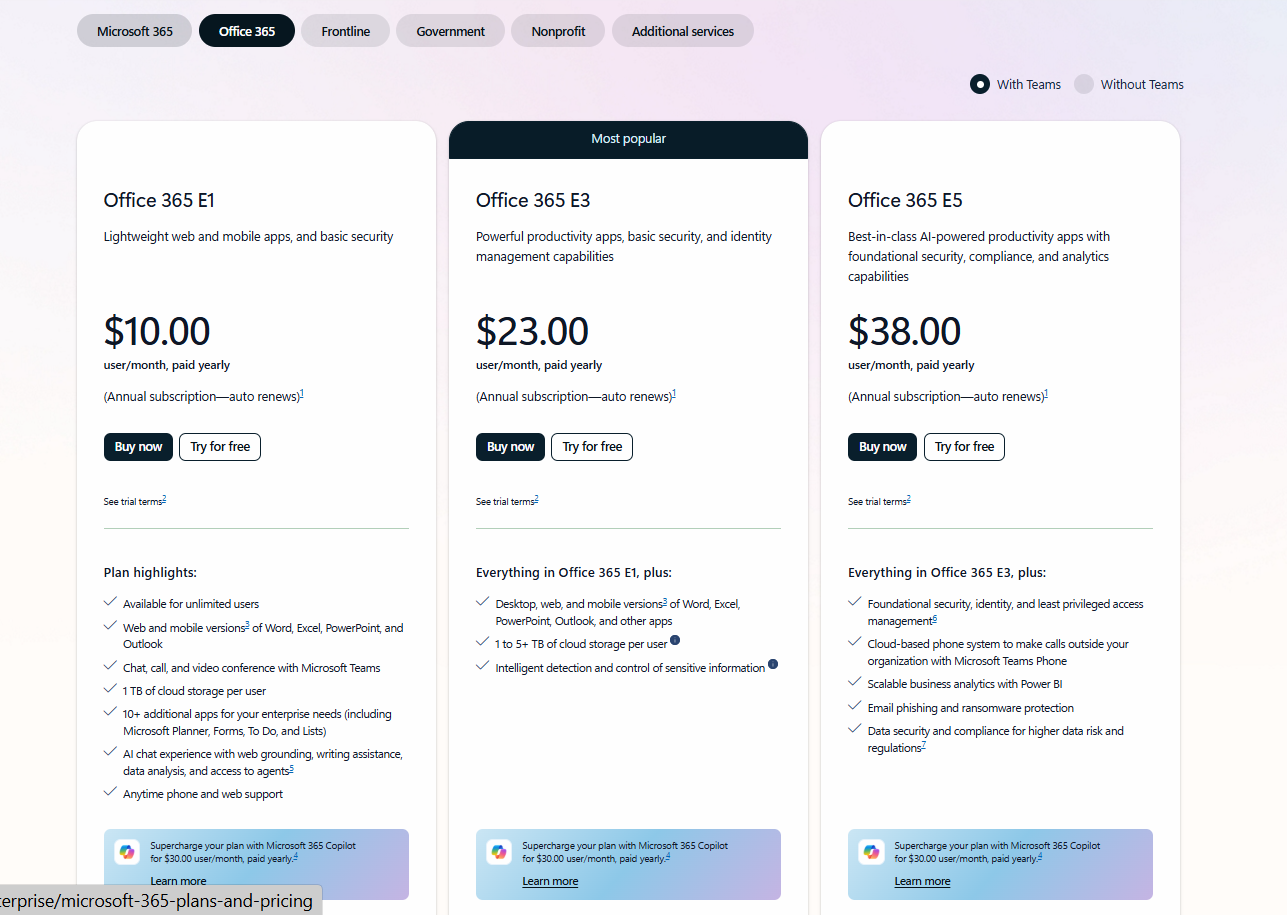
Image source: Office 365 with Teams
Here’s a glimpse of Office 365’s plans and pricing without Teams:
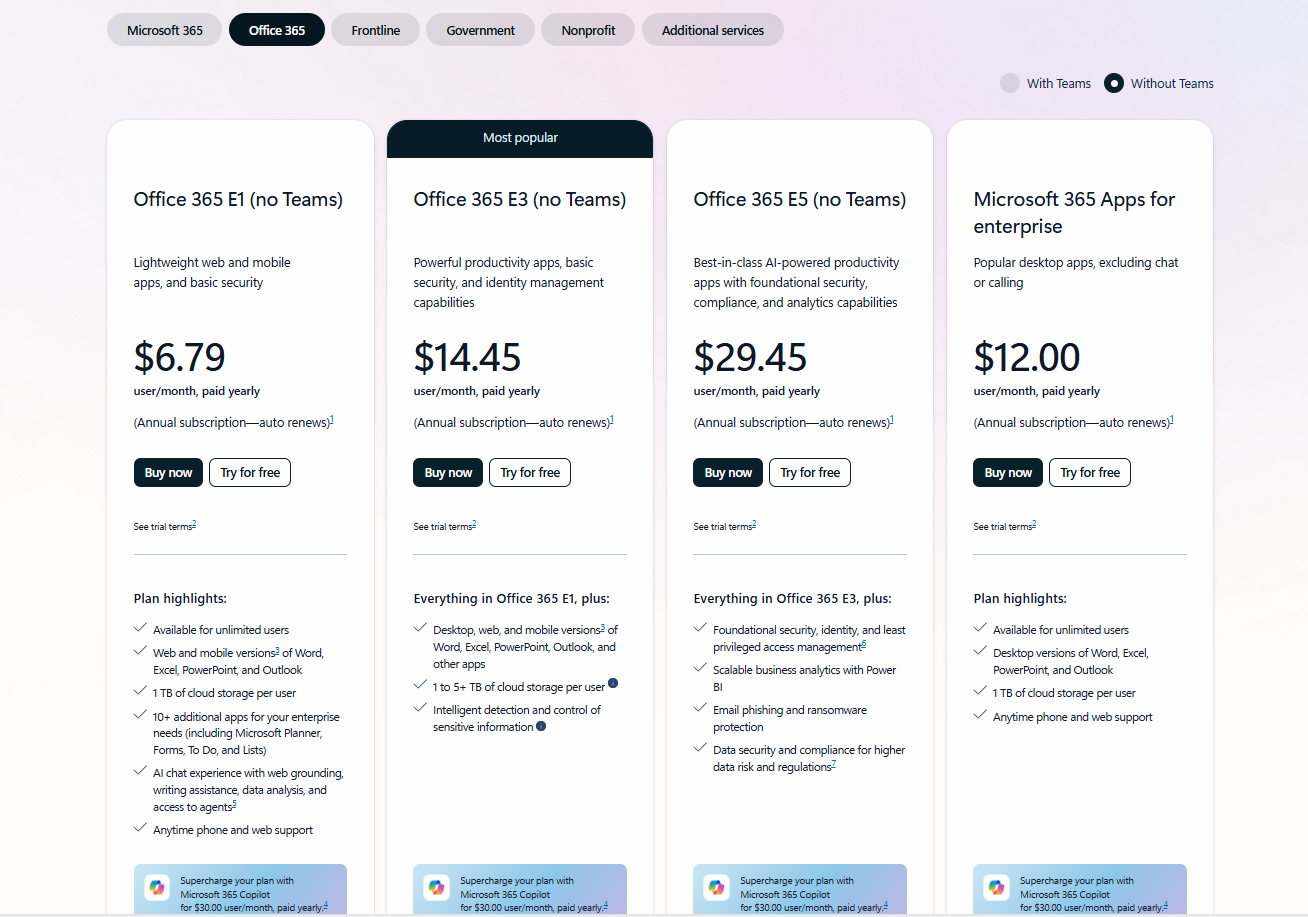
Image source: Office 365 without Teams
Note that all the pricing ranges given under Office 365 are as per March 2026 data and are applicable only when you take an annual subscription. You can check the official pricing pages of Office 365 for more details.
Box 2026 Pricing Plans and Tiers
The table below compares Box’s pricing plans:
| Cloud | Plan | Price/user/month | Storage |
|---|---|---|---|
| Box Business Plans | Business | $15 | Upload files up to 5GB |
| Business Plus | $25 | Upload files up to 15GB | |
| Enterprise | $35 | Upload files up to 50GB | |
| Enterprise Plus | $50 | Upload files up to 150GB | |
| Enterprise Advanced | Customized Quote | Larger file uploads up to 500GB |
Here’s a glimpse of Box’s plans and pricing:
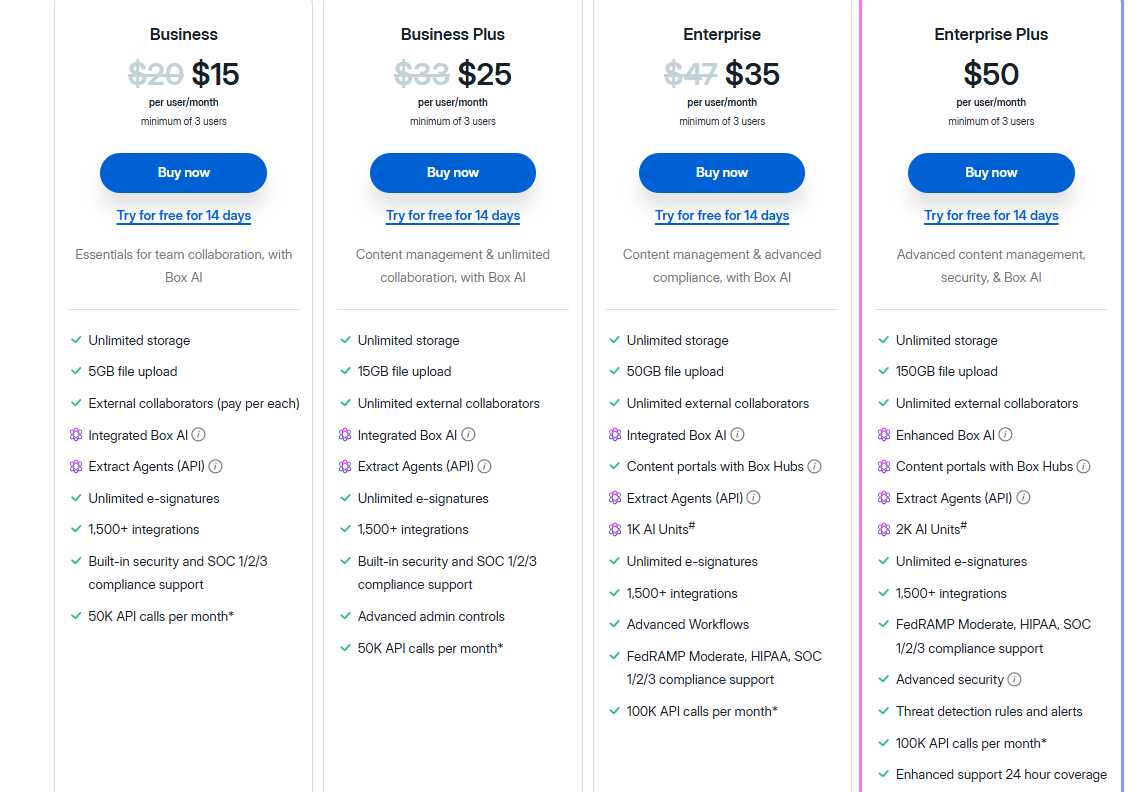
Image source: Box
Note that all the pricing ranges given under Box are as per March 2026 data and are applicable only when you take an annual subscription. Check Box’s official pricing page for more details.
How Do the Pricing Models of Box and Office 365 Compare for Small Businesses?
If you are a small business, then Office 365 can be the best option for your company. Office 365 E1 plan with Teams costs $10 per user/month when you take an annual subscription. Office 365 E1 plan without Teams costs $6.79 per user/month when you take an annual subscription.
Both Office 365 E1 plans (with or without plans) are available at affordable price ranges when compared with Box’s Business plan, which begins at $15.
2. Box vs Office 365 – AI Features
AI Features in Office 365
AI-powered assistance offered in Office 365(applicable when you take with or without Teams) with Microsoft 365 Copilot:
| Features | Office 365 E1 | Office 365 E3 | Office 365 E5 | Microsoft 365 Apps for Enterprise |
|---|---|---|---|---|
| Advanced Grammar and Style Suggestions Using Editor | Basic features | Fully Supported | Fully Supported | Fully Supported |
| AI Chat in Select Productivity Apps | Fully Supported | Fully Supported | Fully Supported | – |
| AI Chat Powered by Your Work Sources and Context | Available as an Add-on | Available as an Add-on | Available as an Add-on | Available as an Add-on |
AI Features in Box
AI-powered assistance offered in Box:
| AI Features | Business | Business Plus | Enterprise | Enterprise Plus | Enterprise Advanced |
|---|---|---|---|---|---|
| Box AI Q&A | Single File | Plus Single File | Single File | Multi-File | Multi-File |
| Box AI Content Generation | Yes | Yes | Yes | Enhanced | Enhanced |
| Box AI Q&A for Hubs | No | No | No | Yes | Unlimited |
| Box AI Units included per month# | No | No | 1000 | 2000 | 20000 |
| Standard and Enhanced Extract Agents# | Via APIs | Via APIs | Via APIs | Via APIs | Via web app and APIs |
| Custom Extract Agents# | No | No | No | No | Via web app |
| AI Studio | No | No | No | No | Yes |
In the above table, # denotes Box AI Unit consumption. One can get additional volume for purchase.
3. Box vs Office 365 – Productivity Apps Integration
Office 365 Productivity Apps
The table represents productivity apps supported under Office 365:
| Productivity Apps | Office 365 E1 | Office 365 E3 | Office 365 E5 | Microsoft 365 Apps for Enterprise |
|---|---|---|---|---|
| Word, Excel, PowerPoint, and OneNote for Web and Mobile | ✓ | ✓ | ✓ | ✓ |
| Word, Excel, PowerPoint, OneNote, and Microsoft Access (PC only) For Desktop | ✓ | ✓ | ✓ | ✓ |
| Online Survey, Quiz, And Poll Creator with Microsoft Forms | ✓ | ✓ | ✓ | ✓ |
| Apps To Manage Tasks, Such As Microsoft To Do, Lists, And Planner | ✓ | ✓ | ✓ | ✓ |
| Data Visualization Tools With Visio for The Web | Web only | Web only | Web only | Web only |
| Ability To Create Shareable Project Workspaces With Microsoft Loop | ✓ | ✓ | ✓ | ✓ |
Box Apps and Integrations
Below table represents productivity apps and plans supported under Box:
| Apps & Integrations | Business | Business Plus | Enterprise | Enterprise Plus | Enterprise Advanced |
|---|---|---|---|---|---|
| Built-in Integrations with Microsoft 365, Google Workspace and Slack | ✓ | ✓ | ✓ | ✓ | ✓ |
| MCP Server For Third Party AI Agents [Additional Charges May Apply for API Calls Generated and AI Units Consumed] | – | ✓ | ✓ | ✓ | ✓ |
| Enterprise App Integrations | 1 | 10 | Unlimited | Unlimited | Unlimited |
| API Calls Per Month | 50,000+* | 50,000+* | 100,000+* | 100,000+* | 200,000+* |
| Unlimited Integrations, Including DLP & eDiscovery | – | – | ✓ | ✓ | ✓ |
| No-code Apps with Custom Dashboards | – | – | – | – | Unlimited |
*Additional volume available for purchase under Box
4. Box vs Office 365 – Security Features
Office 365 Security Features
Irrespective of your chosen Office 365 plan, users get multifactor authentication for their work accounts and single sign-on for apps and services. Businesses can ensure intelligent detection and control of sensitive information with Microsoft Purview Data Loss Protection for emails and files on Microsoft 365 E3 and Microsoft 365 E5 plans.
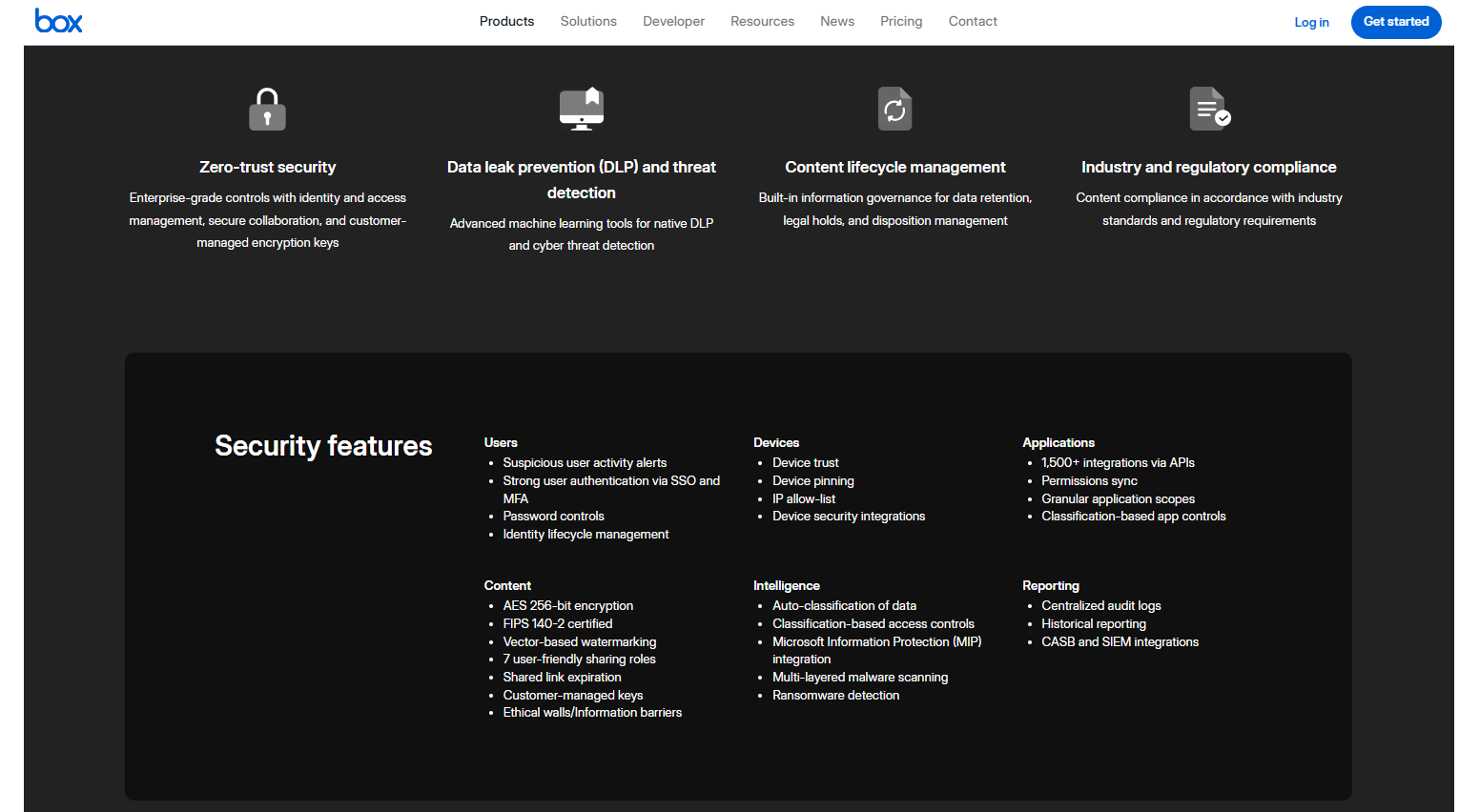
Box Enhanced Security Features
The image below shows security features offered in Box plans:
5. Box vs Office 365 – Storage and File Upload
Office 365 Storage and File Upload
| Office 365 Plans (With or Without Teams) | Storage |
|---|---|
| Office 365 E1 | 1 TB per user |
| Office 365 E3 | 1 to 5+ TB per user |
| Office 365 E5 | 1 to 5+ TB per user |
| Microsoft 365 Apps for Enterprise | 1 TB per user |
Note: For Office 365 E3 and E5 plans, Microsoft provides up to 5 TB of initial OneDrive storage per user based on the default quota for the tenant. Eligible enterprise customers can work with their Microsoft representatives for additional storage requirements.
Box Storage and File Upload
Box provides unlimited storage to all five plans. File upload restrictions are shown below:
| Box Plans | Single File Upload Limits |
|---|---|
| Business | 5GB |
| Business Plus | 15GB |
| Enterprise | 50GB |
| Enterprise Plus | 150GB |
| Enterprise Advanced | 500GB |
Best Practices for Implementing Office 365 In A Corporate Environment
Best practices for implementing Office 365 in a corporate environment:
- Select an advanced migration tool such as CloudFuze Migrate to achieve a seamless migration to Office 365.
- Ensure to implement advanced security standards.
- Train your teams for easier adoption to Office 365 environment.
Planning to Migrate from Box to Office 365?
If you’re searching for a one-stop migration solution to transfer from Box to Office 365, you are in the right place. CloudFuze Migrate helps you transfer your enterprise data and metadata accurately to Office 365.
Contact our data migration experts for a free consultation!
Here’s Our Migration Solution’s Overview Video:
Frequently Asked Questions
1. Which cloud storage option is better for collaboration in a business environment?
Businesses can choose the best cloud storage option based on their business team size, storage requirements, and business workflows. If you are choosing Box vs Microsoft 365, then Microsoft 365 can be a better option for your business.
2. Best choice for small businesses Box or Microsoft 365
If you are confused about choosing the best cloud file storage for small business needs among Box or Microsoft 365, then you can choose Microsoft 365. With a wide variety of pricing options and customization features, Microsoft 365 tops as the best for small businesses under 50 employees.
3. Which cloud solution is best for small businesses: the enterprise content solution or the comprehensive business platform?
A comprehensive business platform can be the best fit for small businesses. The Microsoft 365 platform offers enhanced security features, AI capabilities, seamless application integration, and more.
About the Author: Bhavani Asok



