
Trusted Tool for Migrating Outlook to Gmail for US Businesses
For CIOs and CTOs of companies in the United States, this migration from Outlook to Gmail is a strategic step in the journey toward a modern, cloud-first workforce for AI-driven collaboration and productivity. However, this migration also brings with it significant responsibilities, such as ensuring the security of the data, ensuring compliance, and ensuring that there are no disruptions to the business.
At CloudFuze, we are a leading provider of migration solutions for US companies looking to migrate from Outlook to Gmail safely, swiftly and easily.
Key Takeaways
Why US Businesses Are Migrating Outlook to Gmail
US companies are increasingly adopting Gmail and Google Workspace as a solution for supporting a distributed workforce, collaborating, and reducing IT costs. Some of the reasons why companies are adopting this solution are as follows:
- Facilitating collaboration, as companies can utilize tools such as Google Docs, Google Drive, and Google Meet, enhanced with Gemini AI features for faster teamwork.
- Simplifying IT management, as this solution can help companies manage IT costs.
- Facilitating a hybrid workforce, as this solution can help companies support both remote and in-office employees.
For companies operating in regulated industries, such as finance, healthcare, and legal, this Outlook to Gmail migration needs to meet specific security and compliance requirements of the US.
The Security Stakes in Outlook to Gmail Migration
Email data is the most critical information that any business holds. During migration, CIOs and other business leaders need to ensure that:
- Data is encrypted in transit and at rest to prevent unauthorized access
- Data is not vulnerable to security breaches
- Audit trails, folders, and other email data are maintained
- US regulations like FINRA or SOC 2 are adhered to
Any failure in these areas will lead to security breaches, regulatory issues, and business disruption. This is exactly why many businesses are not opting for manual migration or basic Outlook to Gmail migration tools for their email migrations.
Why CloudFuze is the Trusted Choice for Your US Business’s Email Migration Needs

At CloudFuze, our focus is on security, compliance, and migration. Let’s see how we can help large US businesses migrate from Outlook to Gmail:
1. Enterprise-Grade Security That CIOs and IT Leaders Can Trust
- Data is encrypted in transit to ensure that emails and other data remain safe.
- Secure migration through APIs eliminates security risks and workarounds.
- Role-based controls ensure that data is not modified without permission.
- SOC 2 Type II certified processes for adherence to industry-standard security and privacy controls.
2. Preservation of Every Detail of Your Outlook Environment
Our tool, CloudFuze Migrate, preserves every detail of your Outlook environment. This includes:
- Emails, Attachments, and Hierarchy of Folders Accurately Mapped to Gmail Labels
- Metadata Including Timestamp and Read/Unread Status of Emails
- Calendar Events, Recurring Meetings, and Contact Information
3. Delta Migration Ensures No Loss of Data During Migration
Our Outlook to Gmail migration tool is designed to continuously sync emails during the migration process. This means that in an active environment, no email is left behind. Also, the migration to Gmail is done seamlessly.
4. Designed to Handle Any Size of Migration
The platform is designed to handle any size of migration. This means that whether it is 100 users or 10,000+, we can handle it. This includes:
- High-speed migration engine with parallel processing
- Built‑in controls to manage Microsoft and Google API throttling
- Seamless migration of large mailboxes and attachments
- Users can continue to use Outlook while migration happens in the background
5. Managed Migration Services for Hassle-Free Migration Experience
For those organizations that prefer a hassle-free migration experience, we offer our managed migration services. This includes:
Our experts:
- Plan and execute the entire migration strategy
- Monitor progress and resolve issues proactively
- Handle complex scenarios like hybrid environments or compliance-heavy industries
- Ensure your teams can stay productive while we manage the technical work
Enterprise Support & Services Comparison
| Support/Services | CloudFuze | Google / Microsoft Tools | Other Third-Party Tools |
|---|---|---|---|
| Dedicated migration support team | Yes | No | Varies |
| Custom compliance planning | Yes | No | Varies |
| SLA/Enterprise support | Yes | No | Some |
| Post-migration validation checks | Yes | No | Some |
| Migration strategy consulting | Yes | No | Varies |
Feature Comparison: CloudFuze vs Top Competitors
| Feature | CloudFuze | Other Third-Party Tool |
|---|---|---|
| Outlook → Gmail migration | Enterprise-grade (for 10K+ users) | Varies by vendor |
| Delta Migration (sync active emails) | Yes | Limited |
| Metadata preservation (timestamps, read/unread) | Accurate | Partial |
| Folder hierarchy & label mapping | Yes | Varies |
| Parallel processing | Full | Varies |
| Audit logs & reporting | Built-in | Limited |
| Secure API-based migration | Yes | Varies |
| Enterprise-scale (10,000+ users) | Yes | Limits |
Proven Migration Strategy for US Organizations
The structured and low-risk approach ensures that the transition process is smooth and seamless. The steps involved in the process are:
- Pre-migration Assessment & Compliance Planning
- Pilot Migration
- Bulk Migration Execution
- Delta Sync & Secure Cutover
- Post-Migration Validation
The process ensures that the transition is smooth and minimizes any disruption. Also, it avoids any manual intervention that might go wrong and ensures that the process is carried out in a highly secured way.
We at CloudFuze maintain all the important aspects of enterprise email. However, the native or standard tools fail to provide the required metadata and scaling that US organizations require.
Watch the CloudFuze video to see how we handle every step of Outlook to Gmail migration:
Cost Of Migrating Outlook to Gmail for Large US Businesses
The cost of migrating Outlook to Gmail for large US businesses depends on several factors. The factors that might affect the overall cost of the process are the number of users, the overall mailbox size, and the complexity of the folder structure.
However, each organization’s needs are unique. We at CloudFuze offer high-speed, tailored migration solutions that optimize efficiency and ensure every email, calendar, and contact is securely transferred.
Our service helps enterprises stay on budget without compromising on quality or security. Get a quote today!
Why CIOs and CTOs Trust CloudFuze?
Technology leaders in organizations across the US trust CloudFuze because we offer:
- Security-first architecture for enterprise-class migrations
- Compliance-ready processes for regulated industries
- Automation that saves time and eliminates errors
- Scalable performance for large-scale organizations
- Dedicated support for complex scenarios
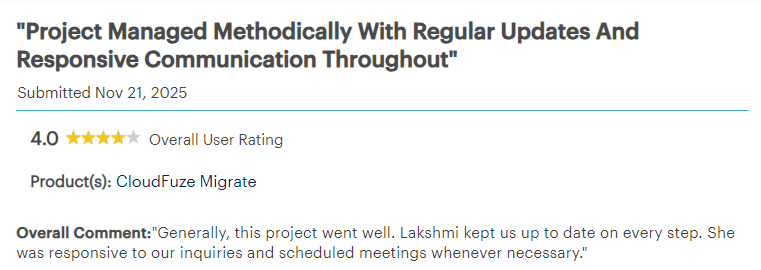
Enterprise Leaders Share Why They Rely on CloudFuze – Gartner Insights
See how enterprise users rate CloudFuze for seamless project management and responsive support:
Get a Free Demo of CloudFuze Migration Solutions Now!
For organizations in the US, there is no question that protecting sensitive data, maintaining compliance, and ensuring business continuity are key priorities. With CloudFuze, organizations in the US can achieve all three goals while also benefiting from a solution that is designed specifically for secure, seamless, and enterprise-class migrations.
Request a free demo today and see how CloudFuze can make your Outlook to Gmail migration simpler while keeping your organization secure and compliant.
Frequently Asked Questions
1. What are the most effective tools that US businesses can utilize for migrating Outlook to Gmail?
The most effective tool that US businesses can utilize for migrating Outlook to Gmail is CloudFuze. This tool offers high-speed and secure migration services that are enterprise ready.
2. How can US businesses migrate emails from Outlook to Gmail successfully?
The most important thing that US businesses need to do when migrating emails from Outlook to Gmail is to plan the migration process. The process should be carried out in the most secure way possible. The business should also consider the delta sync and data preservation process. The most effective tool that the business can utilize in this process is CloudFuze.
3. How can US businesses assess the effectiveness of the migration process from Outlook to Gmail?
The effectiveness of the migration process can be determined in the following ways:
- Complete migration of emails and data
- Preservation of data and folder structure
- Zero downtime
- Compliance with business needs
4. What are the steps that US businesses can take after migrating from Outlook to Gmail?
The steps that US businesses can take after migrating from Outlook to Gmail are:
- Validating the data
- Providing training to employees
- Decommissioning the old system (if required)
- Monitoring post‑migration performance



Leave A Comment