
CloudFuze uses Stripe for payment processing. Payments can be made using your credit card or Paypal.
Download the Invoice
Step 1: Please login to CloudFuze account.
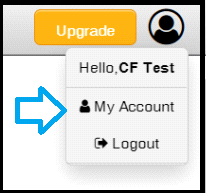
Step 2: Click on the user icon located in the top right corner of the page.

Step 3: Choose My Account option from the dropdown.
Step 4: Click on the Billing Details

Step 5: Browse payment history in the table and click on the invoice next to the specific month.




Leave A Comment