
Copilot Studio Governance: Strategies and Steps
Copilot Studio governance is the process of controlling and monitoring AI agents created within the Microsoft Copilot Studio. Reviewing AI agents, including their owners, permissions, and activity, matters since these agents are not mere chatbots sitting inside your ecosystem.
Agent – Can access internal data and take actions across your workforce ecosystem based on its permissions
That’s why Copilot Studio governance is imperative, but this is also quite a challenge. Simply put, building an agent is exponentially easier than managing and keeping track of it i.e constantly monitoring it and reviewing its actions.
Any employee can whip up an agent within Copilot Studio within seconds, but companies tend to err when they decide to treat the agent as a simple feature rather than a powerful internal entity that can access all your sensitive information.
Key Takeaways:
Asking the Right Questions
IT teams need to start asking the right questions to bring about an effective layer of Copilot Studio agent governance:
- Who owns this agent?
- What access does this have? What files can it reach?
- What internal systems can it interact with?
- What client, stakeholder, or company information does it have?
- What other permissions does it hold?
- Is this agent still required to be deployed, or can we recall it?
Microsoft provides controls for knowledge, monitoring, event triggers etc, but a complete Copilot Studio governance requires ongoing, real-time visibility into all the agents your organization has deployed and the potential risks they can introduce into the ecosystem.
This is compounded if you have cross-functional teams, each with agents of their own, resulting in an increasing web of agents. Each of these might have their own agenda, instructions, permissions, data access etc. This creates a chaotic mess for IT to constantly track and govern.
Copilot Studio Governance: A Practical Playbook
All this changes the governance conversation completely. Not permitting employees to use Copilot Studio is just not an option, as this will limit your organizational capabilities. Blocking access does not eliminate the widespread need for AI automation or agents in particular.
So the only solution is a safe and controlled adoption. It’s about making sure your IT teams can maintain constant vigilance, monitoring the environment and being ready to step in the instant agents become risky or redundant.
That is the building block of a good Copilot Studio governance strategy. We’re at a stage where managing agents, right from discovery to lifecycle control, is arguably more important than creating an agent in the first place. This means providing IT with a clear gateway to understanding the connections and level of access agents have within your workplace ecosystem.
With that said, here are our practical recommendations for achieving this: Two questions you need to ask and answer.
1. What Agents Do We Own?
Effective governance can only happen with knowledge and inventory – you cannot govern an agent you don’t even know exists. It’s absolutely imperative that IT maintains 360-degree visibility into your Copilot Studio environment. This means knowing each agent’s owner, permission, purpose, destination, connections, etc – in short, lifecycle management.
This also helps maintain control even when agents spread out into different workflows, which can happen when multiple departments build and deploy these agents. A strong Copilot Studio governance strategy begins with a precise inventory that’s updated in real time.
This becomes increasingly important as different teams build agents for their own workflows. Without a centralized view, agents can spread across departments with different owners, access requirements, and business purposes.
A strong Copilot Studio agent governance strategy rooted in a strong inventory that gives IT a clear picture of the agent estate and highlights which agents require closer review. Not even once a day or periodic will cut it – a risky agent or an agent going rogue needs to be discovered right now, which is only possible with constant surveillance.
2. What Can This Agent Actually Do?
Once you know an agent, it’s time to understand its reach. This means scrutinizing its knowledge sources and triggers. When you govern agents in Copilot Studio, this level of security is mandatory to make sure your internal data is not compromised. Why? An agent with limited knowledge poses a much lower risk than one that can potentially access sensitive business or stakeholder data, so this can help you prioritize.
Organizations also need to lay down clear policies and guidelines on what permissions are being fed to their agents at the building stage. Employees are free to create and deploy agents that can help amplify workplace progress, but the level and nature of data that’s being fed to these agents needs to follow certain protocols and remain subject to stringent analysis before approval.
When Two Questions Become Hundreds of Agents
These scenarios are where CloudFuze Manage adds a real-time, continuous visibility layer. With Manage, you can monitor and review agents across Copilot Studio. You can also map each agent to its owner, and even analyze risks to a precise degree based on
- The agent’s scope and instructions
- The level of access that the agent has to internal files
- The agent’s connectors and the overall external system
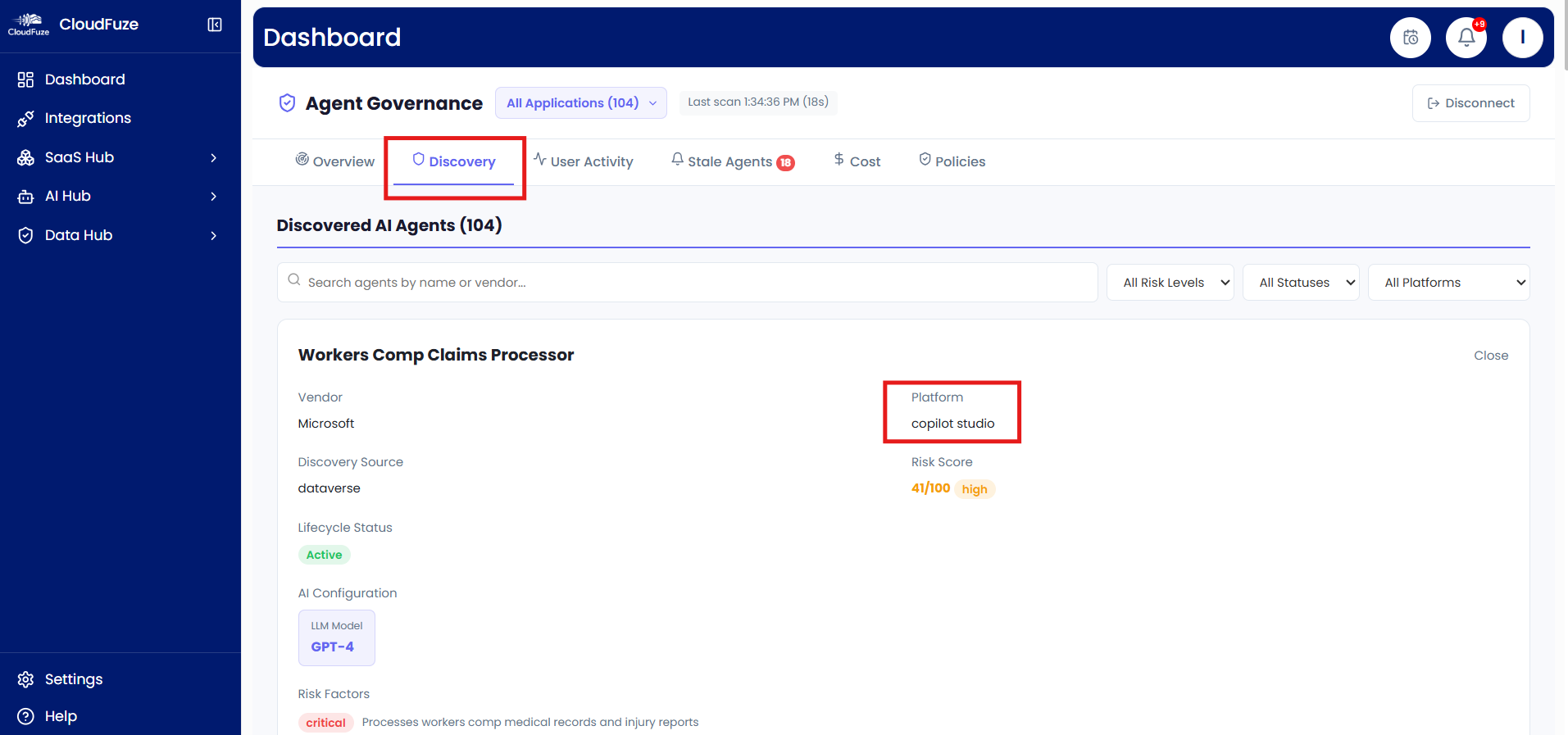
For IT teams, CloudFuze Manage helps you turn Copilot Studio governance into something as simple as a centralized dashboard and cut costs by identifying inactive and redundant agents.
Frequently Asked Questions
1. How do you govern agents created in Copilot Studio?
The first thing to do is find out what agents you have. Make a proper record of each one: who owns it, where it lives, what information it can reach, which connectors it uses, and whether people are still using it.
And that isn’t the end of the job. An agent may change after it has been launched. Its owner might change, new data might be added, or its permissions might grow. So IT needs to keep an eye on these things instead of checking an agent just once and forgetting about it.
2. What are the biggest governance risks with Copilot Studio?
One of the biggest worries is an agent being given access to more information than it really needs. If it can reach sensitive files or connect with important business systems, a small mistake in its setup can become a much bigger problem.
There is another problem that is easy to overlook: the person who created an agent may move to another role or leave the company. The agent can carry on running, even when nobody is quite sure who should be looking after it.
3. Should IT approve every Copilot Studio agent?
Not every agent needs to go through a long approval process. If IT insists on checking every small, harmless agent in exactly the same way, things can quickly become slow and tiresome.
It makes more sense to look at what each agent can actually do. An agent with little access to company information may need only basic controls. One connected to sensitive data or important systems deserves a much closer look.
4. How often should Copilot Studio agents be reviewed?
There isn’t one magic timetable that works for every agent. An agent with access to sensitive information needs more attention than one doing a small, low-risk job.
It’s also wise to review an agent whenever something important changes. A new owner, connector, permission, knowledge source, or deployment can alter its risk. What was perfectly sensible yesterday may need another look tomorrow.
5. How can I find inactive or redundant Copilot Studio agents?
Start by looking at how frequently agents are used and what their jobs are. You may find an agent that nobody uses anymore, or two agents doing almost exactly the same thing.
A central inventory makes this much easier. Instead of going from department to department asking what everyone has built, IT can see the agent estate in one place.
From there, unused or unnecessary agents can be reviewed and retired.
About the Author: Arun Jyothi


