
How to Easily Recover Permanently Deleted Emails from Gmail
Accidentally deleting an important email in Gmail can be a stressful situation, especially if it’s no longer in the Bin folder. While Gmail does make email recovery pretty easy in some cases, permanently deleted emails aren’t always recoverable. However, depending on when, how, and where that email got deleted, you might still have some options to retrieve it.
This guide is about when Gmail will let you recover an email, step by step ways to retrieve deleted emails, and what to do when even Google’s recovery is not an option.
Key Takeaways:
Method 1: The Simple Fix – Recover Emails from the Gmail Bin Folder (Within 30 Days)
If that email was deleted just a bit ago, this is going to be the easiest fix you can do.
Steps to Take:
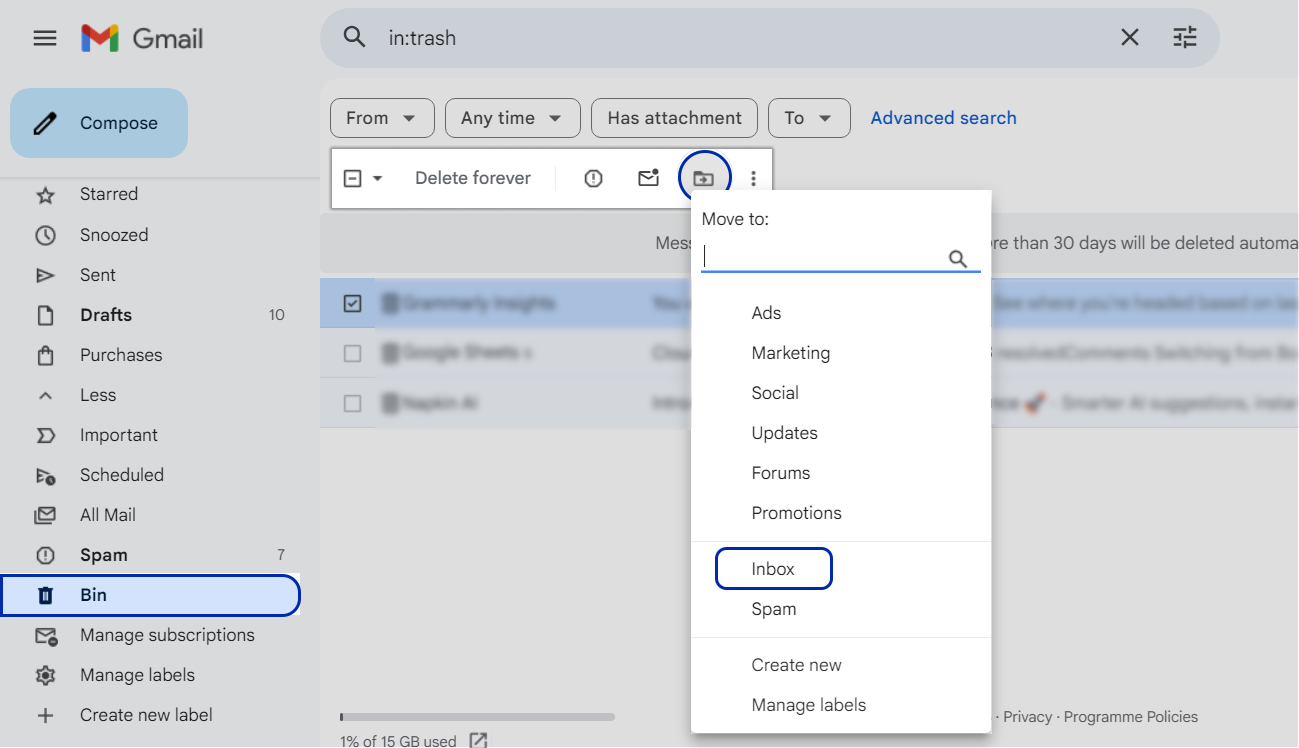
- Open your Gmail account
- Click on the Bin in the left sidebar
- See if that deleted email is there
- If it is, select it and then click Move to Inbox or put it in another folder that you want
Works best when the email was deleted within the last 30 days.
Method 2: Try Gmail’s “Recover Deleted Messages” Tool (But It’s a Long Shot)
If the email is no longer in the Bin, then Google has a hidden recovery tool, but it only works under very specific circumstances.
When You Can Use This:
- The email got deleted because someone had managed to compromise your account
- The deletion happened within the last 25 days
- The email was not deleted because some automated policy had kicked in
Steps to Take:
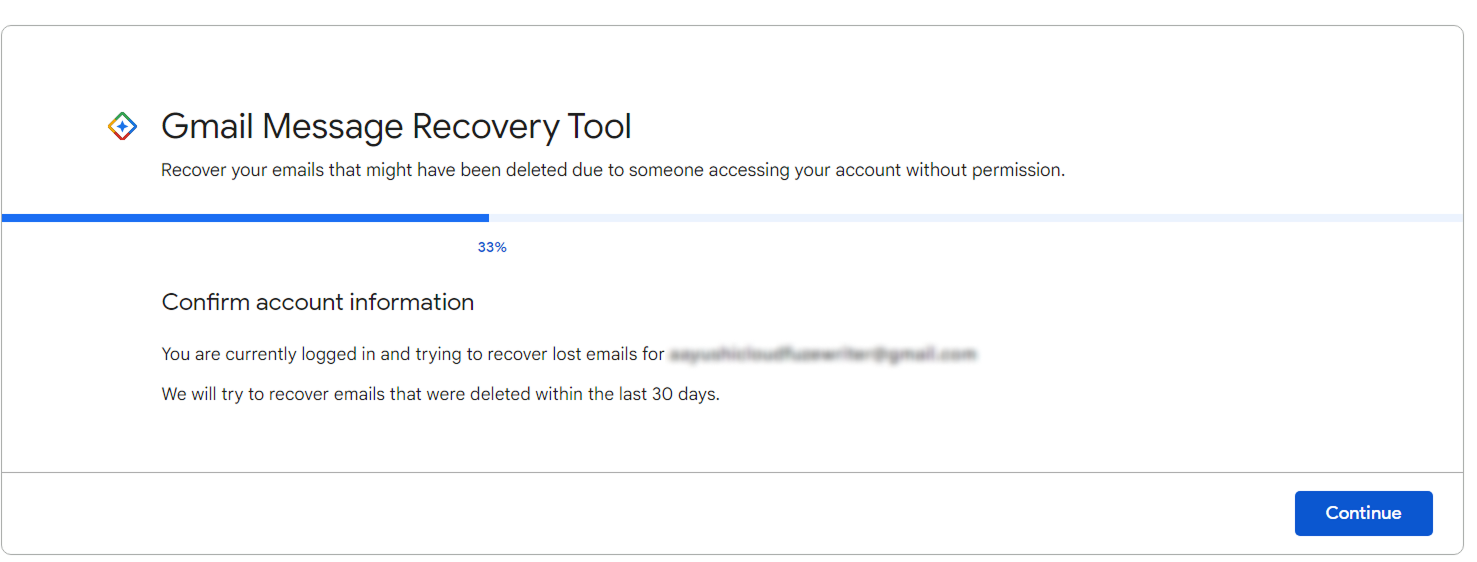
- Head on over to Google’s Gmail Message Recovery Tool
- Sign in to your Gmail account
- Confirm if your account has had any suspicious activity recently (if Google asks you)
- Submit your request for recovery
Recovery may take several hours. But remember that Google clearly states that recovery is not guaranteed.

Method 3: Recover Deleted Emails Using Google Workspace Admin (For Business Accounts)
If you use Google Workspace, then admins have a bit more control to work with.
Admin Recovery Timeframe:
- Emails can get restored within 25 days of permanent deletion
What Admins Need to Do:
- Log in to your Google Admin Console
- Go to the Users page
- Pick the user account that had the email deleted
- Choose Restore Data
- Select Gmail from the list
- Choose the date range
- Click Restore
Any restored email will get back in its original folder.
Method 4: Check Your Email Backups or Look at Third-Party Archiving Tools
If none of the other methods work, your email backups might help.
Where You Might Find Your Backups:
- Google Vault (for Workspace users)
- Third-party email backup tools
- Email migration or archiving platforms
- Even just your local email client (Outlook, Thunderbird, etc.)
If your emails have been exported, archived, or migrated, then you might be able to get them back from there.
Why It’s Not Possible to Recover Emails That Have Been Permanently Deleted
Google deletes emails to:
- Protect your user privacy
- Keep things tidy in storage
- Prevent unauthorized data access
Once emails disappear from all Google servers, then not even Google’s support team can retrieve them.
A Few Simple Rules to Prevent Losing Your Gmail Emails
Prevention is a lot easier than recovery, trust us.
Our Top Recommendations to Keep Your Emails Safe:
- Turn on Google Vault for email retention and eDiscovery
- Use some email backup or archiving solution – just don’t rely on Gmail’s default settings
- Avoid manually emptying Bin
- Label your emails instead of deleting them
- Make sure your users are properly trained in safe deletion practices
- Set up retention policies for business emails
A lot of enterprises use automated backup or migration platforms that guarantee zero data loss even in the event of an accidental deletion.
Act Now to Recover Deleted Emails from Gmail
Recovering deleted emails from Gmail depends on getting the timing right, having the right account type, and having a good backup in place. While Google does offer some recovery options, they’re not foolproof, especially when it comes to business-critical data.
For businesses, the best approach is to be proactive about email backup, implement retention policies, and be ready to migrate to a new platform, so you never have to worry about permanent data loss.
Enterprise-Ready Migration and SaaS Management with CloudFuze
If you’ve got an enterprise planning on moving from Outlook to Gmail or Gmail to Gmail, or just want to do a large email migration, CloudFuze Migrate provides a secure and managed email migration service. We preserve all the emails, attachments, metadata, and folder structures and transfer everything accurately.
We also help businesses manage Google Workspace, Microsoft 365 and all those other SaaS tools like ChatGPT and Gemini with CloudFuze Manage. That way, you can gain centralized visibility of who’s using what, manage licenses, monitor usage and enforce data governance across your whole SaaS environment.
Get in touch with the CloudFuze team today to plan your migration and simplify your enterprise SaaS management.
Frequently Asked Questions
1. Can I recover permanently deleted emails from Gmail after 30 days?
In most cases, no – Gmail permanently deletes emails in the Bin after 30 days and there’s no guarantee you’ll be able to get them back after that.
2. Does Google offer any way to recover deleted Gmail emails?
Google does provide limited recovery options – but it’s mostly for account compromise situations
3. Can Google Workspace admins restore permanently deleted emails?
Yes, but only for a short time – 25 days to be exact.
4. Are third-party tools any good for recovering deleted Gmail emails?
They work if you’ve got a backup or archive of your emails; they might be able to help. But if they’ve already been deleted from Google servers, they cannot be retrieved.
About the Author: Aayushi Raj



