
Best Gmail to Gmail Migration Tool for Enterprises: CloudFuze
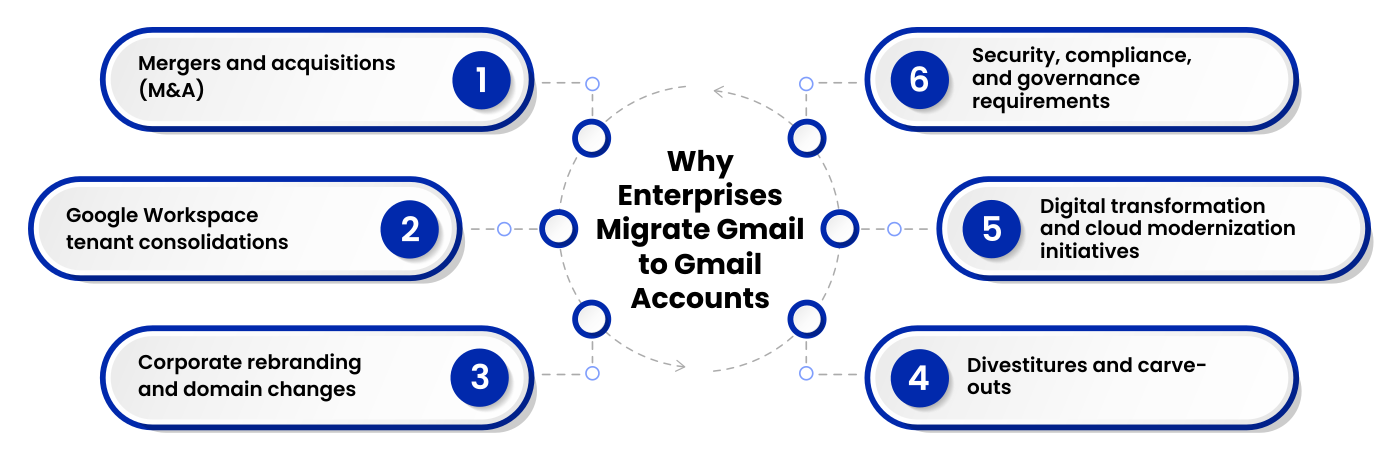
Enterprise Gmail migrations can involve thousands of users, millions of emails, and even terabytes of mission-critical data. During mergers, acquisitions, tenant consolidations, domain changes, ensuring that this data remains intact is the top priority, thus making a robust Gmail migration solution paramount.
When large enterprises need to migrate email data from one Gmail account to another, the process has to be ultra secure, scalable, and smooth to ensure that there’s no downtime. Among all others, CloudFuze comes out on top as the #1 Gmail to Gmail Migration tool trusted by IT professionals around the world for fast, secure transfers with full metadata preservation.
Key Takeaways
Why Gmail to Gmail Migration Is Complex for Enterprises
Enterprise Gmail to Gmail migrations presents several technical and operational challenges.
- Metadata loss
- User mapping errors
- Missing attachments
- API throttling
- Downtime
- Calendar migration issues
For this reason, enterprises rely on specialized Gmail to Gmail migration platforms like CloudFuze rather than manual migration methods.
CloudFuze: The Most Reliable and Best Gmail to Gmail Email Transfer Solution
CloudFuze is the best Gmail-to-Gmail migration tool for IT admins, CIOs, CTOs, and enterprises who need to migrate thousands of mailboxes precisely, quickly, and reliably. Our email migration solution supports:
1. Full Data Fidelity
CloudFuze keeps all your email metadata intact during migration, such as original send/receive timestamps, labels on folders, whether an email was marked as read or unread, and integrity of attachments. Nothing gets re-formatted or lost during migration.
2. Delta Migration Support
Cloudfuze does its first bulk migration (one-time) and then performs delta syncs on the days leading up to your cutover. It captures any new emails that come in during the migration window.
3. Granular User Mapping
IT administrators can map source users to destination users either individually or in bulk by using CSV upload. It’s crucial for mergers when email addresses change across domains.
4. Real-Time Migration Dashboard
CloudFuze offers a live dashboard displaying migration progress by user, estimated time of completion, error logs, and retry queue. This provides IT teams with complete transparency throughout.
5. Automated Error Handling and Retry
When Gmail API rate limits are hit or individual items fail to migrate, CloudFuze automatically retries failed items without human intervention. Failed item reports are available for post-migration audits.
6. Compliance and Audit Logging
Every migration action is logged with timestamps, item counts, and user identifiers. CloudFuze supports compliance requirements under GDPR, and SOC 2 Type 2 with exportable migration reports.
7. Zero Downtime, Zero Impact Migration
CloudFuze allows you to perform Gmail to Gmail migration seamlessly with zero downtime, which means you can send, receive and access your emails as usual during the whole process of migration.
What are the Features Preserved by CloudFuze During Gmail to Gmail Migration
Here are all the important features retained by CloudFuze during Gmail to Gmail data transfer.
| Features | Gmail to Gmail migration |
|---|---|
| Inbox | YES |
| Sent Items | YES |
| Draft Emails | YES |
| Junk Emails | YES |
| Deleted Emails | YES |
| Timestamps | YES |
| Maintains Starred/Important Status | YES |
| Preserve Unread/Read Status | YES |
| Mail Attachments | YES |
| Calendar Events (Normal/Recurring) | YES |
| Calendar Event Timestamps | YES |
| Calendar Event Attachments | YES |
| Threads | YES |
| Contacts | YES |
| Shared Mailbox | YES |
| Archive Mailbox Migration | YES |
Gmail to Gmail Migration: How CloudFuze Works
Starting Gmail email migration with CloudFuze is simple with these steps:
- Connect source and destination tenants: Authenticate both Google Workspace tenants via OAuth. CloudFuze never stores admin credentials.
- Run a pre-migration audit: CloudFuze scans source mailboxes to inventory email volume, folder depth, and shared resources.
- Configure user mapping: Map source users to destination accounts using auto-map or via bulk CSV.
- Start the bulk migration: CloudFuze starts migrating emails, managing Google API rate limits automatically.
- Run delta syncs: Days before your cutover, CloudFuze syncs any CloudFuze syncs newly added or modified data.
- Cutover and validate: Switch DNS/MX records, run a final delta, and validate data integrity by using CloudFuze’s post-migration reports.
Watch this video that guides you through each step of Gmail to Gmail migration using our world-class email migration tool.
Why CloudFuze is the Preferred Gmail to Gmail Migration Tool for Large Enterprises with 10K+ Users
Large-scale Gmail-to-Gmail migrations are anything but simple involving thousands of users, terabytes to petabytes of email data, and tight project timelines. With CloudFuze, enterprises can experience quick, safe migrations without the worry of downtime and guaranteed accuracy.
From pre-migration assessment to execution to post-migration validation, we manage every step of the migration lifecycle with accuracy.
Important features include:
- Bulk Gmail-to-Gmail migrations for 10,000+ users and TBs to PBs of email data
- Preserves emails, labels, attachments, timestamps, and metadata
- Executes high-speed migrations under stringent enterprise timelines
- Secure cross-tenant migrations for mergers, acquisitions, and domain consolidations
- Admin controls, real-time reporting, and full migration visibility
- Automatically handles Google API throttling
- Dedicated migration managers for planning, execution, and ongoing support
- Zero-downtime migrations for uninterrupted user productivity
Whether you’re moving 500 users or 10,000+, CloudFuze offers the support, scalability, security, and reliability for enterprise-level Gmail to Gmail email migrations.
Use Cases for CloudFuze for Gmail to Gmail Data Transfer Tool
CloudFuze is the right fit for:
- Enterprises with 500-1K+ users migrating between Google Workspace tenants
- IT teams managing M&A migrations
- Managed Service Providers (MSPs)
- Organizations in regulated industries (healthcare, finance, government, IT services)
- Companies rebranding domains
Gmail Migration to Gmail for Mergers and Acquisitions
M&A activity is one of the most common reasons for Gmail tenant migration. After an acquisition, companies may need to consolidate multiple Google Workspace instances while maintaining business as usual.
CloudFuze enables enterprises to migrate users, mailboxes, calendars, and shared resources from tenant to tenant during mergers and acquitions without disruption.
Cost for Large-Scale Gmail to Gmail Data Transfer Services
The cost of large-scale Gmail migrations depends on various factors such as number of users, volume of data, migration complexity, and support needed. For businesses moving thousands of mailboxes or multiple Google Workspace tenants, it is recommended that you opt for custom pricing.
We at CloudFuze provide tailored enterprise pricing, free migration assessments, and managed migration services for Gmail to Gmail migration.
You can request quote for your customized pricing today!
Reviews of Enterprise Email Migration Platforms
With fantastic customer reviews on Gartner, CloudFuze is known to deliver secure, scalable and hassle-free migrations for businesses of all sizes.

Case Study: Gmail to Gmail Migration for a Global IT Services Company
A global IT services firm with over 8,500 employees sought to unite disparate Google Workspace tenants as a result of various mergers & acquisitions.
With CloudFuze, they were able to migrate 8,500+ Gmail mailboxes and over 10 TB worth of email data including metadata, labels, attachments and calendar events.
Results
- 8,500+ Gmail users migrated
- 10+ TB of data transferred
- 100% migration accuracy
- Zero downtime for end users
By leveraging CloudFuze, the IT services company streamlined its Google Workspace environment, improved administrative efficiency, and accelerated post-acquisition integration efforts.
Ready to Migrate Gmail to Gmail?
Whether you’re planning a tenant consolidation, merger, domain migration, or enterprise Gmail modernization project, CloudFuze has the tools, expertise, and support needed for a seamless transition.
From small team migrations to enterprise-wide migrations, CloudFuze offers a future-proof, streamlined approach to Gmail to Gmail migration with free consultation services.
Frequently Asked Questions
1. How long does Gmail to Gmail migration take with CloudFuze?
The time taken for a Gmail migration varies based on the size and complexity of the project. CloudFuze speeds up enterprise migrations using high speed transfers, automated workflows, and delta migrations, enabling organizations to complete their Gmail migration faster than ever before without compromising data integrity and causing zero downtime.
2. What’s the best Gmail to Gmail migration tool for enterprises?
CloudFuze is built for enterprise-scale Gmail migrations with features like automated user mapping, metadata retention, delta migrations, and managed migration services for businesses of all sizes.
3. Can I move my Gmail to another Gmail without losing any emails?
Yes. With CloudFuze, your emails are safely moved while keeping attachments, labels, timestamps, read/unread status, and other crucial data intact.
4. Can I move my Gmail labels & folders?
Yes. We maintain Gmail labels and mailbox hierarchy while moving from Gmail to Gmail.
5. Does CloudFuze preserve my email timestamps & metadata?
Yes. CloudFuze retains original timestamps, metadata, read/unread status, and other email attributes to preserve data fidelity.
6. Can CloudFuze migrate Gmail to another Google Workspace tenant?
Yes. CloudFuze facilitates seamless cross-tenant Gmail migrations during mergers, acquisitions, tenant consolidation, and domain migrations.
About the Author: Aayushi Raj


