
How CloudFuze Handles OneDrive Invalid Characters During Migration
Companies that are migrating to OneDrive for Business (Microsoft 365) from other cloud providers such as Dropbox, Box, Google Workspace, etc. often face a problem. The issue is that Microsoft OneDrive (or even SharePoint) doesn’t support certain characters to be in the names of files and folders.
The following are the characters not allowed in all products across Microsoft 365 including OneDrive and SharePoint.
” * : < > ? / \ |
In addition to this, Microsoft doesn’t allow leading or trailing spaces in the file and folder names.
Most cloud companies, on the other hand, don’t restrict users from using certain special characters in the file or folder names.
What happens to the files or folders with special characters when migrating to Microsoft 365.
If you are migrating manually, there is not much you can do except renaming all the affected content in the source cloud account.
However, if you are using software like CloudFuze, all these files and folders with invalid characters can still be migrated to OneDrive for Business.
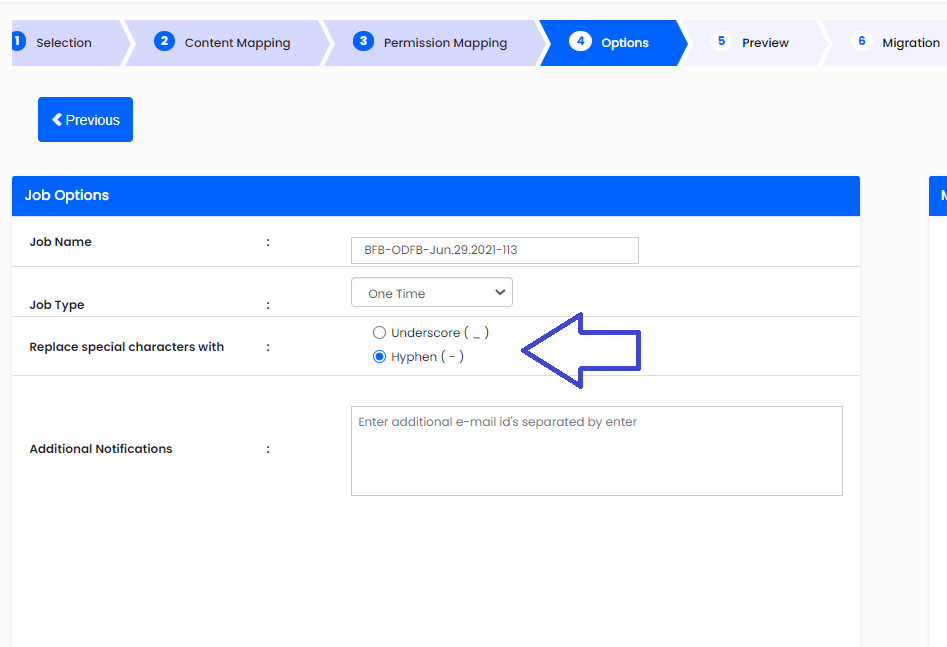
During migration, CloudFuze converts all those invalid characters into either a hyphen (-) or underscore (_). You can choose one option as shown in the screenshot below.
Post migration, CloudFuze even provides a detailed report on how many such files/folders are migrated and their details.
If you are still unaware of what our CloudFuze is, it’s a cloud office migration suite that helps IT admins and managers migrate their business data between leading cloud storage services quickly and securely.
CloudFuze supports all leading business cloud office suites such as Microsoft, Google Workspace, Box, Dropbox, Egnyte, SharePoint, etc.
About the Author: Arun Jyothi


