
From First Copy to Final Cutover: The Power of Exchange Online Delta Migration
For organizations migrating 1,000, 50,000, or more mailboxes, even small synchronization gaps can cause operational challenges. New emails, calendar updates, and mailbox changes must be captured before users switch to the destination environment.
In this, Exchange Online delta migration helps by transferring changes made after the initial one-time migration, reducing redundant transfers and keeping destination mailboxes aligned with the source.
Our Outlook migration tool, CloudFuze Migrate supports Exchange Online delta migration to capture supported changes and coordinate migration activities through cutover.
Key Takeaways
Exchange Online Delta Migration: What Is It?
Exchange Online delta migration is an incremental migration approach in which changes made after the initial mailbox copy are transferred during subsequent synchronization passes.
The entire mailbox doesn’t have to be copied again if the migration process is able to detect eligible changes and migrate the data that is left to be moved.
For instance, imagine that the migration of a 40 GB mailbox starts on Monday for an enterprise company. The first pass migrates the current mailbox data. Further, for several days the person receives new emails, creates calendar entries, and modifies some of the messages in the source environment.
A subsequent delta synchronization can transfer eligible changes that were not included in the initial pass, depending on the migration method and the data supported by the tool.
This helps reduce the gap between the initial copy and the final migration.
Importance of Delta Migration in Large Enterprise Environments
The mailbox migration process is rarely a one-time operation. The business does not stop functioning during the period of the migration process; in addition, the state of the source environment keeps changing until the cutover is complete.
There are several benefits to implementing delta synchronization:
1. Keep mailbox data up-to-date
During the migration process, employees keep working. New emails can be sent, folders modified, and calendar items changed.
Incremental synchronization allows you to include eligible changes made since the initial migration into your scope of work.
2. Minimize unnecessary data transfer
Mailboxes in large organizations are often stored in email archives containing years’ worth of emails and many attachments.
If the mailbox has already been successfully migrated, transferring it all each time is wasteful and consumes too much network bandwidth. Whether it’s Outlook to Outlook or Gmail to Outlook Delta migration includes only new changes that need to be migrated.
3. Make sure that the cutover is ready
Initially, you only have the first milestone. You have to validate the synchronization status, fix any possible errors, plan mail flow changes, etc.
A carefully planned delta migration helps the team prepare for cutover without waiting for the first migration to finish.
Initial Copy vs. Delta Migration vs. Final Cutover
Understanding the three stages helps administrators build a more predictable migration plan.
| Migration stage | What happens | Primary objective |
|---|---|---|
| Initial copy | Existing mailbox data is transferred to the destination | Move the bulk of the data |
| Delta synchronization | Eligible new or changed data is transferred in subsequent passes | Reduce the synchronization gap |
| Final cutover | Mail flow and user access transition according to the migration plan | Complete the move to the destination |
These stages are a general planning model rather than a universal Exchange Online workflow. Native Exchange migration batches and third-party migration platforms can differ in their synchronization schedules, completion procedures, and supported workloads.
The key principle remains the same: complete the bulk transfer early, synchronize outstanding changes, validate the results, and execute cutover in a controlled manner.
Exchange Online Delta Migration Procedure: 6 Important Steps
To perform a successful delta migration from one Office 365 tenant to another or Gmail to Outlook, the IT team requires a certain strategy for synchronization, validation, and cutover.
Step 1: Source environment assessment
Prior to the migration of mailboxes, it is necessary to define the source environment, mailbox count, total data size, average mailbox size, and any very large mailboxes.
For instance, an organization with 10,000 mailboxes and 150 TB of data requires a certain capacity and schedule planning, which is different from one with 500 mailboxes and 5 TB of data.
Moreover, the assessment should include mailbox permissions, aliases, shared mailboxes, archives, and other required information or configuration, depending on the chosen migration approach.
Step 2: Configure the destination environment
Prepare the Exchange Online destination before beginning the transfer.
Typical tasks include:
- Provisioning or mapping destination users.
- Verifying domains and identity configurations.
- Assigning the required permissions and licenses at the appropriate stage.
- Reviewing mailbox limits and migration prerequisites.
- Planning DNS and mail-flow changes.
- Establishing security and access requirements.
Completing these tasks early helps reduce avoidable delays when the migration reaches a cutover.
Step 3: Perform the first phase mailbox migration
Perform the copying of the current mailbox content using the chosen migration methodology.
The migration scope depends on both source and destination and can involve email messages, folders, contacts, calendars, and other supported mailbox components.
It is recommended that the administrators track the progress of the transfer and investigate the errors and skipped items. The successful completion of the initial migration may need some corrections or additional verification.
Step 4: Incremental Synchronization
Perform further synchronization of the mailbox content after the initial copy according to the capabilities of the chosen migration platform. The objective of synchronization is to transfer the eligible changes that took place since the last migration run.
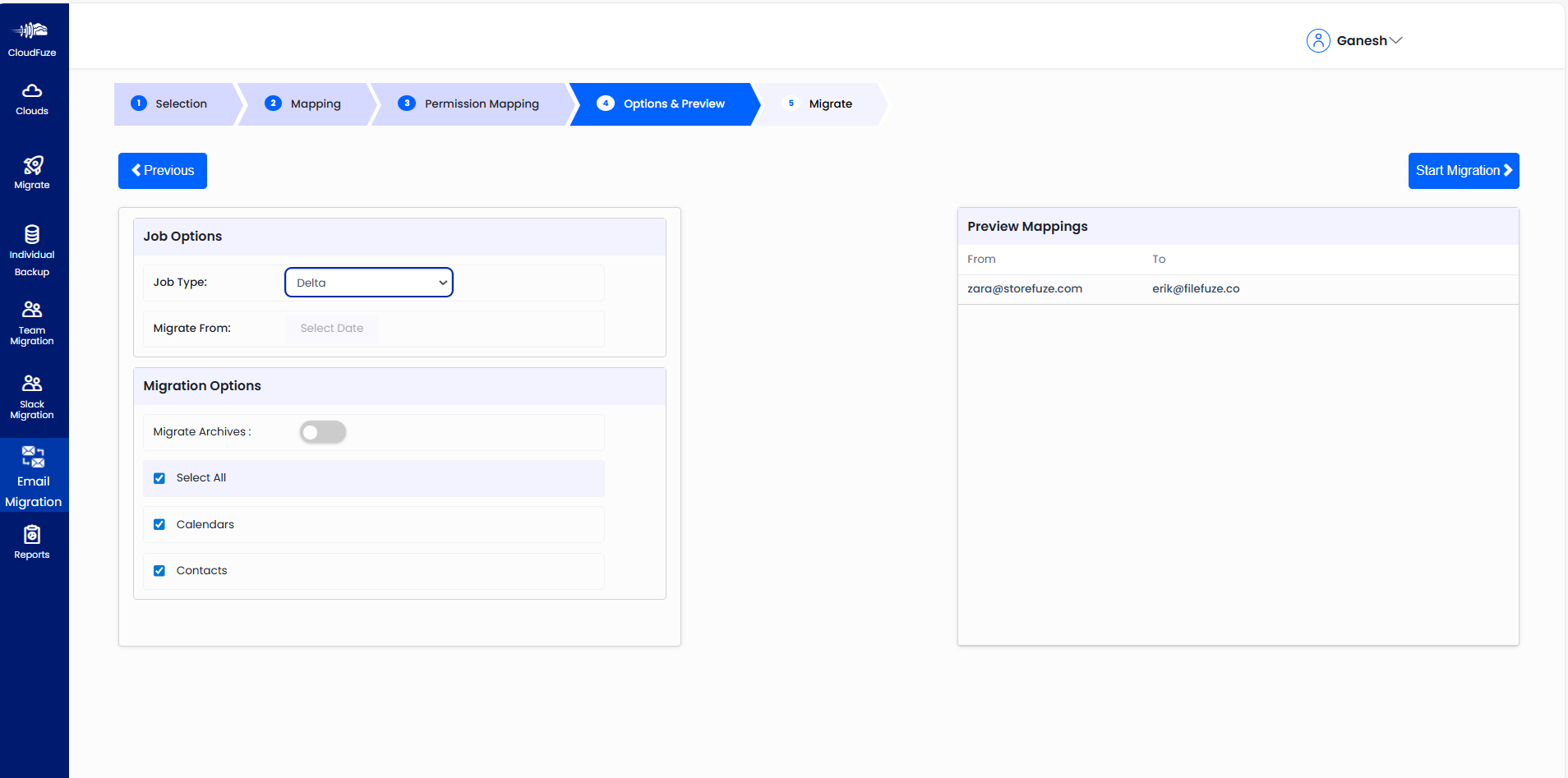
Imagine a mailbox where 350 new emails arrived and where 12 calendar entries were modified after the initial copy. With proper delta processing, the remaining items will be transferred without a full retransmission of the whole mailbox.
Step 5: Validate mailbox readiness
Before cutover, review migration reports and confirm that destination mailboxes are ready.
Validation should include:
- Mailbox migration status and outstanding errors.
- Availability of expected folders and messages.
- Relevant contacts and calendar items.
- Mailbox permissions and delegated access.
- User mapping and destination account access.
- Mail flow and client connectivity requirements.
For large migrations, validation should be systematic rather than limited to a small number of manually inspected mailboxes.
Step 6: Complete cutover and monitor the destination
Execute the planned mail-flow and user-access transition. Depending on the migration method, this may involve completing migration batches, updating routing, verifying DNS configuration, and coordinating user sign-in or Outlook configuration.
After cutover, monitor delivery, mailbox access, and migration errors. Keep the appropriate rollback or remediation procedures available until the migration meets its acceptance criteria.
Biggest Delta Migration Challenges in Enterprise Environments
Delta migration makes final synchronization simpler, but not all migration challenges and risks are addressed.
1. Large Mailbox Sizes
Enterprise might migrate 150 TB+ of mailbox data or have 10 PB+ on supported cloud workloads. Large projects should consider throttling, network capabilities, concurrency, and validation.
Why is that important: Teams have to complete migration and validation within planned time period.
2. Changes to Users
During the migration, users send emails and modify supported data. Untimely or unverified synchronization leaves eligible changes missing in destination mailboxes.
Why is that important: Delta synchronization and cutover mitigate data loss.
3. Identity, Permissions, and User-Mapping Risks
Wrong identity mappings, mailbox permissions, or delegated access prevent users from accessing their migrated content.
Why is that important: Validate user mappings and permissions along with mailbox data.
4. Errors hidden by aggregate progress
A migration dashboard may report high overall completion while some mailboxes remain failed, partially migrated, or awaiting synchronization.
Why is that important: Teams should review per-mailbox status, error reports, and final acceptance criteria instead of relying only on a single completion percentage.
CloudFuze Migrate Offers Unlimited Delta Migration for Exchange Online Transfer
CloudFuze Migrate helps enterprises manage Microsoft 365 migrations by simplifying data transfer and synchronization. The delta migration option lets you move newly added emails and, if applicable, changes to contact and calendar items since the first one-time migration, keeping destination mailboxes up to date as the cutover approaches.
For organizations migrating thousands of mailboxes or working with 150 TB+ of data, this migration type could simplify the migration process by avoiding repetitive data migration. IT administrators can track synchronization progress, verify mailbox content, and prepare for cutover without starting the whole migration from scratch.
Enterprise companies can migrate their mailboxes using incremental synchronization and cutover according to their migration projects using CloudFuze Migrate.
Reviewing Exchange Online Delta Migration Reports in CloudFuze Migrate
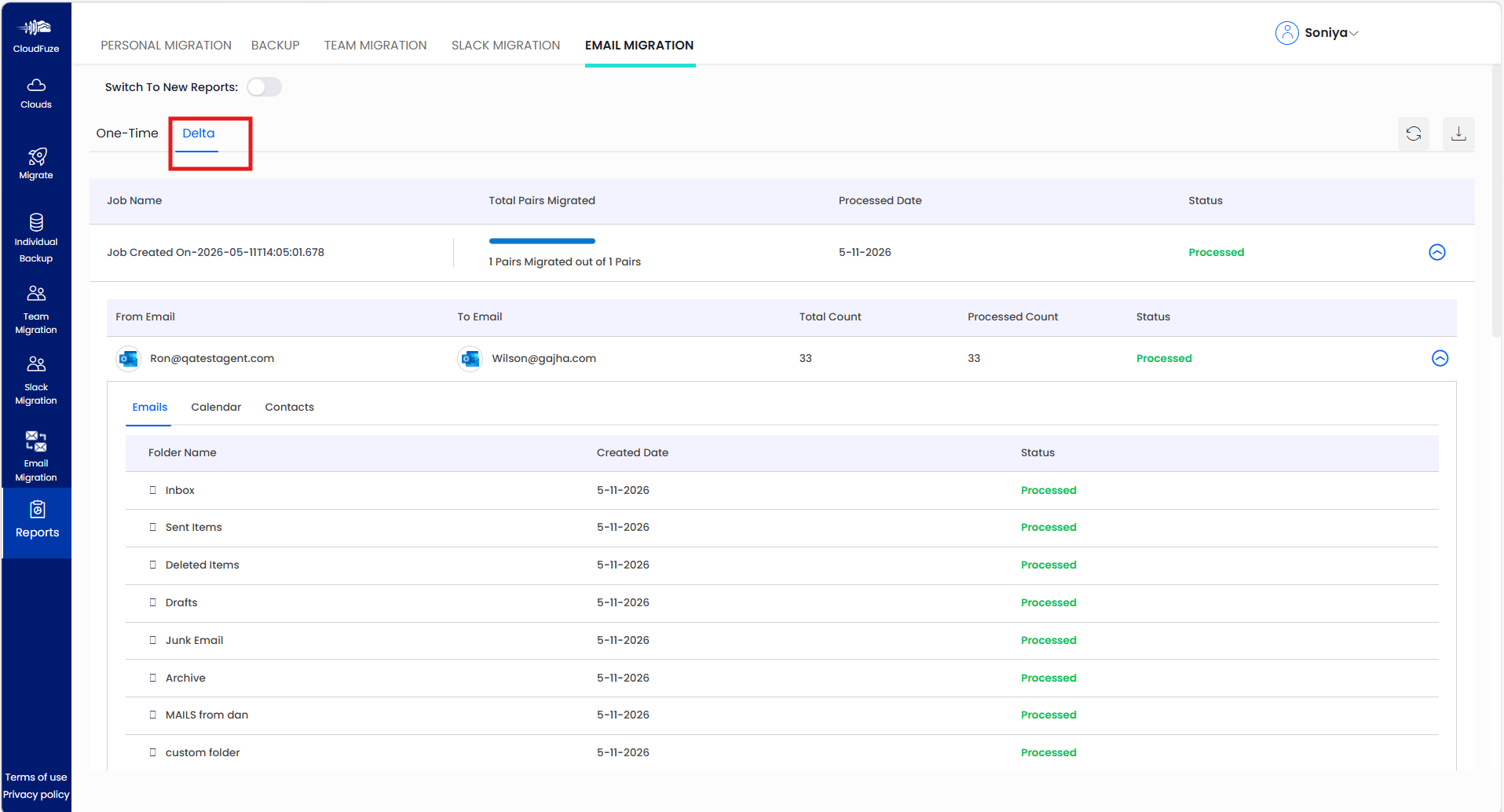
The Delta tab in CloudFuze Migrate displays reports for delta migration jobs performed after the initial one-time migration. It shows the source and destination mailboxes, the number of items processed, and the status of email folders, calendars, and contacts. Administrators can use this report to monitor synchronization progress and review processing status before completing the final cutover.
Case Study: US-Based Manufacturing Company Streamlines Exchange Online Delta Migration with CloudFuze
Company Profile: US-based manufacturing company | 3,000 users | 12 TB of mailbox data
The Challenge
A US-based manufacturing company needed to migrate 3,000 employee mailboxes containing 12 TB of email data to Exchange Online. With employees relying on email for production coordination, supplier communications, and daily operations, keeping mailbox data current through cutover was essential.
The Solution
Using CloudFuze Migrate, the company organized its migration workflow around the initial mailbox transfer, delta synchronization of eligible changes, and destination mailbox validation before cutover.
The Outcome
The structured approach helped the IT team track migration progress, manage outstanding mailbox changes, and prepare for a controlled transition to Exchange Online while reducing redundant transfers where supported.
Key Takeaway: CloudFuze Migrate helps enterprises coordinate complex mailbox migration workflows with a focus on synchronization, data validation, and cutover readiness.
How to Measure Delta Migration Success
A migration should be evaluated using measurable outcomes rather than a single claim that the data has moved.
The following metrics help enterprises assess migration readiness.
| Metric | What it measures |
|---|---|
| Initial migration completion | Percentage of planned mailboxes that completed the first copy |
| Delta synchronization status | Whether outstanding supported changes have been synchronized |
| Mailbox error rate | Number or percentage of mailboxes requiring remediation |
| Data validation results | Whether required mailbox content and configurations meet acceptance criteria |
| Cutover duration | Time required to execute the planned transition |
| Mail-flow health | Whether messages are delivered correctly after cutover |
| User access readiness | Whether users can access their destination mailboxes and required features |
For example, a migration program with 10,000 mailboxes should track individual mailbox outcomes and unresolved errors, not just overall data volume transferred.
Targets should be established before the project begins. Any claims about migration speed, success rates, downtime, or data accuracy should be supported by documented testing or actual project results.
Ensure That Your Final Sync Makes a Difference
Exchange Online delta migration is designed to solve one of the biggest challenges in the process of migrating mailboxes – ensuring that destination data stays up-to-date during migration while business processes continue in the source environment.
CloudFuze Migrate assists businesses in facilitating mailbox migrations by way of initial data transfer, incremental sync, validations, and controlled cutover, thus minimizing the synchronization gap and increasing migration preparedness.
Frequently Asked Questions
1. What is Exchange Online delta migration, and what does it involve?
Exchange Online delta migration syncs changes to eligible mailboxes after the first data transfer. This ensures that any new or changed data gets synchronized before the actual cutover of the migration process. The behavior of delta migration is contingent upon the choice of the method and migration tool.
2. How do you ensure that Exchange Online mailboxes stay updated throughout migration?
Incremental synchronization is required to sync eligible changes after the first migration. Check mailbox status, migration errors, and validate destination data.
3. What would happen if users were receiving emails at the time of their mailbox migration?
Users might be receiving new emails during the process of the initial migration. Based on the migration process selected, synchronization could be performed to move the suitable email messages from the source mailbox to the destination.
4. Can delta migration be used for enterprise mailbox migrations?
Yes, delta sync is effective in big migration tasks with many thousands of mailboxes. However, it greatly depends on mailbox size, amount of data, service throttling, available resources, and platform capacity. Enterprises need to verify capacity and scheduling prior to migration.
5. How CloudFuze Migrate facilitates Exchange Online delta migration?
CloudFuze Migrate assists enterprises in managing supported migration flows including data transfer, synchronization, and migration verification. Enterprises need to verify capabilities of the platform related to Exchange Online delta sync prior to its selection.
About the Author: Aayushi Raj


